Gensys DataSheet 2017 web.pdf
Gensys TM X-ray Inspection Softwar e contr ols every aspect of the Quadra TM X-ray Inspection System via an intuitive user interface, so you can inspect samples quickly and easily , and with minimal training. T ur n imag…

Gensys
TM
X-ray Inspection Software controls every aspect of the
Quadra
TM
X-ray Inspection System via an intuitive user interface, so
you can inspect samples quickly and easily, and with minimal training.
Turn images into solutions
Gensys makes it easy to see the tiniest details and
find defects quickly. Building on the high resolution
X-ray data acquired by the AspireFP
TM
flat panel
detector, Gensys applies a range of filtering and
optimization algorithms to create unbeatable quality
inspection imagery.
Live image lters enhance X-ray imagery in real time,
making features and defects clearer and easier to
measure. Choose from over 30 general purpose and
sample specific filters to get the best results for your
application, or create your own custom filter chain.
The HDR Imaging feature increases dynamic range so
details in both dark and light areas can be seen clearly
on one image.
Features and benefits
• Get started quicker, clear point and click user
interface is easy to learn.
• Find features faster, live image lters show
every detail.
• Inspect similar samples quickly using
powerful automated inspection routines.
• Look at individual image layers without cutting
the sample with X-Plane
®
.
X-ray Live Filtering
X-ray Inspection Software
Quantify
Get the information you really need from your
inspection imagery. Gensys includes a range of measurement
tools for checking dimensions, nding and analysing voiding
in samples, measuring PTH ll levels, pad analysis, and for
performing BGA and wire sweep quality control.
Need to measure multiple samples? Simply add these to a
Gensys Automated Inspection Routine.
Template based analysis
Take measurements quickly and easily in complex component
shapes. The Template Based Analysis add-on module imports
CAD design data for use as a template. Perform BGA checks
on irregular shaped arrays, analyse voiding and wafer bumps.
Template based analysis can also be used in automated
inspection routines. Supports AutoCAD DXF, XML, CSV, Text,
and Gerber data formats.
BGA solder
ball pass / fail /
bridge / missing
classification.
Intuitive user
controls makes
operation easy
and quick to
learn.
Measure solder
filling in connector
through holes.
Quadra’s oblique
angle shows the
through hole
clearly.
Repeatable, automated
inspection
Quickly inspect multiple samples to the same quality
standards using automated inspection routines.
Record an inspection sequence on one sample,
then sit back and allow Gensys to inspect your
samples automatically.
Save your work
Modern quality control protocols frequently require
inspection ndings to be retained for 10 years or
more. Gensys creates informative reports in a
variety of formats, ranging from clear annotated
X-ray imagery through to comprehensive automated
inspection summaries, so you can review past
inspection results well into the future.
Protect your sample
Limit your sample’s exposure to radiation
with built-in X-ray Dose Controls.
Slice your samples
Cutting samples for inspection of slices is time
consuming, destructive and potentially expensive.
The X-Plane
®
module creates image slices anywhere
on the sample tray without additional CT hardware,
and without having to manually align the sample.
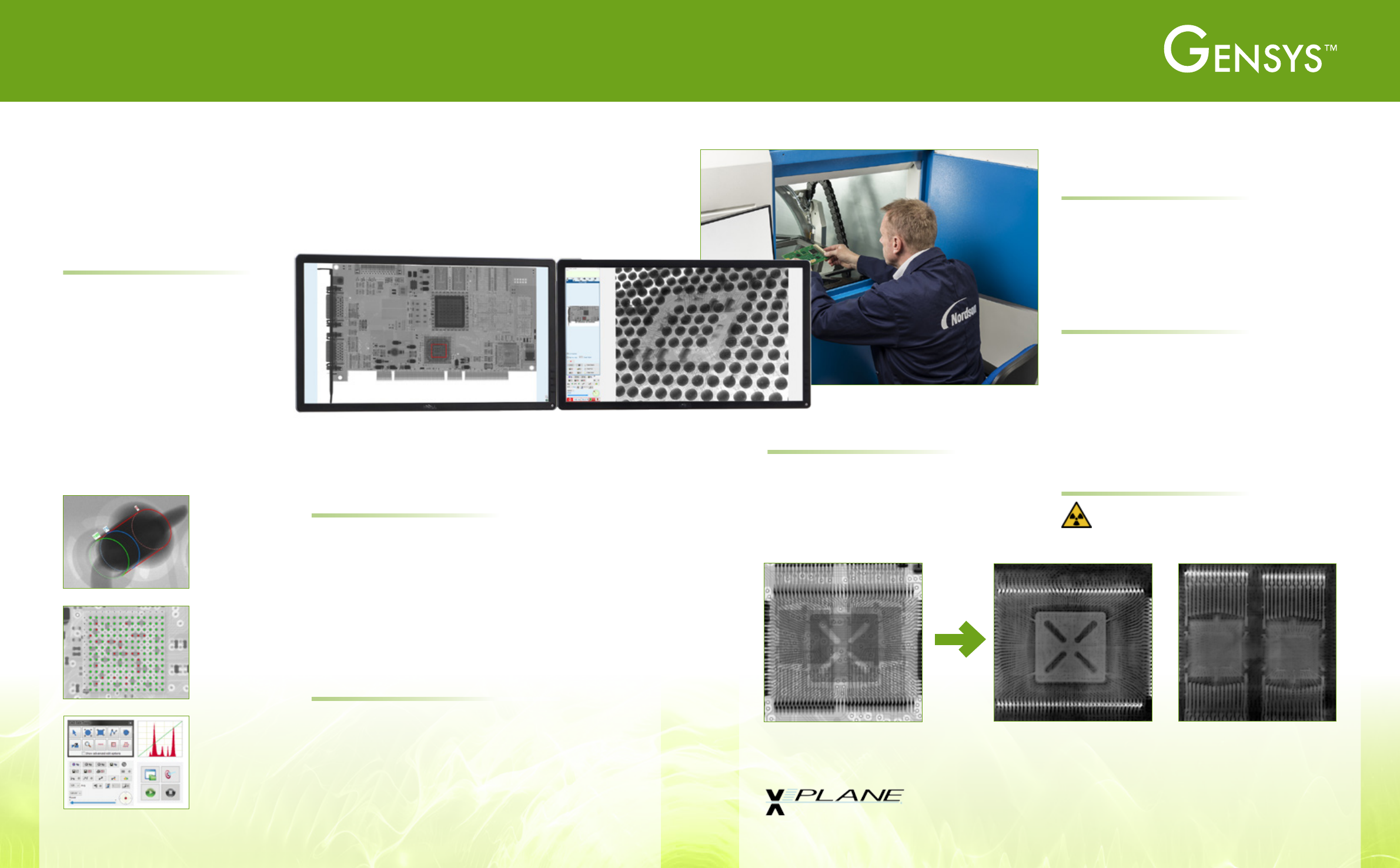
2D X-ray shows both the upper
and lower packages in a PoP
device.
X-Plane image slices show the upper and lower devices separately,
allowing unambiguous inspection of both separately.
X-PLANE
X-ray Inspection Software
Simplicity as standard
Ease of use
Whether you are controlling the X-ray
power, moving around the sample or
performing a measurement, all operations
are performed using simple mouse clicks.
This makes Gensys the easiest X-ray
inspection software to use and quickest
to learn, allowing your operators to
perform inspections faster.
Moving around your sample is effortless
thanks to the sample navigation and fault
location map. Just click wherever you
want to go.
Sample navigation and fault location map. Quickly magnify any
component by drawing a rectangle around it.
X-ray inspection using Gensys
TM
is easy and intuitive so both
experienced operators and occasional users can inspect samples
quickly, and with minimal training.
X-ray Inspection Software
Control Mouse point and click or joystick (optional)
Navigation
Navigation map showing active region, split screen for comparing
4 regions, 360° feature orbit
Detector Aspire FP
TM
Flat Panel Detectors
Safety Features Anti collision X-ray dose monitoring
Filtering
Image averaging, exposure control, contrast filters, 30 live
enhancement filters, HDR Imaging mode
Measurement
Dimension measurement, void analysis, plated through hole fill
level, pad analysis, ball grid array measurement, wire sweep
measurement
Automation
Automated inspection recipes
Barcode reader (optional) for sample tracking
Reporting / Archiving
MPEG video and JPG image storage, automated inspection HTML
reports and SQL archiving, annotated image reports
Platform Windows 10
DS-CT-012417-V1
Americas + 1 760 930 3307
sales@nordsondage.com
Europe +44 1296 317800
globalsales@nordsondage.com
China +86 512 6665 2008
sales.ch@nordsondage.com
Germany +49 89 2000 338 270
sales.de@nordsondage.com
Japan +81 3 3 3599 5920
sales.jp@nordsondage.com
South East Asia +65 6552 7533
sales.sg@nordsondage.com
Taiwan +886 2 2902 1860
globalsales@nordsondage.com
United Kingdom +44 1296 317800
globalsales@nordsondage.com
www.nordsondage.com
Specications at a Glance