TS560R-USER-GUIDE.pdf
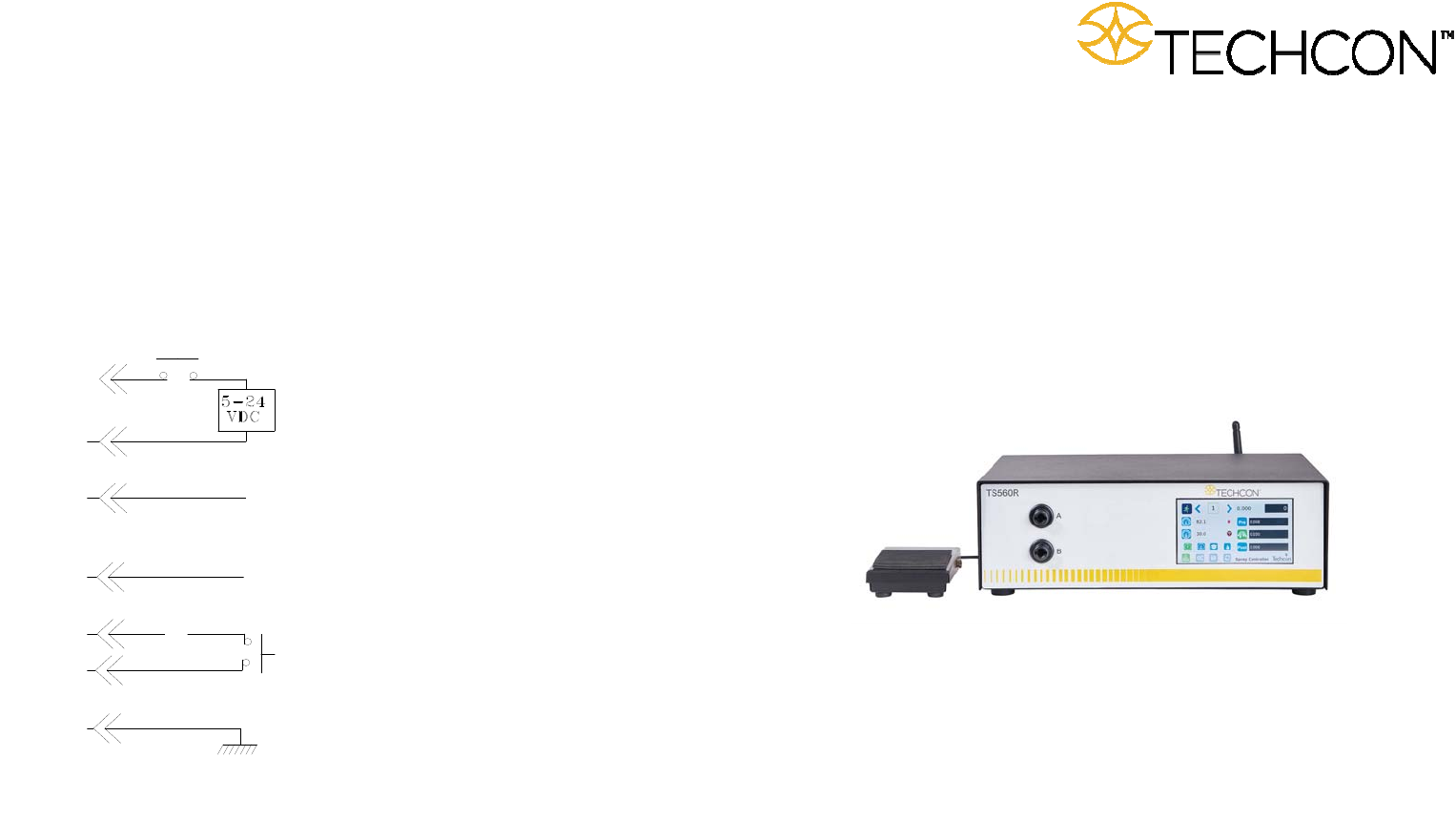
32 11. I/O CONFIGURATIO N AND END OF CYCLE FEEDBACK During a spray c ycle, an open col lector circuit clo ses and remains closed while the valve is dispensing . Pin 3 and 4 can be as f eedback signal to s ynchronize with…
32
11. I/O CONFIGURATION AND END OF CYCLE FEEDBACK
During a spray cycle, an open collector circuit closes and remains closed while the
valve is dispensing. Pin 3 and 4 can be as feedback signal to synchronize with other
devices. Power from an external source is allowed to pass through the circuit to
operate a 5 to 24 VDC load. Power consumption must not exceed 250 mA. The
load could be a relay, solenoid, counter, LED, or any device that will operate within
a 5 to 24 VDC range and a maximum of 250 mA.
Note: During the spray cycle, pin 3 will be grounded. Please make sure the
external device (your machine that controls the controller) has the same ground
as the controller.
7508-0260_A
Pin 7, 8, and 9 = Available
Chasis Ground
To initiate a dispense cycle with
contact closure
When low pressure alarm is triggered, Pin 4 is grounded (-)
When low pressure alarm is turned off,
Pin 4 is not connected (opened)
End of Cycle Feedback
During dispensing cycle, Pin 3 is grounded (-)
End of dispensing cycle,
Pin 3 is not connected (opened)
To initiate a dispense cycle with voltage
Pin 1 (+)
Pin 2 (-)
Pin 3
Pin 4
Pin 5
Pin 6
Pin 5
TS560R SMART CONTROLLER
FOR
SPRAY VALVES
User Guide
Copyright © OK International

2
CONTENTS
Page Number
1. Safety ………………………………………………………………… 3
2. Symbol Definitions ……………………………………………….. 4
3. Specifications ……………………………………………….……….. 5
4. Features …………………………………………………………….. 5
5. To Control SprayValve…………………………………................. …. 6
5.1 Connecting the unit……..……………………………………… 6
5.1.1 Login …………………………………………………… 7
5.1.2 Pressure Calibration.…………………………………… . 7
5.2 Spraying ………………..……………………………............ 9
5.2.1 Pressure Adjustment ………………………………….. 9
5.2.2 To Change Pressure Unit Display …………..………... 9
5.2.3 Spray Time Setting ……………………………………... 10
5.2.4 Manual/Purge Cycle ……………………………………. 11
5.2.4 Automatic Cycle ……………………………………… 11
5.2.5 Teach Mode Setting …………………………………….. 12
5.2.6 To run in Continuous mode …………………………….. 12
5.3 Low Pressure Alarm Setting ……………………………….. 14
5.4 Stored Program in Memory Cell …………………………….. 15
5.4.1 To store dispense parameters …………………………… 15
5.4.2 To run in Single Sequence mode ……………………….. 15
5.4.3 To run in Continous Sequence mode …………………… 17
5.5 Cycle Counter ………………………………………………... 17
5.6 To Change Password ………………………………………….. 18
5.7 To Connect to Wi-Fi network ………………………………… 20
6. Internet of Thing (IoT) ………………………………………………... 22
7. Software Upgrade …………………………………………………….. 28
8. Troubleshooting …………………………………………………….. 30
9. Maintenance …………………………………………………………. 31
10. Warranty ……………………………………………………………... 31
11. I/O Configuration and End of Cycle Switch ………………………. 32
31
9. MAINTENANCE
The controller is designed and built to be relatively maintenance free. To assure
trouble free operation, please follow below steps:
1. Make certain air supply is clean and dry.
2. Avoid connecting the unit to excessive moisture or solvent saturation
3. Avoid connecting air supply exceeding 100 psi (6.9 bars)
4. Use only Amyl Alcohol to clean outside surface of the main housing
5. Use only soft cloth to clean the display screen
10. LIMITED WARRANTY
OK International warrants this product to the original purchaser for a period of 2
years from date of purchase to be free from material and workmanship defects but
not normal wear-and-tear, abuse and faulty installation. Defective product or
subassembly and components under warranty will be repaired or replaced (at OK
International's option) free of charge. Customer with defective product under
warranty must contact the nearest OK International office or distributor to secure a
return authorization prior to shipping the product to the assigned OK International
authorized service center. For nearest OK International office or distributor contact
information, please visit www.techconsystems.com. OK International reserves the
right to make engineering product changes without notice.
All returns must be issued with a Returns Authorization number, prior to return.
Send warranty returns to:
Americas
OK International
10800 Valley View Street
Cypress, CA 90630
+1 714 230 2398
Europe
OK International
Eagle Close Chandler’s Ford Ind Est
Eastleigh, Hampshire
SO53 4NF
United Kingdom
+44 2380 489 100
Asia
Dover (Shenzhen) Industrial
Equipment Manufacturing Co., LTD.
4th Floor East, Electronic Building
Yanxiang Industrial Zone, High Tech Road
Guangmin New District
Shenzhen, P.R.C
+86 21 64952662
www.techconsystems.com

30
8. TROUBLESHOOTING
PROBLEM POSSIBLE CAUSE CORRECTION
Display does
not light up
No power inputs
Check power cord
connections
Turn on power
System will not
actuate
Supplied pressure
dropped below “Low
Pressure” setting
Foot switch not plugged
in or improperly
plugged in
Defective foot switch
Broken wire or loose
connection inside unit
Defective solenoid
Defective PC board
Increase supplied
pressure
Check foot switch
connection
Foot switch needs to be
repaired or replaced
Unplug power cord and
disconnect air supply.
Remove cover and check
for broken wires or loose
connections
Replace solenoid
Replace PC board
System will not
pressurize
Insufficient air pressure
Air hoses not plugged
in
Re
g
ulator defective
Increase air supply
pressure
Check connection
Re
p
lace re
g
ulato
r
Inconsistent
spray coverage
Air bubbles in material
Activation time is too
low
De-air material
Increase activation time
3
1. SAFETY
1.1 Intended Use:
WARNING: Use of this equipment in ways other than those described in this User
Guide may result in injury to persons or damage to property. Use this equipment
only as described in this User Guide.
OK International cannot be responsible for injuries or damages resulting from
unintended applications of its equipment. Unintended uses may result form taking
the following actions:
Making changes to equipment that has not been recommended in the User
Guide
Using incompatible or damaged replacement parts
Using unapproved accessories or auxiliary equipment
1.2 Safety Precautions:
Do not operate this unit in excess of maximum ratings/settings
Always wear appropriate personal protective clothing or apparel
The fluid may be toxic and/or hazardous. Refer to Material Safety Data Sheet
for proper handling and safety precautions
Do not smoke or use open flame when flammable materials are being sprayed
This equipment is for indoor use only