TM5739.Insertion-Component_SimpleVisionAlgorithmSetting.pdf
SMT Software Engineering Group IM Operations Y A MAHA MOT OR CO., L TD. MDO C-SOFT 50229 1/12 Insertio n-Comp onen t Simple Vision Algorithm Setting function Conten t s Insertion-Com p onent Sim ple Vision Algor…

SMT Software Engineering Group
IM Operations YAMAHA MOTOR CO., LTD.
MDOC-SOFT50229 1/12
Insertion-Component Simple Vision Algorithm
Setting function
Contents
Insertion-Component Simple Vision Algorithm Setting function ......................................................... 1
Contents ..................................................................................................................................................... 1
1 Applicable models and software versions .......................................................................................... 2
2 Outline ..................................................................................................................................................... 2
3 Detail........................................................................................................................................................ 2
Rev
Version Chapter
Revised Contents
00 V3.41STD R1.000 or later
V1.41STD R1.000 or later
All Created
Theinformationcontainedinthismessagemaybeconfidentialandlegallyprotectedunderapplicablel
aw.The
messageisintendedsolelyfortheaddress(es).
Ifyouarenottheintendedrecipient,youareherebynotifiedthatanyuse,forwarding,dissemination,or
reproductionofthismessageisstrictlyprohibitedandmaybeunlawful.

SMT Software Engineering Group
IM Operations YAMAHA MOTOR CO., LTD.
MDOC-SOFT50229 2/12
1 Applicable models and software versions
Applicable items and software version are as below.
Fig 1. Applicable models and software version
Item Name Software Version Remarks
Mounter, Y.FacT (Editor) VGOS V3.41STD R1.000 or later
Y.FacT V1.41STD R1.000 or later
2 Outline
This function facilitates the setting of recognition algorithm suitable for insertion parts.
In addition, pin-bend of the parts is detectable. And, the direction judgment is available by
using polarity mark etc. on the recognition face of parts.
3 Detail
This function is enabled with the following setting.
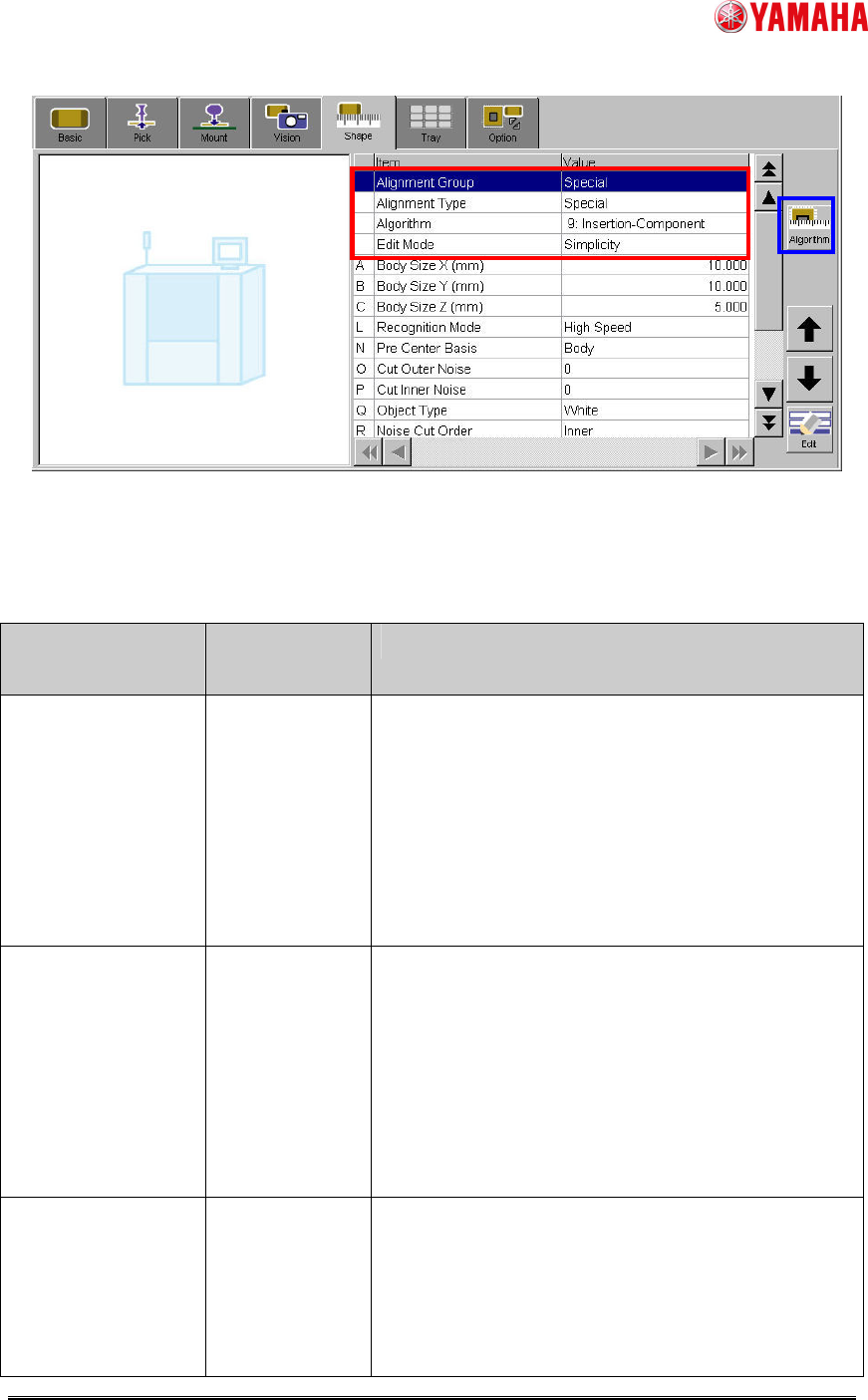
(1) Open [Parts] – [Shape] and set items as follows.
- “Alignment Group” = “Special”
- “Alignment Type” = “Special”
- “Algorithm” = “9: Insertion-Component”
- “Edit Mode” = “Simplicity”
(Or, tap “Algorithm” button and open “Vision Algorithm Select” screen, and select [Special]
- [Select] - [9: Insertion-Component])
SMT Software Engineering Group
IM Operations YAMAHA MOTOR CO., LTD.
MDOC-SOFT50229 3/12
Fig.1 [Parts] – [Shape] screen
(2) Set particular parameters for “Insertion-Component” algorithm. (Ref. Table2)
Table2 Particular parameters for “Insertion-Component” algorithm
Item Range or
selection item
Explanation
Recognition Mode High Speed /
Detail
When “High Speed”, it is judged by a binary image
whether the recognized image of the pin end is
correspond to the definition shape. And, when
“Detail “, it is judged by matching processing.
Specify ”High Speed” when contrast of pin end is
clear. Specify ”Detail” when pin end is dark and
contrast does not clear.
Pin Matching Level
(%)
0~100 * Only when “Recognition Mode” is ”Detail”.
Specify the judging standard of whether the
recognized image of the pin end is correspond to
the definition shape.
When the matching level is less than this value, the
recognition error occurs.
In the case of 0%, it is treated as 50%.
Pre Center Basis Pin / Body Specify ”Pin” when the parts center position is
datum pin detection center. Specify ”Body” when
the parts center position is center of the parts body
(Calculated by the method of “Center Pre-detection
Algo”). (Ref. fig.2, fig.3)