Galaxy EX Machine PC.pdf
MACHINE P C OVERV IEW Ch apte r Issue 4, Jun 18 Tech nical Ref erenc e Ma nual 7.1 CHAPTER 7 MAC HINE PC OVER VIEW The Pr i nter PC handles all th e machine functi ons (via CA N Bus and L AN Ho st Comms), pr inter c ame …
MACHINE PC
OVERVIEW
Chapter Issue 4, Jun 18 Technical Reference Manual 7.1
CHAPTER 7 MACHINE PC
OVERVIEW
The Printer PC handles all the machine functions (via CAN Bus and LAN Host
Comms), printer cameras and the MMI.
The PC for the Electronic Assembly machine is configured using a dual core
processor with standard PCI for the camera system.
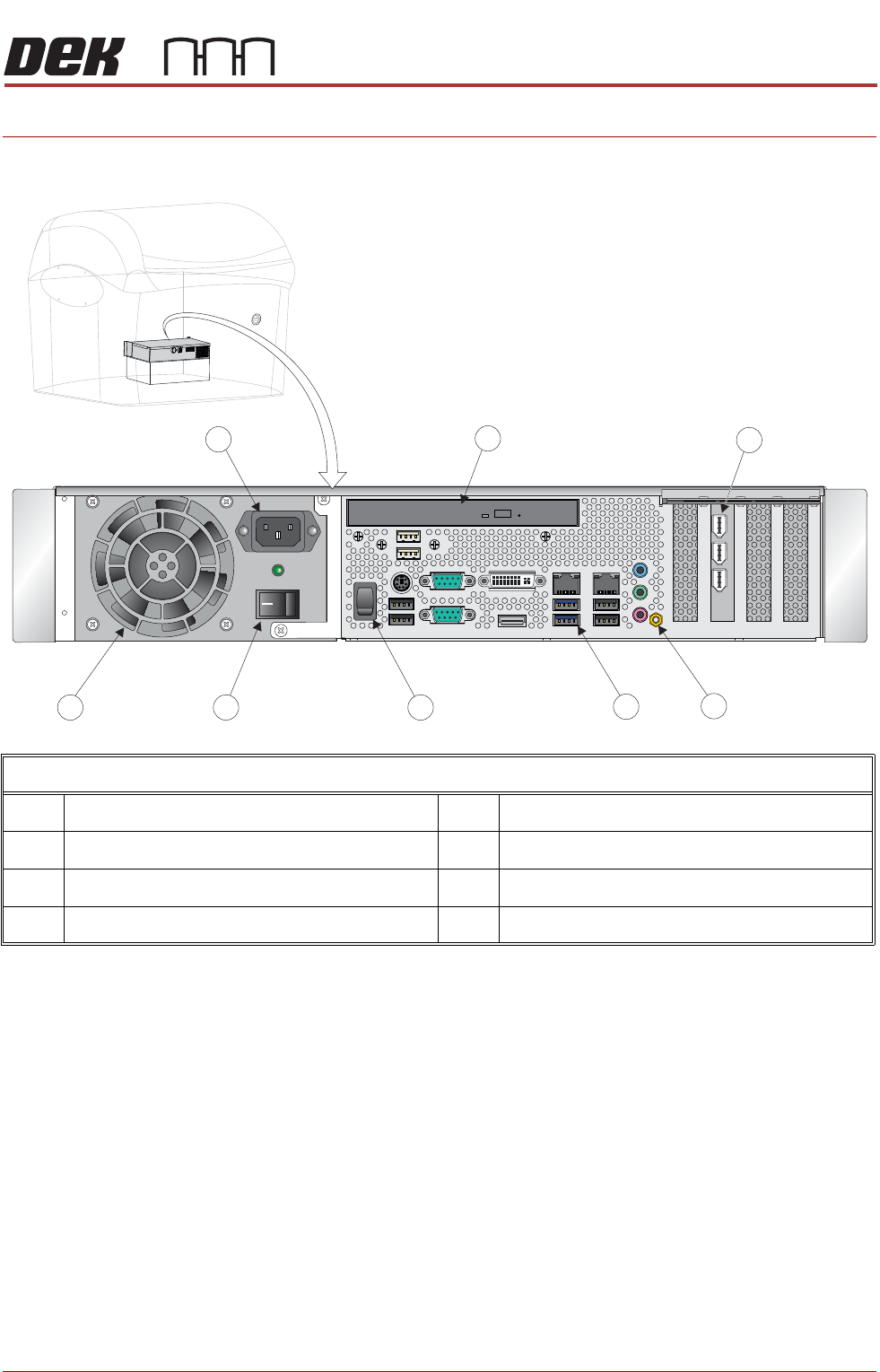
PC Enclosure Rear Panel
1 PCI Interface Card 5 Mains Power Switch
2 Earth Bonding Connector 6 Cooling Fan
3 Peripheral Connector Panel 7 Mains Input Connector
4 Reset Switch 8 DVD Drive
MACHINE PC
ELECTRICAL SCHEMATIC
7.2 Technical Reference Manual Chapter Issue 4, Jun 18
ELECTRICAL SCHEMATIC

MACHINE PC
PC ENCLOSURE
Chapter Issue 4, Jun 18 Technical Reference Manual 7.3
PC ENCLOSURE
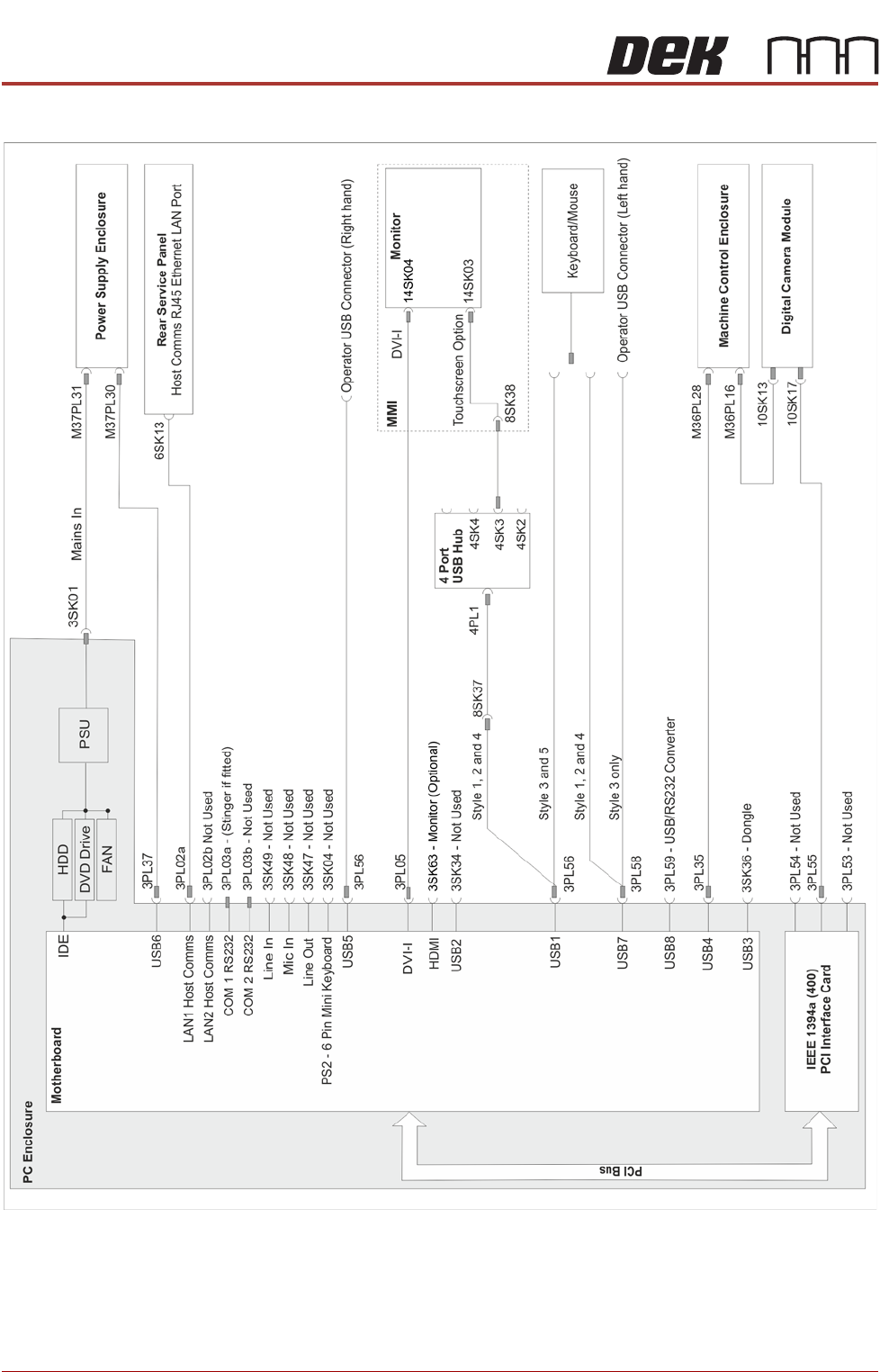
Motherboard
System
This card provides the master control of all machine functions. It houses the
Central Processing Unit (CPU) which is an Intel® Pentium® Dual Core proces-
sor G3420 3.2GHz.
The main features of this card are:
• VGA Video Output DVI and HDMI
• 8 USB Ports
• Ethernet 10/100Base-T output via an RJ45 connector to LAN1 Host
Comms
• LAN2 Host Comms - (Not Connected)
• EIDE HDD fixed disk controllers (DVD ROM)
• 6 SATA HDD Controllers (Not Shown)
• 2 PCI Bus Interface
• Bi-directional Parallel Printer Port (Not Shown)
• RS232 Interface (COM1) - (Not Connected)
• RS232 Interface (COM2) - (Not Connected)
• CMOS RAM with Lithium battery backup (Not Shown)
• 6 Pin Mini Keyboard Connector - (Not Used)
• 4 DDR2 DIMM Sockets (RAM) (Not Shown)
• Line Out Connector - (Not Used)
• Line In Connector - (Not Used)
• Mic In - (Not Used)
CMOS Settings The CMOS settings are password protected to prevent any settings being
changed.
It is highly unlikely that the CMOS settings could be responsible for PC issues
however, if the settings are strongly suspected, contact the CSG Helpdesk.