TM1998_Stride Board Buffering Function.pdf
SMT Software Engineeri ng Group IMOperationsYAMAHAMOTORCO. ,LTD. MDOC-SOFT 50038-001 1/12 S trideBoardBu fferingfu nction Content s S tride Board Buffering function ........…
SMT Software Engineering Group
IMOperationsYAMAHAMOTORCO.,LTD.
MDOC-SOFT50038-0011/12
StrideBoardBufferingfunction
Contents
Stride Board Buffering function ........................................................ 1
1. Introduction ......................................................................2
2. Summary ........................................................................2
3. Limitations .......................................................................2
4. Basic Specifications ...............................................................3
5. Settings .........................................................................5
5.1. Way of Settings ...............................................................5
6. Error messages ..................................................................6
7. Appendix ........................................................................8
7.1. Automatic settings .............................................................8
7.2. Manual settings ..............................................................10
7.3. The board dimensions specifications ............................................12
Revision No.
Update Changes
000 2009/10/28
Create
001 2010/01/21
The section of “4. Basic Specifications - About the display of
Enable or Disable state of this function” is added. This function
is displayed from V3.11STD R1.000 or later.
SMT Software Engineering Group
IMOperationsYAMAHAMOTORCO.,LTD.
MDOC-SOFT50038-0012/12
1.Introduction
The target model and the object version are as follows.
Table1TargetmodelandObjectversion
Item Object Remarks
Target Model YS12 Series mounter, YS100, YS88, YS24
YG12 Series mounter
Object version V3.10STD R1.000 or later
2.Summary
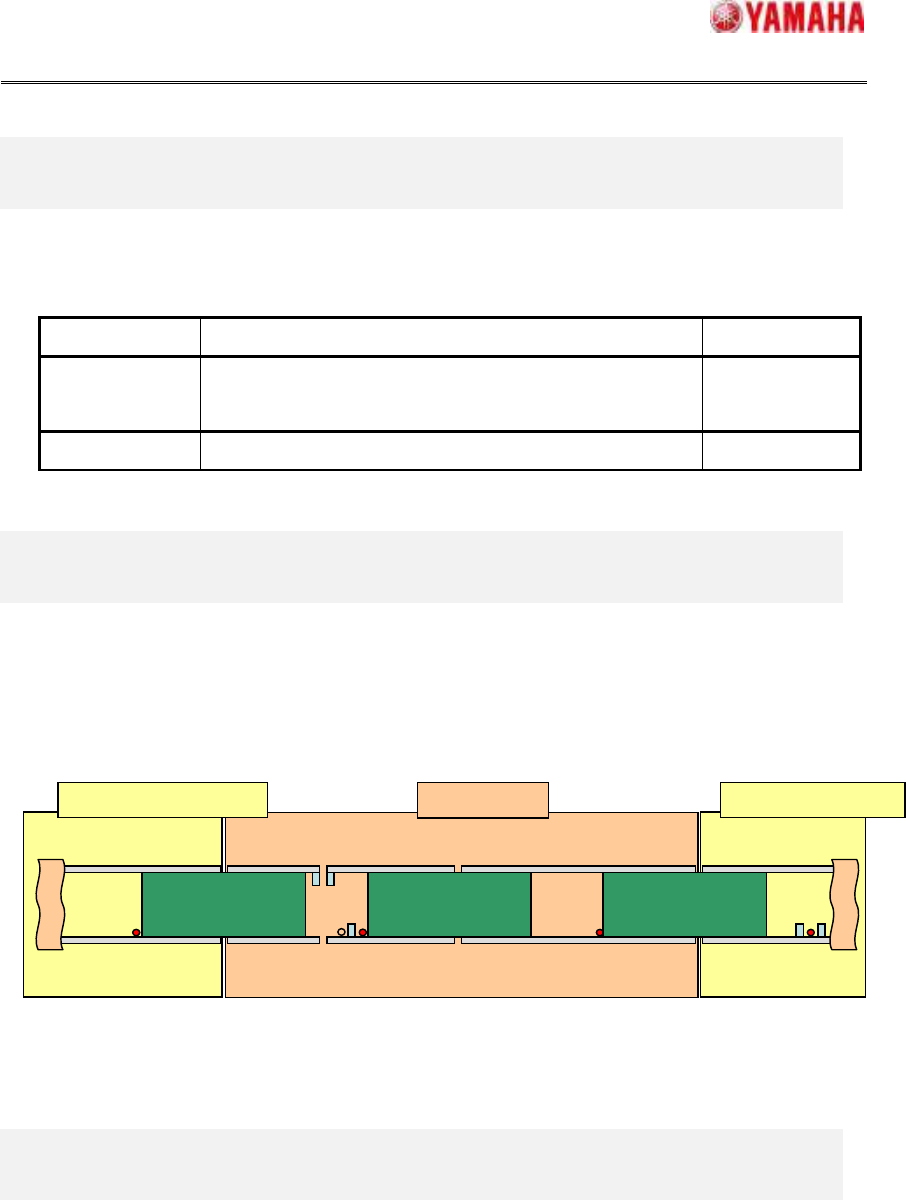
A board can stay between the downstream machine and the upstream machine in this version
(Refer to Fig.2.1). By this function, a large size board which could not stay on the waiting
position can stay there because the board can be transferred to the waiting position, and the
transfer cycle time can be improved.
Fig.2.1StrideBoardBuffering
3.Limitations
This function does not work other than “ADVANCED_GATE".
Only when the “ADVANCED GATE 2” is used as the transfer signal cable, this function
becomes effective. When this function is used other than “ADVANCED GATE 2” as the
transfer signal cable, interlock errors etc occur, and normal operation cannot be done.
When this machine is with the buffer conveyor (include d-YTF) in the downstream side,
“Stride Board Buffering” function is not available in the downstream side.
This Machine
Upstream
Machine
Board Board Board
Downstream
Machine
SMT Software Engineering Group
IMOperationsYAMAHAMOTORCO.,LTD.
MDOC-SOFT50038-0013/12
4.BasicSpecifications
A) Abouttheproductionboardcount
The number of produced board is counted up when the board reaches at the exit position
as before. When this function is used, the number of produced board is counted up when
the board reaches at the exit sensor because the board cannot be stopped and be
transferred to the downstream machine.
B) Aboutthelog
When there is a board between the downstream machine and the upstream machine (“the
board wait striding the machine” state), the board is treated as a board of the downstream
machine. Therefore, the transfer time from the “the board wait striding the machine” state to
the board fixing position, is measured as transfer cycle time of the downstream machine.
The transfer time of the upstream machine is displayed by reaching time to the exit position
as before.
C) Abouttherecoverymethodafterthetransfererror
When the transfer error occurred, according to the instructions of the error message, please
move the board to the transfer destination position and restart auto-running.
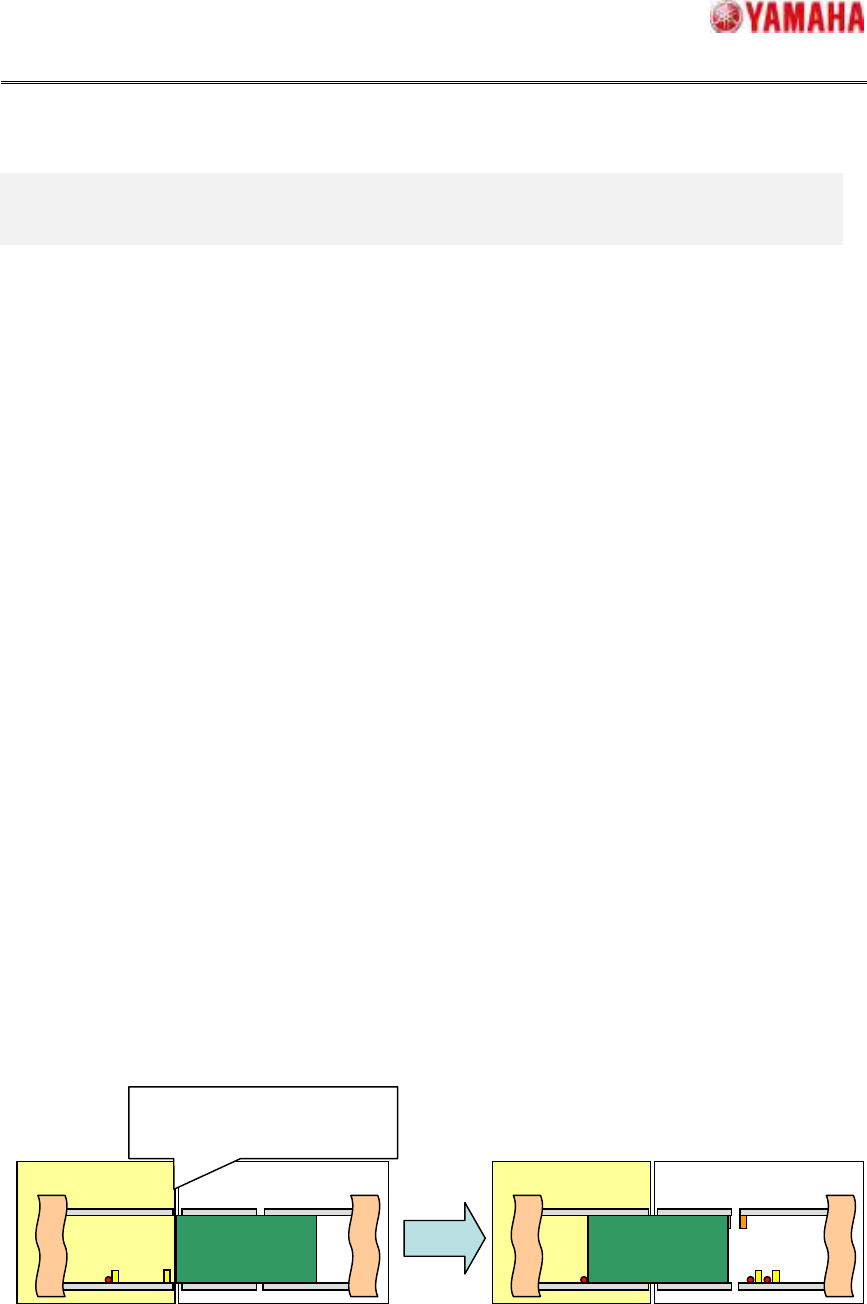
When the board is stacked between machines, “Ea7337: BOARD TRANSFER ERROR” is
displayed, please move the board to the wait position of the downstream machine and
restart auto-running (cf. figure 4.1).
About the other transportation errors, please refer to "Chapter.6. Error message."
Fig.4.1Recoverymethodafterthetransfererror
This Machine
The board is stacked between
machines
, and the transfer error
“Ea7337” occurred.
This Machine Upstream Machine
Upstream Machine