TM1794_Auto Cleaning Detail Setting.pdf
SMT Software Engineering Group IM Operations YAMAHA MOTOR CO. , LTD MDOC-SOFT5007 1 1 A u t o C l e a n i n g D e t a i l S e t t i n g s F u n c t i o n Content s 1. Intro duction ........ ...... ........ ...... .......…

SMT Software Engineering Group
IM Operations
YAMAHA MOTOR CO., LTD
MDOC-SOFT50071
1
Auto Cleaning Detail Settings Function
Contents
1. Introduction ..................................................................................................................... 2
2. Summary......................................................................................................................... 2
3. Settings ........................................................................................................................... 3
3.1. In the case of “Controlled in the Board”................................................................... 3
3.2. In the case of “Controlled in the Time”..................................................................... 6
4. Utility ............................................................................................................................... 8
5. Remarks.......................................................................................................................... 8
SMT Software Engineering Group
IM Operations
YAMAHA MOTOR CO., LTD
MDOC-SOFT50071
2
1. Introduction
The target model and the version are as follows.
Table1.1 Target model and target version
Item Object Remarks
Target model YSP
Target version VGOS V3.21STD R1.000 or later
Y.FacT V1.21STD R1.000 or later
2. Summary
This function enables detail settings for the cleaning operation sequence.
Each forward or backward cleaning movement can be counted as one sequence. The
following parameter can be set for every sequence.
1. Cleaning Type (Wet/Dry)
2. Cleaning Speed
3. Vacuum (Use/Not Use)
This function does not support “TXT” type board data. Please save with “YGZ” type
board data in order to enable this function.
SMT Software Engineering Group
IM Operations
YAMAHA MOTOR CO., LTD
MDOC-SOFT50071
3
3. Settings
The settings to use this function are as follows.
3.1. In the case of “Controlled in the Board”
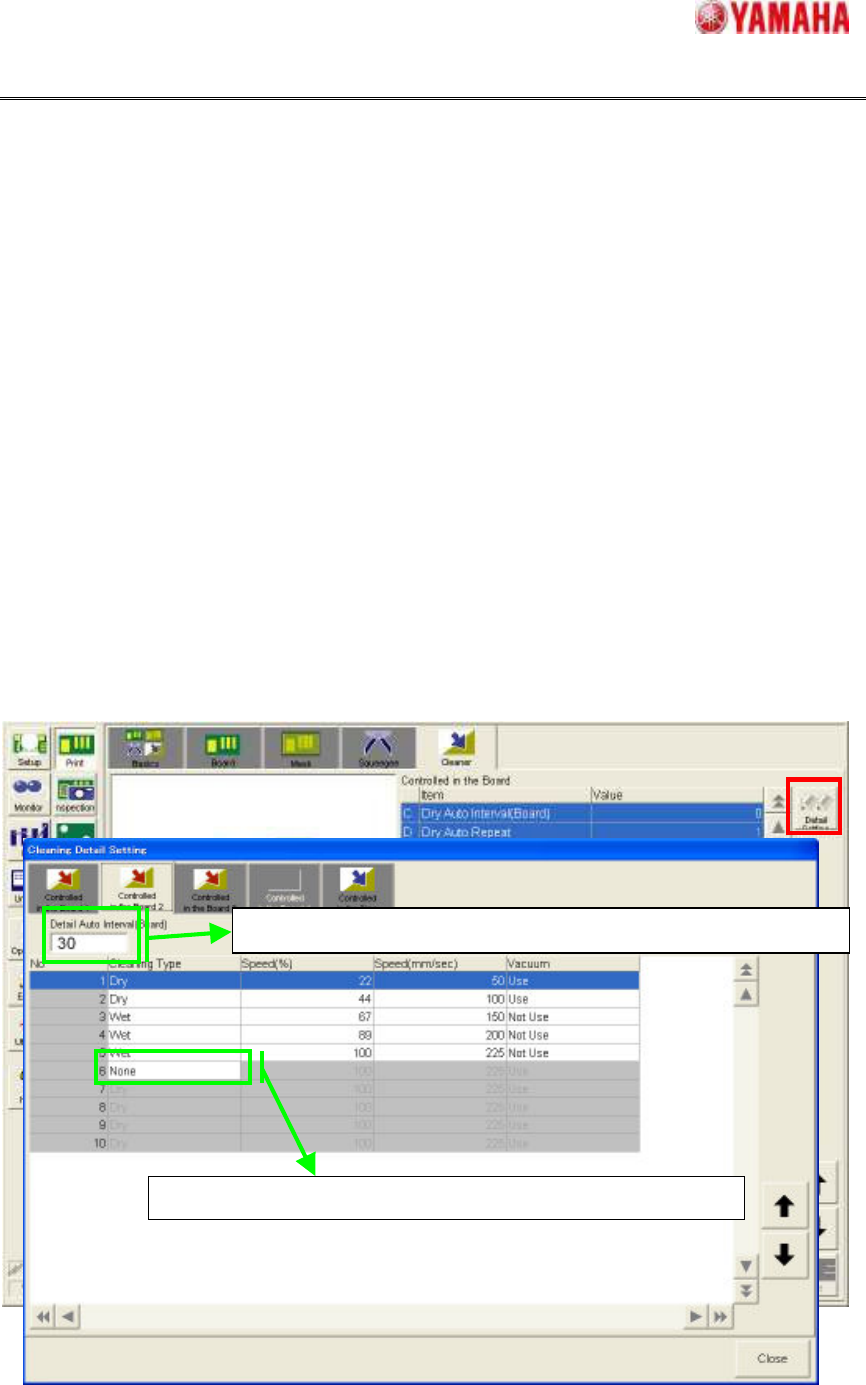
All of cleaning detail settings is set in “Cleaning Detail Setting” window. Please tap [Print]
– [Cleaner] – [Detail Setting] button and open the “Cleaning Detail Setting” window.
(Fig.3.1)
In “Cleaning Detail Setting” window, ten cleaning sequences (five round trip) can be set
at a maximum in each “Controlled in the board” tab(Four kinds of ”Controlled in the Board
1”– “Controlled in the Board 4” tab).
Input the cleaning execution interval to “Detail Auto Interval” . And set “Cleaning Type”,
“Speed” and “Vacuum” of each sequence.
When “None” is set on “Cleaning Type” cell, the following cleaning sequences are not
executed. When “0” is set on “Detail Auto Interval”, the following “Controlled in the Board”
tabs are invalid.
Fig.3.1 [Controlled in the Board] tab in “Cleaning Detail Setting” window
If “0” is set, following “Controlled in the Board 2” tabs are invalid.
The settings following No.6 are invalid because
“
None
”
is set.