00193463-01.pdf - 第181页
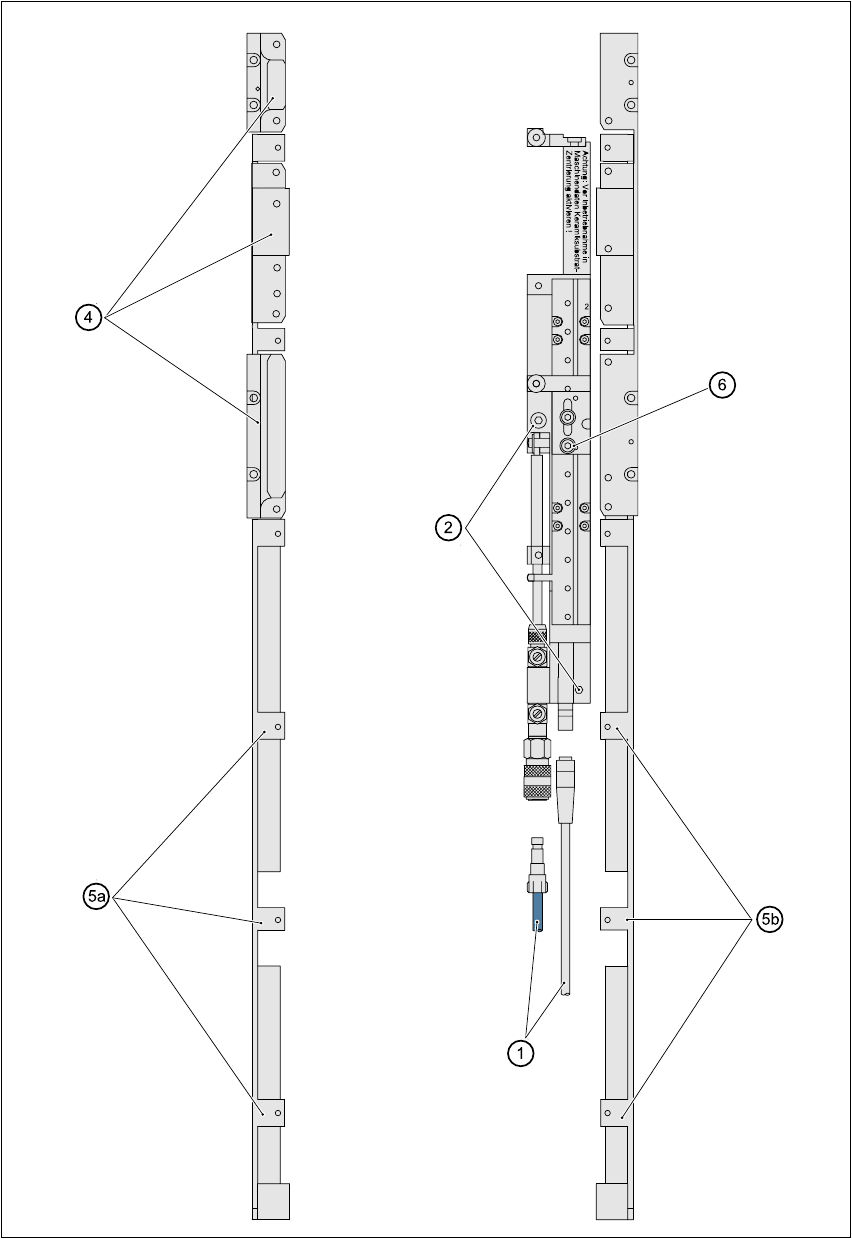
User Manual SIPLAC E S-25 HM 5 Station extensions Software Vers ion SR.503.xx 04/2002 US Edition 5.5 Ceram ic substrate ce ntering 181 Fig. 5.5 - 1 General overview (plan view)

5 Station extensions User Manual SIPLACE S-25 HM
5.5 Ceramic substrate centering Software Version SR.503.xx 04/2002 US Edition
180
5.5 Ceramic substrate centering
5.5.1 General
The ceramic substrate can be centered either mechanically or optically. 5
With optical centering, the fiducials can be detected with either normal or oblique lighting. 5
5.5.2 Possible centering types
The following centering types for ceramic substrates can be entered in the transport type machine
data (REAL.MA). 5
5.5.3 Mechanical centering
5.5.3.1 General
Mechanical substrate centering is used to lock ceramic substrates firmly in position in the X and
Y directions in such a way that the material is not damaged. Ceramic substrates can also be
placed right up to the edge. 5
5.5.3.2 Changing the ceramic substrate on the PCB
Æ Disconnect the air line and power cable (see point 1 in Fig. 5.5 - 1).
Æ Remove the ceramic substrate centering (see point 2 in Fig. 5.5 - 1).
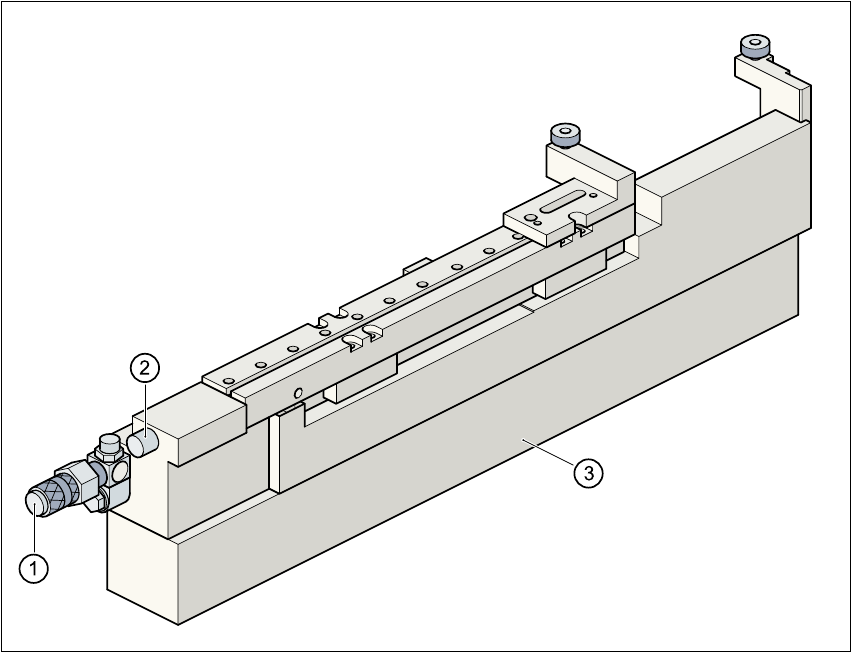
Æ Detach the base of the ceramic substrate centering unit (see point 3 in Fig. 5.5 - 2).
Æ Remove the three clamping parts (see point 4 in Fig. 5.5 - 1), and fit the standard guide at this
point.
Æ Fit the hold-down bracket (see point 5a and 5b in Fig. 5.5 - 1).
Æ Adjust the size of the PCB (see point 6 in Fig. 5.5 - 1).
Æ Use the SITEST program to edit the transport type (see table in Section 5.5.2) in the machine
data.
Transport type Centering
4 Mechanical substrate centering with normal lighting
5 Oblique lighting only with Y axis PCB clamping unit
6 Mechanical substrate centering with oblique lighting
User Manual SIPLACE S-25 HM 5 Station extensions
Software Version SR.503.xx 04/2002 US Edition 5.5 Ceramic substrate centering
181
Fig. 5.5 - 1 General overview (plan view)
5 Station extensions User Manual SIPLACE S-25 HM
5.5 Ceramic substrate centering Software Version SR.503.xx 04/2002 US Edition
182
Fig. 5.5 - 2 Ceramic substrate centering (side view)
(1) Connecting nozzle
(2) ‘Ceramic substrate centering’ sensor
(3) Base
5.5.3.3 Maintenance
– Clean and grease the ball race in the X-axis centering unit.
– If necessary, check that the pneumatic driving mechanism is running smoothly.
– The conveyor should be maintained as described in the maintenance instructions.