ACT - Accuracy Check Tool mit SSW 6xx User Manual 2017.pdf - 第117页
ACT with SSW 6xx / User Manual 07/2017 Edition 53 4.2.5.1 Measurement Eval uation and Measure ment Data with the 605.xx Station S oftware Once all fiducials have been measured, the ACT Measuremen t evaluation di alog box…
ACT with SSW 6xx / User Manual 07/2017 Edition
52
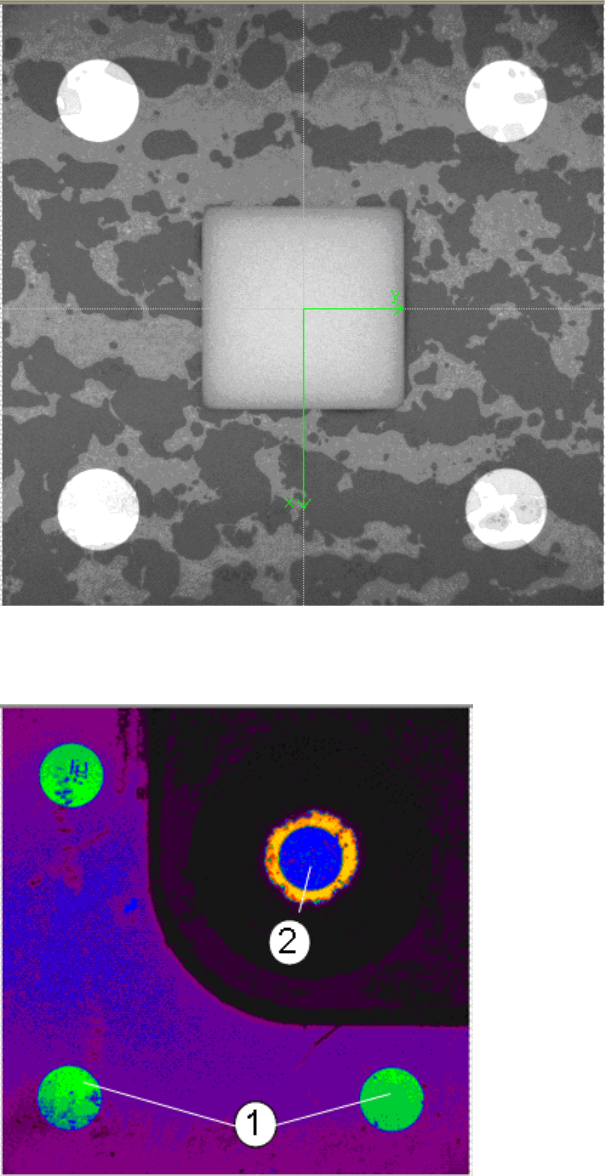
Example of measurement operation with the ceramic components Cerampads:
Figure 4-31: Example of measurement window with Cerampads
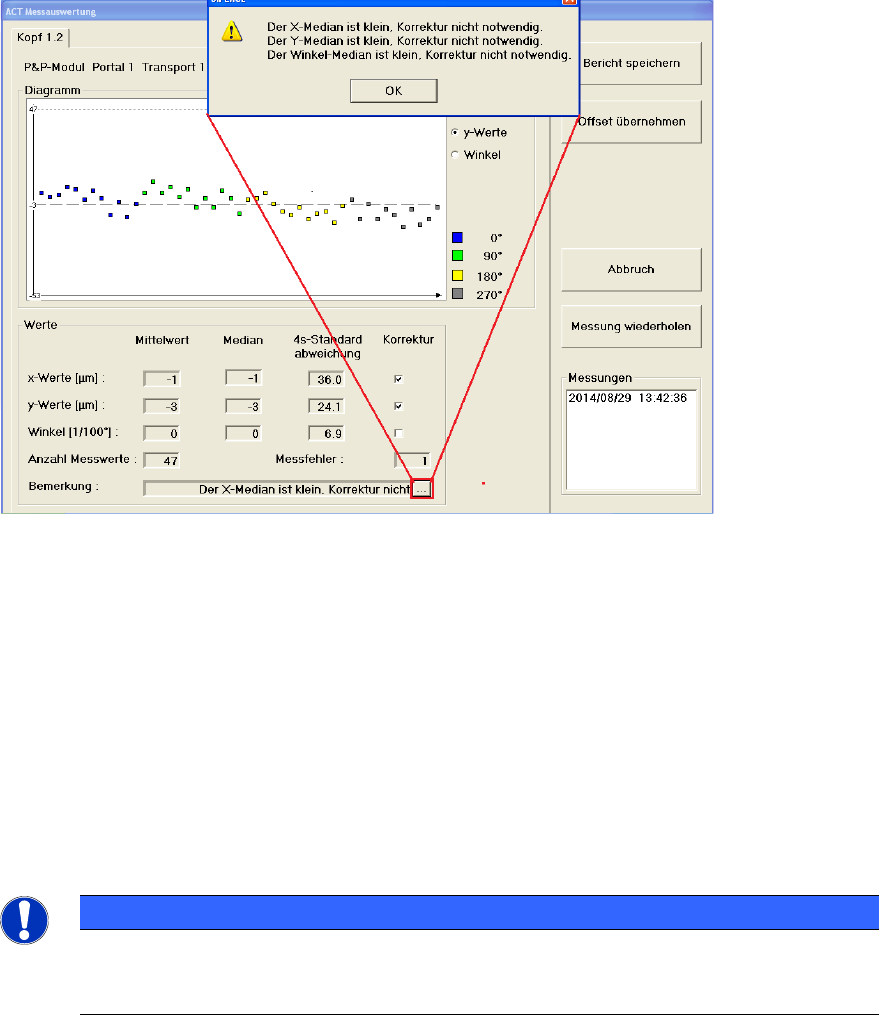
Example of measurement operation with glass components:
Abbildung 4-32: Anzeige Messfenster mit Glasbauelementen (Falschfarbendarstellung)
Key:
(1) Fiducials on the ACT plate (2) Fiducials on the glass component
ACT with SSW 6xx / User Manual 07/2017 Edition
53
4.2.5.1 Measurement Evaluation and Measurement Data with the 605.xx Station Software
Once all fiducials have been measured, the ACT Measurement evaluation dialog box will be
automatically opened.
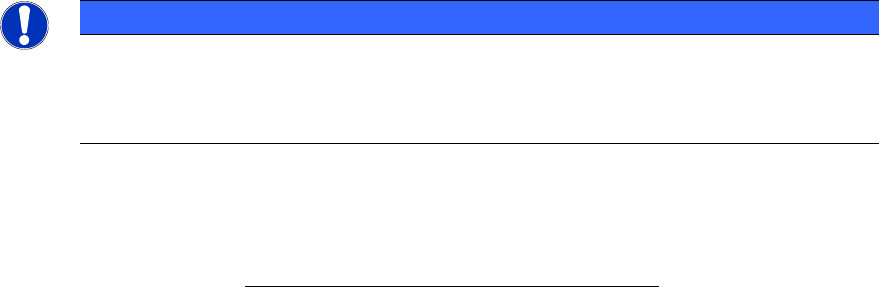
Example of measurement evaluation at the GUI for C&P12 heads (Cerampads) on a
SIPLACE D1:
Figure 4-33: Measurement results for ACT (example: Dialog box for C&P12 head)
Key:
(1) Here you will get additional information on the detected x-, y- and angle values
(e.g. if a correction of the offset value makes sense or not).
x-Werte (x-values)
Displays the offset values in x-direction.
y-Werte (y-values)
Displays the offset values in y-direction.
Winkel (Angle)
Displays the offset values of the placement angle.
NOTICE
When measuring the ceramic components, the placement angle cannot be calculated, as
the ceramic components are too small to deliver reliable information for the angle.
Therefore the angle is not displayed!
The measured values are highlighted in color. This allows you to see, for instance, whether
components that were positioned with a particular placement angle show exceptionally deviations.
ACT with SSW 6xx / User Manual 07/2017 Edition
54
The PDF evaluation (see section 4.2.5.3) outputs data on segments and overall values for the Twin
Head.
NOTICE
In rare cases (pickup errors and thereafter recovery placement), individual segment
assignments might not be correct. If it is necessary to know the segment assignments
when analyzing the measurement results, the placement has to be repeated until the
segment assignments are correct.
The results displayed in the Statistics area and the graphical view of the measurement results
match the selected head and the selected segment.
Mittelwert (Average (calculated average, offset))
The average calculated here relates to the segments activated in the segment selection. This is the
calculated average, i.e. the sum of all measured values / number of values.
Median (central value)
The median relates to the segments activated in the segment selection, too. This is the "middle
one" of the measuring values. To determine the median, all measuring values are arranged
according to size. The measuring value in the middle of the list of all measuring values then shows
the median (by 5 measuring values this is the 3rd value).If there is an even number of
measurement values, the median is defined to be the arithmetic mean of the two middle values (by
4 measuring values (x2 + x3) / 2). The median is inured to so-called runaway values, because
these will be sorted at the beginning or the end of the list of measuring values.
Standardabweichung (Standard deviation)
The standard deviation calculated here relates to the segments activated in the segment selection.
The standard deviation is displayed as 4
σ
.
Korrektur (Correction)
The offset data can be automatically transferred to the appropriate machine data file on the station
(see section 4.2.5.2).
Anzahl Messwerte (Number of measured)
Displays the total number of measurements.
Messfehler (Measuring error)
Displays the number of measurement errors per measurement.The user decides whether the
number of errors is too high and whether to repeat the measurement process.
► Check the measuring plate before you repeat the measurement. Possibly the foil was not
applied to the plate without air bubbles or the surface is scratched or dirty if the plate has been
used several times.
Bericht speichern (Save report)
See section 4.2.5.3.
Offset übernehmen (Accept offset)
The values that are marked under Correction are corrected in the machine data (see section
4.2.5.2).
Abbruch (Cancel)
The measurement is terminated and the board is moved out of the conveyor. You can remove the
ACT plate.