ACT - Accuracy Check Tool mit SSW 6xx User Manual 2017.pdf - 第82页
ACT with SSW 6xx / User Manual 07/2017 Edition 18 3.2.3 Importing the SIPLACE Pro Data - Procedure The import of board s and tables is des cribed below: ► Insert the ACT CD into t he appropriate drive on the SIP LACE Pro…
ACT with SSW 6xx / User Manual 07/2017 Edition
17
3.2 Software Preparations
The ACT case contains a CD on which the software packages described in the following are
available. However, these may be out-of-date.
Therefore, please obtain the latest versions from the Software License Portal or the SIPLACE
Hotline respectively.
3.2.1 Station Software
For SIPLACE placement machines with station software 60xx (X-series (old) and D-series) an
additional software installation is required for using the ACT.
Please see chapter 5.
3.2.2 SIPLACE Pro Software
For SIPLACE Pro, prefabricated table and board data files are available for the respective versions.
These so-called *.sipro files can be imported into the SIPLACE Pro database over the Data Model
Import.
The corresponding component shapes and components are also contained in these files.
NOTICE
Update of SIPLACE Pro ACT data
► Recommendation: Delete old ACT data before importing the newest SIPLACE Pro
data to avoid having a confusing amount of data.
► Delete all recipes, jobs and setups for ACT manually.
Now you can delete tables, boards, placement lists, fiducials, components and
component shapes one after the other from the ACT folders.
► If it is impossible to the delete these objects for reasons of time:
Rename all ACT folders of the single views (components, component shapes,
fiducials, placement lists, boards, tables, trays) to ACT_Old.
The ACT structure is automatically provided again when the new data is imported.
NOTICE
Import of data
► DON'T select the Flatten directories option.
► Always overwrite all objects (even image data/blobs; if necessary, resolve conflicts
by creating new image data). This cannot be avoided because the table and board
files partially contain redundant data (component, component shape,...).
ACT with SSW 6xx / User Manual 07/2017 Edition
18
3.2.3 Importing the SIPLACE Pro Data - Procedure
The import of boards and tables is described below:
► Insert the ACT CD into the appropriate drive on the SIPLACE Pro computer.
(Alternatively, you can provide the data from a USB stick).
► Start the SIPLACE Pro Desktop software.
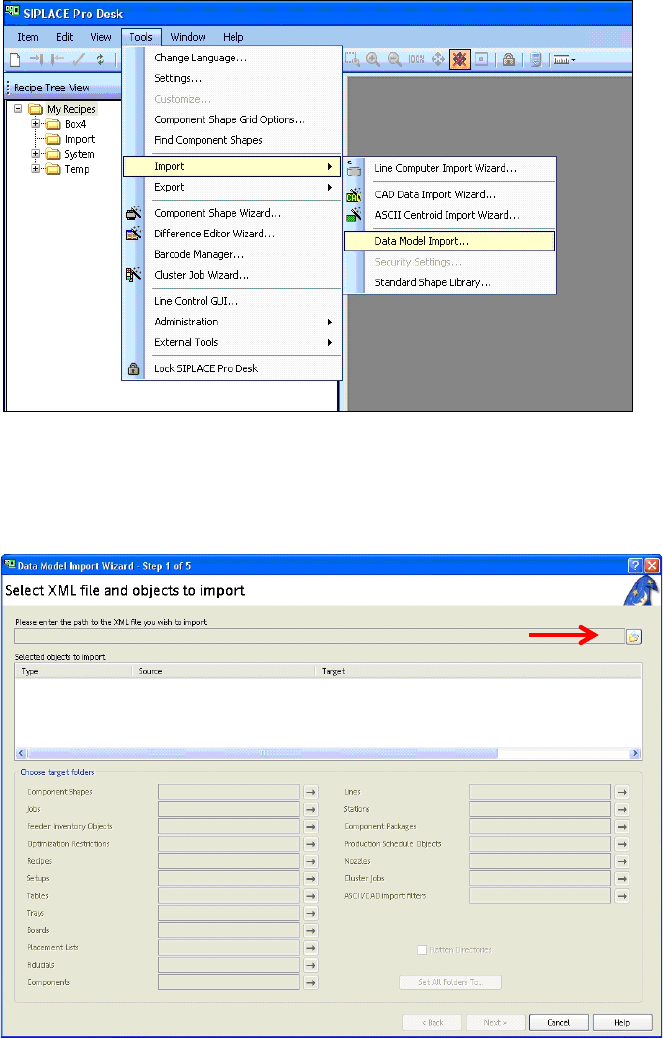
Figure 3-9: SIPLACE Pro view: Menu for importing the placement programs
► Select the Data model import function as shown in Figure 3-9:
Tools – Import – Data Model Iimport
View on screen:
Figure 3-10: Data import screen
► Click on the folder next to the red arrow (Figure 3-10).
ACT with SSW 6xx / User Manual 07/2017 Edition
19
3.2.4 Importing Boards in SIPLACE Pro
► Select the appropriate folder to your software.
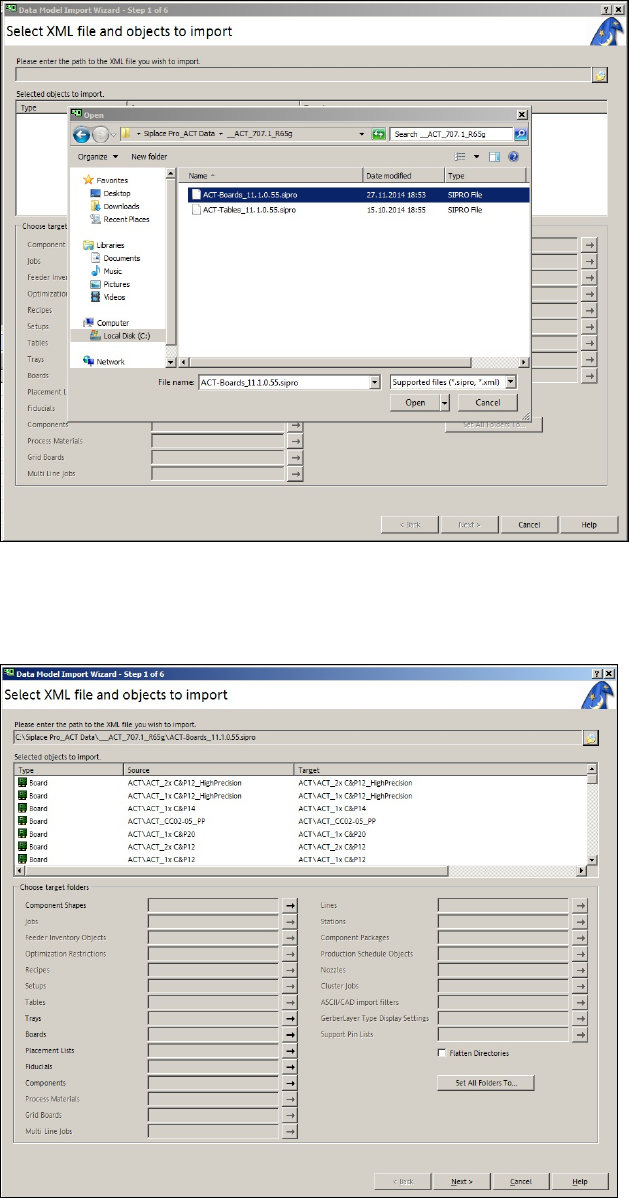
► Click on the file with the board programs on the ACT CD (Figure 3-11).
Figure 3-11: ACT board import screen
► Click Open (Figure 3-11).
► Click Next (Figure 3-12).
Figure 3-12: XML file import screen