HS50_advance_level 2.pdf - 第320页
07/2002 Editio n Student G uide HS -50 Advanc ed II 10 Star Axis 16 0HDVXU HPHQW6HW XSIRU$ [LV$GMXVWPHQW V ready for operat ion enable outp ut stage effecti ve current lim it error tac ho P-gain axis 0 axis 1 …
Student Guide HS-50 Advanced II 07/2002 Edition
10 Star Axis
15
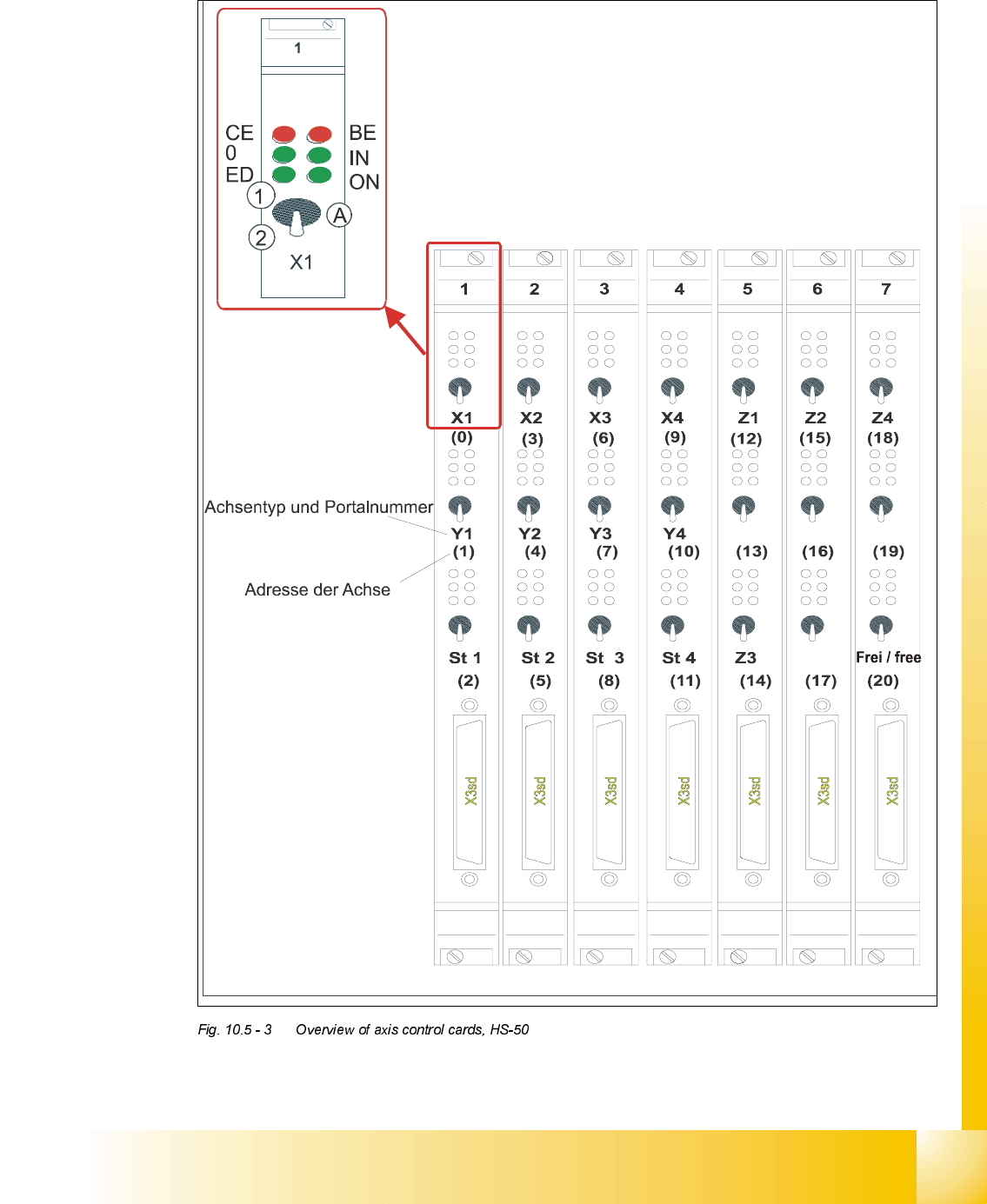
2YHUYLHZRI$[HV&RQWURO&DUGV+6
type of axis and gantry number
adress of axis
'3 '3
'3
'3
CE = Counting error
0 = Zero pulse
ED = End signal
BE = General error, module error
IN = Initialized
ON = Servo ON
(A) Axis enable switch
(1) Servo ON
(2) Servo OFF
07/2002 Edition Student Guide HS-50 Advanced II
10 Star Axis
16
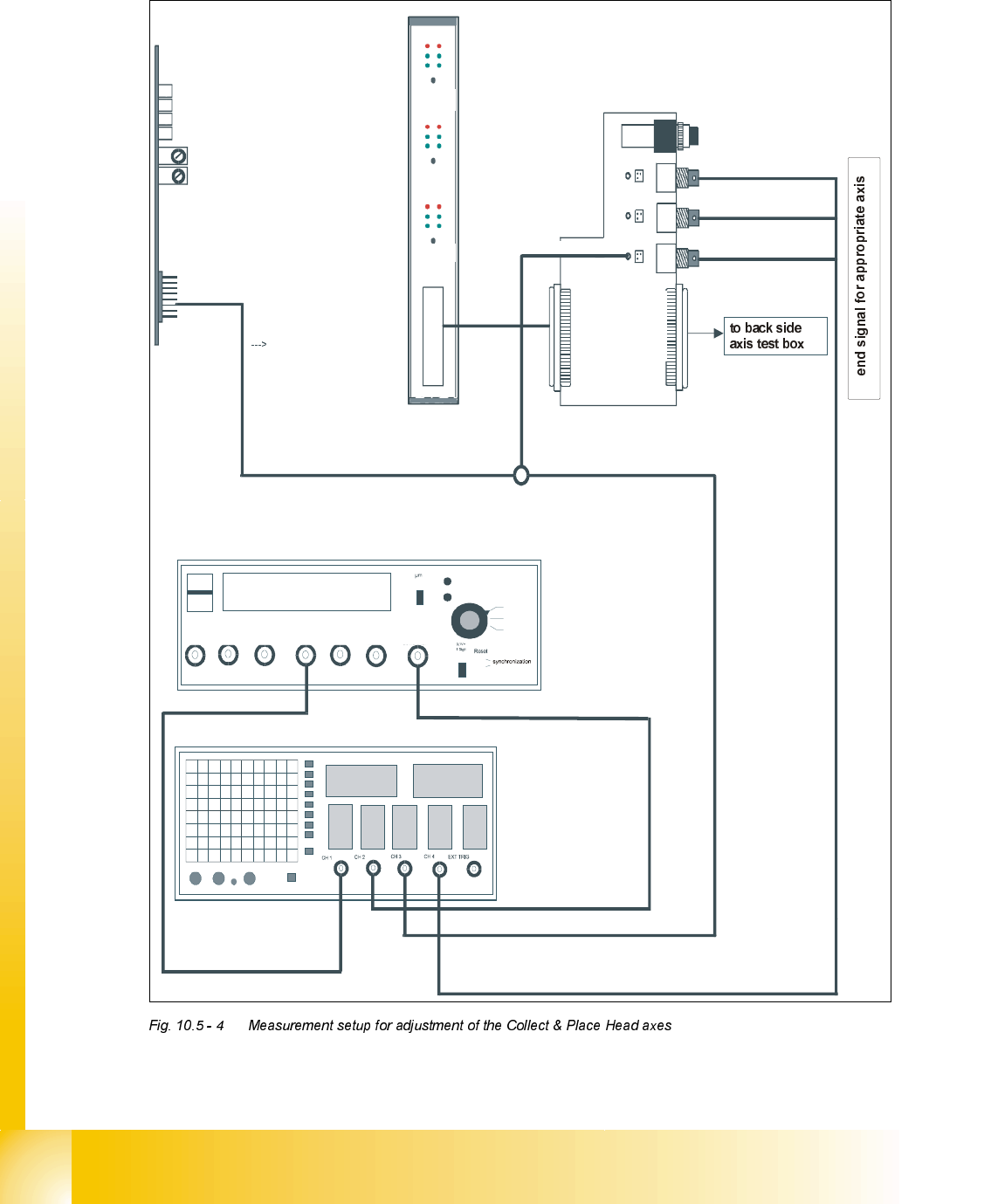
0HDVXUHPHQW6HWXSIRU$[LV$GMXVWPHQWV
ready for operation
enable output stage
effective current limit
error
tacho
P-gain
axis 0
axis 1
axis 2
measuring current of star - axis
changeover switch pressed down
end signal axis 0
end signal axis 1
end signal axis 2
interface
test adapter
axis test box
actual current
with RC - filter
current measuring of dp - axis and z-axis only
interface axis control card
interface axis tes
t box
track A track B zero pulse Vnom force end signal deviat. of pos.
dgt
zero pulse
end signal
axis 0
axis 1
axis 2
OFF
ON
Vnominal
d
e
v
i
a
t
i
o
n
o
f
p
o
s
i
t
i
o
n
c
u
r
r
e
n
t
v
a
l
u
e
e
n
d
s
i
g
n
a
l

Student Guide HS-50 Advanced II 07/2002 Edition
10 Star Axis
17
6WDU$[LV
*HQHUDO3UHSDUDWLRQ
➠ Start SITEST.
➠ Turn on the compressed air.
➠ Prepare the measurement setup for the star - axis according to .
➠ Set the oscilloscope according to the table below.
➠ Perform a head reference run.
NOTE
Use an RC - filter to record the current curve
Measure the end signal on the adapter board "axis control card", (the lowest BNC socket), with
the switch activated.
Measure the nominal current of the star - axis on the "measuring adapter axis control card current
measure star" (Do not connect GND).
&KHFN3*DLQ
NOTE
An adjustment of the star - axis on the servo amplifier is not possible.
Adjustment parameters are preset by board VC10 Controller. This board is on the axis control card
1, or 2, 3 or 4.
6,7(67
➠ Select "C&P Heads" ==> "Select head" ==>
"Axis functions" ==> "Select star - axis" ==> "Continuous run, star" ==> "Input: Waiting
time 500 ms" ==> "Accept".
➠ If necessary, press the START button.