HS50_advance_level 2.pdf - 第421页
Stud ent Gu ide HS-5 0 Adva nced II 07/2 002 Ed ition 14 Conve yor System 47 Key to Fi g. 14.3.10 5HPRYLQJ WKH3 UR[L PLW\ 6ZLW FKHVRI WKH:L GW K$ GMXVWPHQW6\VWHP NOTE: For the exc hange th e proxim ity…
07/2002 Edition Student Guide HS-50 Advanced II
14 Conveyor System
46
➠ Make certain that the WUDQVPLVVLRQOHYHU on the pertinent lifting table motor is folded down on
the lifting curve (see Fig. 14.3.5, illustration bottom left).
➠ Re-install the lifting table as described in section 14.3.8.2.
➠ Perform the pertinent )LQDOVWHSVLQFOXGLQJ)XQFWLRQ&KHFN (see section 14.4).
➠ Test the limit switch function by actuating the limit switch (manually, if applicable).
Actuating the limit switch the input signal must change from "0" -> "1".
➠ In the conveyor menu, activate the adjustment movement and - with visual inspection of
the position of the movable conveyor side relative to the limit switch - inch toward the limit
switch in small adjustment steps. When actuated, the adjusting movement must be shut
off. The associated input signals must be "1" if the limit switch is actuated.
([FKDQJLQJWKH3UR[LPLW\6ZLWFKIRUWKH3RVLWLRQRIWKH:LGWK$GMXVWPHQW
6\VWHP
For an overview of the layout of the "Proximity switch for position of the width adj. system" at con-
veyor 1 and 2 is available in . 14
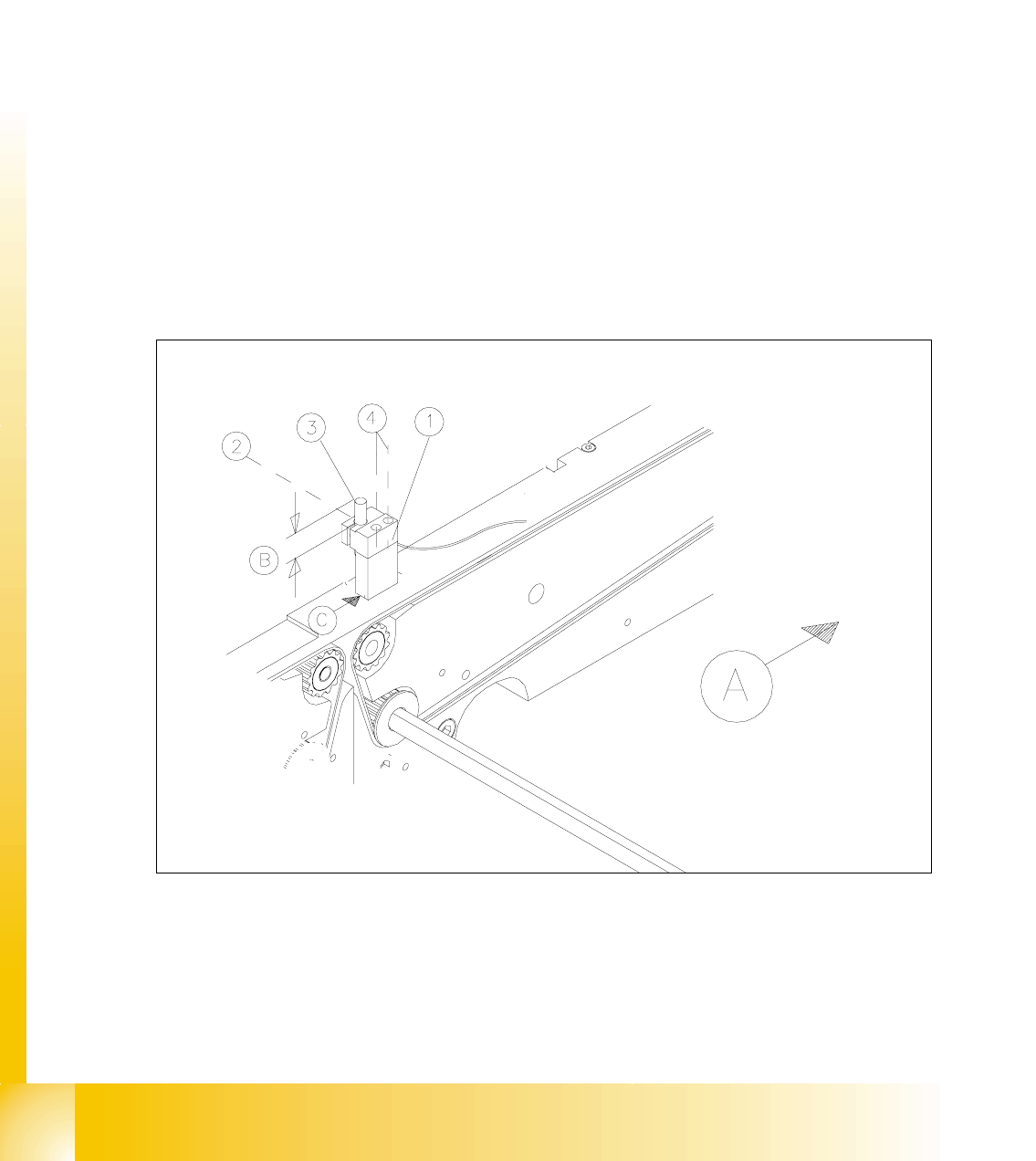
Fig. 14.3.10 Removing the Proximity Switches for the Position of the Movable Conveyor Side

Student Guide HS-50 Advanced II 07/2002 Edition
14 Conveyor System
47
Key to Fig. 14.3.10
5HPRYLQJWKH3UR[LPLW\6ZLWFKHVRIWKH:LGWK$GMXVWPHQW6\VWHP
NOTE:
For the exchange the proximity switch cable must be run on a weaving course as far as the SLIO
module on PCB1 or PCB2, as the case may be (layout: see ). This may be somewhat complicated
due to the routing of cable inside the machine base.
Contact Siemens SMD Service, if you wish, or proceed as described below. 14
➠ Check wether the proximity switch has sustained any mechanical damage which may have
been caused by the JDQWU\. If so, the proximity siwitch was installed incorrectly (too high).
➠ If the proximity switch is XQGDPDJHG, first eliminate other causes such as too great an actua-
toin distance or a poor X13 plug-and-socket connection on the SLIO module (see data below).
➠ Prior to any removal, ascertain the assembly dimension of the XQGDPDJHGproximity switch
(see Fig. 14.3.10 -> %).
➠ Loosen the clamping unit (see Fig. 14.3.10) holding the proximity switch on the mount and pull
out the proximity switch.
➠ Take of the corresponding cable duct cover and FDUHIXOO\remove the cable ties.
➠ Check whether it would be helpful to pull in the cable for the new proximity switch with the aid
of the old one, at least in some area.
➠ Proceed appropriately and FDUHIXOO\run the wiring of the proximity switch on a weaving
course as far as the "SLIO module PCB1" or "...PCB2" (layout: see ).
➠ Disconnect plug-and-socket connection ; (see circuit diagram 6/,2PRGXOH3&%or
3&%).
,QVWDOOLQJWKH3UR[LPLW\6ZLWFKIRU3RVLWLRQRI:LGWK$GMXVWPHQW6\VWHP
➠ Note the different cable lengths for the proximity switches of conveyor 1 and 2.
➠ Run the proximity switch cable from the SLIO module on PCB1 or PCB2 to the proximity switch
mount or vice versa.
➠ Install any new proximity switch in the mount in such a manner that the actuation surface is
pointed XSand the assembly dimension (dimension % -> see Fig. 14.3.10) has been reset.
Clamp the proximity switch in the mount in this position.
A) PCB transport direction B) Assembly dimensions for proximity switch
(measured before removal)
C) Assembly position for retaining bracket
1) Mount for width proximity switch LPH S50 2) 1 hexagonal socket head cap screw
M 3 x 12
3) Proximity switch for position width adj. sys-
tem for conveyor 2 or 1 (conveyor 2 is
shown)
4) Screws for fastening the mount
2 hexagonal socket head cap screws
M 3 x 45

07/2002 Edition Student Guide HS-50 Advanced II
14 Conveyor System
48
CAUTION O
Make certain that the proximity switch is not mounted too high.
To check, carefully push the gantry/placement head over the proximity switch manually. 14
➠ Where applicable, mount the retaining bracket for the proximity switch in its earlier position,
Fig. 14.3.10 -> &).
➠ Make the plug-and-socket connection of X13 to SLIO module on PCB1 or PCB2.
Note: The strain on the wiring must be relieved after the cable ties are attached.
➠ Re-attach the cable ties and insert the cable duct cover.
➠ Perform the appropriate )LQDOVVWHSVLQFOXGLQJ)XQFWLRQ&KHFN(see section 14.4). Check
the function of the "Proximity switch for position of width adjustment system".
– The proximity switch must not be damaged when the gantry is moved.
– If the proximity switch is not being actuated, correct the triggering distance of the proximity
switch.
([FKDQJLQJWKH6RQDU3UR[LPLW\6ZLWFK6HQVLQJ+HDGDQGRU$PSOLILHU
The sensing heads for the sonar proximity switches are positioned as follows (see ):
– In placement areas 1 and 2 or 3 and 4:
in the hold in the stopper base unit.
– On the input and intermediate conveyor (conveyor 1 / 2):
In the mount for the sonar proximity switch on the motor mount of the pertinent conveyor drive.
– On the output conveyor (conveyor 1 / 2):
With a bracket on the fixed side of the conveyor.
NOTE:
The assembly "Sonar proximity switch" consists of the sensing head and of theDPSOLILHU(see )
and the cable (not removable on sensing head).
It is also possible to exchange just the amplifier RUthe sensing head of the sonar proximity
switch.
5HPRYLQJWKH6RQDU3UR[LPLW\6ZLWFK6HQVLQJ+HDG$PSOLILHU
➠ To remove the sensing head in the placement area first remove the Liftig table as described in
section 14.3.8.1.
➠ Use the caliper gage to ascertain the PRXQWSRVLWLRQof the sonar proximity switch sensing
head that is to be removed (measured to front surface of the proximity switch) and record the
dimensions.