00197089-02_AI_EA-Verl_X-Serie_S_de_en - 第75页
Installation 3.6.1 Teaching the PCB Sensors (SW70x) Final Work: Extension Input/Output Conveyor and Hand Guard Ein-/Ausga beband verlängerung und Eingreifschutz 75 ► Select Laser light barrier at conveyor lane 1, enable …
Installation
Final Work: 3.6.1 Teaching the PCB Sensors (SW70x)
74 Extension Input/Output Conveyor and Hand Guard Ein-/
3.6
3.6 Final Work:
Final Work:
► If you have dismantled the nozzle reject station, fix it back into place.
► If you have loosened the clamp, restore the clamping function.
► If you have loosened the fixed side, fix it back into place.
► Check the PCB sensors and calibrate these if needed (see section "3.6.1 Teaching the PCB Sensors
(SW70x)" [ ➙ 74]).
► Configure the installation (or removal) of the extension in the Sirio software.
3.6.1
3.6.1 Teaching the PCB Sensors (SW70x)
Teaching the PCB Sensors (SW70x)
Whenever you manually loosen the conveyor sides, you also need to reteach the light barrier sensors.
This is required because the light intensity depends on the conveyor width. Without teaching, the con-
veyor will show boards which are not present, preventing the conveyor from being referenced.
Teaching is performed automatically during operation.
Procedure
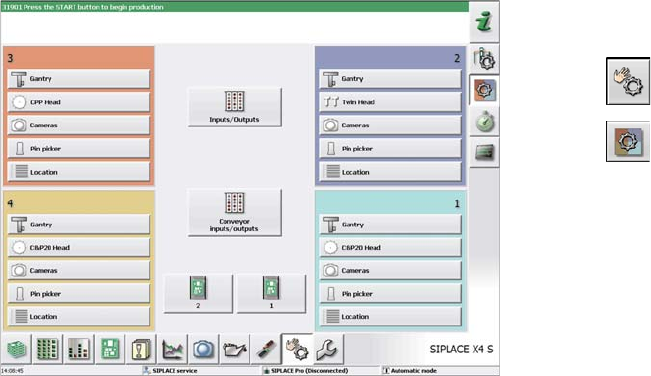
► Switch over to the activity level "Service (customer)"
(or better still).
► Select .
► Select .
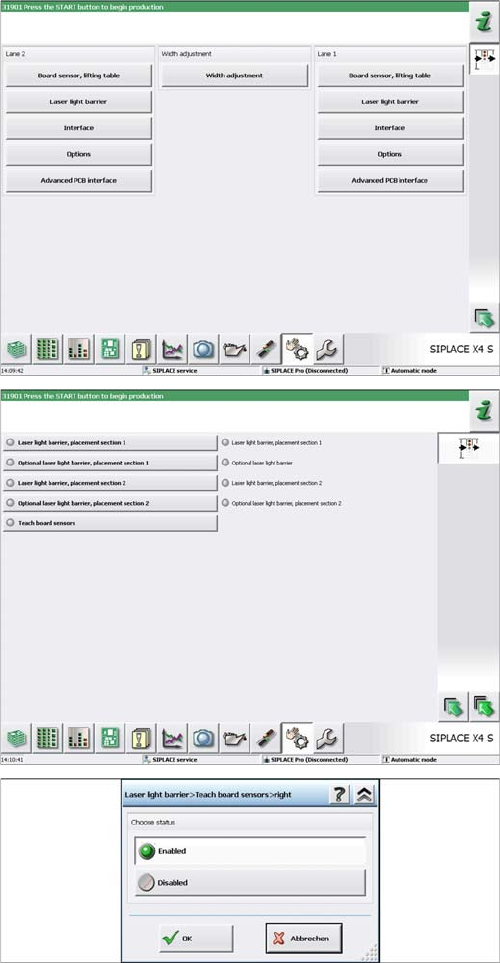
► Select Conveyor inputs/outputs.
Installation
3.6.1 Teaching the PCB Sensors (SW70x) Final Work:
Extension Input/Output Conveyor and Hand Guard Ein-/Ausgabebandverlängerung und Eingreifschutz 75
► Select Laser light barrier at conveyor lane 1, enable
Teach board sensors and press the Start button on
the machine.
Disable this function again afterwards.
► For DC: select Laser light barrier at conveyor lane 2,
enable Teach board sensors and press the Start but-
ton on the machine.
Disable this function again.
Installation
Final Work: 3.6.1 Teaching the PCB Sensors (SW70x)
76 Extension Input/Output Conveyor and Hand Guard Ein-/