ASM_MANUAL_TYPHOON_USC_en_100620_online.PDFA - 第26页
3 TYPHOON UNDER STENCIL CLEANER 3.6 REPLENISHMENT PROCEDURES 26 STANDALONE MANUAL TYPHOON UNDER STENCIL CLEANER 06/2020 2 10. Remove the used fabric (3) from the take-up roller: – Rotate the fabric clamping spindle (4) 4…
3 TYPHOON UNDER STENCIL CLEANER
3.6 REPLENISHMENT PROCEDURES
STANDALONE MANUAL TYPHOON UNDER STENCIL CLEANER 06/2020 25
3.6 REPLENISHMENT PROCEDURES
3.6.1 Fabric Roll
Fabric rolls for the Typhoon USC are available in 300mm, 400mm, 515mm (used for 460mm and
515mm) and 620mm widths to suit a variety of board lengths. To replace a used fabric roll, or to
change fabric roll width to suit a plenum chamber width change (different stencil/product), complete
the following remove and replace procedures.
NOTE
If changing fabric roll for a different stencil/product, ensure that the fabric roll width matches the
width of the plenum chamber.
3.6.1.1 Fabric Roll Removal
To remove the fabric roll, carry out the following:
1. Select Open Cover Commands.
2. If the stencil is covering/obstructing access to the cleaner, continue at Step 3.
If the cleaner can be accessed without moving the stencil, open the printhead cover and con-
tinue at Step 7.
3. Select Unload Screen.
4. Open the printhead cover.
5. If necessary, push the stencil towards the rear of the machine to improve access to the
cleaner.
NOTE
It may be necessary to completely remove the stencil from the machine.
6. Select Cleaner Functions button.
7. Select Change Paper.
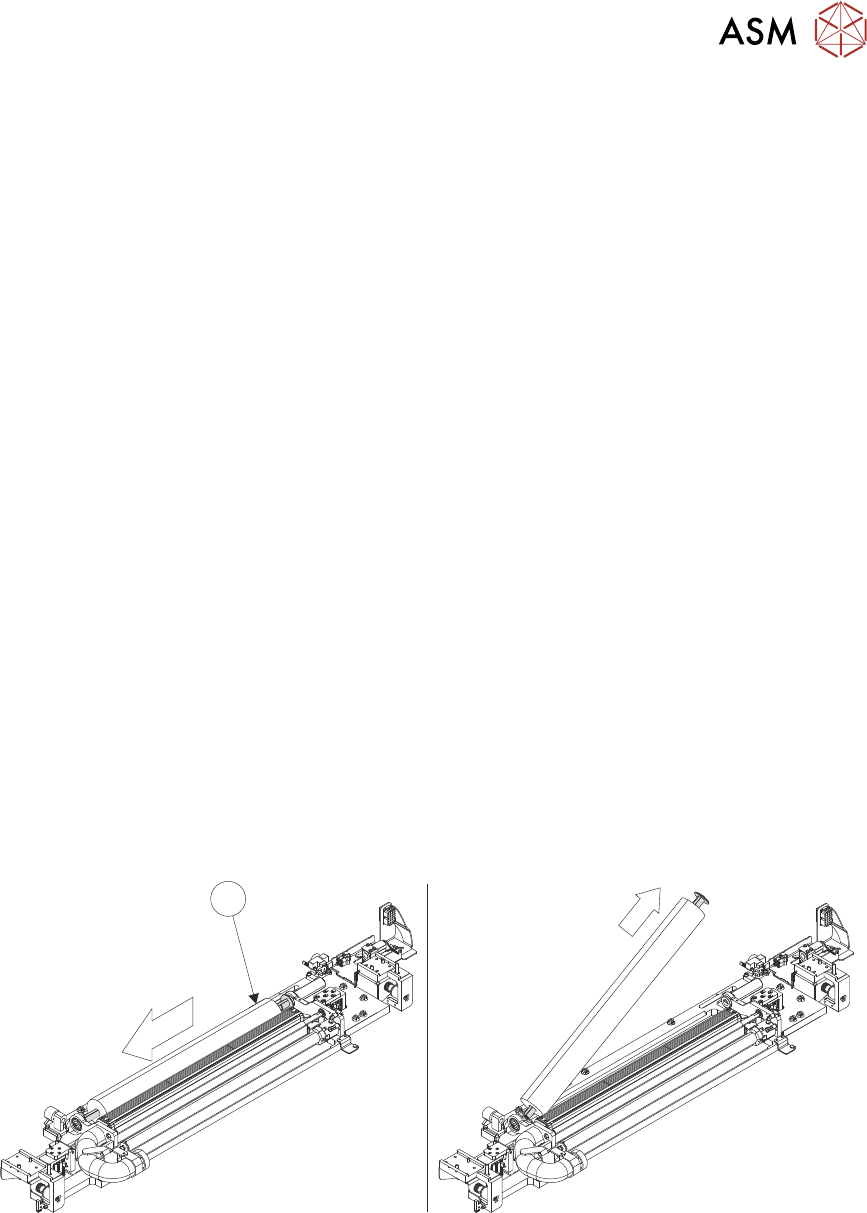
8. Remove the used fabric take-up roller (1):
– Push the fabric take-up roller towards the left-hand end of the USC.
– Angle the fabric take-up roller and lift out of the printer.
1
9. Remove the empty fabric roll (2):
– Push the empty roll towards the left-hand end of the USC.
– Angle the empty roll and lift out of the printer.
3 TYPHOON UNDER STENCIL CLEANER
3.6 REPLENISHMENT PROCEDURES
26 STANDALONE MANUAL TYPHOON UNDER STENCIL CLEANER 06/2020
2
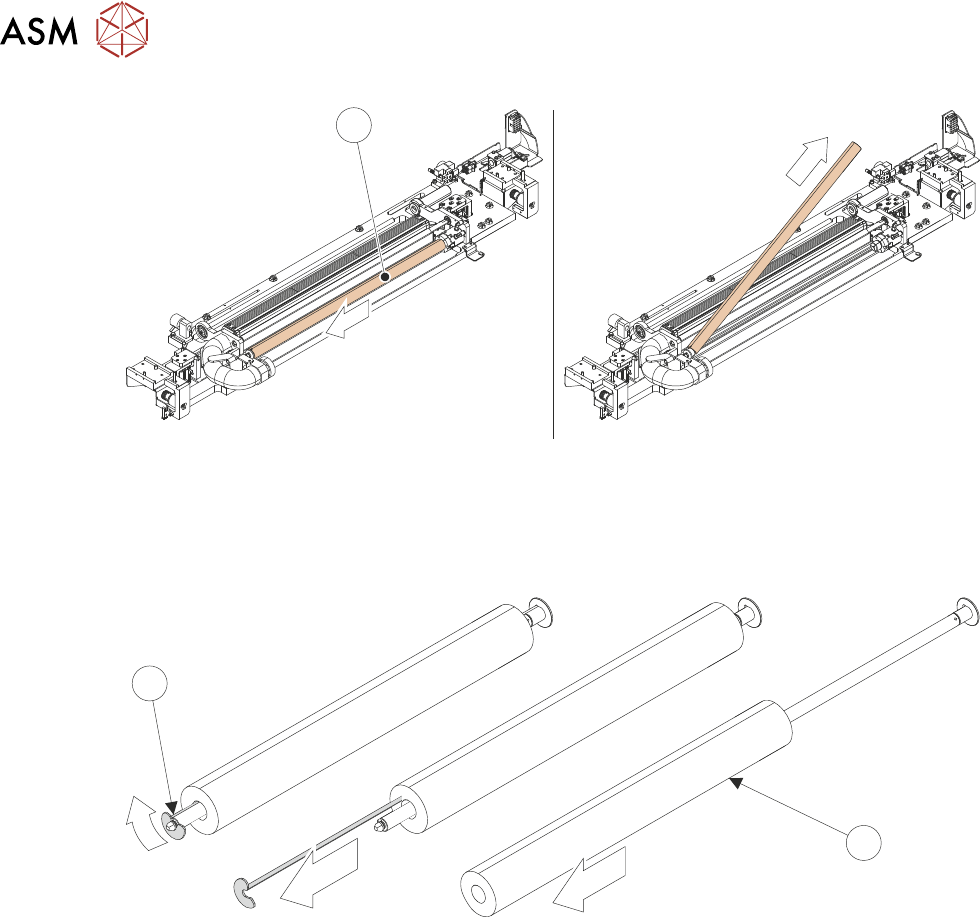
10. Remove the used fabric (3) from the take-up roller:
– Rotate the fabric clamping spindle (4) 45° anti-clockwise.
– Slide the fabric clamping spindle out from the used fabric.
– Remove the used fabric from the take-up roller.
4
3
11. While fabric roll is removed, check that plenum chamber and/or chamber insert is correct for
next printing process
– If installing new fabric roll immediately - see 3.6.1.2 "Fabric Roll Replacement" [}27].
– If plenum chamber insert requires changing before installing new fabric roll - see 3.7.1.1
"Plenum Chamber Insert Removal" [}31].
– If plenum chamber width requires changing before installing new fabric roll - see 3.7.2
"Plenum Chamber" [}33].
3 TYPHOON UNDER STENCIL CLEANER
3.6 REPLENISHMENT PROCEDURES
STANDALONE MANUAL TYPHOON UNDER STENCIL CLEANER 06/2020 27
3.6.1.2 Fabric Roll Replacement
To install new fabric roll, carry out the following:
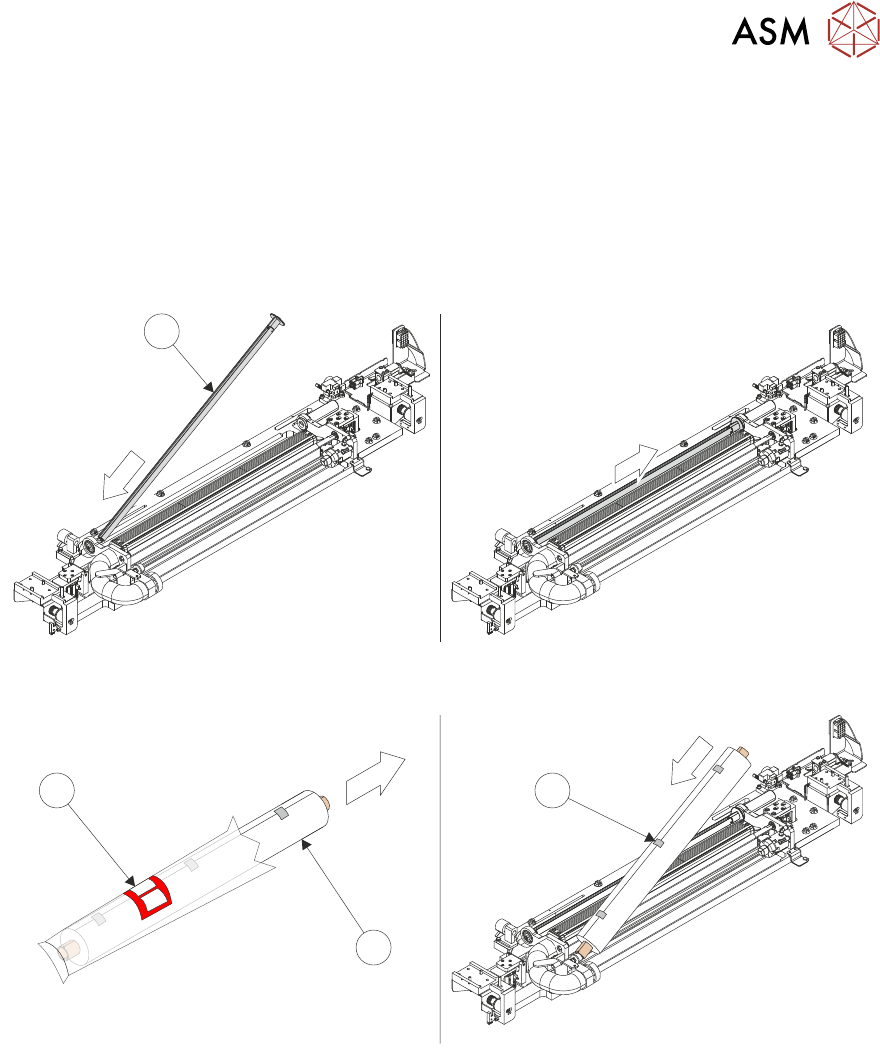
1. Install the fabric take-up roller (1) (without the fabric clamping spindle fitted):
– Fit the left-hand end of the fabric take-up roller.
– Push the fabric take-up roller to the left-hand side, allowing the right-hand grooved end to
line up with and connect into the paper motor drive.
– Ensure that the fabric clamping spindle slot is facing upwards.
1
2. Remove new fabric roll (3) from the packaging (2).
2
3
4
3. Fit the left-hand end of the new fabric roll onto the left-hand end sprung plunger.
4. Push the new fabric roll towards the left-hand end of the USC, until the right-hand end can
slide over the fabric roll brake. Ensure the fabric roll is loaded in the correct direction.
5. Remove all fabric roll fastening tape (4).