ASM_MANUAL_TYPHOON_USC_en_100620_online.PDFA - 第29页
3 TYPHOON UNDER STENCIL CLEANER 3.6 REPLENISHMENT PROCEDURES STANDALONE MANUAL TYPHOON UNDER STENCIL CLEANER 06/2020 29 9. Lower the fabric clamping spindle down into the fabric clamping spindle slot, and when in place r…
3 TYPHOON UNDER STENCIL CLEANER
3.6 REPLENISHMENT PROCEDURES
28 STANDALONE MANUAL TYPHOON UNDER STENCIL CLEANER 06/2020
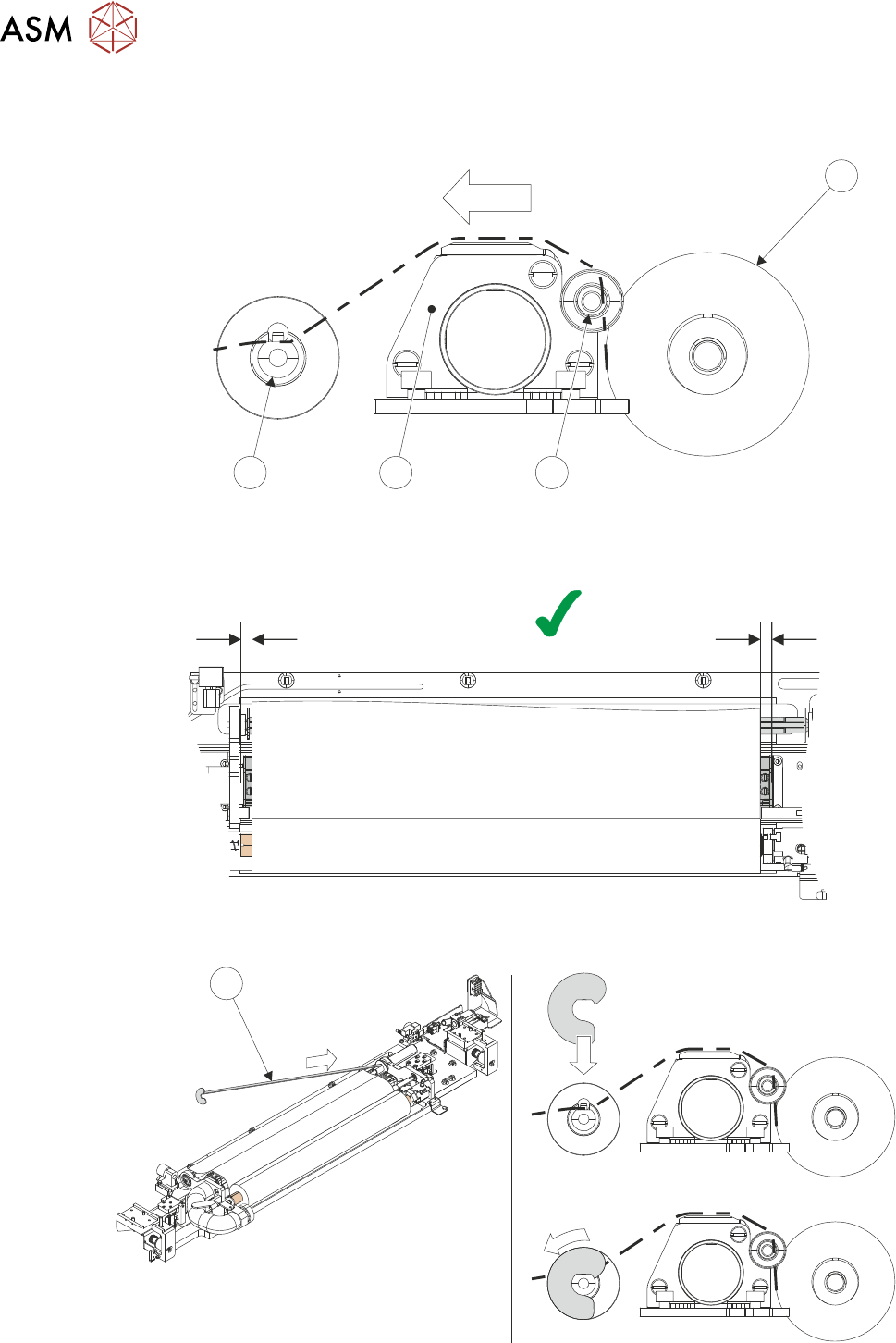
6. Feed the fabric from the fabric roll over the usage reel (6), plenum chamber (7) and across the
top of fabric take-up roller (8) - fabric should run 10mm past fabric take-up roller.
5
68 7
7. Ensure that the fabric is running parallel with the plenum chamber, measure distance from
each end of plenum chamber to the edge of the fabric roll.
A B
A = B
8. Insert the right-hand end of the fabric clamping spindle (9) into the paper motor drive.
9
3 TYPHOON UNDER STENCIL CLEANER
3.6 REPLENISHMENT PROCEDURES
STANDALONE MANUAL TYPHOON UNDER STENCIL CLEANER 06/2020 29
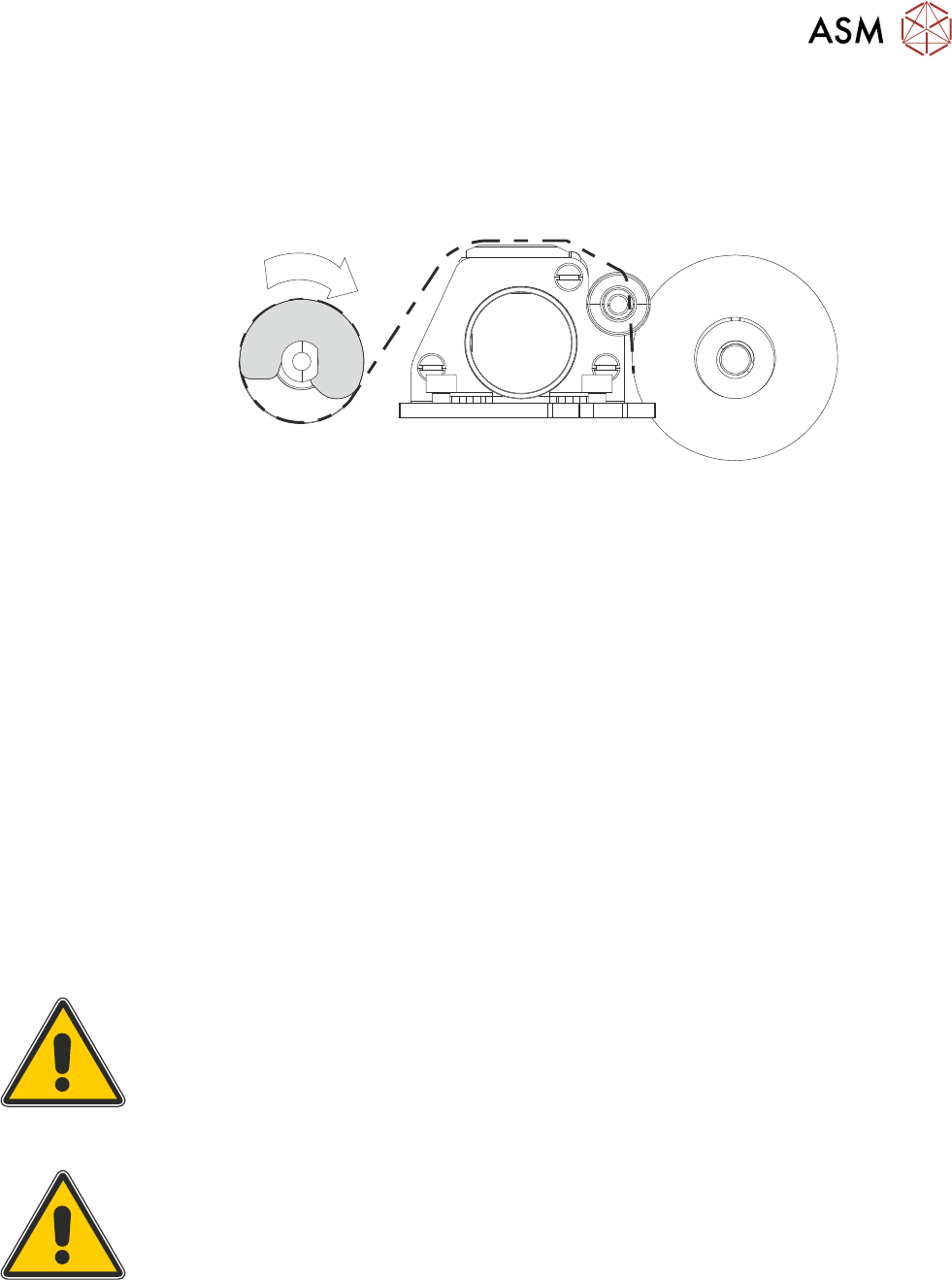
9. Lower the fabric clamping spindle down into the fabric clamping spindle slot, and when in
place rotate 45° anti-clockwise using the left-hand end.
10. Rotate the fabric take-up roller two full revolutions clockwise to securely bind the fabric to the
take-up roller.
x2
11. Select Paper Roll Length.
12. Enter the length of fabric roll fitted.
13. Select Accept.
14. Select Continue.
15. Select Prime Paper.
16. Using the two machine jog buttons simultaneously, ensure the fabric feeds correctly.
17. Press the Back button.
18. If stencil was moved / removed during fabric roll removal, reposition / install stencil as re-
quired.
19. Close the printhead cover.
20. Press the System button.
21. If required, select Load Screen.
22. Select Continue.
23. Select Back.
3.6.2 Solvent
WARNING
RECOMMENDED SOLVENTS. ANY SOLVENTS USED MUST COMPLY WITH
LOCAL ENVIRONMENTAL GUIDELINES. ASM RECOMMEND USING
SOLVENTS THAT ARE ENVIRONMENTALLY FRIENDLY, IE CFC FREE AND
WATER BASED. SOLVENTS USED MUST HAVE FAST EVAPORATION RATES
AND FLASHPOINT SPECIFICATIONS GREATER THAN 39°C.
WARNING
PROTECTIVE CLOTHING. APPROVED PROTECTIVE CLOTHING SHOULD BE
WORN BY SOLDER PASTE AND SOLVENT HANDLERS AT ALL TIMES TO
ELIMINATE FUME INHALATION, EYE CONTACT, SKIN CONTACT AND
INGESTION.
3 TYPHOON UNDER STENCIL CLEANER
3.6 REPLENISHMENT PROCEDURES
30 STANDALONE MANUAL TYPHOON UNDER STENCIL CLEANER 06/2020
CAUTION
PRINT MEDIUM AND SOLVENTS. WHEN USING OR HANDLING ANY PRINT
MEDIUM OR SOLVENT FORMULATION THE MANUFACTURER’S SAFETY
DATA SHEETS MUST BE STRICTLY ADHERED TO.
The solvent for the under stencil cleaner is stored in the external solvent tank. The external solvent
tank is secured to the machine base frame and may be located on either side or the rear of the
machine.
The plastic tubing that transports the solvent from the solvent tank to the under stencil cleaner
head is designed to withstand most types of solvent. However, mixing of two different solvents can
cause a chemical reaction and seriously damage the plastic tubing. When changing to a different
type of solvent, the tubing must be replaced completely to prevent solvent leaks. To obtain new
tubing and replacement instructions, order Machine Performance Upgrade (MPU) 602287*2.
To replenish the solvent, use the following procedure:
1. If the machine is printing, select Stop.
NOTE
Do not replenish the solvent whilst the machine is running as an air lock may be created if a
cleaning cycle is performed whilst the lid of the solvent container is disconnected.
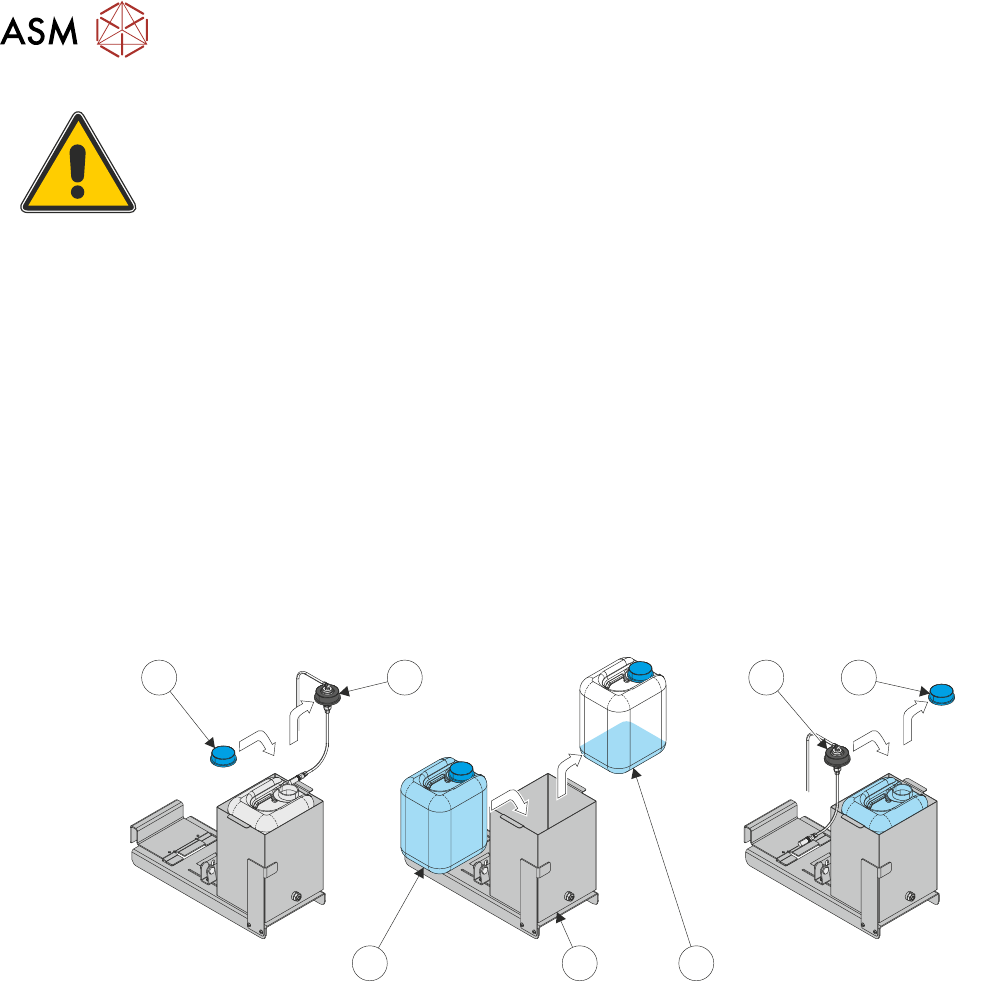
2. Remove the solvent lid (2) from the solvent container.
1 12
3
4
5
2
3. Refit the original container lid (1) to prevent spillage.
4. Remove the empty solvent container (5) from the external solvent tank (4).
5. Place the new solvent container (3) in to the external solvent tank (4).
6. Remove the new solvent container lid (1) and retain.
7. Refit the solvent lid (2) and tighten.