ASM_MANUAL_TYPHOON_USC_en_100620_online.PDFA - 第32页
3 TYPHOON UNDER STENCIL CLEANER 3.7 REPLACEMENT PROCEDURES 32 STANDALONE MANUAL TYPHOON UNDER STENCIL CLEANER 06/2020 5. Remove and retain the four slot head screws (two per end) (1) fastening the plenum chamber insert (…
3 TYPHOON UNDER STENCIL CLEANER
3.7 REPLACEMENT PROCEDURES
STANDALONE MANUAL TYPHOON UNDER STENCIL CLEANER 06/2020 31
3.7 REPLACEMENT PROCEDURES
WARNING
SOLVENT SPRAY. THE UNDERSCREEN CLEANER SPRAYS A FINE JET OF
SOLVENT SOLUTION ON TO THE CLEANER. APPROVED PROTECTIVE
CLOTHING SHOULD BE WORN.
CAUTION
PRINT MEDIUM AND SOLVENTS. WHEN USING OR HANDLING ANY PRINT
MEDIUM OR SOLVENT FORMULATION THE MANUFACTURER’S SAFETY
DATA SHEETS MUST BE STRICTLY ADHERED TO.
MANDATORY
TOXIC SUBSTANCES MAY BE PRESENT. SAFETY GLOVES MUST BE WORN.
MANDATORY
TOXIC SUBSTANCES MAY BE PRESENT. EYE PROTECTION MUST BE WORN.
3.7.1 Plenum Chamber Insert
Plenum chamber inserts for the Typhoon USC are available in three variants, the following table
details the available widths:
Insert Variant Widths (mm)
300* 400* 460* 515* 620
Hard Top Y Y Y Y N
Poly Blade Y Y Y Y Y**
Duo Y Y Y Y N
* 300, 400, 460 and 515mm widths are interchangeable on the standard USC.
** 620mm width are for use on the long board USC. Only the Poly Blade insert variant is available.
To remove a chamber insert for cleaning, or to change variant and/or width to suit a different sten-
cil/product, complete the following remove and replace procedures:
NOTE
As the Long Board (620mm) USC only has one width of chamber insert available, the following pro-
cedure only applies to the standard USC.
3.7.1.1 Plenum Chamber Insert Removal
To remove the plenum chamber insert, carry out the following:
1. Power down the machine.
2. Remove the stencil from the machine.
3. Open the front printhead cover.
4. If not already removed, remove the fabric feed roll and temporarily stow on top of the take-up
roll at the rear of the USC.
3 TYPHOON UNDER STENCIL CLEANER
3.7 REPLACEMENT PROCEDURES
32 STANDALONE MANUAL TYPHOON UNDER STENCIL CLEANER 06/2020
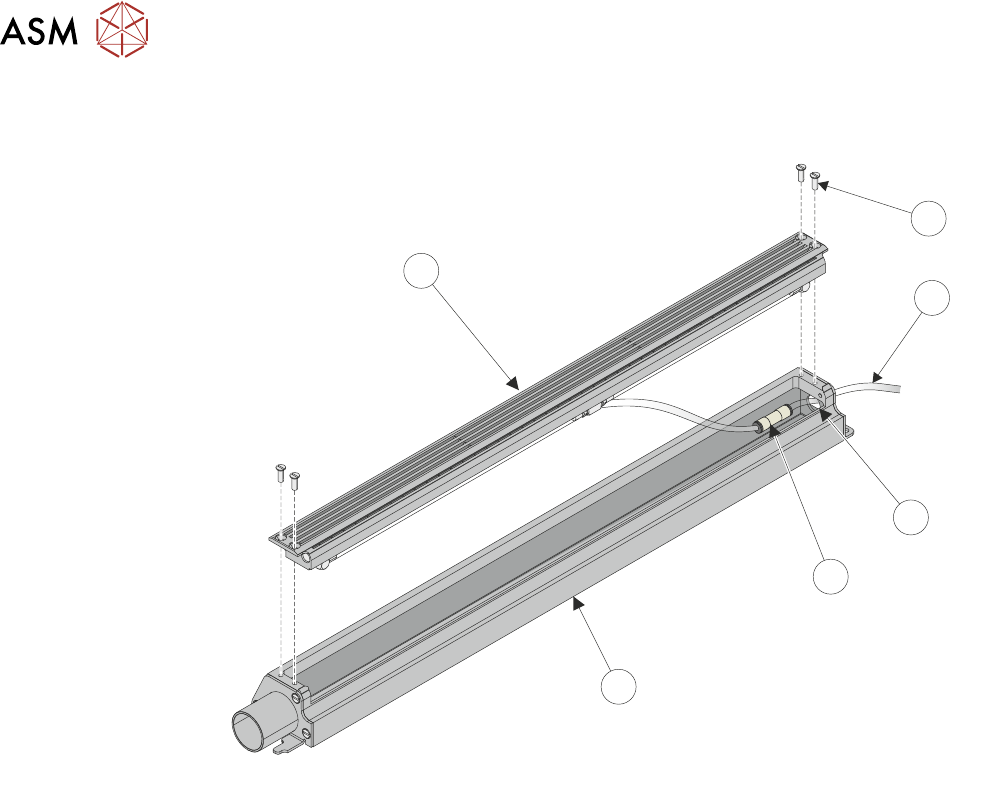
5. Remove and retain the four slot head screws (two per end) (1) fastening the plenum chamber
insert (6) to the plenum chamber (5).
2
1
3
4
5
6
6. Lift the plenum chamber insert (6) out of the plenum chamber (5) carefully, disconnect the
solvent inlet tube (2) from the connector (4) and remove through the plenum chamber inlet
hole (3).
NOTE
Blanking off end of solvent inlet tube may be required to prevent solvent leakage.
7. Remove the chamber insert from the machine.
3.7.1.2 Plenum Chamber Insert Replacement
To install/reinstall new plenum chamber insert, carry out the following:
1. Feed the solvent inlet tube through the plenum chamber's solvent inlet, and connect to the
plenum chamber solvent connector.
2. Place the plenum chamber insert into the top of the plenum chamber.
3. Secure the plenum chamber insert to the plenum chamber using the four slot head screws
(two per end) retained during 3.7.1.1 "Plenum Chamber Insert Removal" [}31].
4. Re-install fabric feed roll, stowed on top of take-up roll during 3.7.1.1 "Plenum Chamber Insert
Removal" [}31]..
3 TYPHOON UNDER STENCIL CLEANER
3.7 REPLACEMENT PROCEDURES
STANDALONE MANUAL TYPHOON UNDER STENCIL CLEANER 06/2020 33
3.7.2 Plenum Chamber
Plenum chambers for the Typhoon USC are available in 300mm, 400mm, 460mm, 515mm and
620mm widths to suit a variety of board lengths. To remove a chamber for cleaning, or to change
width to suit a different stencil/product, complete the following remove and replace procedures:
NOTE
As the Long Board (620mm) USC only has one width of chamber available, the following procedure
only applies to the standard USC.
3.7.2.1 Plenum Chamber Removal (Standard USC)
To remove the plenum chamber, carry out the following:
1. Ensure that 3.7.1.1 "Plenum Chamber Insert Removal" [}31] has been performed.
2. Remove the vacuum tube from the right-hand end of the USC assembly.
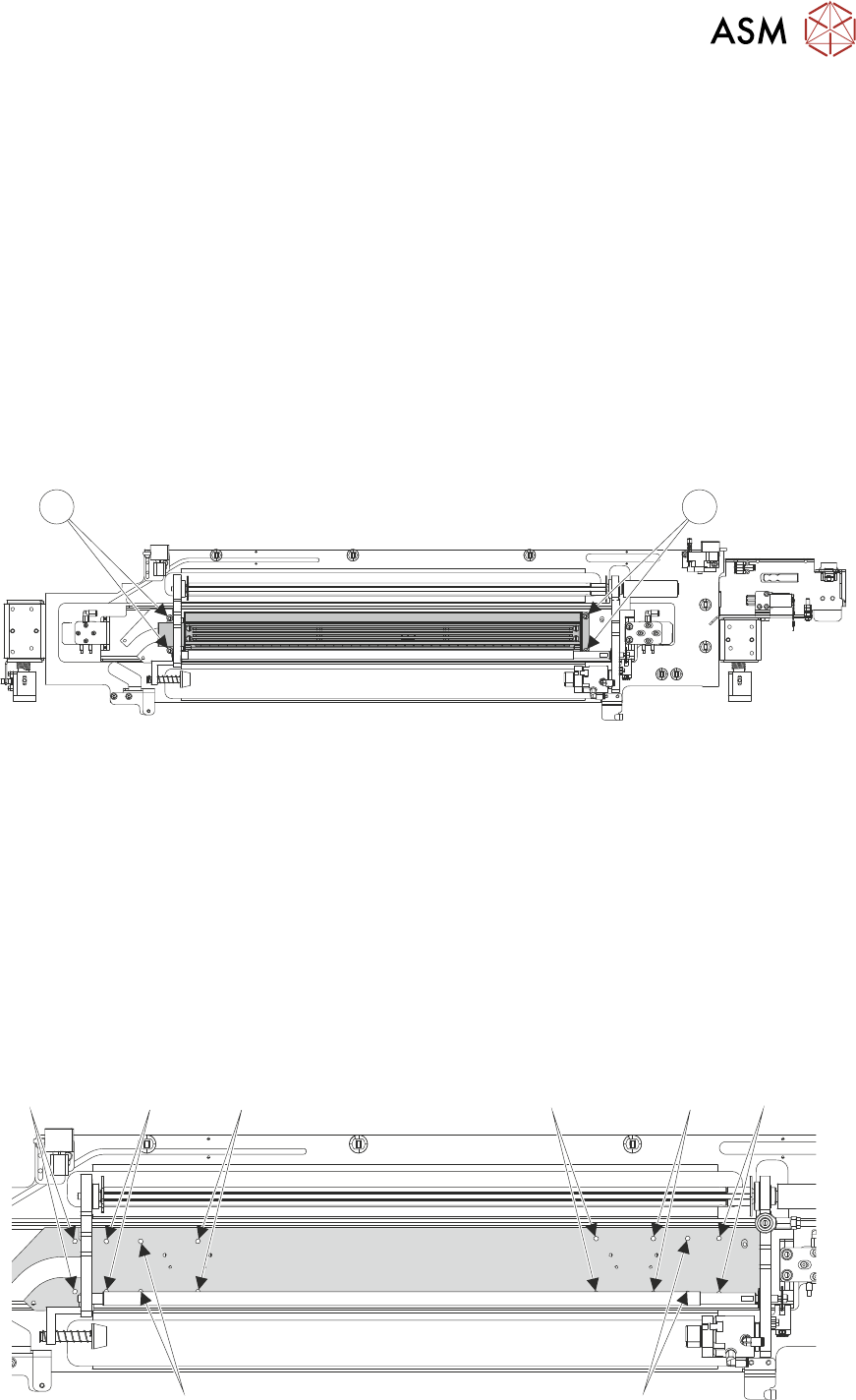
3. Remove and retain the four M5 socket cap head screws (1), which secure the plenum cham-
ber to the USC base.
1 1
4. Slide the plenum chamber towards the right-hand end of the USC assembly and lift away from
the base unit.
5. Remove the plenum chamber from the machine.
3.7.2.2 Plenum Chamber Replacement (Standard USC)
To install/reinstall the plenum chamber, carry out the following:
1. Place the plenum chamber onto the USC base.
2. Slide the plenum chamber towards the left-hand end of the USC.
3. Secure the plenum chamber to the USC base using the four M5 socket cap head screws re-
tained during 3.7.2.1 "Plenum Chamber Removal (Standard USC)" [}33]. (Illustration below
displays the screw holes to be used depending on width of plenum chamber.)
515mm
460mm 300mm
400mm
300mm
400mm 515mm
460mm
4. Connect the vacuum tube to the left-hand end of the USC assembly.