DECAN_S2_Maintenance(Eng_Ver4.3).pdf - 第39页
DE CAN S2 M ain ten an ce H and bo ok 3-4 chapt er 3 Daily Inspe ction Advanced Chip Shooter Checking and cleaning the nozzle Daily Inspection Caution Use only the required amount of lubricating oil. If insufficient lubr…
DECAN S2 Maintenance Handbook
3-3
chapter 3
Daily Inspection
Advanced Chip Shooter
Checking and cleaning the nozzle
Caution
Wipe the cleaning liquid on the nozzle using a clean cloth, ensuring
none remains on the nozzle.
When foreign materials remain on the nozzle continuously, contact
our C/S company (STS) or local agent to solve the problem.
Use the ultrasonic cleaning machine, the clean case the Nozzle, you
will be able to improve the cleaning of the nozzle.
Step 9.
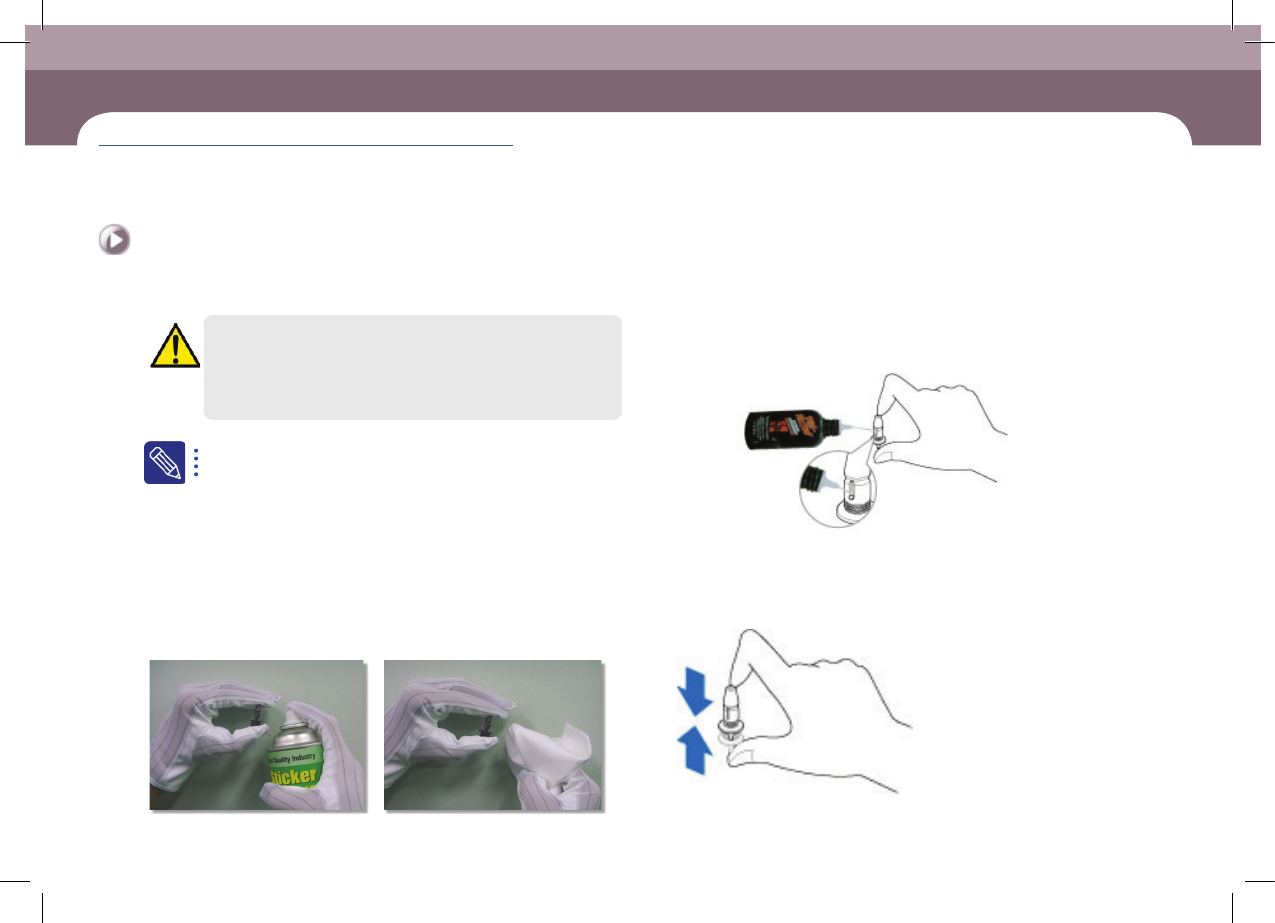
The method to clean the nozzle is as follows:
ㆍ Spray the cleaning liquid recommended by us on the nozzle exterior using a spray
straw.
ㆍ Clean the nozzle exterior with a clean cloth within 1 minute after spraying the
cleaning liquid.
ㆍ If the foreign materials (solder paste, etc.) have not been removed, repeat
cleaning once more.
Step 10.
If lubrication of the nozzle spring is insufficient due to
its having become thick, inject a suitable amount of the
nozzle lubricating oil provided with the machine.
lubricant for nozzle
Lubricating Point
Step 11.
Press the nozzle 4~5 times after lubricating so that the
ubricating oil is uniformly spread out.
Nozzle spring
DECAN S2 Maintenance Handbook
3-4
chapter 3
Daily Inspection
Advanced Chip Shooter
Checking and cleaning the nozzle
Daily Inspection
Caution
Use only the required amount of lubricating oil. If insufficient
lubricating oil is applied, the nozzle will not operate smoothly.
If too much lubricating oil is applied, it may lump together with
foreign materials causing defective pickup.
Step 12.
Release the emergency stop as described in "Releasing
'Emergency Stop' mode" on page 1-10 and perform the
operation again.
DECAN S2 Maintenance Handbook
3-5
chapter 3
Daily Inspection
Advanced Chip Shooter
Cleaning Dump Box
Prevent defective parts from filling the dump box and spilling over into the machine.
Tool for Maintenance
Cloth, Flat Brush
Measures
Step 1.
Press the 'Feeder Change' and move the front and rear X
frames to the center of the machine.
For further details, refer to "Move the front and rear X frames to the
center of the machine" on page 1-2 .
Step 2.
Press the 'STOP' and 'RESET' buttons in order after
pressing the 'EMG' button on the OP panel to stop
operation.
For more details, refer to "How to perform emergency stop" on page
1-2.
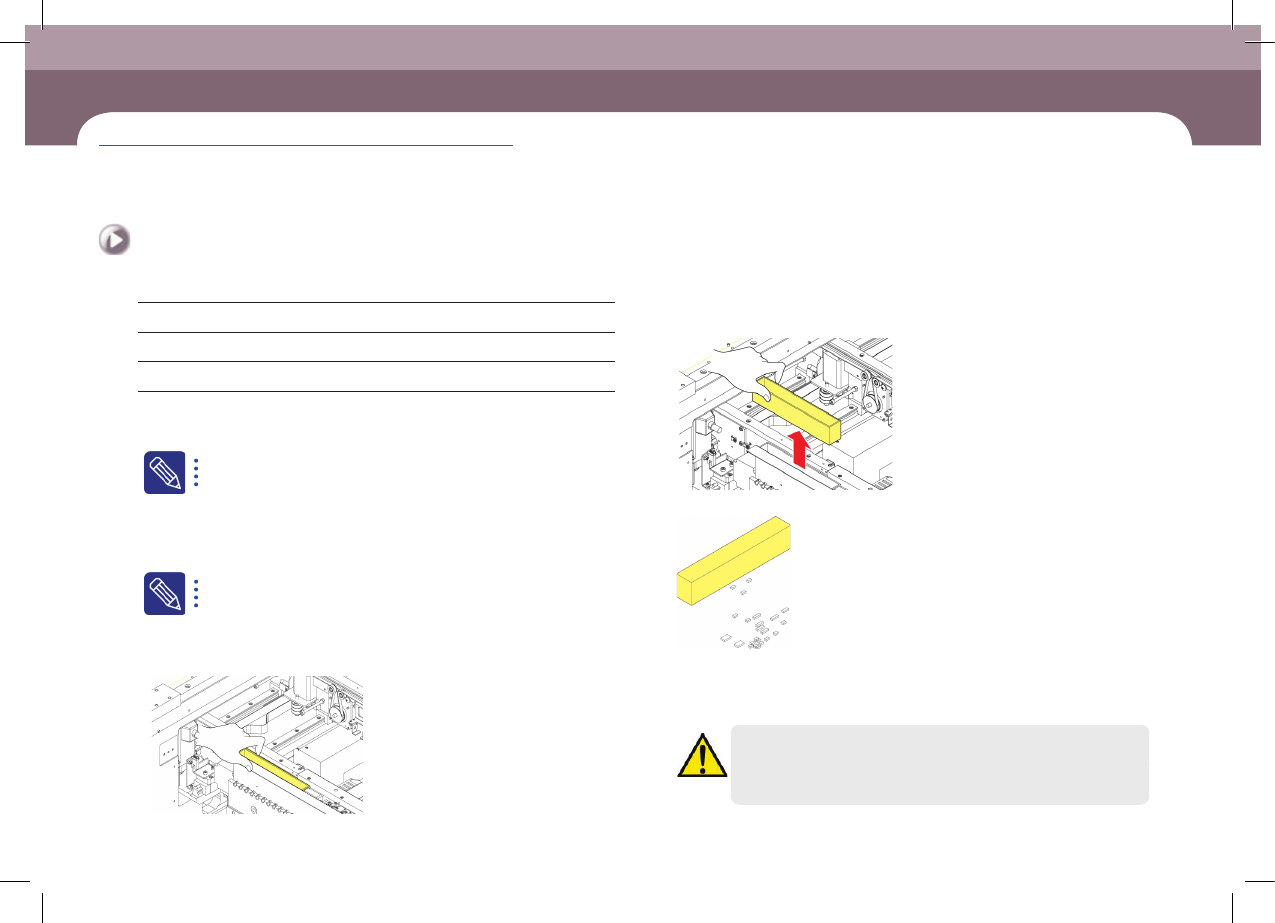
Step 3.
Empty the dump box of defective parts.
①Lifting dump box
②Remove the dump box
③Empty the dump box of defective parts
Step 4.
Release the emergency stop as described in "Releasing
'Emergency Stop' mode" on page 1-10 and perform the
operation again.
Caution
Remove the part that dropped down without being put in the
dump box.
Cleaning Dump Box
(Time required: 5min / No. D-2)