00198481-01_Technical_Training_E_by_DEK_EN - 第106页
11 Benchmark Test 106 Technical Training E by DEK 12/2017 Set up machine for benchmark test Load the 265test1 product file and ensure that the following parameters are set correctly: Note: Calibration stencil, Calibrat…
11 Benchmark Test
Technical Training E by DEK 12/2017 105
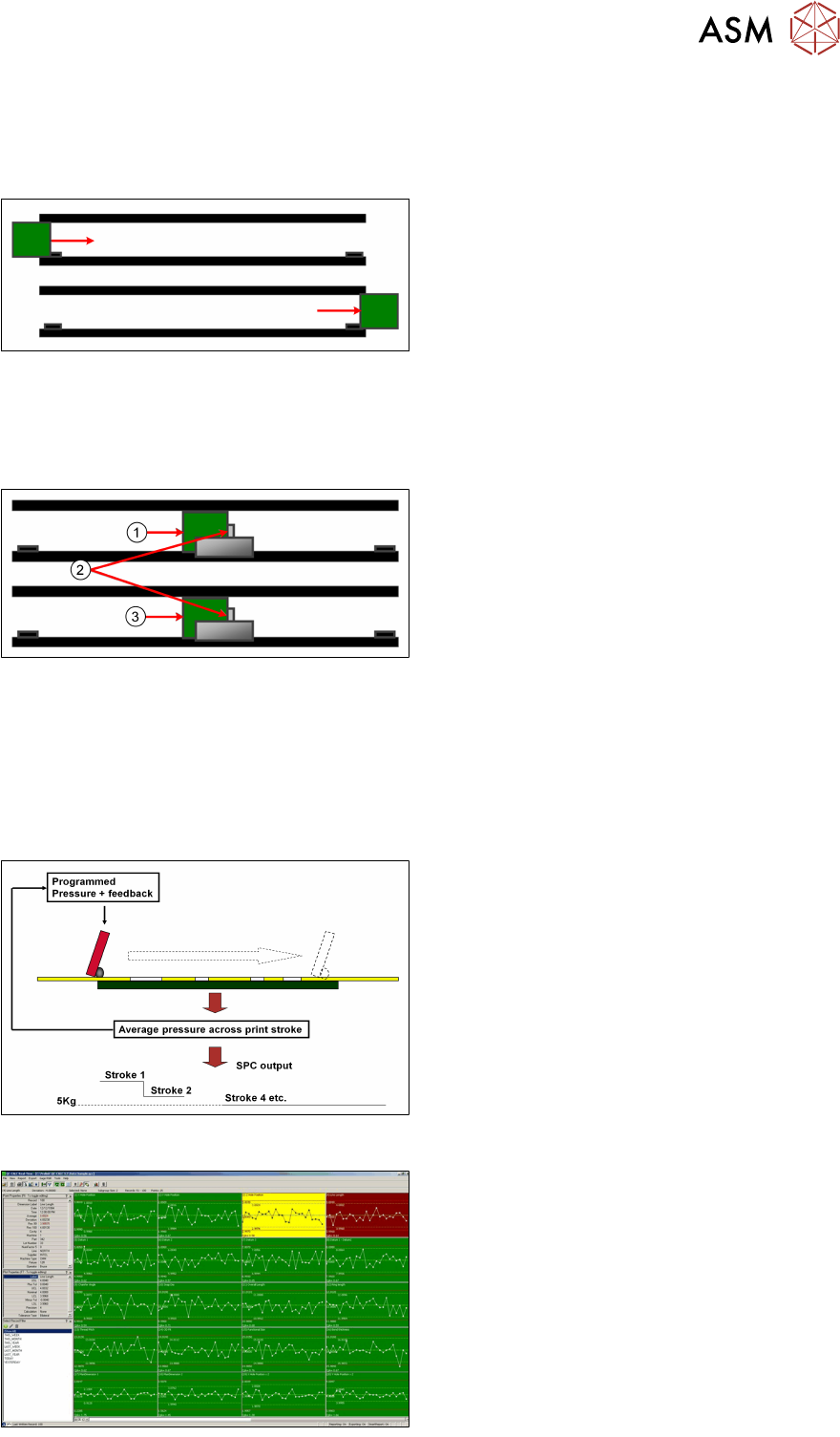
SPC Data Cycle Time L-R or R-L
Cycle time 1
(Left to Right/Right to Left) is time from board being received from Upline to same board being re-
leased to Downline.
●
Board Received by Machine
= Cycle Time starts
●
Board Exits Machine
= Cycle Time stops
SPC Data Cycle Time R-R or L-L
Cycle time 2
(Left to Left/Right to Right) is time from board arriving at board stop to board on next cycle arriving
at board stop.
1. Cycle 1
2. Board Stop
3. Cycle 2
●
Board Received at Board Stop (1)
= Cycle Time 1 starts
●
Board Received at Board Stop (2)
= Cycle Time 1 stops and Cycle Time 2
starts
Squeegee Pressure
DEK printers utilise a pressure monitoring and feedback system, which ensures that the pressure
applied to the squeegees is the same as that which is programmed. However, if different length
squeegees are fitted or the material hardness changes it may take one or two prints for the pres-
sure to re-stabilize.
Benchmark test using QC-CALC

11 Benchmark Test
106 Technical Training E by DEK 12/2017
Set up machine for benchmark test
Load the 265test1 product file and ensure that the following parameters are set correctly:
Note: Calibration stencil, Calibration board and SPC Benchmark board are NOT supplied. They
need to be ordered separately.
Front Print speed 25 mm/s
Rear Print speed 25 mm/s
Front Pressure 5kg
Rear Pressure 5kg
Separation Speed 1 mm/s
Under Clearance 20mm
No paste dispense or Screen Cleaner rate
SPC Configuration:
●
Data output rate = Every cycle
●
Start Rate = 1
●
Sample Rate = 0
●
Start Rate Limit = 0
●
SPC data mode = Disc
●
SPC Format = Windows
●
Update On Start = No
●
Align Inspect mode = Post
Ensure that the following hardware is set-up correctly:
●
9 Tooling support pillars are used
●
Squeegees fitted are of the correct length to suit board and heights calibrated
●
DEK alignment test board (Part Number 137071) is used
●
Screen loaded is the calibration/dry align screen
Adjust machine parameters for benchmark test
●
Transport Mode Left to Left (or Right to Right)
●
Upline Protocol No FMI
●
Downline Protocol No FMI
●
Screen size 265
11 Benchmark Test
Technical Training E by DEK 12/2017 107
Perform Benchmark Test and record results
Apply small amount of paste or suitable lubricant to stencil to lubricate squeegees.
Run QC-Calc package on printer.
Carry out a minimum of 100 full machine cycles.
On completion of the test record the following information:
Front Print Speed Cp/Cpk = ………………………………………………………….
Rear Print Speed Cp/Cpk = ………………………………………………………….
Separation Speed Cp/Cpk = ………………………………………………………….
X alignment Cp/Cpk = ………………………………………………………….
Y alignment Cp/Cpk = ………………………………………………………….
Theta alignment Cp/Cpk = ………………………………………………………….
Front Pressure Cp/Cpk = ………………………………………………………….
Rear Pressure Cp/Cpk = ………………………………………………………….
NOTICE
Error message
The error message "No variation in selected data – Increase significant digits" may appear
for pressure and speeds due to the lack of variation. In this instance, no values are re-
quired.
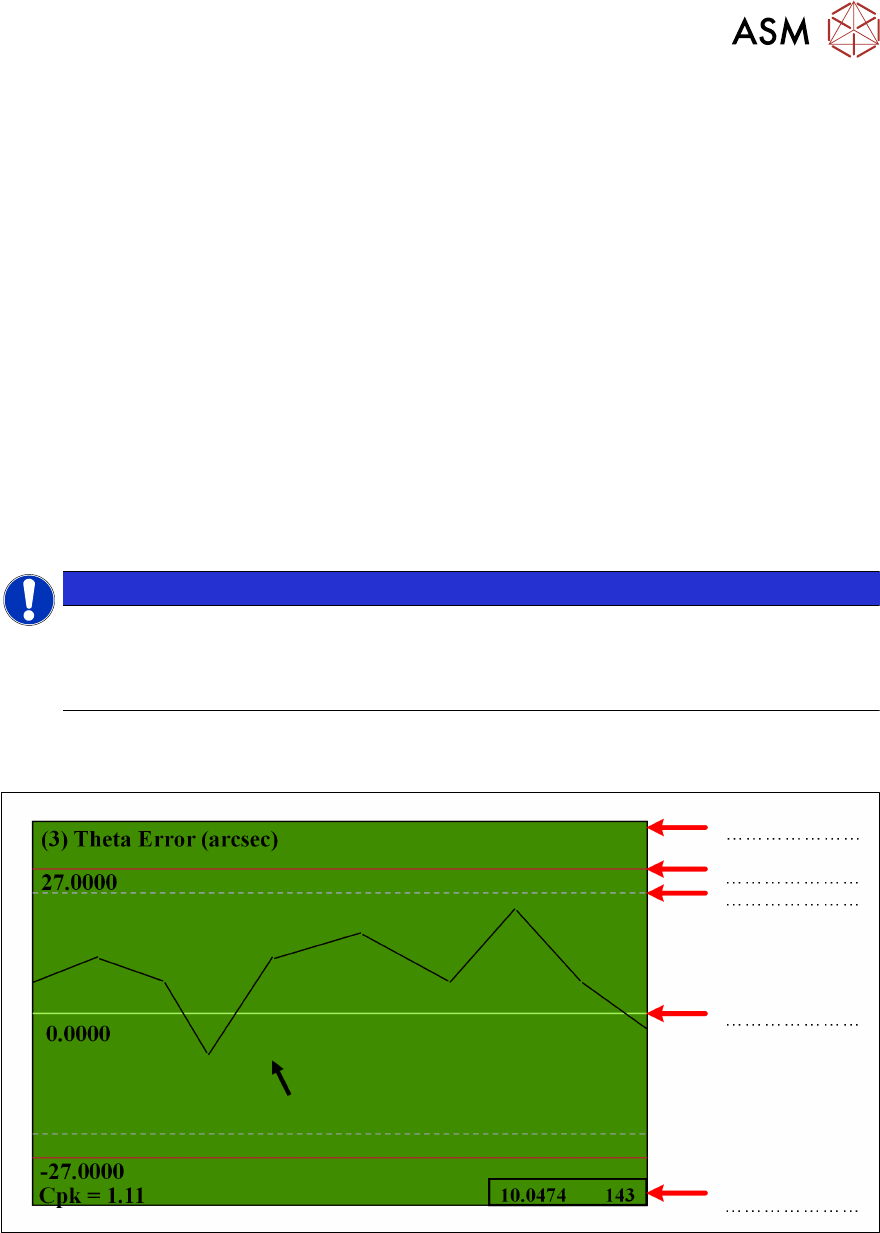
Exercise
Identify the arrowed items below: