00198481-01_Technical_Training_E_by_DEK_EN - 第78页
8 Communication and Control Room for Your Sketches and Notes 78 Technical Training E by DEK 12/2017
8 Communication and Control
Room for Your Sketches and Notes
Technical Training E by DEK 12/2017 77

8 Communication and Control
Room for Your Sketches and Notes
78 Technical Training E by DEK 12/2017
9 Station Software Overview
9.1 Creating a Product file
Technical Training E by DEK 12/2017 79
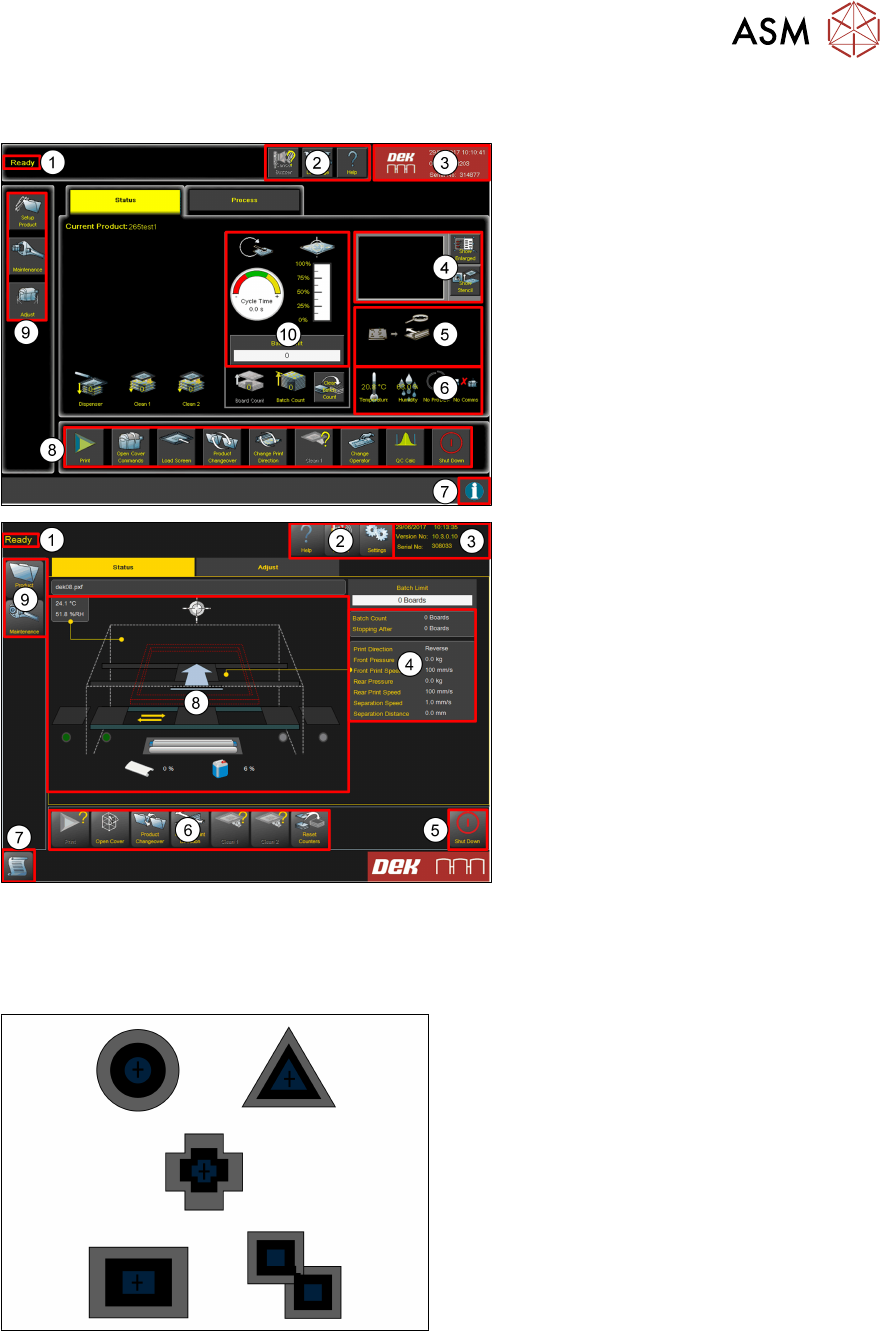
9 Station Software Overview
1. Breadcrumb
2. Tools
3. Status
4. Vision window
5. Board Mimic
6. Temperature Humidity Host Comms
7. Information
8. Commands
9. Navigation
10. Performance
1. Breadcrumb
2. Tools
3. Status
4. Detailed machine information
(Process, Transport & USC)
5. Shut down
6. Commands
7. Information
8. Machine mimic
9. Navigation
9.1 Creating a Product file
9.1.1 Setup Synthetic Fiducials
●
Use synthetic fiducials whenever available
●
Diagonally opposite…
●
These must align to corresponding
fiducials on the underside of the stencil.
Failure to set up the fiducials correctly could result in print offsets or vision error messages.