00198481-01_Technical_Training_E_by_DEK_EN - 第96页
10 Machine Modules 10.2 Under Screen Cleaner 96 Technical Training E by DEK 12/2017 10.2 Under Screen Cleaner The E by DEK is fitted with an Interchangeable Under Screen Cleaner 10.2.1 Interchangeable Under Screen Cleane…
10 Machine Modules
10.1 Stencil Mount
Technical Training E by DEK 12/2017 95
10.1.4.4 Screen Alignment Module - Exercise
Maintain the Screen Alignment System
Perform the following tasks:
⃞ Remove and replace an actuator
⃞ Remove and replace a chase clamp
⃞ Check roller counter plates for wear
⃞ Adjust chase clamp air gap
⃞ Adjust chase clamp air pressure and measure clamp strength
⃞ Describe screen alignment theory of operation using module schematic
10.1.5 Parts Exchange / Settings / Calibrations
Parts Exchange Tools / Setting Calibration
Actuator Standard tools Vision and Offset Calibration
Roller Bearing Counter late Standard tools None
Roller Bearing Standard tools Coplanarity (Chase to Table Height)
For detailed instructions refer to the technical reference manual.
10.1.6 Analysis Common error list
Problems Solution
Fiducial not found, poor SPC,
poor print alignment
Swap X with Y actuators and retest.
Poor alignment
●
Check for grooves worn in the counter plate.
●
Replace plate.
Poor alignment
●
Check the roller bearing is free.
●
Lubricate or replace.
For detailed instructions refer to the technical reference manual.
10.1.7 Maintenance
Maintenance item for Conveyor system.
Maintenance content Interval Requirement
Roller bearing and counter plate Annual Check for groove in hardened pad.
Roller bearing and counter plate Annual Lubricate with light machine oil (ensure no
lubrication on top surface of counter plate).
Actuator roller end and striker plate Annual Clean and lubricate with light machine grease.
For detailed instructions refer to the technical reference manual.
10 Machine Modules
10.2 Under Screen Cleaner
96 Technical Training E by DEK 12/2017
10.2 Under Screen Cleaner
The E by DEK is fitted with an Interchangeable Under Screen Cleaner
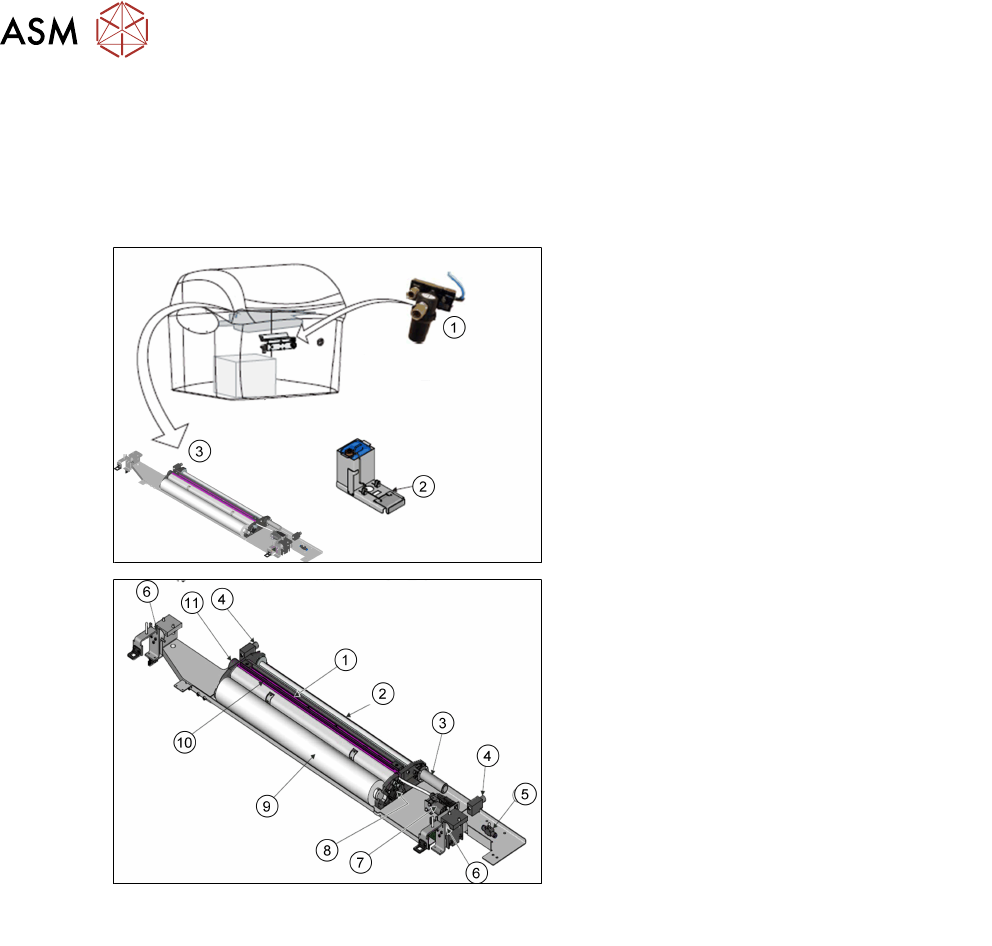
10.2.1 Interchangeable Under Screen Cleaner
Overview
1. Inbuilt Vacuum Filtration Unit
2. External Solvent Tank
3. Squeegee Assembly
1. Squeegee Assembly (Wipers)Vacuum
Chamber
2. Take Up Roll
3. Paper Feed Motor
4. Permanent Magnet (2 positions)
5. Lift Mechanism Air Flow Controller
6. Electromagnetic Clamp (2 positions)
7. Solvent Pump
8. Fabric Usage Sensor
9. Clean Paper Roll
10. Solvent Spray Bar
11. Paper Braking Mechanism

10 Machine Modules
10.2 Under Screen Cleaner
Technical Training E by DEK 12/2017 97
10.2.1.1 Interchangeable Under Screen Cleaner Functionality
●
The under screen cleaner wipes lint free paper, dry or wet across the underside of the screen
to minimize paste build up. The frequency and mode (wet/dry/vac) is programmable
●
The paper rolls are available in 300, 400, 520 widths
●
When a screen cleaner is required, the camera carriage approaches the cleaner and attaches
to the cleaner using two permanent magnets. The two electromagnetic clamps holding the
screen cleaner unit in the home position are de-energized allowing the camera carriage to
control the cleaner.
●
The paper feed motor supplies a clean section of paper across the two rubber wiper blades of
the squeegee assembly. During a ‘Wet’ clean, a solvent pump dispenses solvent through the
solvent spray bar, wetting the width of the paper just behind the squeegee assembly. The
squeegee assembly is lifted (engaging the cleaner with the underside of the screen) and the
camera carriage pulls the cleaner across the underside of the screen, removing any surplus
print material.
●
The two wiper blades form the mouth of the vacuum cleaner.
●
A paper usage sensor enables the software to monitor the paper roll usage. ‘Time To Go’ is
disabled, software monitors the pulses from the sensor and if no pulses are detected during
paper advance, it is assumed that the paper roll is empty and displays an “Roll Empty error
message
●
The solvent pump supplies solvent to the paper roll from the external solvent tank, mounted
on the rear or either side of the machine.
●
The external solvent tank container is capable of accommodating a 5 litre container of solvent.
●
A load cell in the base of the external solvent tank enables the software to calculate the
percentage level of solvent within the container.
Solvent
ASM only recommend the DEK-PRO and the DEK-PRO XF (Environmentally Friendly) USC
solutions to be used with the under screen cleaner. The following are available from ASM:
●
DEK-PRO
●
DEK-PRO XF
They are available in 1;5;20 litre containers.
Vacuum Filtration
The vacuum filtration unit extracts solvent fumes and draws excess print material onto the paper:
●
Inbuilt Vacuum Filtration Unit