PS288_OwnersMnl_PriorTo2009 - 第110页
Operation • Administrato r Functions 3—50 PS288 Owner’s Manual 3. Reset statistics— The statistics displayed correspond to the package file and therefore to the Socket Adapter used. When a So cket Adapter (or an individu…
Operation • Administrator Functions
PS288 Owner’s Manual 3—49
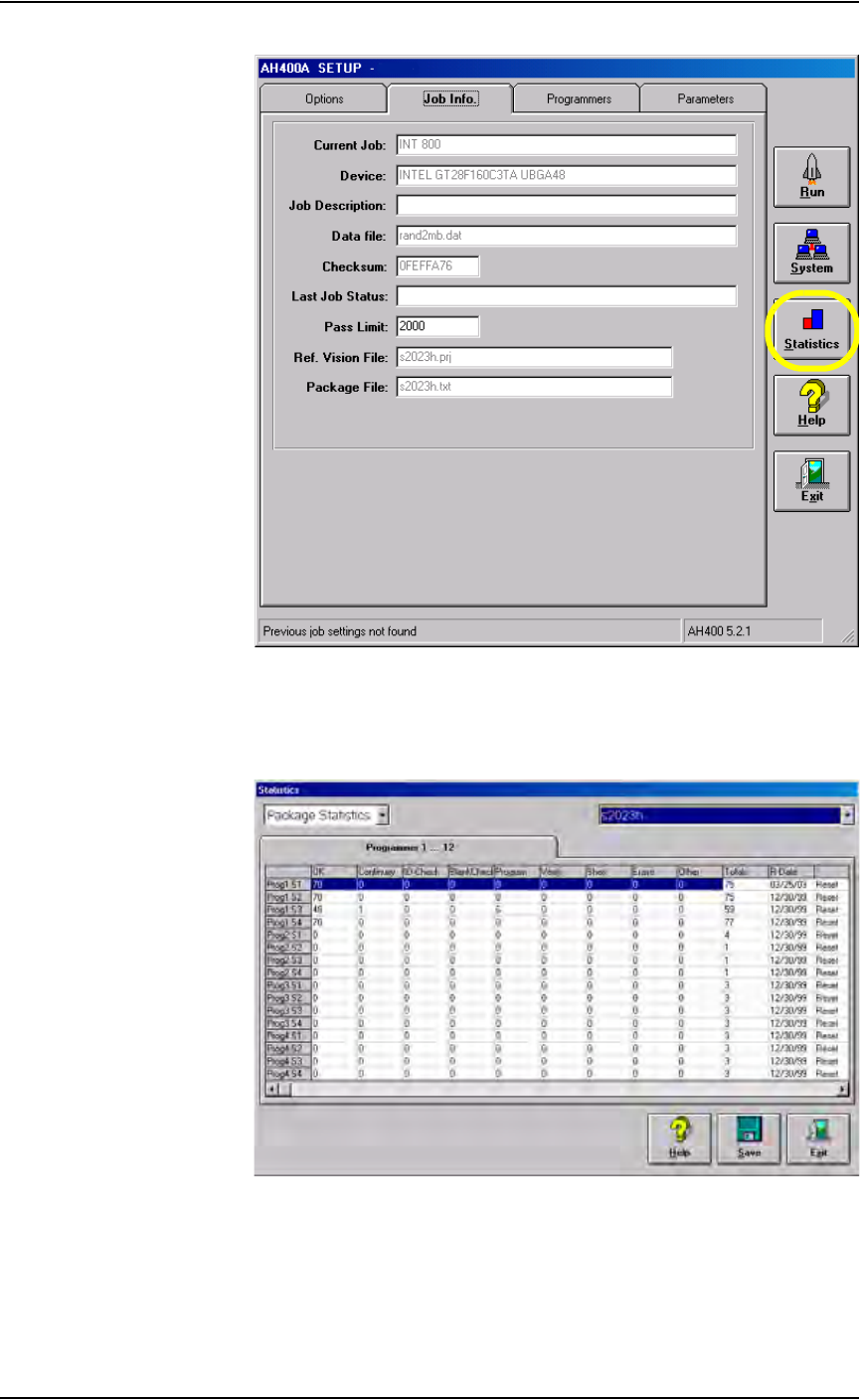
Figure 3-67—Job Info tab
2. Review statistics information—
The statistics include such items as successful programs, continuity
failures, verify failures, etc.
Figure 3-68—Package statistics
Pass/fail criteria are logged for each individual programmer. This is
useful when attempting to identify a potential hardware problem with a
programmer.
Operation • Administrator Functions
3—50 PS288 Owner’s Manual
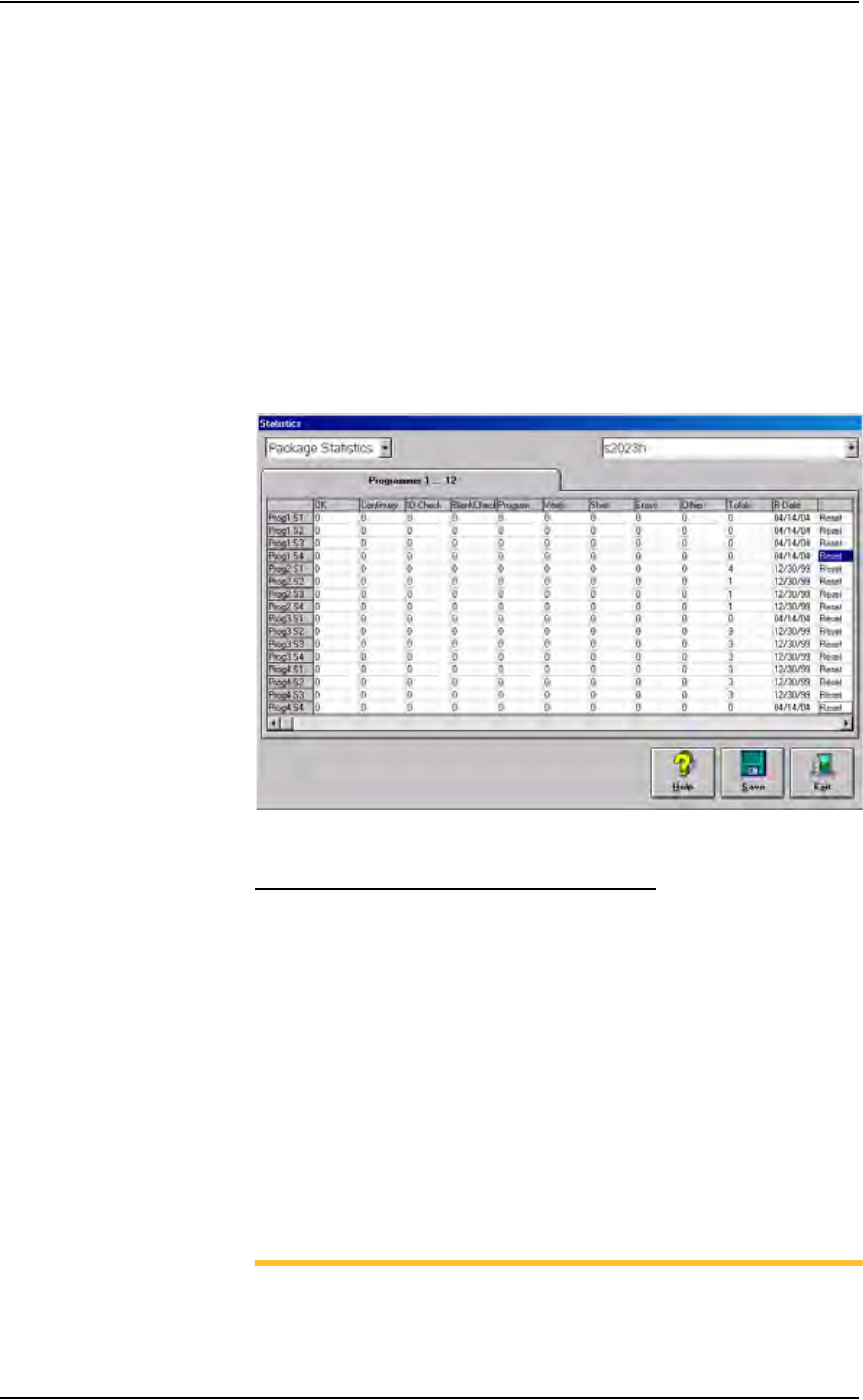
3. Reset statistics—
The statistics displayed correspond to the package file and therefore to
the Socket Adapter used. When a Socket Adapter (or an individual
socket in a Socket Adapter) is replaced on a particular programmer, sta-
tistics for that Socket Adapter or individual socket must be reset.
To reset statistics, click Reset in the right-most column corresponding
to the programmer on which the Socket Adapter (or individual socket)
was replaced.
• If a Socket Adapter was replaced, reset all rows for that programmer.
• If an individual socket was replaced, reset only the row corresponding
to the replaced socket.
The R-date (reset date) is set to the current date and statistics are reset
to all zeroes.
Figure 3-69—Resetting statistics for Prog1
Statistical Process Control Software (SPC)
This user-supplied software program can import the comma-delimited file
generated by the AH500 software.
1. Enable SPC—
1a) On the Handler Computer, navigate to C:\AH400_32 and open
WinAH400.ini with Notepad editor.
1b) Locate the section for SPC Logging. It will look like this:
[SPC Logging]
LoggingEnabled=FALSE
MaxFileSize=10485760
TempLogFile=C:\AH400_32\spcout.txt
1c) Set the second line value to TRUE:
LoggingEnabled=TRUE
1d) Save and close WinAH400.ini.
NOTE: In the above example the SPC logging file is saved to
C:\AH400_32\ directory. It can, however, be saved anywhere on the

Operation • Administrator Functions
PS288 Owner’s Manual 3—51
Handler Computer hard drive, or on a networked drive if the PS288
is connected to a network.
The SPCOut.txt file contains 19 comma-delimited fields, as follows:
Figure 3-70—Comma-delimited fields
Maximize Programming Yields
Occasional declines in system yields may occur during day to day operation
of the PS288. While overall yield levels can vary depending on device man-
ufacture, any short term change in yields of more than 0.5% is sufficient rea-
son for investigation of a local or immediate cause of variation. These
changes in yield can be attributed to a number of causes, including the man-
ufacture of devices, socket issues, system maintenance, and process errors.
Manufacture of Devices
Variations in the manufacture of devices may affect yields in an automated
system, such as:
Description
01 DevicesInputSystem - number of devices picked from Input media
02 DevicesInspected - number of devices inspected by Vision system
03 InspectionQuality - as percentage, compared with reference vision
04 InspectionYield
05 DevicesInsertedSocket - number of devices inserted into socket
06 SocketYield
07 ProgrammerYield
08 ProgSysYield (Yield of all programmers together)
09 DevicesProcessedMarker
10 MarkingYield
11 SystemThroughputExcWait - Starts with first device placed,
excludes wait times.
12 SystemTotalThroughputIncWait - Starts when Run starts, includes
wait times
13 SystemYield
14 AreaID - Programmer #1 = "17", Programmer #2 = "18", …,
Programmer #24 = "40")
15 PosID - that is Socket #
16 TimeStamp - Date/Time of SPC log entry
17 OrderNumber - Job Name and or number
18 Package - Package File used for the job
19 VisionPRJ - Reference Vision File used for the job