PS288_OwnersMnl_PriorTo2009 - 第111页
Operation • Administrator Functi ons PS288 Owner’s Manual 3—51 Handler Computer hard drive, or on a networked drive if the PS288 is connected to a network. The SPCOut.txt file contains 19 comma-deli mited fields, as foll…
Operation • Administrator Functions
3—50 PS288 Owner’s Manual
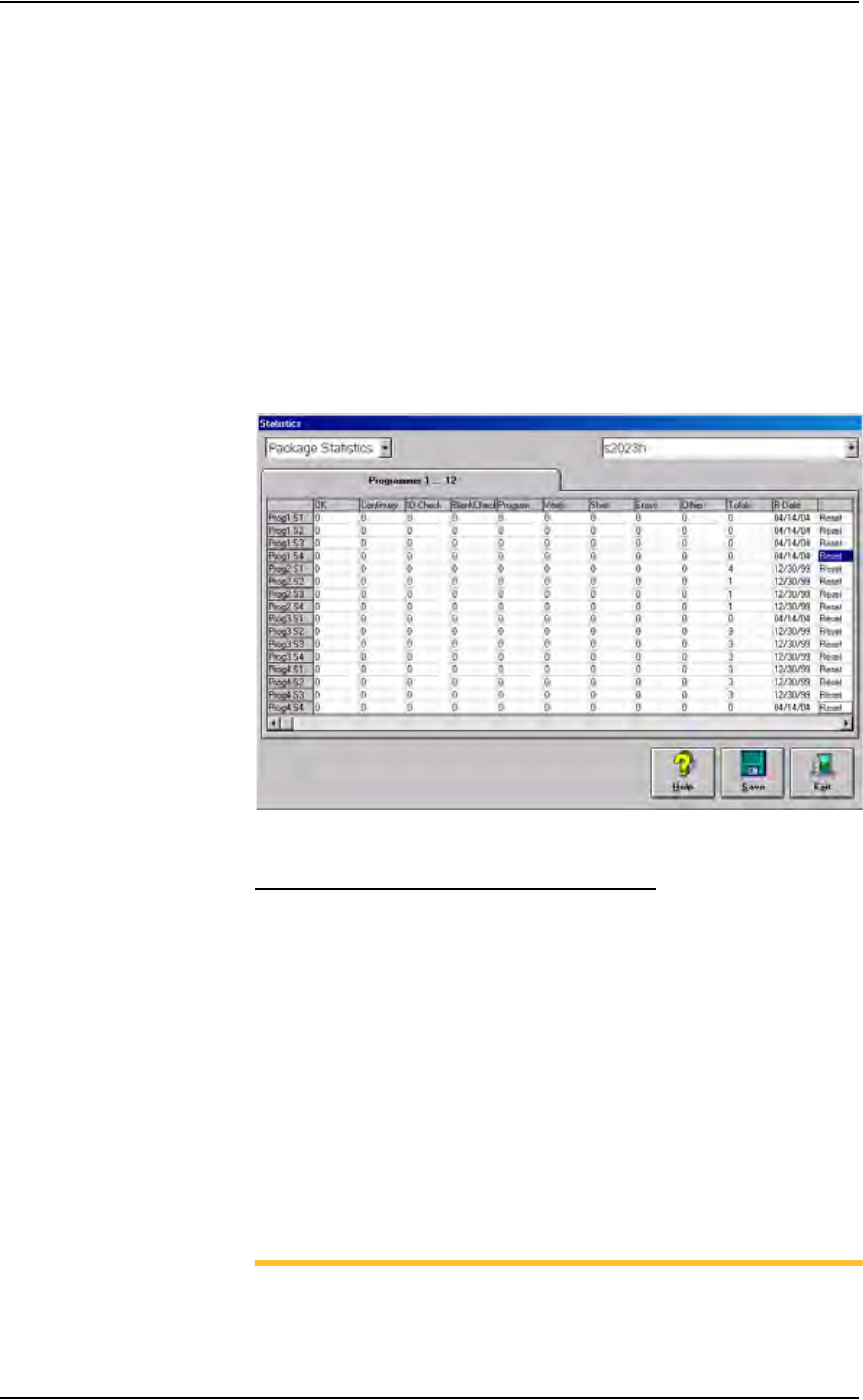
3. Reset statistics—
The statistics displayed correspond to the package file and therefore to
the Socket Adapter used. When a Socket Adapter (or an individual
socket in a Socket Adapter) is replaced on a particular programmer, sta-
tistics for that Socket Adapter or individual socket must be reset.
To reset statistics, click Reset in the right-most column corresponding
to the programmer on which the Socket Adapter (or individual socket)
was replaced.
• If a Socket Adapter was replaced, reset all rows for that programmer.
• If an individual socket was replaced, reset only the row corresponding
to the replaced socket.
The R-date (reset date) is set to the current date and statistics are reset
to all zeroes.
Figure 3-69—Resetting statistics for Prog1
Statistical Process Control Software (SPC)
This user-supplied software program can import the comma-delimited file
generated by the AH500 software.
1. Enable SPC—
1a) On the Handler Computer, navigate to C:\AH400_32 and open
WinAH400.ini with Notepad editor.
1b) Locate the section for SPC Logging. It will look like this:
[SPC Logging]
LoggingEnabled=FALSE
MaxFileSize=10485760
TempLogFile=C:\AH400_32\spcout.txt
1c) Set the second line value to TRUE:
LoggingEnabled=TRUE
1d) Save and close WinAH400.ini.
NOTE: In the above example the SPC logging file is saved to
C:\AH400_32\ directory. It can, however, be saved anywhere on the

Operation • Administrator Functions
PS288 Owner’s Manual 3—51
Handler Computer hard drive, or on a networked drive if the PS288
is connected to a network.
The SPCOut.txt file contains 19 comma-delimited fields, as follows:
Figure 3-70—Comma-delimited fields
Maximize Programming Yields
Occasional declines in system yields may occur during day to day operation
of the PS288. While overall yield levels can vary depending on device man-
ufacture, any short term change in yields of more than 0.5% is sufficient rea-
son for investigation of a local or immediate cause of variation. These
changes in yield can be attributed to a number of causes, including the man-
ufacture of devices, socket issues, system maintenance, and process errors.
Manufacture of Devices
Variations in the manufacture of devices may affect yields in an automated
system, such as:
Description
01 DevicesInputSystem - number of devices picked from Input media
02 DevicesInspected - number of devices inspected by Vision system
03 InspectionQuality - as percentage, compared with reference vision
04 InspectionYield
05 DevicesInsertedSocket - number of devices inserted into socket
06 SocketYield
07 ProgrammerYield
08 ProgSysYield (Yield of all programmers together)
09 DevicesProcessedMarker
10 MarkingYield
11 SystemThroughputExcWait - Starts with first device placed,
excludes wait times.
12 SystemTotalThroughputIncWait - Starts when Run starts, includes
wait times
13 SystemYield
14 AreaID - Programmer #1 = "17", Programmer #2 = "18", …,
Programmer #24 = "40")
15 PosID - that is Socket #
16 TimeStamp - Date/Time of SPC log entry
17 OrderNumber - Job Name and or number
18 Package - Package File used for the job
19 VisionPRJ - Reference Vision File used for the job

Operation • Administrator Functions
3—52 PS288 Owner’s Manual
) Variation in dimensions from different manufacturing lots or facilities
can cause devices to fit improperly in the sockets or require re-calibra-
tion of the system to be placed successfully.
) Presence of residual plastic on the edges of the devices (“flashing”) can
cause devices to rest improperly in the sockets.
) Die changes (shrinks, process improvement for improved wafer yield,
etc.) require new algorithms. Data I/O tracks these changes with ven-
dors and recommends all customers subscribe to the algorithm update
program.
) Die processes contain variability. Programming yields can sometimes
vary on a normal die. Device families recently introduced to the market
tend to have more fluctuations in yields as the semi-vendor's manufac-
turing process stabilizes.
) Multiple fabrication sites often produce the same devices. Performance
characteristics, including programming yield, can vary from location to
location.
) Lead oxide accumulating on device leads is an issue for some devices.
This can vary with age and the conditions with which the devices are
stored.
) Programming yields decrease with the number of programming cycles.
Devices that are processed more than once are more likely to experi-
ence problems.
Socket Issues
The programming sockets are perhaps the most important and vulnerable
element of the PS288. They are subject to residue buildup, damage from
mis-inserted devices (perhaps due to poor calibration of the placement sys-
tem), and general wear and tear. Socket life is generally rated by their manu-
facturer as insertions per socket, depending on the type, after which yields
may drop significantly.
Socket conditions that cause varying yields include the following:
) Debris of any type can prevent sockets from closing completely. Some-
times the debris may not be visible. Simple actuation may clear debris,
or it may be necessary to clean sockets with low pressure air.
NOTE: Clean or blow out sockets with low pressure air (90 PSI or
less) every day. Press down on the opener to blow out debris from
beneath the contacts. More frequent cleaning is recommended in a
dirty environment.
) Small molded tabs between each of the contact fingers may become
damaged, preventing one or more fingers from closing completely and
causing intermittent socket failures.
) Clamping fingers are one piece, from the connector pin to the contact
finger. If the connector pin is not seated in the molded base it will affect
the contact point of the finger.
) Bent or distorted contact fingers can cause intermittent socket failures.