PS288_OwnersMnl_PriorTo2009 - 第113页
Operation • Administrator Functi ons PS288 Owner’s Manual 3—53 System Mainten ance System maintenance is critical to m aintaining high yiel ds. Periodic cleaning, adjustment and replacement of worn elem ents will ensure …

Operation • Administrator Functions
3—52 PS288 Owner’s Manual
) Variation in dimensions from different manufacturing lots or facilities
can cause devices to fit improperly in the sockets or require re-calibra-
tion of the system to be placed successfully.
) Presence of residual plastic on the edges of the devices (“flashing”) can
cause devices to rest improperly in the sockets.
) Die changes (shrinks, process improvement for improved wafer yield,
etc.) require new algorithms. Data I/O tracks these changes with ven-
dors and recommends all customers subscribe to the algorithm update
program.
) Die processes contain variability. Programming yields can sometimes
vary on a normal die. Device families recently introduced to the market
tend to have more fluctuations in yields as the semi-vendor's manufac-
turing process stabilizes.
) Multiple fabrication sites often produce the same devices. Performance
characteristics, including programming yield, can vary from location to
location.
) Lead oxide accumulating on device leads is an issue for some devices.
This can vary with age and the conditions with which the devices are
stored.
) Programming yields decrease with the number of programming cycles.
Devices that are processed more than once are more likely to experi-
ence problems.
Socket Issues
The programming sockets are perhaps the most important and vulnerable
element of the PS288. They are subject to residue buildup, damage from
mis-inserted devices (perhaps due to poor calibration of the placement sys-
tem), and general wear and tear. Socket life is generally rated by their manu-
facturer as insertions per socket, depending on the type, after which yields
may drop significantly.
Socket conditions that cause varying yields include the following:
) Debris of any type can prevent sockets from closing completely. Some-
times the debris may not be visible. Simple actuation may clear debris,
or it may be necessary to clean sockets with low pressure air.
NOTE: Clean or blow out sockets with low pressure air (90 PSI or
less) every day. Press down on the opener to blow out debris from
beneath the contacts. More frequent cleaning is recommended in a
dirty environment.
) Small molded tabs between each of the contact fingers may become
damaged, preventing one or more fingers from closing completely and
causing intermittent socket failures.
) Clamping fingers are one piece, from the connector pin to the contact
finger. If the connector pin is not seated in the molded base it will affect
the contact point of the finger.
) Bent or distorted contact fingers can cause intermittent socket failures.

Operation • Administrator Functions
PS288 Owner’s Manual 3—53
System Maintenance
System maintenance is critical to maintaining high yields. Periodic cleaning,
adjustment and replacement of worn elements will ensure the best possible
performance. These periodic procedures are outlined in Chapter 5—Mainte-
nance and should be followed closely.
Careful system calibration is also critical to maintaining high yields. While
not normally required during steady operation, calibration of the PS288
should be checked anytime yields fall to unacceptable levels. See “Adjust-
ments, Calibrations, and Functional Tests” on page 5-29.
Process Errors
Finally, a number of process errors can result in reduced yield. While an
automated approach eliminates most human error during production, errors
in system setup or maintenance programs can result in reduced yield:
) Using old algorithms may affect programming yields. PS288 algo-
rithms are updated weekly at http://www.dataio.com/algorithms/ and
are available depending on your maintenance plan.
) Selecting the wrong part number in a job, thus using the wrong algo-
rithm.
) Changing programming parameters (sector protection, security
options, verify options, continuity testing, blank checking).
) Measuring yields too infrequently, so that a drop in yield rates is not
detected until a large number of devices have failed.
) Using the wrong data file.
) Socket abuse, such as digging failed devices out with sharp instru-
ments.
) Changing to second or third vendor source. Lower quality devices tend
to produce lower yields.
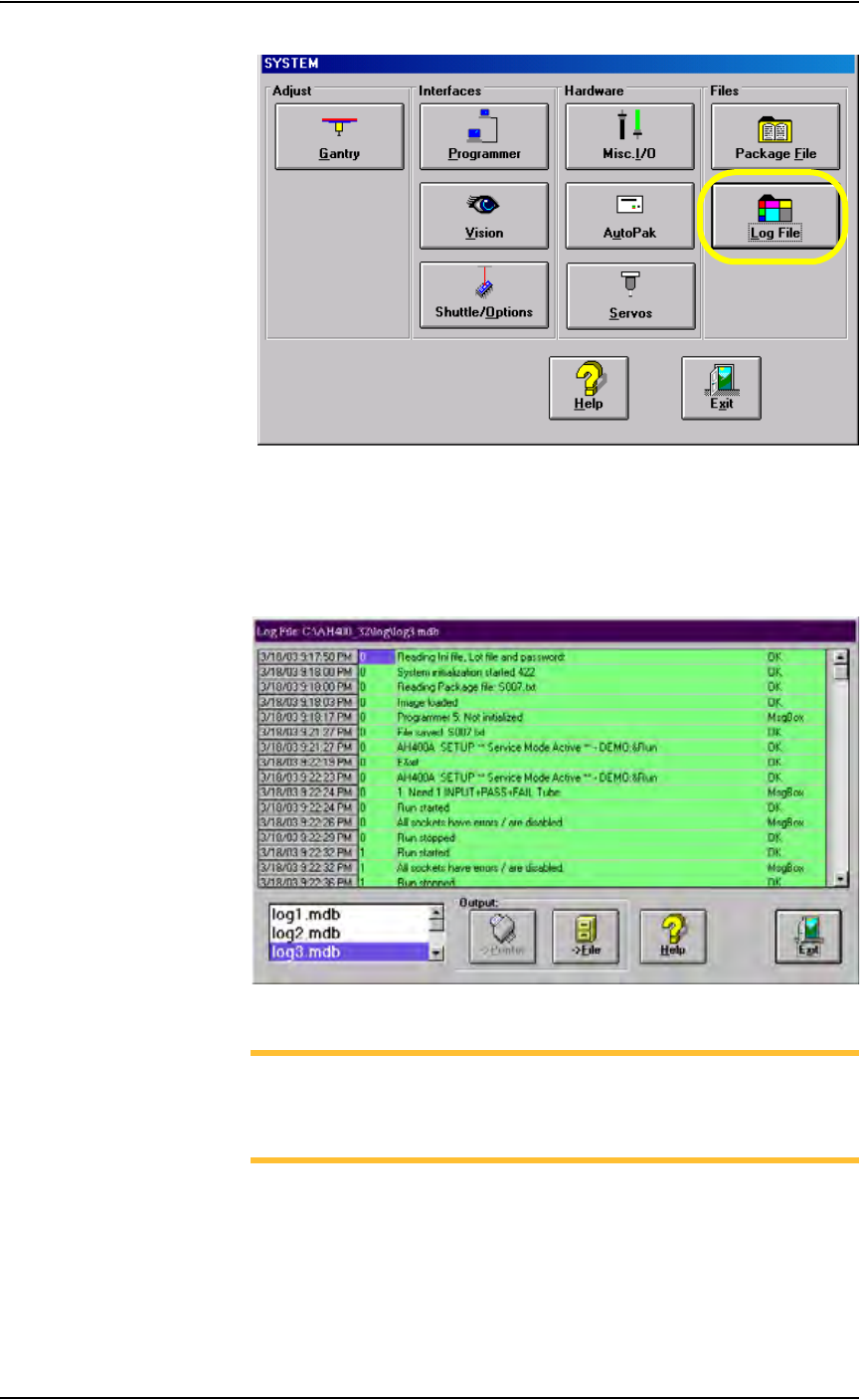
Monitor Daily Operation Logs
Daily operation logs are saved for each operation that the PS288 performs.
As the operation is performed, its completion status is noted in the log for
statistical purposes, or for troubleshooting if necessary.
To view the daily operation logs:
1. Prepare the system—
1a) On the Setup window, select System.
1b) From the System window, select Log File. See Figure 3-71.
Operation • Administrator Functions
3—54 PS288 Owner’s Manual
Figure 3-71—Select Log File
2. The LogFile window—
2a) Information is displayed about the successful or unsuccessful comple-
tion of any operation of the PS288.
2b) (Optional) View, print, or store daily operation logs to another location.
Figure 3-72—LogFile window
NOTE: The Log Files are named log1.mdb, log2.mdb, log3.mdb,
and so on up to log7.mdb. They correspond to the days of the week,
where log1.mdb is the Log File for Sunday, log2.mdb is the Log
File for Monday, and so on up to log7.mdb for Saturday.
(Optional) Create a Data File from a Master Device
The PS288 can read data from a master device and create a data file (PC file)
that can then be used in programming jobs.