PS288_OwnersMnl_PriorTo2009 - 第125页
PS288 Owner’s Manual 4—1 Chapter 4 4 System Theory The PS288 consists of various electri cal and mechanical systems which pro- vide facilities for — or perfor m a portion of — the overall operation of the machine. Their …

Operation • Administrator Functions
3—64 PS288 Owner’s Manual
Figure 3-85—Values for a to j
4. Set text lines—
4a) Select the correct box for each line of text for up to four lines.
4b) In the box, type the text to be printed on label.
5. Set labels per roll—
Set “Labels per Roll” to 1.
6. Save printer file—
Click Save to save and exit the MRPRT software.
NOTE: For information on selecting label printing during Task
creation, see TaskLink online Help.
h Label advance. This is the distance to advance the label toward the
tamp applicator after printing. This only makes some small changes.
The Tamp head should be in the correct position first.
i Text centering in X direction. 0= Auto and 1= All the way to the left
of the label. Normally set to 0.
j Text centering in Y direction. 0= Auto and 1= All the way to the top
of the label. Normally set to 0.
PS288 Owner’s Manual 4—1
Chapter
4
4System Theory
The PS288 consists of various electrical and mechanical systems which pro-
vide facilities for—or perform a portion of—the overall operation of the
machine. Their operation and relationship with the other components of the
system are described in this chapter.
Main Power
System
The main power system provides primary and generated voltages for use
within the PS288. Input power is received from the input panel on the rear of
the machine. It is a 208–240 VAC, 50/60 Hz, 30A circuit.
Circuit Breakers
208–240 VAC is provided to the programmer power supplies, gantry servo
motor amplifiers, and the I/O Controller. The two circuit breakers on the
input panel provide circuit protection for the main power input and the gan-
try servo amplifiers.
I/O Controller
The I/O Controller provides 115 VAC, 60 Hz, for all other systems in the
PS288 including, but not limited to, the Handler Computer, video monitor,
and programmer power supplies. Additionally, the I/O Controller provides a
power-on control signal to the servo motor power contactor, allowing the
208–240 VAC to be applied to the gantry’s X and Y servo motor amplifiers
and two low voltage systems used for sensor power and PNP head motor
drivers. See Figure 4-1.
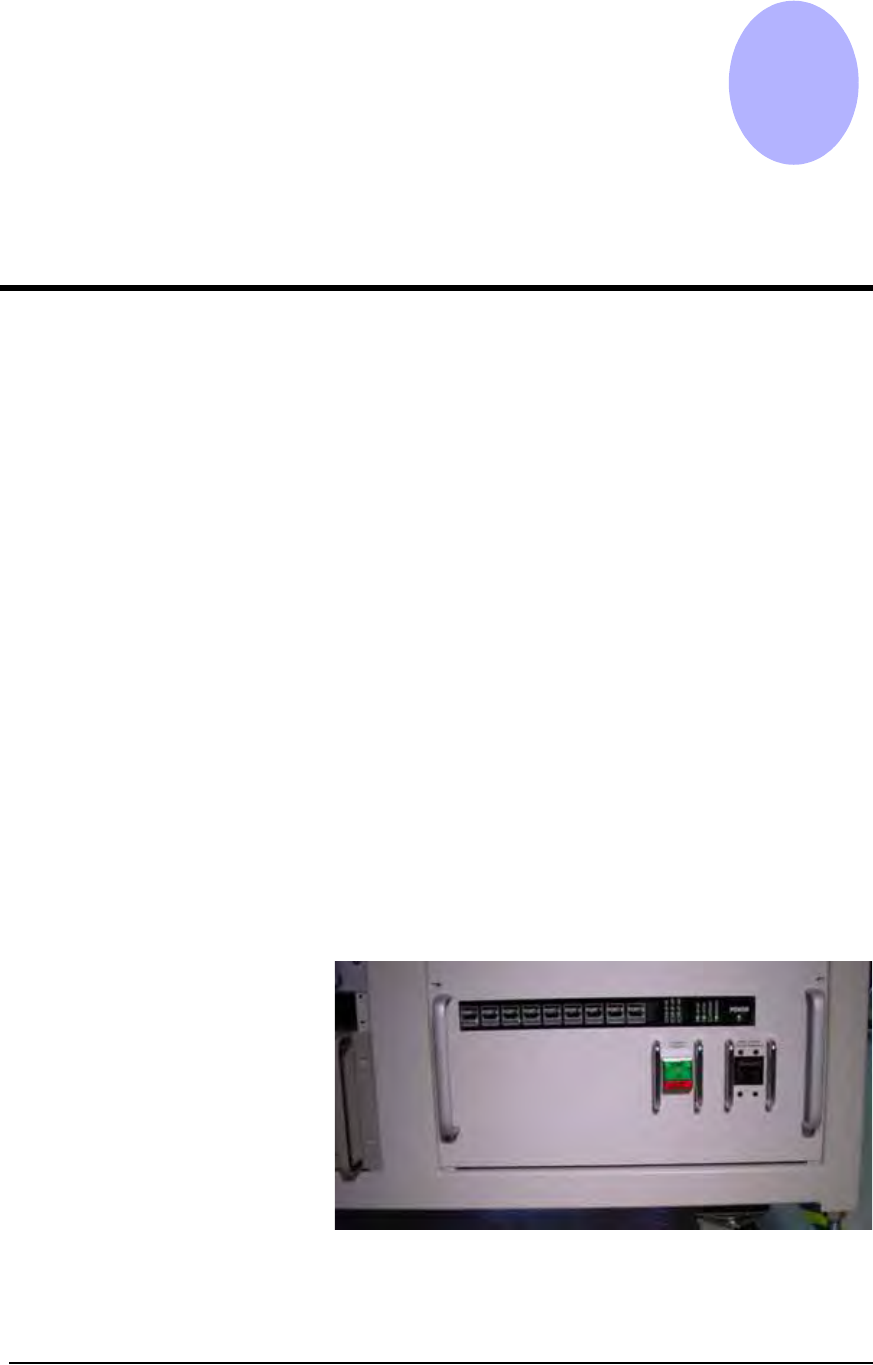
Figure 4-1—I/O Controller
System Theory • FlashCORE Programmer
4—2 PS288 Owner’s Manual
The I/O Controller also provides an interface for all sensor systems, several
visual indicators, and power and control of other systems throughout the
PS288. Sensor conditions are reported back to the Handler Computer
through a series of connections on the rear of the I/O Controller. Connections
supported by the I/O Controller include:
• Air pressure sensors
• Light tower
• Tube vibration assemblies
• Component position optics
• Vacuum and pressure control solenoids and sensors
• Safety shield interlocks
• Tape output control and associated sensors
• Power contactor for the laser marking stage
• Label and laser marking system controls and associated sensors
• Additional connectivity for future options
For a listing of status indicator lights on the I/O Controller, see Appendix A,
“I/O Controller LED Status.”
FlashCORE
Programmer
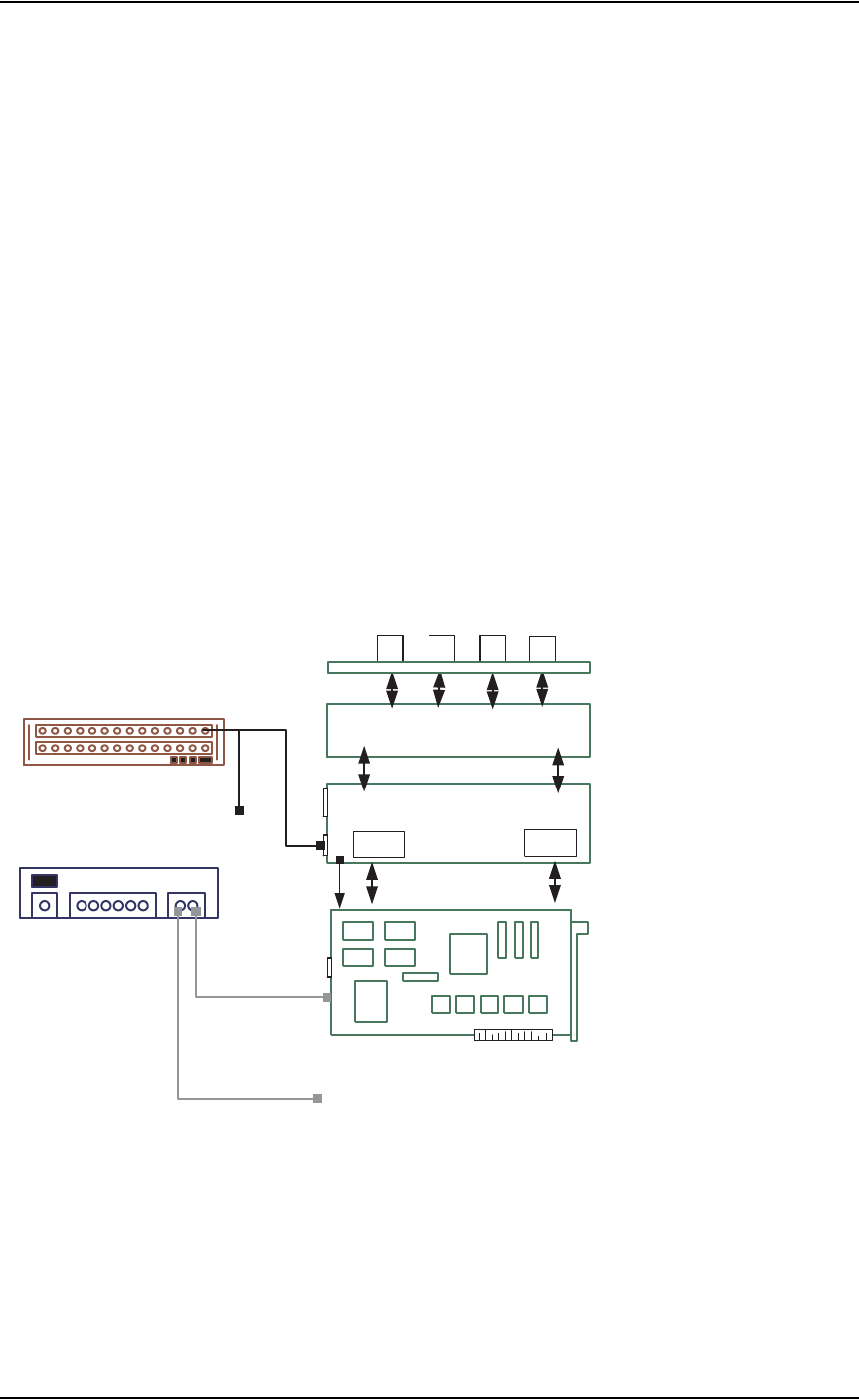
FlashCORE programmer structure is shown in Figure 4-2:
Figure 4-2—Internal structure of FlashCORE programmer
Controller / CPU
RPX Lite
DW or DW-LGMEM
1
2 3
4
Backplane PCB
Waveform PCB
CPLD
FPGA
J3
J4
RJ45
P10
MON PM3
Socket Adapter PCB
ETH
PE3
MPC850SR PowerPC
FdrRoot\Admin.txt
FdrRoot\FdrCfg.txt
FdrRoot\Algs\2711410c.elf
FdrRoot\Algs\HWData_C.elf
FdrRoot\Jobs\<job_name>\FootNote.txt
FdrRoot\Jobs\<job_name>\JobParms.txt
FdrRoot\Jobs\<job_name>\SectProt.txt
FdrRoot\System\DiagLog.txt
FdrRoot\System\ErrOut.txt
FdrRoot\System\EventLog.txt
FdrRoot\System\FdrStat.txt
FdrRoot\System\
NetWork.txt
Programmer IP=139.138.240.4
Subnet Mask=255.255.255.0
Default Gateway=139.138.240.253
Day and Time Server IP=192.169.1.7
PC Port Number=0
Programmer Port Number=7527
Programmer Name=FC 4
SN Server Port Number=7500
SN Server IP=0.0.0.0
FdrRoot\Update\Boot.bin
FdrRoot\Update\HWData_C.elf
FdrRoot\Update\SysFlash.bin
Files on
PCMCIA Card in FlashCORE
J3
Power
+5V(1,2,3,4) GND(5,6,7,8)
+24V(9,10) +12V (11) -12V(12)
Power Supply
one for 2 FlashCORE Programmers
16-port Network Hub
To / from other FC programmers
To 2nd FC programmer