PS288_OwnersMnl_PriorTo2009 - 第143页
Maintenance • Preventive Maintenance 5—8 PS288 Owner’s Manual Also, make sure that they are not st ored on your s ite longer than government regulations allow (the ty pical limit is 90 days). Check your government (local…
Maintenance • Preventive Maintenance
PS288 Owner’s Manual 5—7
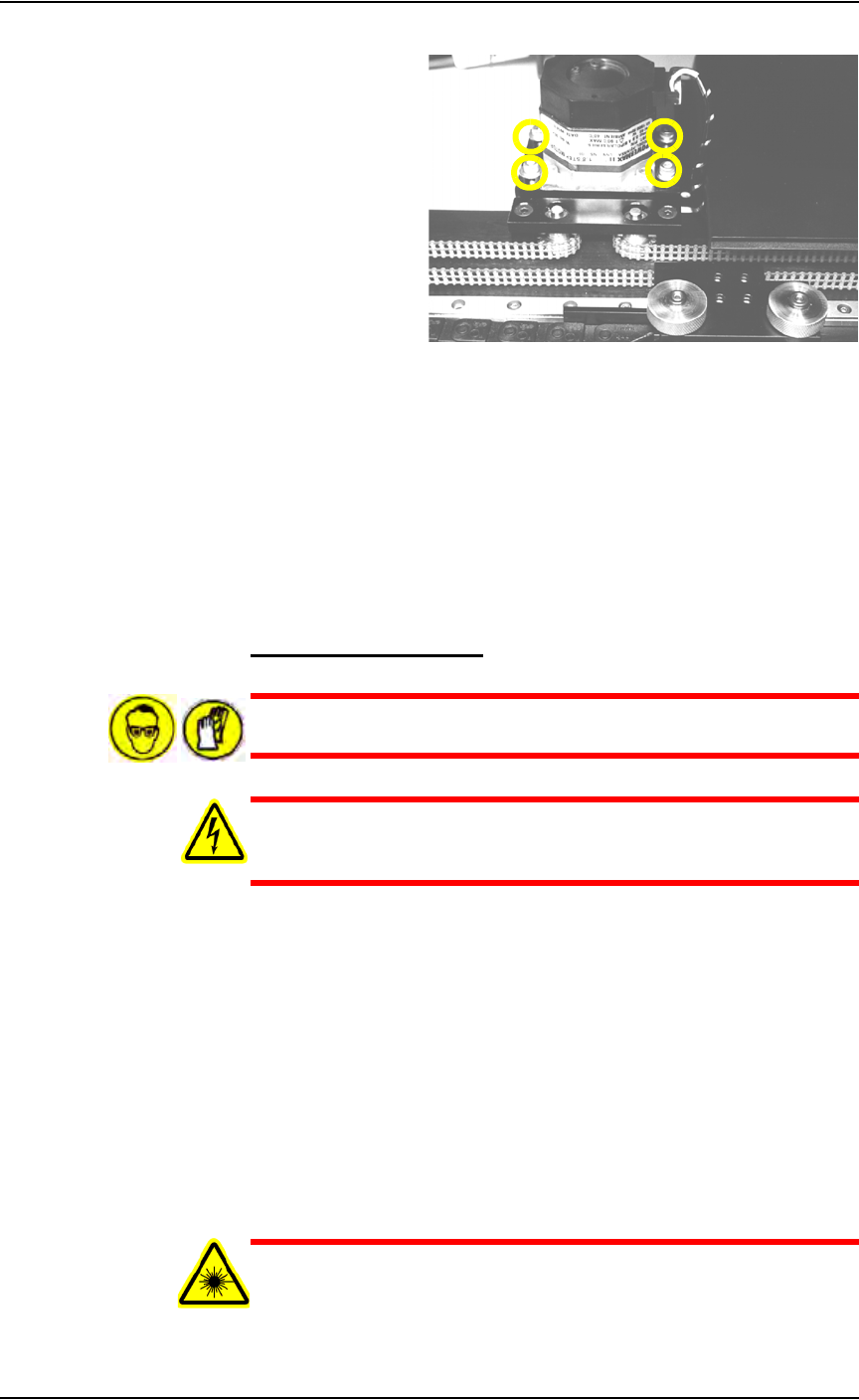
Figure 5-3—Location of four motor mounting screws
3c) If the belt still moves more than 12 mm (0.5 inch), remove it and cut
off as many links as needed to achieve the proper tension.
3d) Replace the belt and tighten the four motor mounting screws.
4. Check the belt sprocket set screws—
4a) Check the belt sprocket set screws and tighten if necessary.
4b) If a sprocket has loosened and is rubbing against the frame, reposition
the sprocket up off the frame and tighten the set screw.
4c) Reinstall all guards and panels.
Clean the Laser Housing
WARNING: Hazardous materials. Wear safety goggles and dis-
posable protective gloves.
WARNING: Electric shock hazard. Shut down the PS288 (see
“Shut Down the System” on page 3-12) and turn off the main
power switch before removing any panels.
1. Prepare the system—
1a) Verify that the PS288 is shut down and the main power switch is in the
OFF position.
1b) Remove all the laser marker housing panels.
2. Clean—
2a) Use a damp paper towel and antistatic cleaner to wipe laser marking
dust and other foreign material from the housing into a sealable plastic
bag.
2b) Place the paper towel in the plastic bag. Pull off the disposable protec-
tive gloves, place them in the sealable plastic bag, and then close and
tightly seal the bag.
WARNING: Numerous government regulations apply to the stor-
age of hazardous waste. Ensure that contaminated filters are
properly labeled and stored in your hazardous waste storage area.
Maintenance • Preventive Maintenance
5—8 PS288 Owner’s Manual
Also, make sure that they are not stored on your site longer than
government regulations allow (the typical limit is 90 days). Check
your government (local, state, and federal) regulations for haz-
ardous waste storage requirements.
3. Reconnect—
3a) Clean all the clear plastic safety shields with an anti-static cleaner.
3b) Reconnect all guards and panels.
Check Pre-Filter in Fume Extractor
Once a month, check the pre-filter in the laser marker fume extractor to
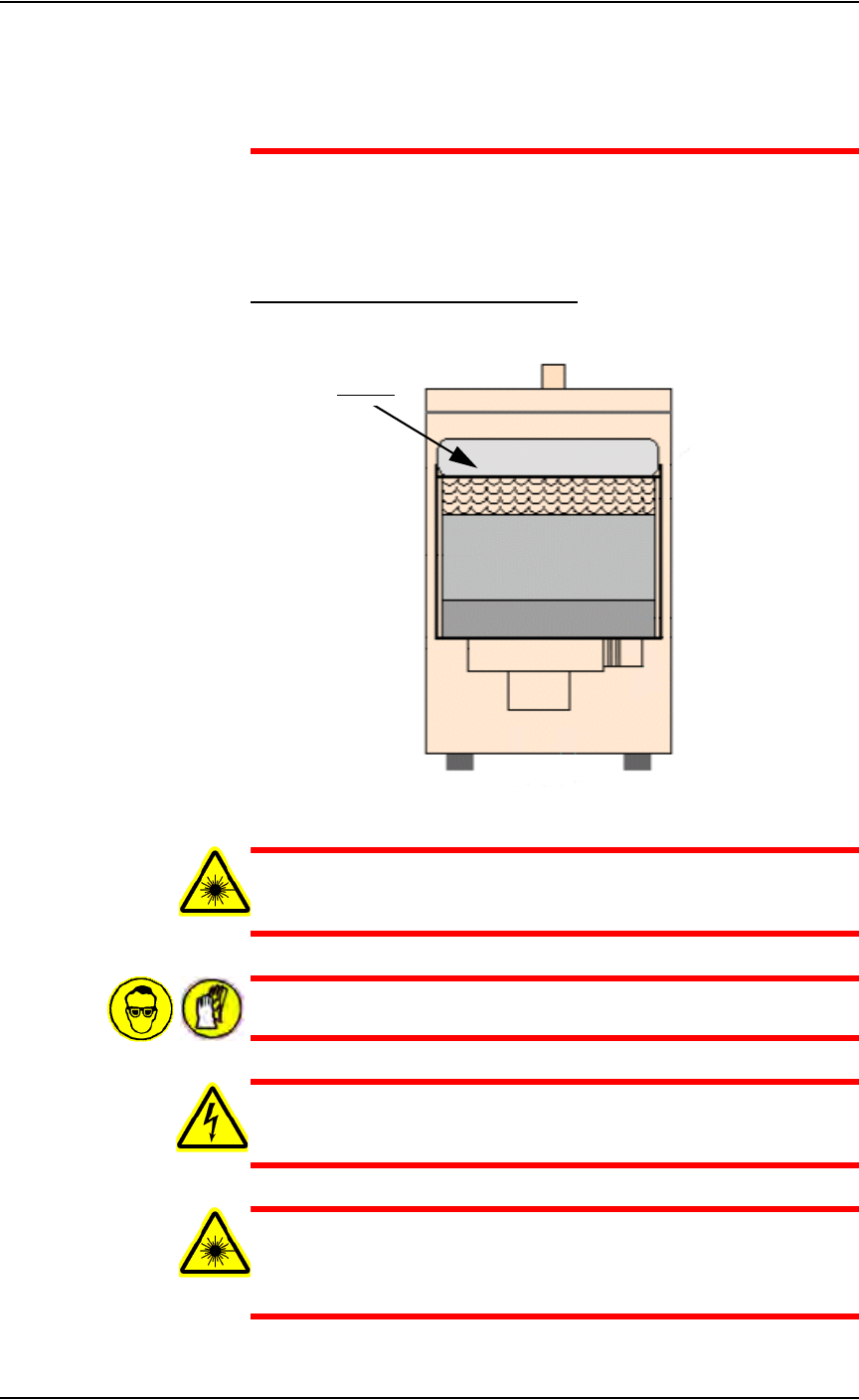
determine if it is clogged. The pre-filter is shown in Figure 5-4.
Figure 5-4—Location of pre-filter
WARNING: Failure to replace the laser vacuum filters at the
appropriate intervals could create a hazardous operating environ-
ment.
WARNING: Hazardous materials. Wear safety goggles and dis-
posable protective gloves.
WARNING: Electric shock hazard. Shut down the PS288 (see
“Shut Down the System” on page 3-12) and turn off the main
power switch.
WARNING: Do not clean the laser vacuum filters by blowing with
compressed air, shaking, or using any other method that allows
the particulate trapped by the filters to be released into the work
environment.
Pre-filter
Maintenance • Preventive Maintenance
PS288 Owner’s Manual 5—9
1. Prepare the system—
1a) Verify that the PS288 is shut down and the main power switch is in the
OFF position.
1b) Remove the lower back laser housing panel.
1c) Loosen the vacuum hose clamp and detach the vacuum hose from the
extractor top.
1d) Undo the four spring clamps on the extractor top and remove the
extractor top.
2. Inspect the pre-filter—
If clogged or dirty, remove the filter and discard it in a sealable plastic
bag.
NOTE: For detailed instructions, see “Replace Pre-filter and
Pleated Filter in Fume Extractor” on page 5-18.
Clean the Laser Marker Shuttle Assembly
During extended or heavy periods of use, the shuttle assembly may become
dirty and gummed up by laser dust or other foreign material. This situation
may cause the shuttle assembly to stall during movement to and from the
laser mark position.
WARNING: Hazardous materials. Wear safety goggles and dis-
posable protective gloves.
WARNING: Electric shock hazard. Shut down the PS288 (see
“Shut Down the System” on page 3-12) and turn off the main
power switch. Do not use compressed air to remove laser dust.
To clean the laser marker shuttle assembly:
1. Prepare the system—
1a) Verify that the PS288 is shut down and the main power switch is in the
OFF position.
1b) Remove the upper left laser housing panel. Figure 5-5 shows the panel
removed.