PS288_OwnersMnl_PriorTo2009 - 第191页
Maintenance • Fixing Failures 5—56 PS288 Owner’s Manual Problem: • The PS288 is putting the wrong numb er of devices into the tubes. Check this: ) From the Setup window , on the Options tab, ensure that Input and/or Outp…

Maintenance • Fixing Failures
PS288 Owner’s Manual 5—55
5. Update firmware—
The newly installed FlashCORE programmer assembly must be
"located" and assigned a site from TaskLink. Once the site is assigned,
firmware on the new FlashCORE programmer assembly must be
updated from TaskLink.
See TaskLink online Help for information about updating firmware.
Fixing Failures
This section contains solutions to problems that may arise during operation
of the PS288. While this list is not a comprehensive compilation of all possi-
ble failures, it provides helpful troubleshooting tips for systems most likely
to cause problems.
Tube Input and Output Problems
Problem:
• The vibration controls are fully clockwise and neither of the tube plat-
forms vibrates.
Check this:
) Make sure that tube input or tube output has been selected on the Setup
window.
Problem:
• Only one tube platform vibrates.
Check this:
) Shut down the PS288 (see “Shut Down the System” on page 3-12) and
check the 2A 250V fuse above the three-wire connector on the back of
the I/O Controller. The input vibrating motor connector is labeled 9-1;
the output vibrating motor connector is labeled 9-2.
) Make sure that the power cable on the back of the I/O Controller is
fully connected.
) Check the 5A 250V fuse on the bottom of the vibration controller box
(behind the control knobs).
) Remove the controller and make sure that the on/off switch was left on
when it was last installed.
If the fuses are continually being blown, the vibration controller box may be
defective and must be replaced. You can switch the wire from the working
controller to the defective controller to determine if this is the case.
Problem:
• The PNP head will not center on the devices.
Check this:
) Adjust the X-, Y-, and Z-axis positions using the adjustment arrows on
the Gantry window. See “Teach the Package File” on page 33 for more
information.
Maintenance • Fixing Failures
5—56 PS288 Owner’s Manual
Problem:
• The PS288 is putting the wrong number of devices into the tubes.
Check this:
) From the Setup window, on the Options tab, ensure that Input and/or
Output options are set to tubes. Click the System icon, then click Gan-
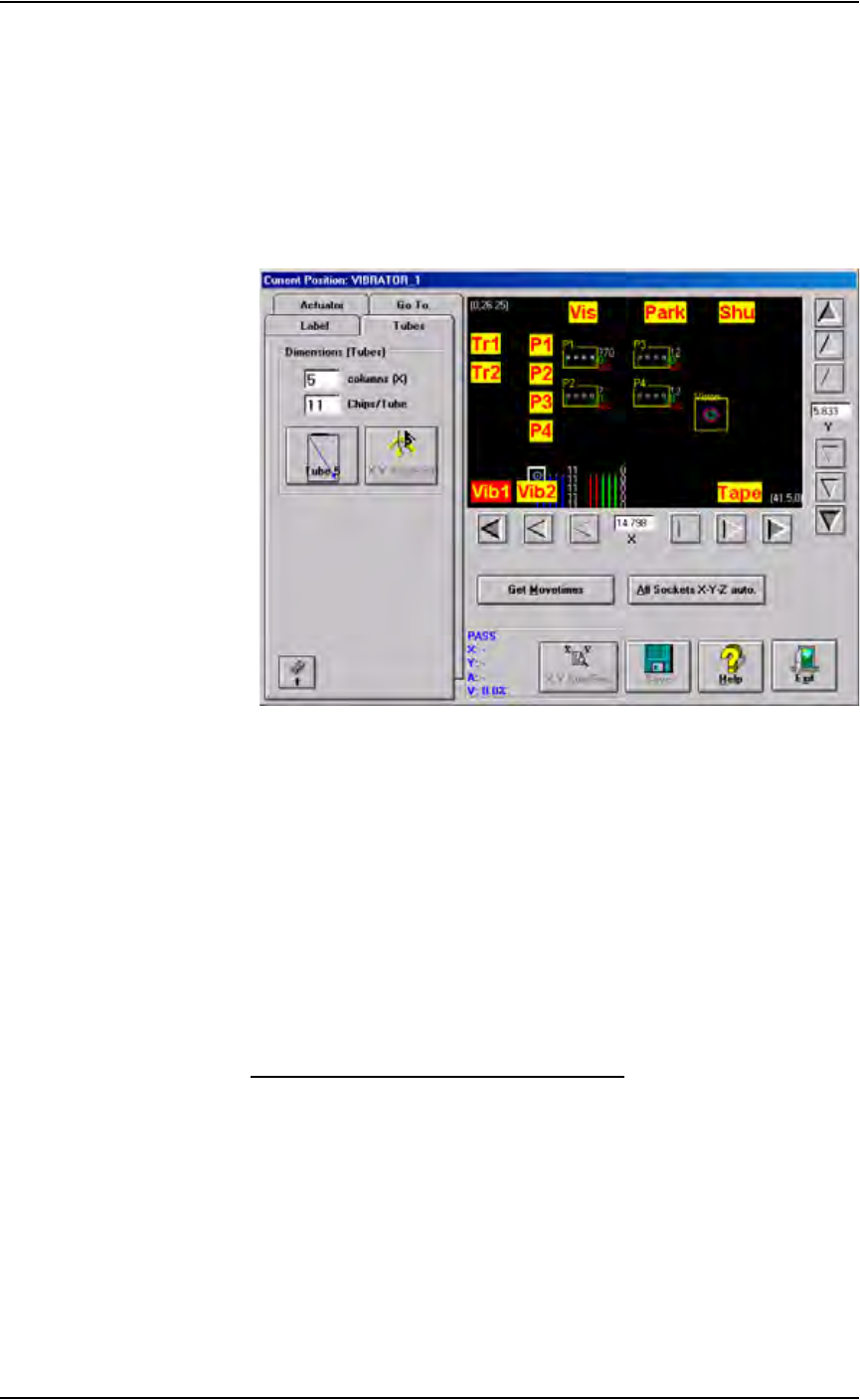
try to open the Gantry window. Click the yellow Vib1 label to move
the PNP head to the first position of the input vibration controller.
Figure 5-67—Enter correct number of devices
) Click the Tubes tab, and then enter the correct number of devices per
tube in the Chips/Tube box.
) Click Save to store the new settings to the package file.
Programmer Errors
Programmer errors discussed:
• Clearing a Programmer Disabled Status
• Fixing Programmer Continuity Failures
• Fixing Programming Failures in All Programmers
• Disabling a Programmer that Fails Self-test
Clearing a Programmer Disabled Status
If the status indicator disappears from any of the programmer outlines, or the
PNP head skips a programmer, first try to clear the programmer disabled sta-
tus.
1. Prepare the system—
1a) On the Run window, click Pause, then click Exit.
1b) From the Setup window, select the Programmers tab.
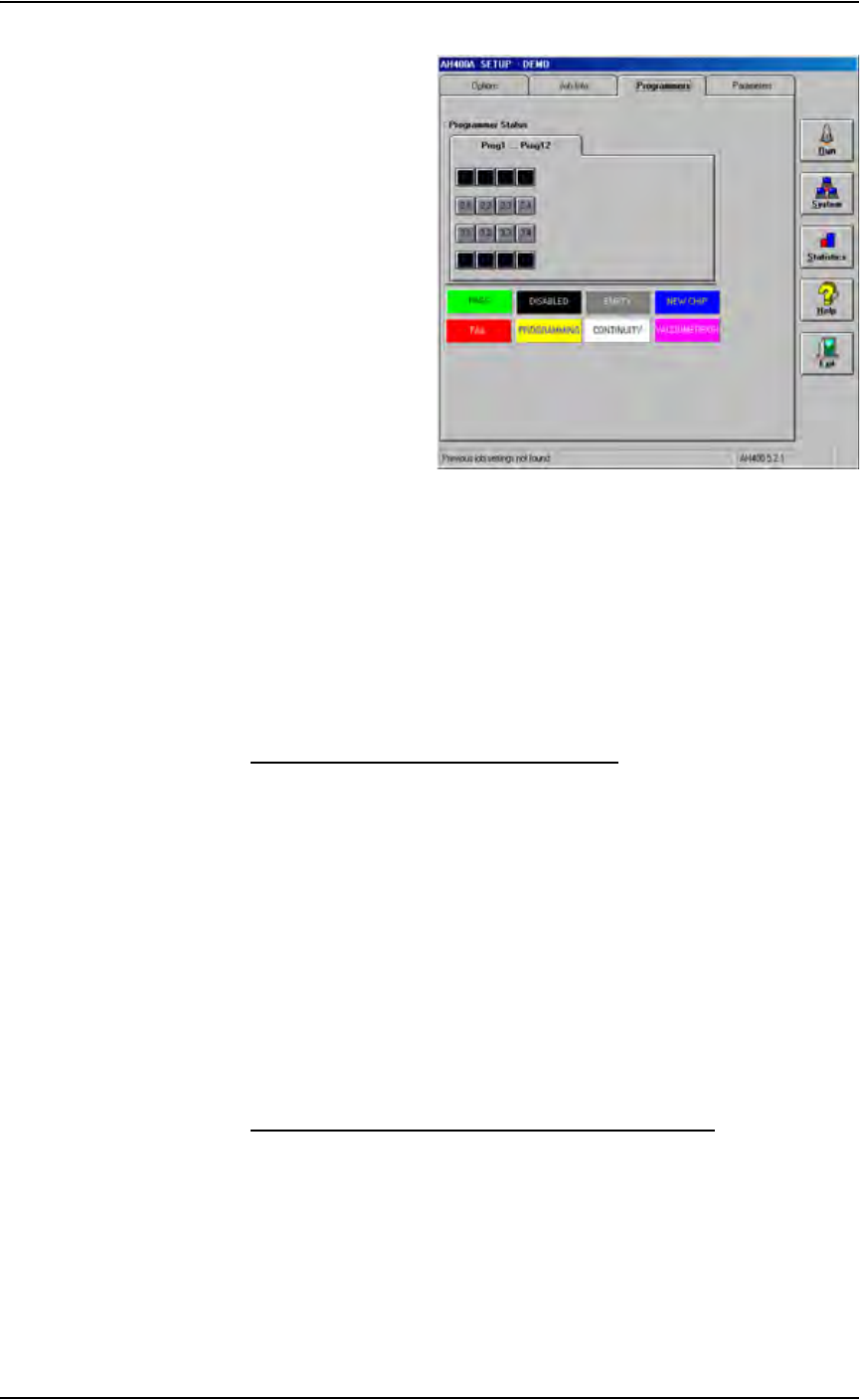
1c) Note which programmers are disabled. In Figure 5-68 below, Program-
mer 1 and Programmer 4 are disabled.
Maintenance • Fixing Failures
PS288 Owner’s Manual 5—57
Figure 5-68—Programmers 1 and 4 are disabled
1d) Click the label for the disabled programmer, and then click the EMPTY
(grey) button. The programmer label changes to grey.
2. Repeat Step 1 for other disabled programmers.
3. Restart job—
3a) Remove any devices in programmer sockets.
3b) Click Run, and then click Run again.
Fixing Programmer Continuity Failures
If only one programmer fails to program devices and continuity failures pre-
dominate in the Statistics window, try the following:
) Move the socket module to another programmer. If the failure moves
with the socket module, check for bent, damaged or worn pins on the
socket and socket module. If the failure persists in the same program-
mer, re-calibrate the device centers for this socket. For information
regarding calibration of the PNP head, see “Teach the Package File” on
page 3-33.
Data I/O does not encourage you to perform repairs on the programmer,
especially if still under warranty. However, you can check for these possible
failures:
Fixing Programming Failures in All Programmers
If all programmers fail to program devices, try the following:
) Check that the Programmer Simulation switch on the Setup window
is OFF.
) Ensure the network hub has power.