PS288_OwnersMnl_PriorTo2009 - 第34页
Introduction 1—24 PS288 Owner’s Manual T o pick up a device using the vacuum tool, squeeze the bladder , place its rubber tip on the device body , release pressure on the bladder , and lift up. Depending upon the physica…
Introduction • Electrostatic Discharge (ESD) Precautions
PS288 Owner’s Manual 1—23
The PS288 should be located in a room with adequate space to allow easy
access to all enclosures. A minimum of one meter (36 inches) of clearance
on all sides is required for removal of system components.
The room should be provided with suitable levels of general room heating,
ventilation, and air conditioning. For an occupied office area, the American
Society of Heating, Refrigeration, and Air Conditioning Engineers, Inc.
(ASHRAE) Standard 62-1992 specifies a minimum of 15 cubic feet per
minute (CFM) of air per occupant. This level of ventilation is intended to
provide the occupants of the room with sufficient air movement to provide a
comfortable environment. The air movement is intended to dissipate heat,
odors, and other exhalation products from respiration (such as carbon diox-
ide and water vapor).
Because the PS288 generates heat, an additional 85 CFM is recommended,
bringing the total room air exchange rate to 100 CFM. In a room with
dimensions of 10 feet by 10 feet, with an 8 foot ceiling (800 cubic feet of
total interior area), 100 CFM would provide approximately six room air
changes per hour.
Based on industrial hygiene monitoring performed during the worst case
operating scenario of a PS288 laser marking system, this rate of air move-
ment is sufficient to provide a safe and healthy airborne work environment.
WARNING: Operating the PS288 in an area that does not meet the
minimum ventilation requirements could result in a hazardous
operating environment.
Electrostatic
Discharge
(ESD)
Precautions
The circuit boards inside the PS288 are susceptible to electrostatic discharge
(ESD), which can damage the circuitry of the programming electronics.
Also, devices processed through the PS288 are very sensitive to static and
can be damaged by accidental and unintended electrostatic discharge while
being handled. The easiest way to prevent damage from ESD is to make sure
a common electric potential (ground) exists between a static-sensitive device
or component, its environment, and the operator.
Operators should wear an antistatic wrist strap connected to the grounding
socket on the front of the PS288. The wrist strap should contain a 1M-ohm
(minimum value) to 10M-ohm (maximum value) current limiting resistor.
Handling
Devices Safely
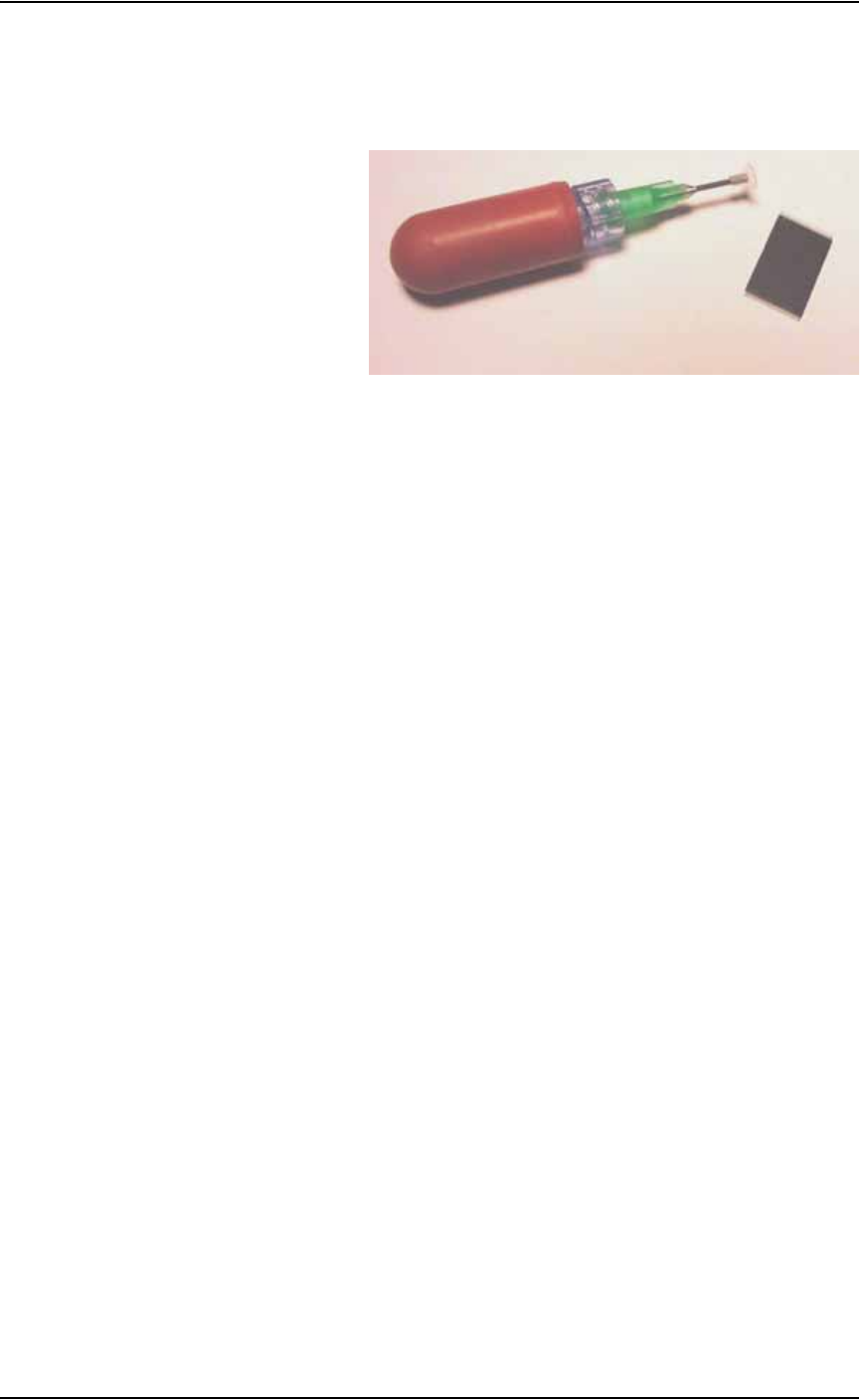
To prevent damage to device leads, use a vacuum tool to move or pick up
devices. The vacuum tool is designed to handle devices without damaging
them.
CAUTION: Do not touch devices with your hands or any imple-
ment other than the vacuum tool. Damage to fine-pitched leads may
result.
Introduction
1—24 PS288 Owner’s Manual
To pick up a device using the vacuum tool, squeeze the bladder, place its
rubber tip on the device body, release pressure on the bladder, and lift up.
Depending upon the physical size of the device, a different sized rubber tip
may need to be used to adequately handle the device. See Figure 1-17.
Figure 1-17—Semiconductor device vacuum tool (PN 565-8000-001)
PS288 Owner’s Manual 2—1
Chapter
2
2Set Up
PS288 installation is performed by Data I/O service personnel or an autho-
rized distributor. The PS288 requires an operating location and two external
facilities (power and air).
The system arrives in a wooden crate. After ensuring that there is no damage
to the exterior of the crate, the installer removes the crate and inspects for
damage that may have occurred during shipping. If there appears to be no
damage, the PS288 is unbolted from the shipping pallet and moved to the
floor.
The operating location for the PS288 must:
• allow at least one meter (36 inches) of area around its perimeter for
opening and removing panels as well as repairing and replacing inter-
nal subassemblies
• provide a solid foundation (for example, a concrete floor)
Once the PS288 is properly located, the feet are adjusted to level the system.
WARNING: Use only the adjustable feet provided on the PS288
for leveling the machine. Do not use shims of any kind to assist in
leveling. The PS288 contains a fast-moving gantry with sizable
mass. Instability may occur if all four of the installed feet do not
make suitable contact with the floor, or if the leg lock nuts are not
tightened against the underside of the frame. The operating area
for the PS288 must be stable, solid, and mostly level prior to
installation. If this is not achievable, consider moving the system
to another location.
Making the
Necessary
Connections
The PS288 requires two external facilities: pressurized air and electrical
power. Both facilities connect to the PS288 through the input panel found on
the rear of the PS288. With these two facilities, all unique electrical voltages
and signals, as well as pneumatic requirements, are generated within the
PS288.