PS288_OwnersMnl_PriorTo2009 - 第63页
Operation • Operat or Functions PS288 Owner’s Manual 3—3 2. From the T askLink Run T ask/Kit window , select the T ask from the list and click Run . Figur e 3-4—Select T ask an d click Run 3. Enter the number of devices …

Operation • Operator Functions
3—2 PS288 Owner’s Manual
• “Prepare Input/Output Modules” on page 3-8
• “Run a Job” on page 3-9
• “Stop the System” on page 3-10
• “Shut Down the System” on page 3-12
• “Monitor the Light Tower” on page 3-13
• “Troubleshoot Programmer Problems” on page 3-13
• “(Optional) Preselect the Programmers” on page 3-15
• “(Optional) Change a Socket Adapter” on page 3-17
• “(Optional) Operate the TF20 Automatic Tray Feeder” on page 3-18
• “(Optional) Operate the TF30 Automatic Tray Feeder” on page 3-19
Check System Readiness
Before you switch on power, check that:
) The external air line is connected, and the air pressure switch is in the
ON position.
) All E-Stop buttons are in the released (operating) position.
) All safety shields are closed.
) The main circuit breaker switch on the front of the PS288 is in the ON
position.
) The power switch on the Handler Computer is in the ON position.
) The Socket Adapters for the job you want to run are installed on all
programmer sites. If necessary, change the Socket Adapters as
described in “(Optional) Change a Socket Adapter” on page 3-17.
Switch On System Power
After checking system readiness as described above:
1. Turn the main power switch clockwise to the ON position.
2. Press the I/O Controller START button.
Start TaskLink and Load Job
1. Double-click the TaskLink icon on the Handler Computer desktop.
Figure 3-3—TaskLink icon
Operation • Operator Functions
PS288 Owner’s Manual 3—3
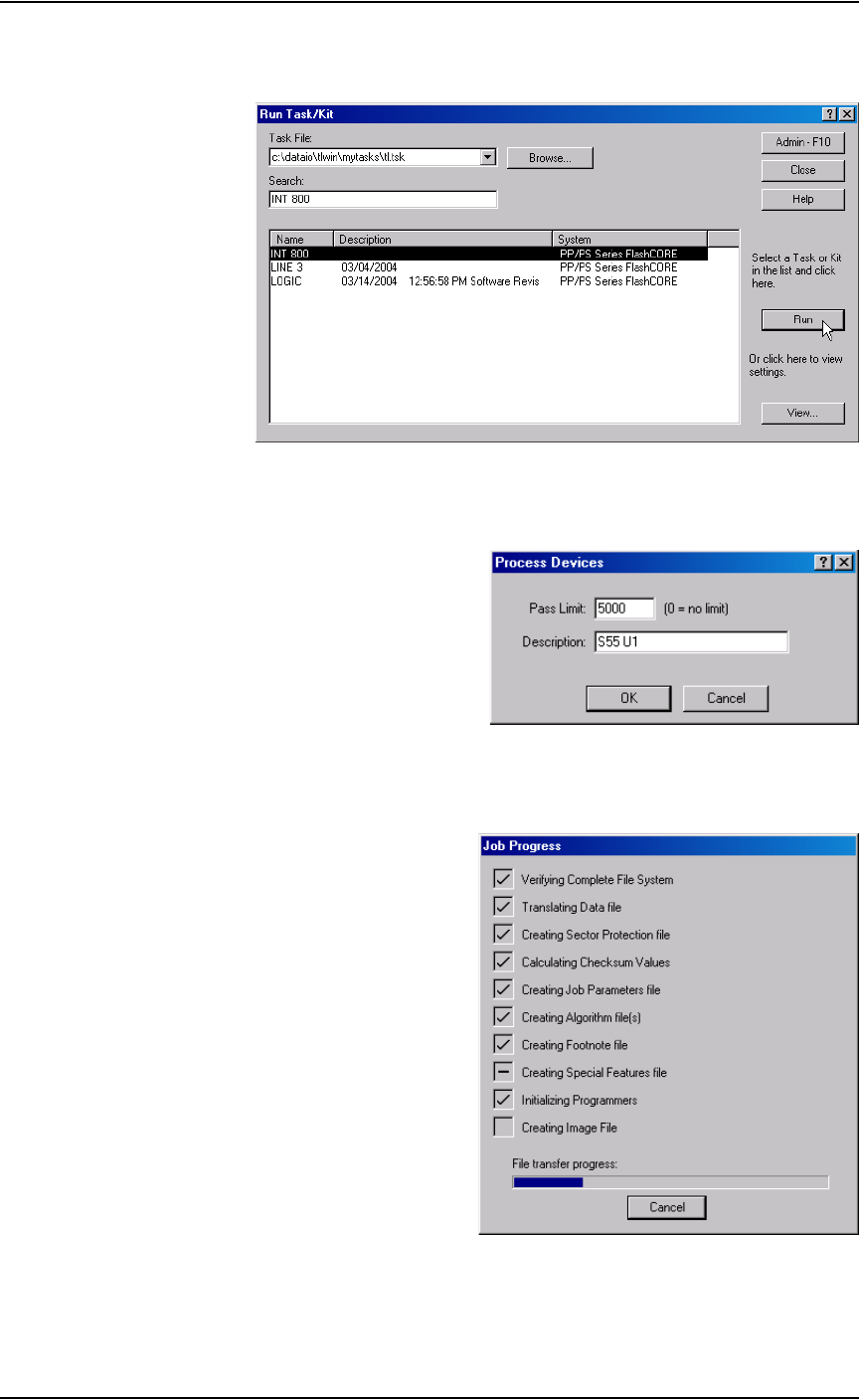
2. From the TaskLink Run Task/Kit window, select the Task from the list
and click Run
.
Figure 3-4—Select Task and click Run
3. Enter the number of devices to be processed in the Pass Limit field (or
leave at 0 for an unlimited number of devices). Click OK.
Figure 3-5—Set Pass Limit
4. TaskLink displays Job progress which includes transferring files to the
programmers. This may take several minutes.
.
Figure 3-6—File transfer progress
Operation • Operator Functions
3—4 PS288 Owner’s Manual
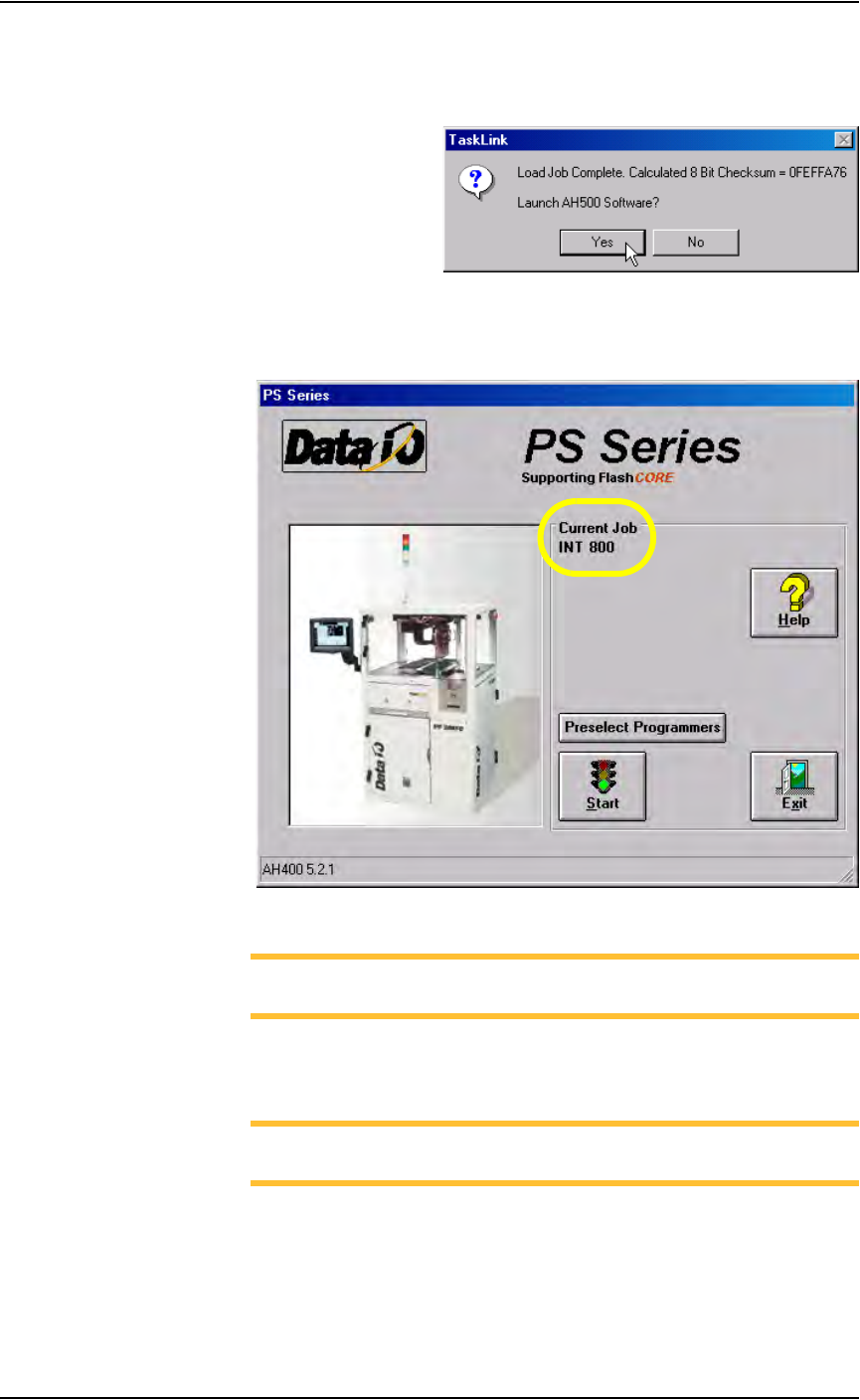
5. When Job loading is complete, TaskLink displays the calculated check-
sum value and prompts to launch the AH500 software. Click Ye s to
launch AH500. TaskLink then minimizes itself.
.
Figure 3-7—Launch AH500 software
6. The AH500 main window opens. Under Current Job, the name of the
Job just loaded is displayed.
.
Figure 3-8—AH500 main screen with Job loaded
NOTE: At this time, you can select which programmers are used.
See “(Optional) Preselect the Programmers” on page 3-15.
Configure Input/Output Settings
NOTE: If you preselected programmers [see “(Optional) Preselect
the Programmers” on page 3-15.], skip forward to Step 1b.
1. Prepare the system—
1a) On the AH500 main window, click Start.