PS288_OwnersMnl_PriorTo2009 - 第78页
Operation • Operator Functions 3—18 PS288 Owner’s Manual (Optional) Operate the TF20 Automatic T ray Feeder As an option, the PS288 can be confi gured with an auto matic tray feeder (either the TF20 or the TF30). Basic o…
Operation • Operator Functions
PS288 Owner’s Manual 3—17
2. Lock configuration and start—
2a) To lock configuration (so that next time the system is switched on the
same programmers are selected), click the O (red) side of the Lock
Cnf. toggle switch.
2b) On the AH500 main window, click Start. This opens the Setup win-
dow.
(Optional) Change a Socket Adapter
To change a Socket Adapter:
1. If a job is running, click Finish on the Run screen and wait for the PNP
head to empty the sockets and return to Park.
2. Exit the AH500 software.
3. Open the safety shield that offers the easiest access to the program-
mer(s).
CAUTION: Electrostatic discharge may damage Socket Adapters
and devices. Wear an ESD strap or discharge static against a com-
mon ground.
4. Unscrew the two captive, 4 mm socket head screws and open the
Adapter Bracket.
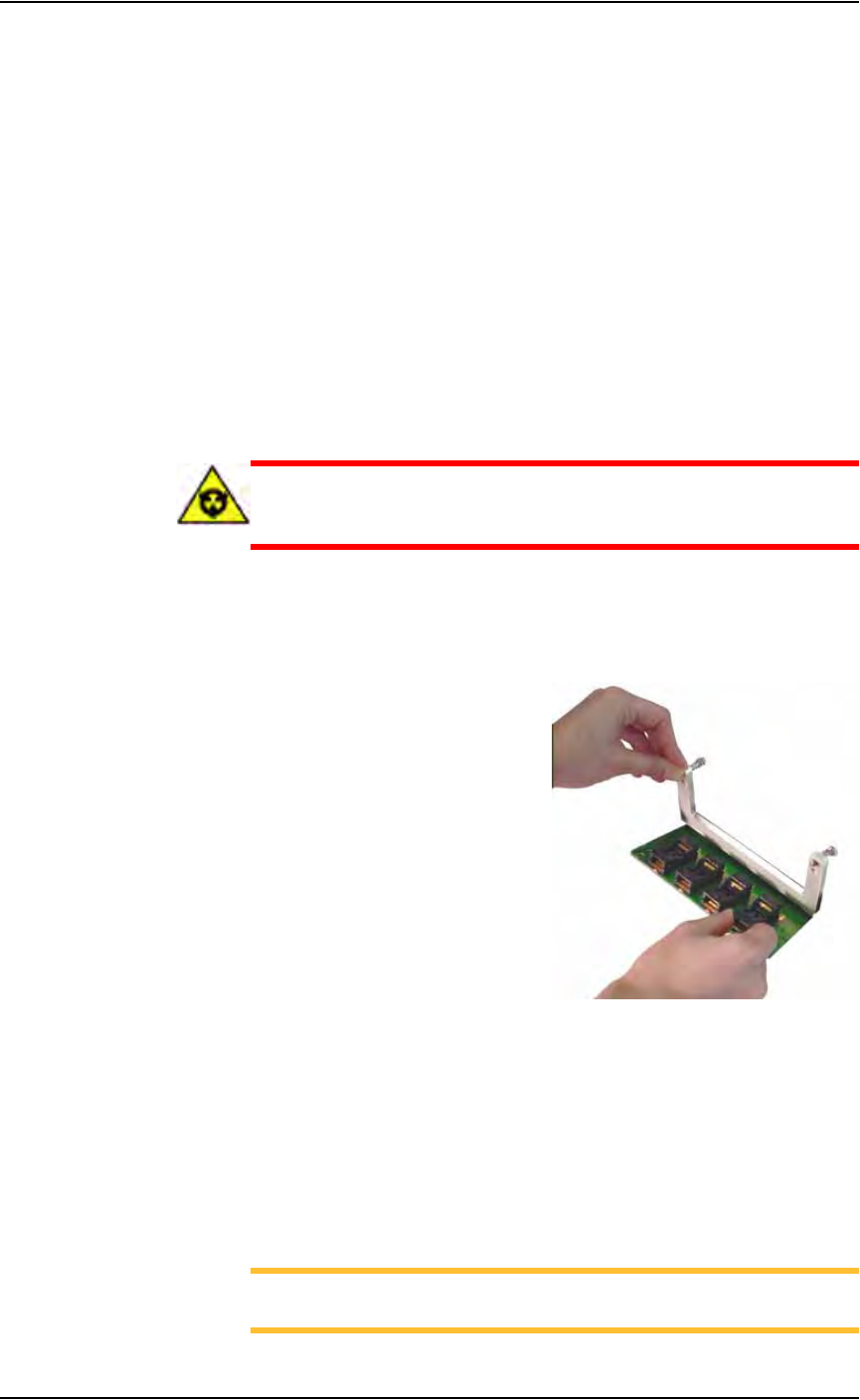
5. Open the Adapter Bracket and lift up the Socket Adapter. (Programmer
not shown.) See Figure 3-25.
Figure 3-25— Lift the Socket Adapter
6. Without touching the gold contact surfaces on the bottom of the Socket
Adapter, lift it up off the dowel pins and remove.
7. Insert the correct Socket Adapter, making sure that it seats on the
dowel pins.
8. Screw in the two screws.
To restart a stopped Job, in TaskLink select the Job and click Run on the
Task/Kit Manager window.
NOTE: If you are using tape output, you also must press the red
reset button on the taping machine to continue.

Operation • Operator Functions
3—18 PS288 Owner’s Manual
(Optional) Operate the TF20 Automatic Tray Feeder
As an option, the PS288 can be configured with an automatic tray feeder
(either the TF20 or the TF30). Basic operation of the TF20 automatic tray
feeder is described here. For more detailed information, see the TF20 Tray
Feeder Instruction Manual that came with your system.
1. Starting—
Plug the TF20 power cable into the PS288. The TF20 automatically
initializes. If the TF20 detects a tray on the conveyor, it moves the tray
to the pick/place position inside the PS288 work envelope and clamps
it in place. Otherwise there is no conveyor motion.
2. Check operator indicators—
• Check the Thick/Thin switch. This switch prepares the TF20 to operate
with JEDEC trays of the correct thickness. Verify that the switch cor-
rectly matches the type of JEDEC trays used.
NOTE: If the Thick/Thin switch is set incorrectly, the feeding mech-
anism will jam and cause an error condition (orange LED on and
flashing).
• If the blue LED (indicating Full/Empty) is on and not flashing, the
lower input elevator is out of trays. Open the tray access door and place
one or more trays in the lower input stack. Close the door. The elevator
automatically begins to move up to a normal run position.
• If the blue LED is on and flashing, the TF20 is full of trays. Remove
the trays from the upper output stack.
• If the yellow LED is on and not flashing (indicating an inhibit condi-
tion), close the elevator access door.
3. Loading trays—
The TF20 can be reloaded with trays at any time. When the last tray is
moved to the pick/place position, the lower input stack is empty and the blue
LED turns on without flashing. The TF20 is in an empty condition. The ele-
vator then drives down to its lower limit. It is best to reload the TF20 at this
time or sooner.
If you do not reload the TF20 and the PS288 continues to operate, the last
tray is returned to the upper output stack. The TF20 automatically goes to an
inhibit condition.
3a) If the TF20 is not empty, press the Elevator Down button. The TF20
automatically goes to an inhibit mode, and the elevator begins driving
down toward its lower limit.
3b) Open the elevator access door and insert one or more trays.
3c) Close the elevator door and the elevator begins moving up to a normal
run position.Once the elevator has reached the normal run position, the
TF20 automatically leaves the inhibit mode.
4. Unloading trays—
The TF20 can be unloaded at any time with little or no interruption to the
operation of the PS288. When the upper output stack reaches its maximum

Operation • Operator Functions
PS288 Owner’s Manual 3—19
capacity, the TF20 automatically goes to an inhibit condition and signals that
it is full (blue LED on and flashing). It is best if you unload the TF20 at this
time or sooner.
If the you do not unload the TF20 and the PS288 continues to operate, the
TF20 does not accept any further manual or automatic tray exchange
requests and goes to idle mode.
4a) If the blue LED is not flashing, the upper output stack has room to
accept more trays. Before you remove the trays, press the Inhibit but-
ton. Remove the trays.
NOTE: Before removing trays, press the Inhibit button and wait to
see the yellow LED. The inhibit mode prevents the TF20 from
cycling a tray while you are removing trays.
4b) If the blue LED is flashing, remove the trays. Once the trays have been
removed, press the Inhibit button to resume normal operation.
For more detailed information, see the TF20 Tray Feeder Instruction Manual
that came with your system.
(Optional) Operate the TF30 Automatic Tray Feeder
To operate the TF30 automatic tray feeder:
1. AH500—
Apply power to the TF30 automatic tray feeder by invoking AH500
and clicking Run on the Setup window.
2. Elevator—
2a) On the TF30 control panel, press the ENABLE and START buttons
simultaneously. The elevator comes to the top.
2b) Press the ENABLE and START buttons simultaneously again. The ele-
vator comes to the loading position.
3. Load magazine—
3a) Open the TF30 door and place the loaded magazine inside. Make sure
the arrows on the magazine point toward the PS288.
3b) Close the door and press the ENABLE and START buttons.
3c) Press the ENABLE and START buttons again until the magazine is all
the way down to the first position.
NOTE: If you want to bring the magazine back up again, you must
press the STOP button first. Then press ENABLE and START again.
Change the magazine when the empty light illuminates. To run the TF30 in
continuous mode, make sure the top tray slot in the magazine is empty. If
you use the STOP button, make sure the tray is back in the magazine.