Apollo1_Operators_Manuel.pdf - 第122页
C-1 22 cab - Produkttechnik GmbH / Tharo Systems, Inc. Possible cause There are labels missing on the label material The label format as set in the software does not correspond with the real label format Printer is loade…
C-121cab - Produkttechnik GmbH / Tharo Systems, Inc.
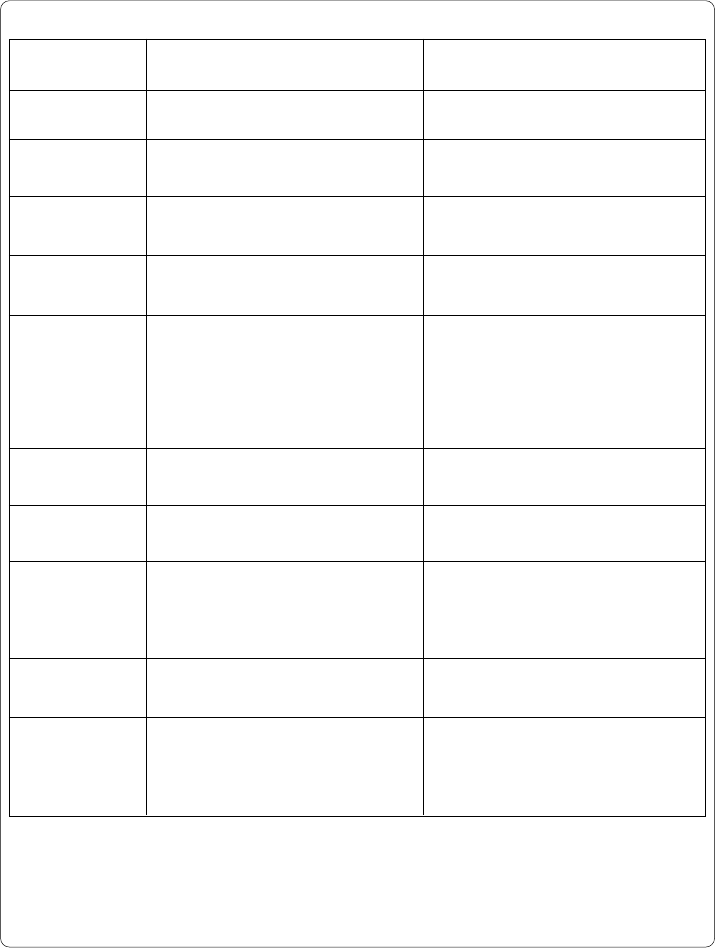
Error message
File not found
FPGA
malfunction
Head error
Head open *
Head too hot *
Invalid data
Invalid outline
Invalid setup
LCD malfunction
Memory overflow
Solution
Check the contents of the card.
Switch printer off and then on.
If error recurs ® contact Service.
Switch printer off and then on.
If error recurs ® contact Service.
Lock printhead.
After pausing to cool down the
printhead, the print job will be
continued automatically.
If the fault recurs repeatedly, reduce
the heat level or the print speed via the
software.
Cancel current print job.
Check data.
Cancel current print job.
Change font.
Use RESTORE function to reset all
settings back to factory settings.
Configure setup. (see Chapter 9)
If error recurs ® contact Service.
Switch printer off and then on.
If error recurs ® contact Service.
Cancel current print job.
Reduce amount of information.
Possible cause
Requested file is not on the card
Hardware error
Hardware error
Printhead is not properly locked
(Apollo 1 only)
Printhead is overheated due to
labels containing a lot of graphics,
text, bar codes, etc.
Fault while downloading graphic
data
Error with the selected font
(download font)
Setup is invalid
Hardware error
Current print job contains too much
information
(selected fonts, large graphics)
Table C-3 Error messages (continuation)
C-122 cab - Produkttechnik GmbH / Tharo Systems, Inc.
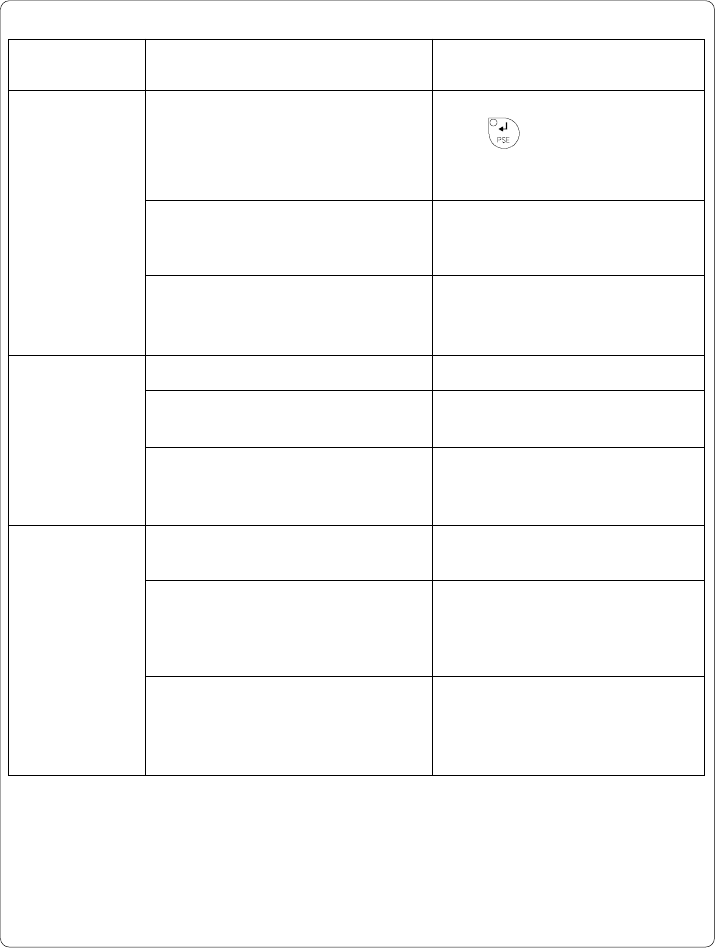
Possible cause
There are labels missing on the label
material
The label format as set in the
software does not correspond with
the real label format
Printer is loaded with continuous
paper but the software is set on
labels
Out of label material
Label has not properly been loaded
in the label sensor fittings
The sensors of the label edge
sensor are positioned outside of the
path of the material
Out of transfer ribbon
Ribbon melted during printing
The printer is loaded with thermal
labels for direct thermal mode
(without transfer ribbon); but the
software is set for transfer printing.
Solution
Press key repeatedly until
printer recognizes the next label on
the material.
Cancel current print job.
Change the label format set in the
software. Restart print job.
Cancel current print job.
Change either software setting or
print media. Restart print job.
Insert new supply roll.
Check paper feed.
Adjust the label edge sensor.
(see Chapter 7)
Load new supply roll of transfer
ribbon.
Cancel the current print job.
Change the heat level via software,
clean the printhead, load transfer
ribbon, restart print job.
Cancel current print job.
Set software to direct thermal mode.
Restart print job.
Error message
No label found *
Out of paper *
Out of ribbon *
Table C-3 Error messages (continuation)

C-123cab - Produkttechnik GmbH / Tharo Systems, Inc.