Apollo1_Operators_Manuel.pdf - 第20页
2 0 cab - Produkttechnik GmbH / Tharo Systems, Inc. T ransfer Ribbon The choice of a suitable transfer ribbon is important for the print quality of your printer as well as the useful life of the printhead. T ransfer ribb…
19cab - Produkttechnik GmbH / Tharo Systems, Inc.
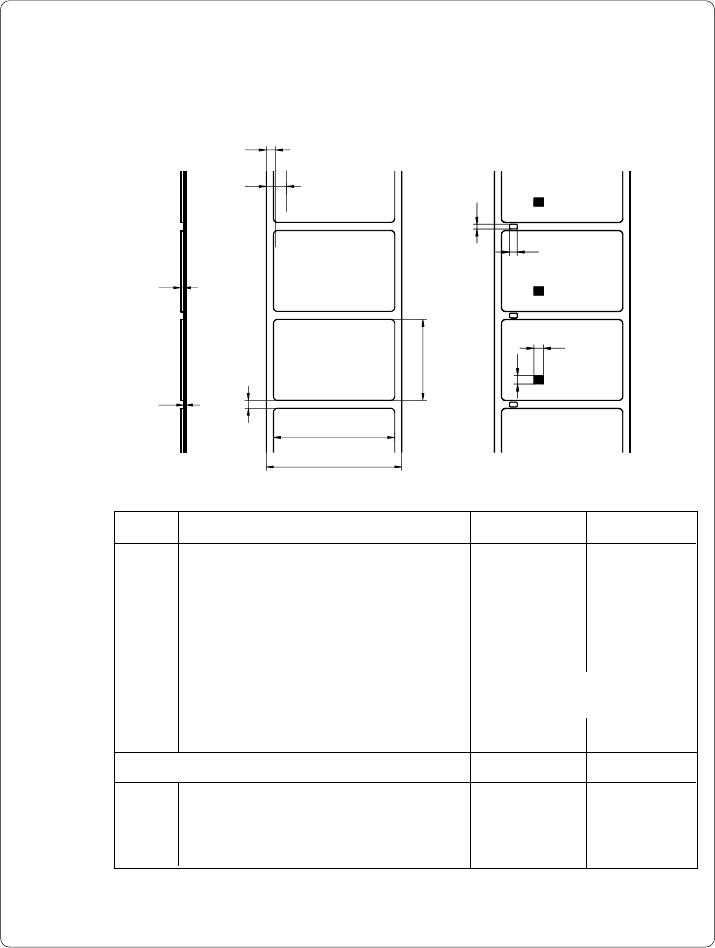
Label/ Tag Media Specifications
Label and tag media to be used for the Apollo can be found in the table below.
Note this information before ordering your labels.
E
F
D
A
B
K
I
L
M
C
G
H
Fig. 1.5 Label formats
Item MINIMUM MAXIMUM
A Label width .5 (12) 4.6 (116)
B Width of silicon liner .5 (12) 4.6 (116)
C Label length .2 (5) 21.5 (546)*
D Gap between labels .08 (2) 21.5 (546)*
E Label thickness .0024 (.06) .01 (.25)
F Thickness of silicon liner .0024 (.06) .01 (.25)
G Distance of the first printing position
from the edge of the silicon liner .08 (2)
H Distance of the label sensor
from the edge of the silicon liner .12 (3) 1.9 (48)
For special materials
I Width of punch hole .2 (5) -
K Height of punch hole .08 (2) .2 (5)
L Width of reflective mark .2 (5) -
M Height of reflective mark .08 (2) .2 (5)
* for Apollo 3 : 37.2 (945)
Table 1 b Label formats in inches (figures in brackets are in mm)

2 0 cab - Produkttechnik GmbH / Tharo Systems, Inc.
Transfer Ribbon
The choice of a suitable transfer ribbon is important for the print quality of your
printer as well as the useful life of the printhead.
Transfer ribbons of inferior quality may cause premature deterioration of
the printhead !
The ribbon material must be antistatic, because the extremely thin surface coating
of the thermal printhead can be damaged by electrostatic discharge.
Also, the material must be extremely resistant to high temperatures to avoid melting
the ribbon with the printhead.
The heat which arises during printing must be carried off by the label and by the
transfer ribbon itself. Transfer ribbons of inferior quality are often poor heat
conductors. This may cause overheating of the printhead in spite of electronic
protection.
Poor transfer ribbons also tend to lose parts of the coating which leads to accumu-
lating dirt on the printhead and the sensors. With some ribbons the color rubs off
and soils the printhead. All of these effects contribute to poor print quality.
We have carried out numerous tests with many different ribbons and we
recommend you use transfer ribbons made by well-known/ brand manufacturers
only. Depending on the label material, several transfer ribbons may be suitable.
The quality of print is determined by the right combination of these materials.
The recognition of the transfer ribbon is sensed by the rotation control of the
transfer ribbon unwinder, rather than by photocell sensors. As a result, ribbons
with a thinner coating or those with a colored coating can be used safely. To be
able to print all labels up to the exact end of the transfer ribbon, the length of the
uncoated trailer is limited.
When buying transfer ribbons, make sure that the trailer of the ribbon does
not exceed a length of 5.9 in (150 mm).
F
F

21cab - Produkttechnik GmbH / Tharo Systems, Inc.
2 General Safety Instructions
- The printers of the Apollo series are built exclusively to print labels and
tags, continuous paper, etc. Do not use other materials than listed in
Chapter 1.
- Connect the printer only to an outlet with the correct voltage !
The printer is configured for either 230V or 115V power supply, which can
be switched using the input voltage selector at the back of the printer.
Connect only to a power outlet with a grounded contact.
- The printer must only be connected to devices which have extra low
voltage.
- Power must be OFF before plugging in any accessory or connecting the
printer to a computer, etc. Also switch power off on all appliances before
disconnecting.
- Do not expose the printer to any moisture, or use in damp or wet areas.
- The printer will operate with the cover open if necessary. This is not
recommended, as moving or rotating parts become accessible. Keep long
hair, jewelry, loose clothes away from the moving parts.
- During the print process the printhead will become hot. Use extra caution
when touching the printhead.
3 Unpacking and Delivery Contents
Inspect the Apollo's packaging and contents immediately after receipt for possible
damage caused by shipping.
The supplied equipment of the Apollo depends on the requested options.
Compare the delivered accessories with your order.
Please keep the original packaging in case the printer must be returned.
F