Apollo1_Operators_Manuel.pdf - 第65页
65 cab - Produkttechnik GmbH / Tharo Systems, Inc. Copy Memory Card The "Copy memory card" facility may be used to copy information from one memory card, for instance PC card, PCMCIA card, etc., onto another on…
64 cab - Produkttechnik GmbH / Tharo Systems, Inc.
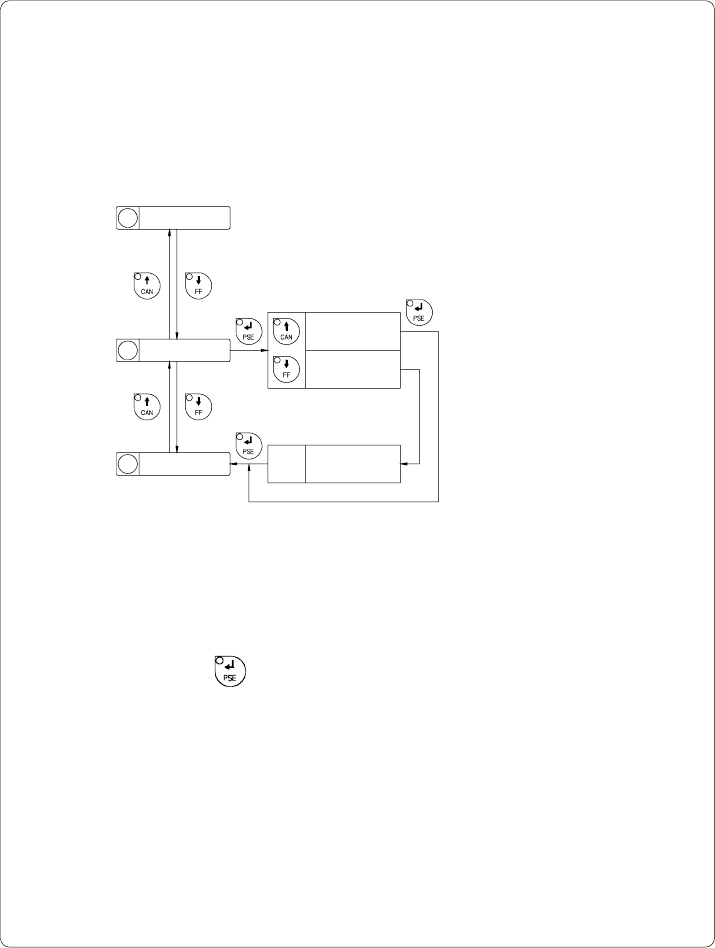
Format Card
The "Format card" facility may be used to delete all stored data from a memory
card, for instance PC card, PCMCIA card, etc. (optional)
The delete process will format the card. Therefore, this option may also be
used to prepare new memory cards for operation.
12 Character set
13 Format card
14
Copy memory card
Format card
No
Format card
Yes
Format card
xxxx yyyy OK
Fig. 9 o Delete/Format a memory card
If the procedure has been started without having a card installed the display will
show "No card".
Pressing the key will skip to the following parameter.
xxxx ... Type of card
(e.g. sRAM)
yyyy ... Memory capacity
(e.g. 128 kB)
65cab - Produkttechnik GmbH / Tharo Systems, Inc.
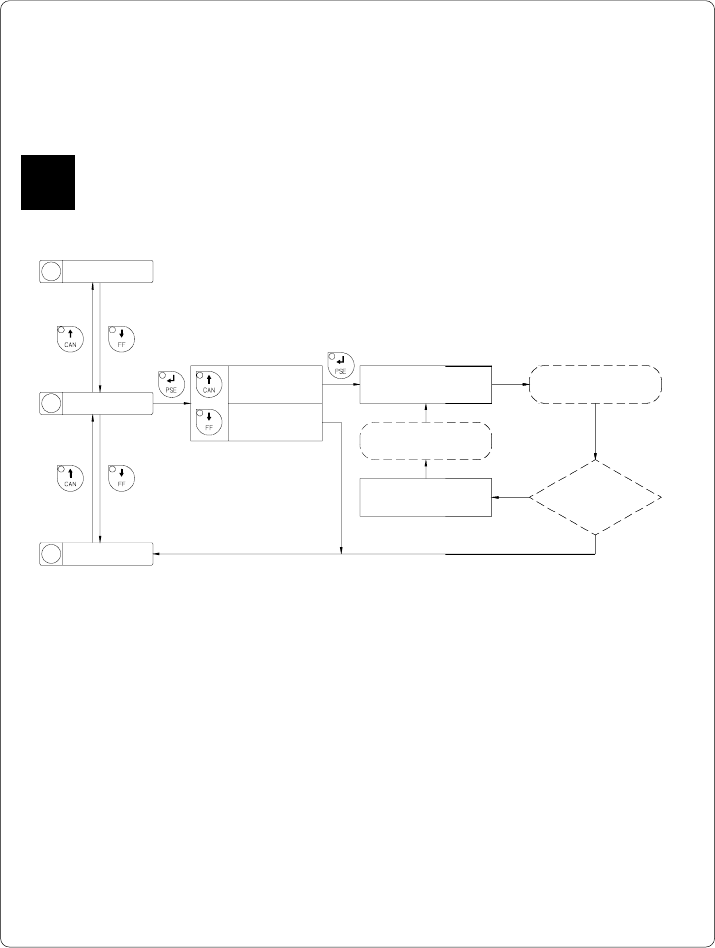
Copy Memory Card
The "Copy memory card" facility may be used to copy information from one
memory card, for instance PC card, PCMCIA card, etc., onto another one.
Before starting the duplication, the source card has to be installed.
F
15 Backfeed
Selection
Insert card
to be copied
no
yes
Fig. 9 p Copy memory card
The duplication is carried out file by file. This allows the usage of memory
cards with different capacities.
When the duplicate card cannot store any more information the display shows
"Card full".
If data with a capacity of more than 1Megabyte has to be copied, the
duplication process will be divided into several cycles. Alternately, the printer
display will ask to insert either the source card or the duplicate card.
14
Copy memory card
13 Format card
Copy memory card
Yes
Copy memory card
No
Copy memory card
Insert dest.
Insert source
card
Copy memory card
Insert source
All files
copied?
66 cab - Produkttechnik GmbH / Tharo Systems, Inc.
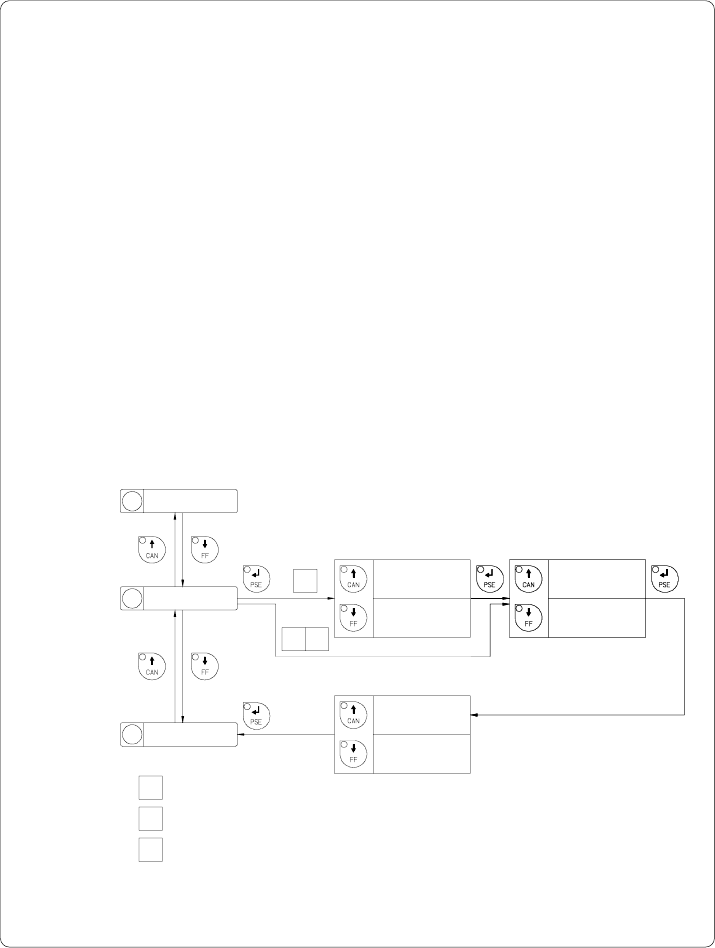
Backfeed
In the cut and dispense mode, the material will be stopped in a position where
the front edge of the following label has already been forwarded over the print
line. The Apollo will carry out a backfeed of the label material from its cut/
dispense position to the print line. Thus, the next label can be printed all at once.
The backfeed will be performed independent of the label design if the parameter is
set on "always". If the setting is on "smart", the backfeed will only be performed if
the front label is in its cut/ dispense position and the Apollo has not yet received all
of the data for printing the following label. Otherwise, the print of the second label
will be started, but only completed after the first one has been picked up. Smart
backfeed can cause flaws in the printed image.
Besides, Apollo 1 offers to select from two backfeed modes, either "head lift-off"
or "head down". By selecting Head lift-off the printhead is raised with each
backfeed of material. This prevents smudging of the label material by the
ribbon. If the printhead is turned down the accuracy of positioning is more
precise.
Default Setting : head lift-off (Apollo 1), smart
1 Apollo 1
2 Apollo 2
3 Apollo 3
15 Backfeed
14
Copy memory card
16 Debug mode
Backfeed
head lift-off
Backfeed
head down
Backfeed
xxx Ye s
Backfeed
xxx No
Selection
Confirmation
Backfeed
smart
Backfeed
always
Selection
23
1
Fig. 9 q Set "Backfeed" parameter