Apollo1_Operators_Manuel.pdf - 第70页
70 cab - Produkttechnik GmbH / Tharo Systems, Inc. 10 Self T est / T est Print Start of T est Print T o prepare a test print, load media (labels or continuous paper) which extends over the entire print width of the Apoll…

69cab - Produkttechnik GmbH / Tharo Systems, Inc.

70 cab - Produkttechnik GmbH / Tharo Systems, Inc.
10 Self Test / Test Print
Start of Test Print
To prepare a test print, load media (labels or continuous paper) which extends over
the entire print width of the Apollo.
If you want to perform the test print in thermal transfer mode, also use transfer
ribbon of the maximum width.
During test print, the Apollo will not sense any label gaps. The length of
the printout will be about 9 in (230 mm). Endless paper would suit best for
test prints, otherwise, a normal sheet of A4 paper which is cut to a width of
4.6 in (116 mm) can be used in thermal transfer mode.
To initiate a self test printout, press the key when switching on the printer
and keep it pressed down until the system test is completed.
The display shows "Test print", and the Apollo will print an internal test sample
which contains a variety of information about the configuration of the printer as
well as the results of the internal test.
The test printout can also include a range of hardware errors which have
occurred previously, even if they have disappeared again. This information is
important for service purposes and can only be deleted by Technical Support.
The information in the printout is also useful for checking the print quality, such
as differences in the blackness left/right, missing ink dots, etc. It is
recommended you carry out a print test immediately after receiving the printer.
After completing the test print, the Apollo will run the system test once again.
Then, the printer proceeds to ONLINE mode.
To cancel the test print press the key.
F
71cab - Produkttechnik GmbH / Tharo Systems, Inc.
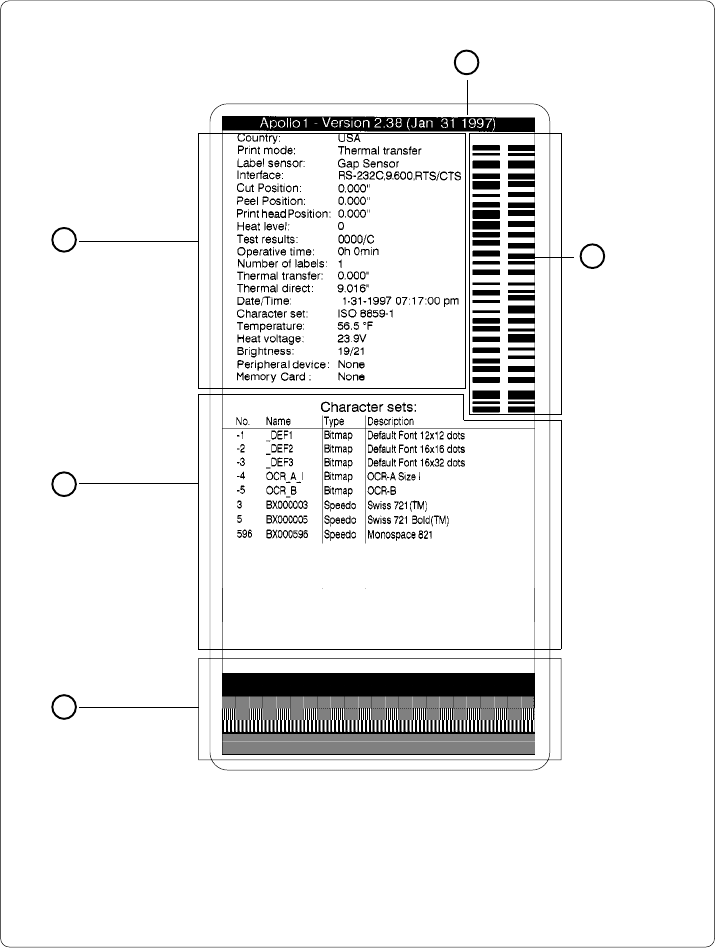
Explanation of the Self Test Printout
Fig. 10 Self test printout
On the following pages you will find detailed information about the contents of the
test printout.
1
2
4
5
3
Firmware version
Setup and status
information
Existing
character sets
Test pattern
Bar code with
test information