Apollo1_Operators_Manuel.pdf - 第78页
78 cab - Produkttechnik GmbH / Tharo Systems, Inc. Example of ASCII Dump Mode The following figures show the "normal" appearance of a printed label, and the appearance of the same label when its commands are pr…
77cab - Produkttechnik GmbH / Tharo Systems, Inc.
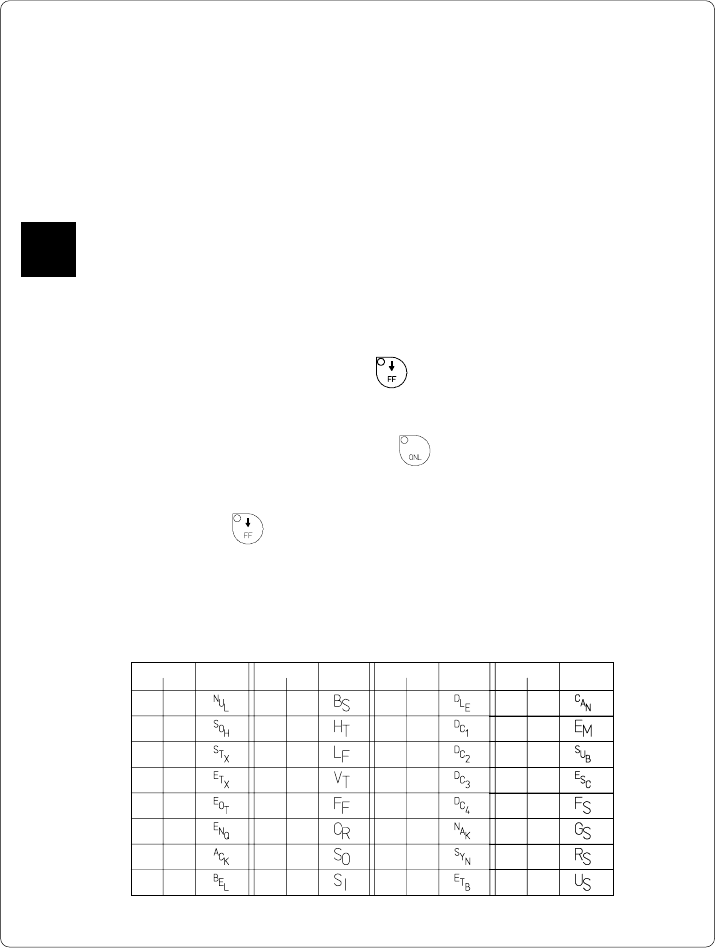
Code Druck Code Druck Code Druck Code Druck
DEC HEX DEC HEX DEC HEX DEC HEX
00 00 08 08 16 10 24 18
01 01 09 09 17 11 25 19
02 02 10 0A 18 12 26 1A
03 03 11 0B 19 13 27 1B
04 04 12 0C 20 14 28 1C
05 05 13 0D 21 15 29 1D
06 06 14 0E 22 16 30 1E
07 07 15 0F 23 17 31 1F
Table 12 Representation of the control characters in monitor mode
12 Monitor Mode/ ASCII Dump Mode
If programming directly, the monitor mode provides a method to print control
sequences which were received at the interface. The commands will be printed in
text format depending on the selected character set. Error messages will be
printed directly behind the fault, e.g. for unknown commands.
In monitor mode, the Apollo will not recognize gaps between labels nor control the
ribbon feed.
The font used for printouts in monitor mode is suitable to send by facsimile.
For questions or future reference, print and retain one copy of the label format for
each label printed.
Start of Monitor Mode/ ASCII Dump Mode
To start the monitor mode, press the key while switching on the printer, and
keep it pressed down until the system test is completed. The display shows
"ASCII Dump Mode".
To cancel ASCII Dump mode, press the key.
In monitor mode, the print of data will be started after every four lines of data
received. Therefore, in some cases, the last lines of the label have to be retrieved
by pressing the key.
Representation of the Control Characters
The control characters (ASCII Code 00 ... 31) as shown in monitor mode
printouts are as follows.
F
78 cab - Produkttechnik GmbH / Tharo Systems, Inc.
Example of ASCII Dump Mode
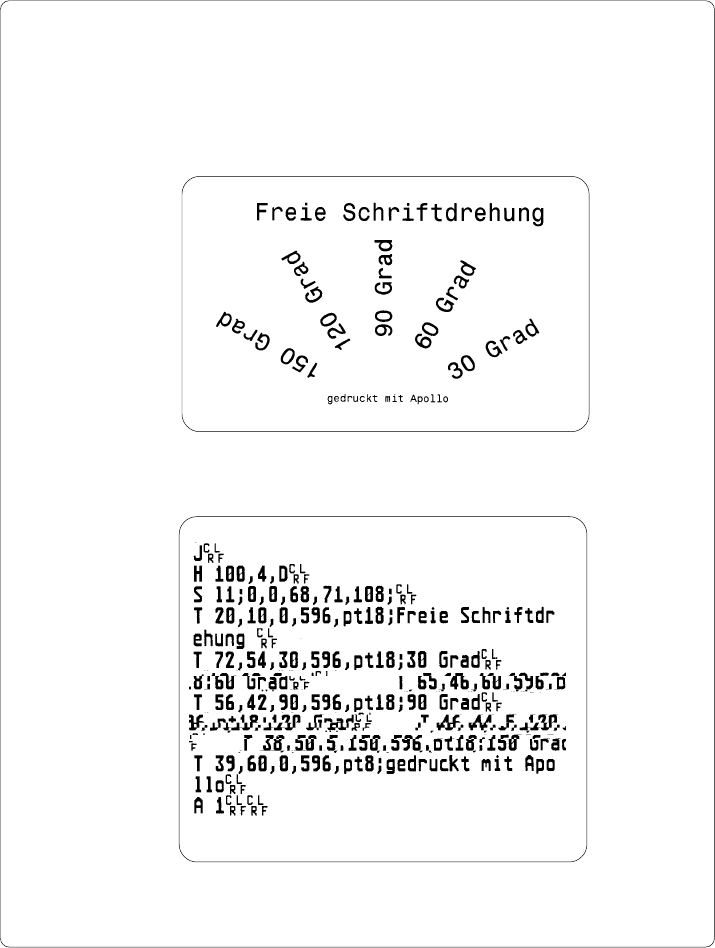
The following figures show the "normal" appearance of a printed label, and the
appearance of the same label when its commands are printed in ASCII Dump
mode.
Fig. 12 a "Normal" label
Fig. 12 b The same label as above printed in ASCII Dump mode
79
cab - Produkttechnik GmbH / Tharo Systems, Inc.
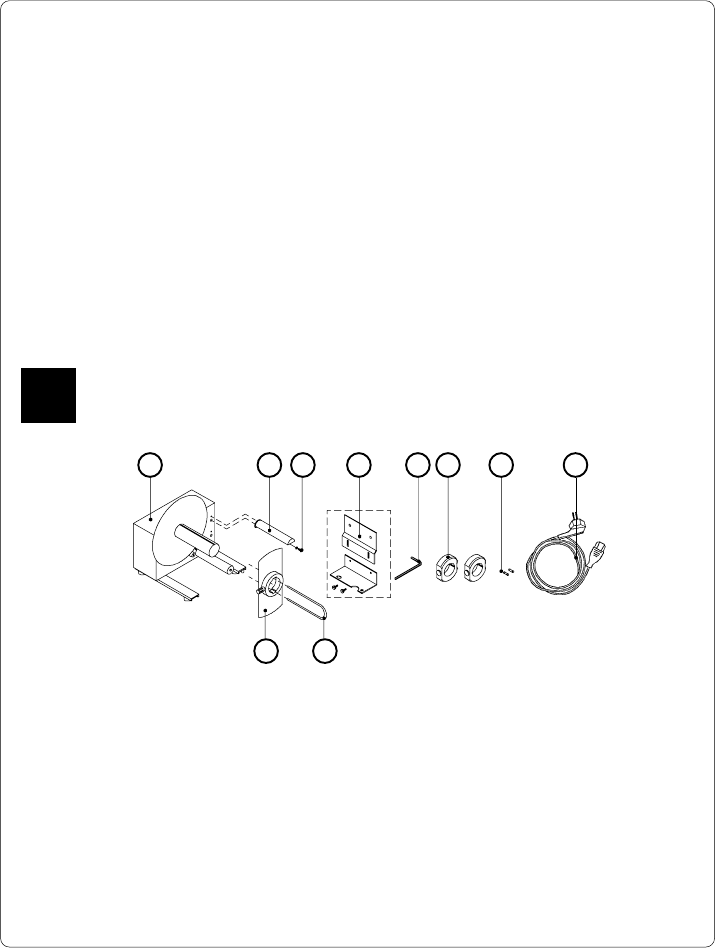
Fig. 13 a Package contents of the external rewinder
85 6 7
13 Options
External Rewinder
To handle large print jobs, an external rewinder is available which allows you to
rewind complete rolls of label material. The maximum size of the media supply roll
is 8 in (200 mm) with a core diameter of 3 in (75 mm), or a roll of 7.5 in (190 mm)
with a core of 1.5 in (40 mm).
The external rewinder is mechanically connectable to the Apollo by an adapter
plate. The rewinder requires a separate power outlet for its operation.
Delivery Contents
The rewinder is packed separately from the printer.
Please keep the original packaging in case the rewinder must be returned !
The following components are included in the package :
1 2 3 4
10 9
1 - Rewinder
2 - Guide bar
3 - Cylinder screw M5x10 incl. washer A5.3
4 - Printer adapter
(upper adapter plate, lower adapter plate, 2 knurled screws M4x6)
5 - Hexagonal wrench (.16 in or 4 mm)
6 - 2 Rewind axle adapters, with a diameter of 3 in or 75 mm
7 - 2 x 1A Fuses (for use at 115V)
8 - Power cable
9 - Clamp
10 - Flange
F