Apollo1_Operators_Manuel.pdf - 第85页
85 cab - Produkttechnik GmbH / Tharo Systems, Inc. Cutter Assembly With the optional cutter assembly installed, labels or endless media may be cut off immediately after being printed. The cutter is controlled and powered…
84 cab - Produkttechnik GmbH / Tharo Systems, Inc.
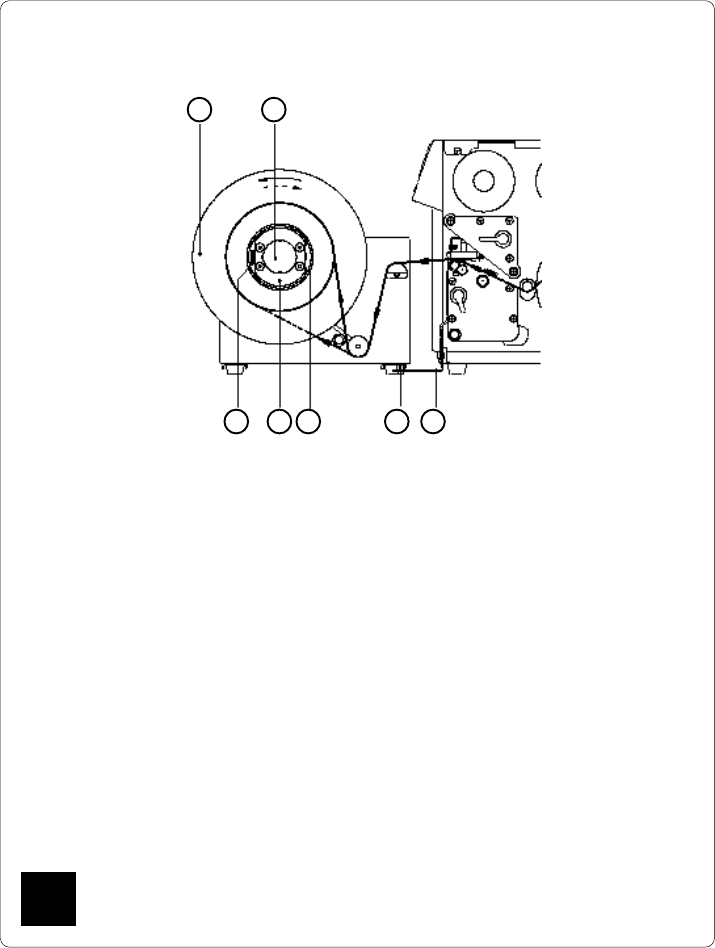
1. Use a cardboard roll (5) which is about .04 in (1 mm) wider than the label strip.
2. Attach the rewinder to the Apollo by positioning the metal posts on the bottom
of the rewinder (4) into the holes of the adapter plate (3).
3. Mount the first axle adapter (6) onto the rewinder axle (2) and slide it up to the
disc (1). Tighten knurled screw (7).
4. Mount the second adapter onto the rewinder axle (2). Slide it towards the first
adapter until the clearance between the edge of the adapter and the disc (1)
is a little less than the width of the cardboard roll (5). Tighten knurled screw
(7).
5. Slide the cardboard roll (5) over the two adapters (6) until it is touching the disc
(1).
6. Feed the label strip over the guide bar and under the roller as shown in Figure
13 g up to the cardboard roll (5).
7. Using adhesive tape or a label, affix the end of the label strip to the cardboard
roll (5). (the broken line shows the path of inside rolled labels)
8. Slide flange onto the rewind axle (2) until it stops at the cardboard. Tighten
knurled screw.
9. Switch the rewinder ON.
Caution !
When switched ON, the rewinder immediately begins rotating !
Fig. 13 g Rewinding onto 3 in (75 mm) cardboard cores
(view without flange)
Rewinding on to 3 in (75 mm) Cardboard Rolls
6 57 4 3
1 2
F
F
85
cab - Produkttechnik GmbH / Tharo Systems, Inc.
Cutter Assembly
With the optional cutter assembly installed, labels or endless media may be
cut off immediately after being printed.
The cutter is controlled and powered by the peripheral port of the Apollo.
The firmware of the printer allows a backfeed of the label stock so that it is
always possible to print the last label in its entirety before it is cut off.
The cutter assembly is delivered in a separate package.
Please keep the original packaging in case the cutter must be returned !
F
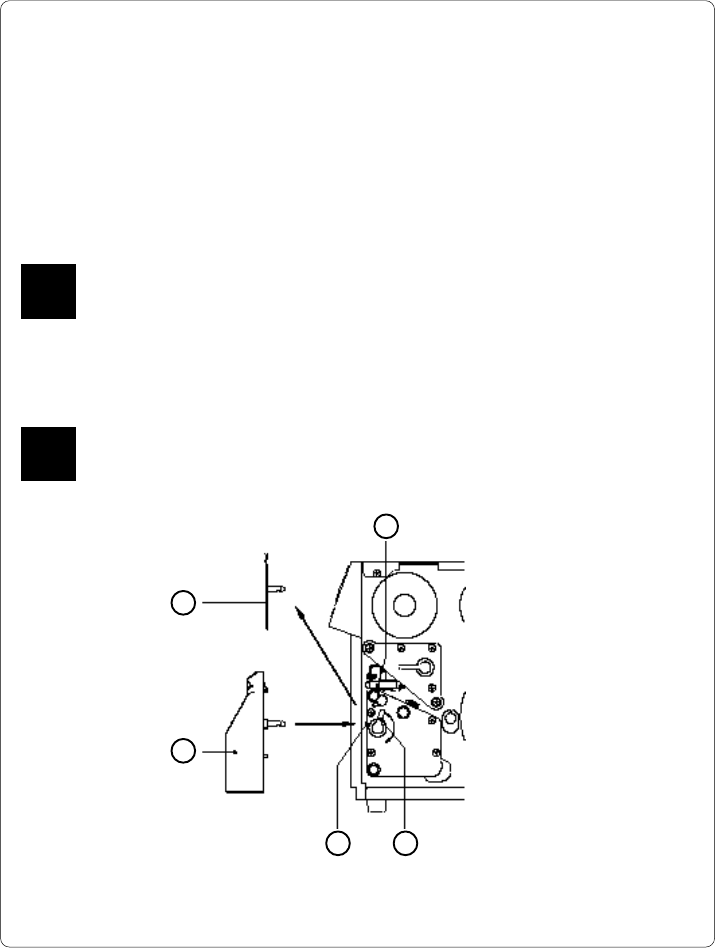
Fig. 13 h Mechanical mounting of the cutter
4
5
1
F
The printer must be switched OFF before mounting the cutter !
The cutter may be used only when mounted onto the Apollo !
Installing the Cutter
3 2
86 cab - Produkttechnik GmbH / Tharo Systems, Inc.
The Apollo is delivered with the tear-off plate (5) installed.
Before mounting the cutter, the tear-off plate has to be removed :
1. Switch the printer OFF.
2. Feed the label stock into the Apollo in such a way that the leading edge of
the first label is protruding slightly beyond the printhead (1).
3. Turn the printhead lever (2) counter-clockwise until it stops.
4. Remove the tear-off plate (5) from the guide holes (3).
5. Slide the cutter (4) into the guide holes (3) .
6. Turn the lever (2) clockwise until it stops.
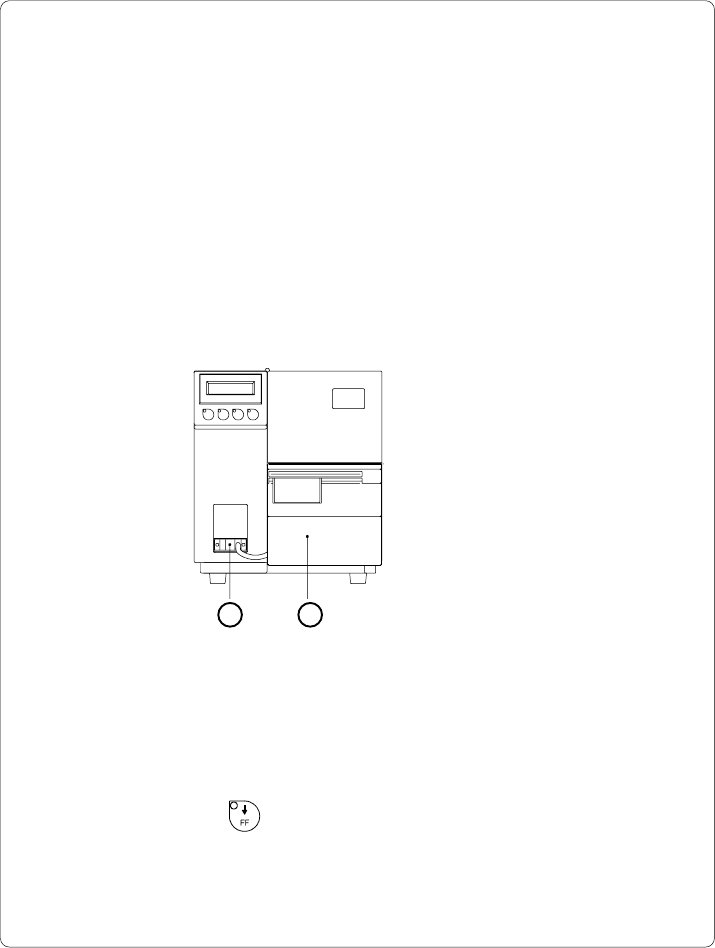
7. Connect the cutter cable (6) to the 15 pin peripheral port on the front of the
Apollo.
8. Switch the printer ON. The cutter will perform a synchronized cutting cycle.
9. Press the key. The printer will feed one unprinted label forwards
which will be cut off by the cutter. The label stock feed is now synchro-
nized for the start of the printing process.
Fig. 13 i Electrical connection of the cutter
46