00193796-08.pdf - 第18页
Installation Manual Station Software Version 505.04 18 of 156 4 Inst allation instructions 4.1 Inst alling the SIPLACE software 4.1.1 Requirements You must have installed the Window s XP Professional operating system wit…

Installation Manual, Station Software Version 505.04 Edition 07/2006
17 of 156
3.2.4 Machine controller
3.2.4.1 Machine controller HF, HF/3
Name
Simicro CPU076
CPU / clock frequency
PIII / 566 MHz
RAM memory
64 MB
Hard disk
6 GB
CD-ROM drive
Yes
Floppy drive
3.5", 1.44 MB
Network
1 x 10/100Base-T
Table 3-5: Machine controller hardware
3.2.4.2 Machine controller S-25 HM, S-27 HM, HS-50, HS-50+, HS-60
Name
Sicomp AMS - M54
CPU / clock frequency
PI / 233 MHz
RAM memory
32 MB
Hard disk
504MB
CD-ROM drive
No
Floppy drive
3.5", 1.44 MB
Network
1 x 10/100Base-T
Table 3-6: Machine controller hardware

Installation Manual Station Software Version 505.04
18 of 156
4 Installation instructions
4.1 Installing the SIPLACE software
4.1.1 Requirements
You must have installed the Windows XP Professional operating system with service pack 2
before installing the station computer version 505 (see section
3).
Caution:
When installing the RMOS operating system (see section
4.4.3), it is imperative that the
installation disks for Version 505 or higher are used. If any other disks are used, the
machine will not boot.
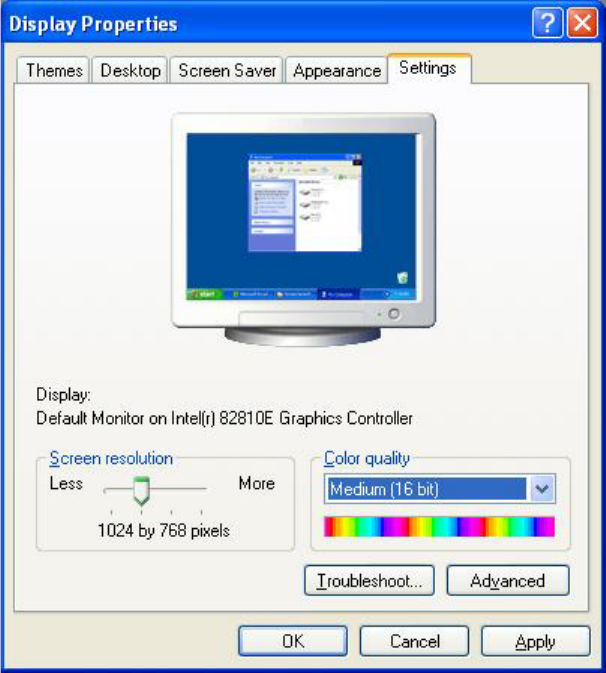
The default Windows display settings must be changed and the touchscreen must be calibrated.
You must be logged on as the Administrator
in order to be able to carry out this work.
Installation Manual, Station Software Version 505.04 Edition 07/2006
19 of 156
4.1.1.1 Changing the screen settings
→ Select Start Æ Settings Æ Control Panel Æ Display.
→ Click the Settings tab.
→ Make the following settings here:
Fig. 4-1: Screen settings