DECAN_S1_Administrator′s_Guide(Eng_Ver1.5)_Print.pdf - 第391页
14-9 Machine Calibration <Clear All Data> button All Fly-Fix offset data can be deleted. Erased data ca nnot be restored. Camera Calibration must be perfo rmed again to apply th e Fly-Fix of fset. <Update>…
14-8
Next Generation, Multi-Functional Placer DECAN S1 Administrator’s Guide
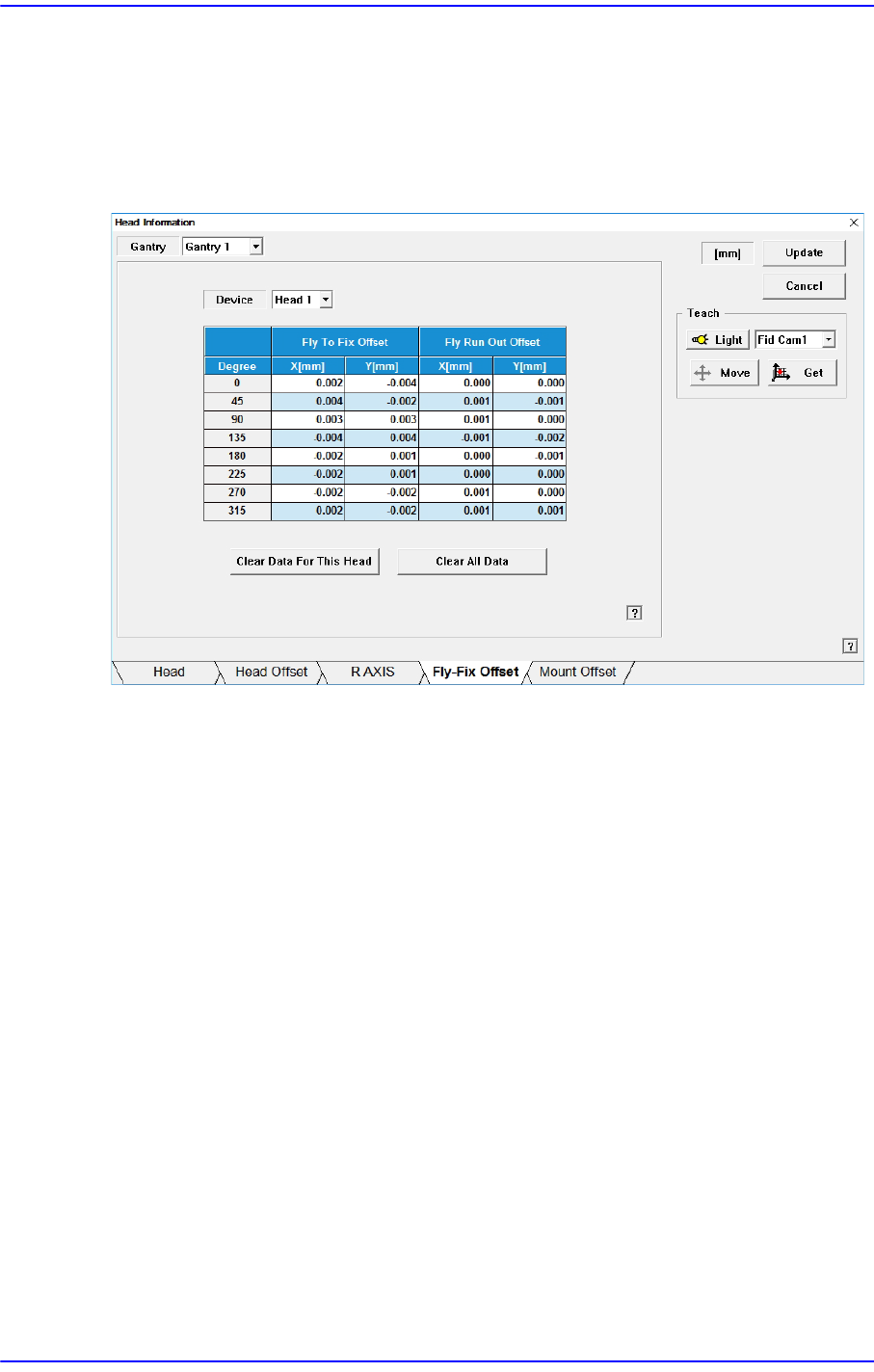
14.1.4. <Fly-Fix Offset> tab dialog
Sets the Fly-Fix offset for each head. Data in this dialog box is updated automatically if the
Fly to Fix Offset Calibration is executed during camera calibration and the result value is
reflected.
Figure14.4 “Fly-Fix Offset” tab dialog
<Device> combo box
Sets the Fly-Fix offset for each head.
<Fly To Fix Offset>
<Degree> column
Sets the Fly-Fix offset by degree at 45 degree interval.
<X, Y> column
Sets the Fly-Fix offset of X, Y.
<Fly Run Out Offset>
<Degree> column
Fly-Fix offset for each angle can be setup at the interval of 45 degrees.
<X, Y> column
Sets the Fly Run Out offset of X, Y.
<Clear data for this Head> button
Deletes Fly-Fix offset data of the selected head. Used when not applying the Fly-Fix
offset on the head. Data cannot be restored once it has been deleted. To apply the Fly-
Fix offset, the camera calibration must be performed again.
14-9
Machine Calibration
<Clear All Data> button
All Fly-Fix offset data can be deleted. Erased data cannot be restored. Camera
Calibration must be performed again to apply the Fly-Fix offset.
<Update> button
Transmits the change data to the equipment and closes the dialog box.
<Cancel> button
Ignores the change data and closes the dialog box.
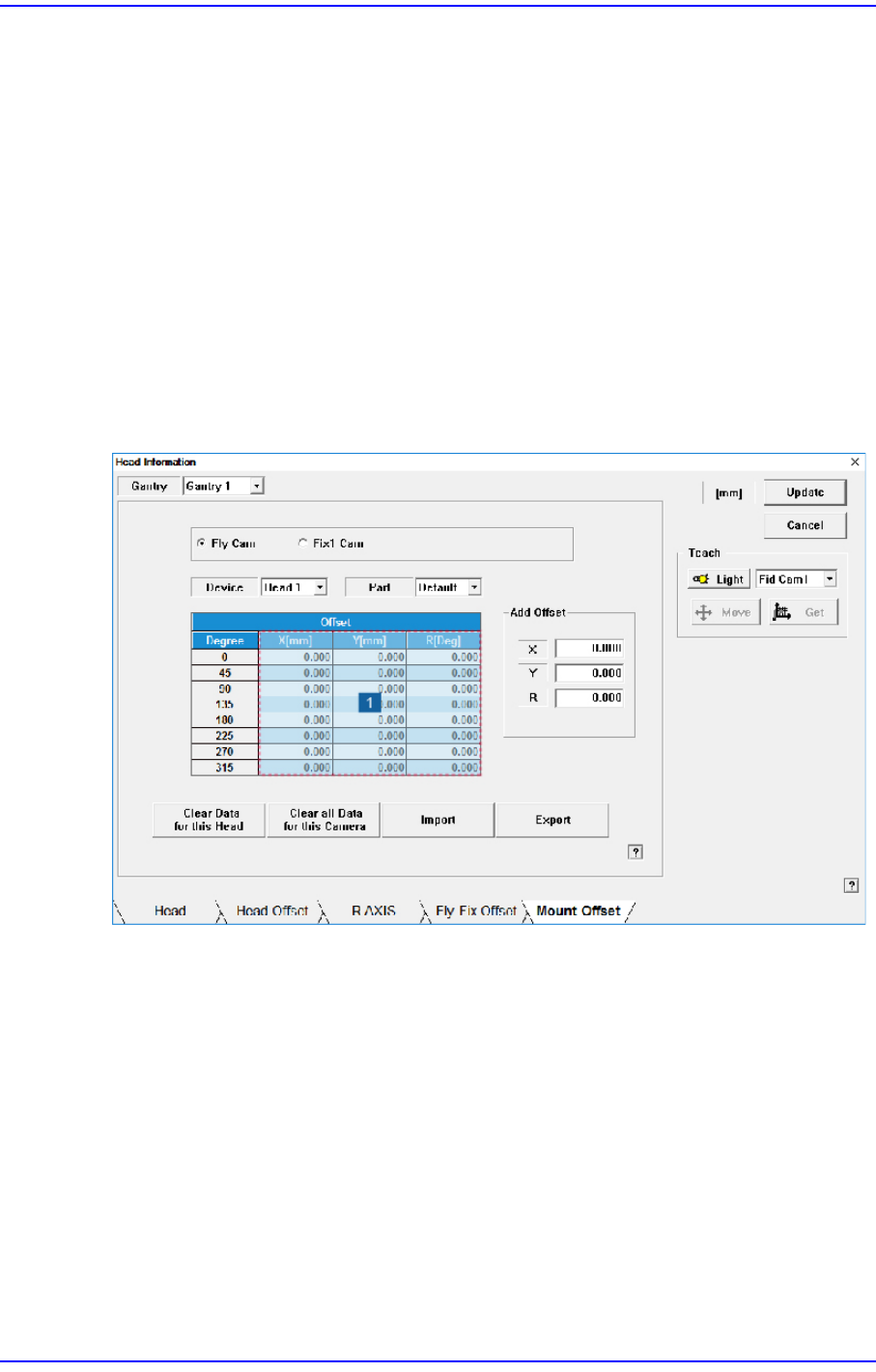
14.1.5. <Mount Offset> tab dialog
Sets the placement offset for each head / Part.
Figure14.5 “Mount Offset” tab dialog
1: Grid group
<Fly Cam / Fix1 Cam> option button area
Sets the placement offset for each camera.
<Device> combo box
Sets the placement offset for each head.
<Part> combo box
Sets the placement offset for each part.
<Grid> group
<Degree> column
Sets the placement offset by degree at 45 degree interval.

14-10
Next Generation, Multi-Functional Placer DECAN S1 Administrator’s Guide
<Offset-X, Y, R> column
Sets the placement offset of X, Y and R.
<Clear Data for this Head> button
Deletes placement offset data of the selected head.
<Clear all Data for this Camera> button
Able to delete the placement offset data of all the heads corresponding to the selected
camera.
<Import> button
It is used to import the saved placement offset file.
<Export> button
Current mounting offset data is exported to the mounting offset file.
<Update> button
Transmits the change data to the equipment and closes the dialog box.
<Cancel> button
Ignores the change data and closes the dialog box.