DECAN_S1_Administrator′s_Guide(Eng_Ver1.5)_Print.pdf - 第544页
15-78 Next Generation, Multi-Functional Plac er DECAN S1 Administrator’s Guide Memo The list of the nozzles for which nozzle tip contam ination can be checked is as follows: CN020, CN030, CN040, CN0 6 5 When these functi…
15-77
System Setup
<Pick Vacuum> edit box
Set the standard pneumatic pressure value (as a percentage) required to determine
whether the part is successfully picked up.
Warning Changing the set up status by an unauthorized user could
damage the equipment or result in personal
injury.Unauthorized user must not change the set up status
of the equipment.
<Stuff Vacuum> edit box
Set the vacuum pressure level to be used as the criteria to determine whether there
is any foreign material in the nozzle or not before the component pick-up with a
percentage.
<Vacuum Range> edit box
Set the vacuum range for the percentages of Pick Vacuum, and Stuff Vacuum.
<Ref. Open Level> edit box
Set the base pneumatic pressure when opening the vacuum system.
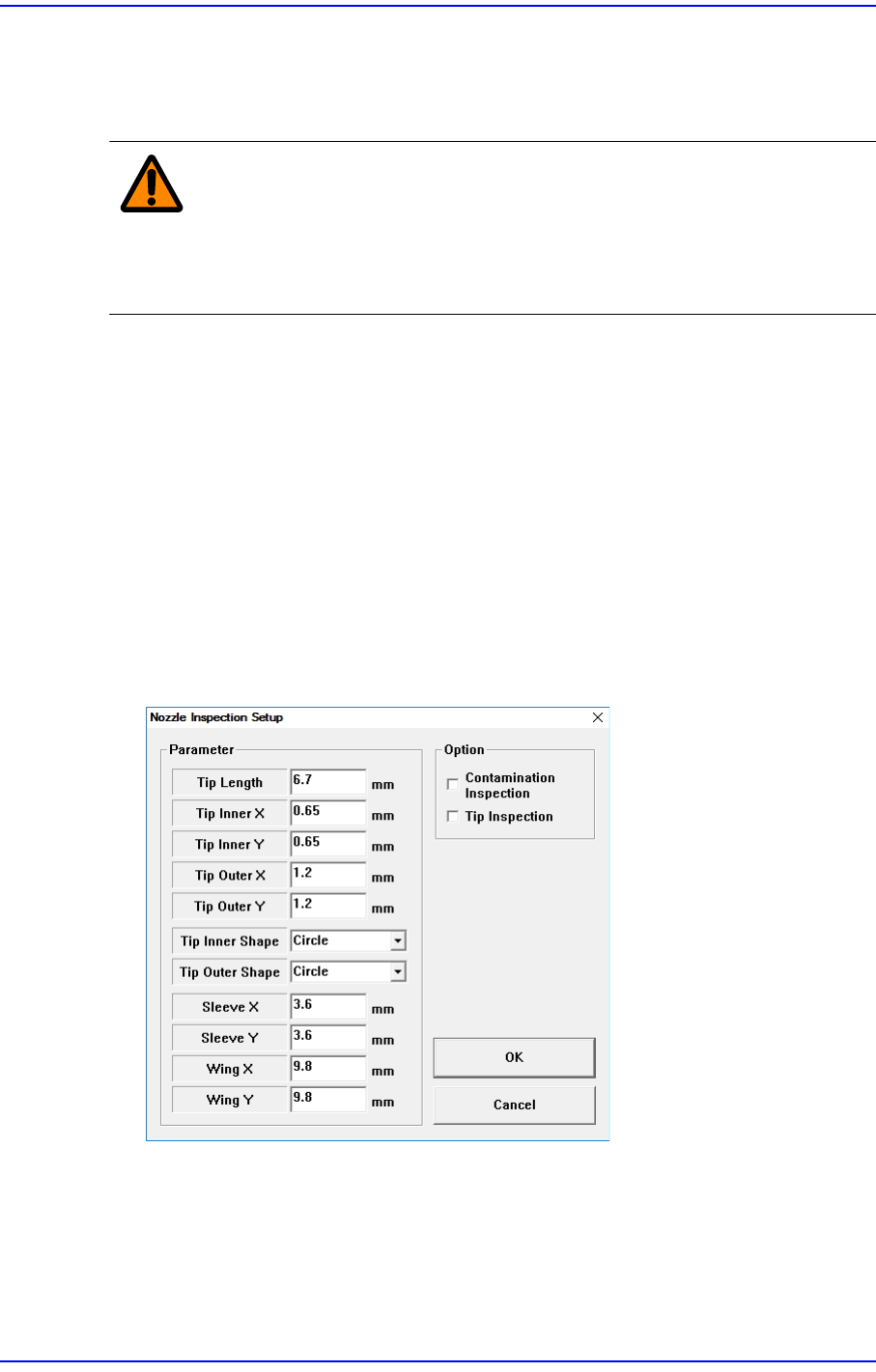
<Nozzle Inspection Set...> Button
Set when checking for any contaminants on the nozzle tip.
<Parameter> group
Indicates the parameter of the corresponding nozzle.
<Contamination Inspection> check box
Select this check box when checking for any contaminants on the nozzle tip using
the fly camera.
15-78
Next Generation, Multi-Functional Placer DECAN S1 Administrator’s Guide
Memo The list of the nozzles for which nozzle tip contamination can be
checked is as follows:
CN020, CN030, CN040, CN065
When these functions are enabled, the production quality may be
improved, but productivity may decrease slightly. When using this
function, please contact our C/S.
<Tip Inspection> check box
Tick this check box to automatically check the center of rotation (COR) of the
nozzle tip.
When this check box is ticked, the COR of the nozzle is inspected when the nozzle
adsorbs in ANC, and the measured value is reflected to the pick-up offset of the
feeder. By compensating the pick-up position of the feeder, it is possible to
prevent the parts from not being adsorbed. (Prevention of missing parts)
When the nozzle is attached to ANC, the changed pickup offset of the feeder is
reset to the existing value.
Memo The list of the nozzles for which COR of the nozzle tip can be
checked is as follows:
CN015, CN020, CN030
Memo To use the “COR Check” function, System Constant setting should
first be performed. Please contact our CS or local representative
office.
<OK> button
Saves the data and closes the screen.
<Cancel> button
Ignores the data and closes the screen.

Diagnosis & Utility &
Production
Management