00195700-02_Install_701_02_EN_DE.pdf - 第15页
Installation Manual, Station Software Version 701.02 07/2008 Edition 4 Inst alling the machine computer 4.1 Inst allation sequence See section 4.2 . 15 of 38 See section 4.3 . See separate Installation Manual for details…
Installation Manual, Station Software Version 701.02 07/2008 Edition
3.3 Network configuration
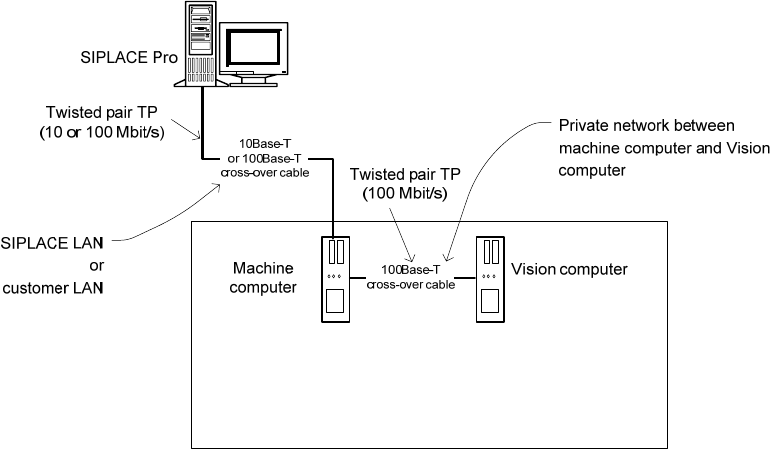
Fig. 3-2: Network connections between the machine and SIPLACE Pro
A separate private network (100 Mbit/s) is set up between the machine computer and the Vision computer
via a subnet mask.
Fixed IP addresses for the machine computer and the Vision computer can thus be assigned for all
SIPLACE machines. These IP addresses are not known outside the private network, for instance in the
SIPLACE LAN or customer LAN.
These IP addresses need not be further configured by the operator while the station software is being
installed.
14 of 38
Installation Manual, Station Software Version 701.02 07/2008 Edition
4 Installing the machine computer
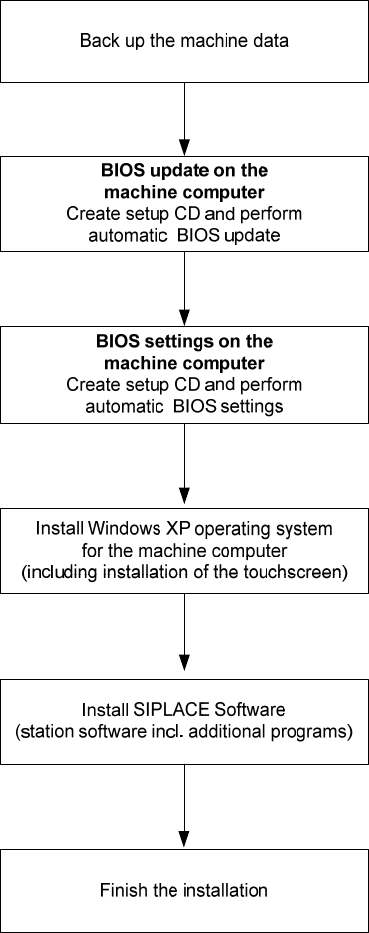
4.1 Installation sequence
See section
4.2.
15 of 38
See section
4.3.
See separate Installation Manual for details on installing the
Windows XP operating system (item no. 00194575-xx)
4.4.3.
For details on calibrating the touchscreen, see section
4.4 and 4.5.
See sections
See section
4.6.

Installation Manual, Station Software Version 701.02 07/2008 Edition
4.2 Automatic BIOS update on the machine computer and the Vision
computer
Note:
The SIPLACE Version 701.02 software was tested with version V05.01.09 of the BIOS
and released for this version. If this version of the BIOS is not installed on your machine
computer or Vision computer, you should update the BIOS.
A setup CD must first be created to automatically update the BIOS on the machine computer or Vision
computer. To do this, you require a computer running Windows XP that is fitted with a CD-RW drive.
The image file necessary for creating the CD (see the following table) is in the "BIOS-Images" folder of the
CD for version 701.02 of the software.
Machine computer / Vision computer
Computer type
BIOS settings / ISO image
SIMATIC Box PC 627 CPU627_BIOS_Update.iso
Table 4-1: File for creating the setup CD for updating the BIOS on the machine computer and the Vision computer
4.2.1 Creating the setup CD
→ Insert an empty writable CD-R in the CD ROM drive on any computer.
→ Insert the CD for version 701.02 of the software in the CD ROM drive.
→ In the Windows Explorer, open the "BIOS-Images" folder on the CD.
→ Open the image file (see the table above) using the installed CD writing program and follow the
instructions on screen.
→ Once the CD has been written, remove the CDs from the drives.
4.2.2 Updating the BIOS on the machine computer and the Vision computer
Note:
Before you start work, ensure that the CD-ROM drive is set as the first boot device in the
BIOS to allow the computer to be booted from CD.
→ Insert the CD you have created in the drive on the machine computer or Vision computer and boot
from the CD by switching the machine on.
The BIOS is now updated automatically.
→ After the settings have been made, remove the CD from the drive and switch the machine off again.
16 of 38