N7201A617E00_0317.pdf - 第470页
NPM-W 2 EJM7DE-MB-13M-00 Accuracy verifica- tion 13-21-2 -1 Maintenance 13-21-2 2 1 Production preparation 1 (Loadi ng MCDA T A: Production program) 2 3 Set the SD card which MCDA T A has been copied 3 ● Load the data as…
NPM-W2 EJM7DE-MB-13M-00
13-21-1-10
Brief description of process
Describes the accuracy measurement procedure of the dispensing head.
The dedicated MCDATA (production
program) is used for dispensing head
accuracy verification.
1.Production
preparation
・Saving calibration DATA (DVD-ROM) to
an SD card
・Preparation for dispensing
■Working process
3.Confirmation of
accuracy
verification result
・Selection of MCDATA (Production program)
・Dispensing
・Checking of dispensing results
*1)
2.Check and
reflection of
dispensing
(offset registration)
・Selection of MCDATA (Production program)
・Dispensing
・Checking and reflection of dispensing results
*1)
MCDATA (production program)
●In the head pattern, for example, DIS-8F shows the front: Dispensing head, the rear: 8-nozzle head, and
the tape feeder supply section.
Likewise, DIS-3FT shows the front: Dispensing head, the rear: 3- nozzle head, and the single tray feeder
supply section
*2)
.
Head pattern
DIS-LW16F LW16-DIS
DIS-12F 12-DIS
DIS-8F 8-DIS
DIS-8FT(TT) 3-DIS
DIS-3F —
DIS-3FT(TT) —
The table below is the major configuration of heads and supply sections
Overview 6
(dispensing head)
Maintenance
13-21-1
Accuracy
verifica-
tion
The MCDATA (Production program) is contained in the DVD-ROM (Machine system / Recognition / LNB
system disk) that comes with the machine.
Refer to the MCDATA sheet included in the DVD-ROM, select the target MCDATA according to the machine
type. Copy it to an SD card once and load it to the machine.
An SD card should be prepared by the customer.
If you overwrite the MCDATA downloaded to the machine to the SD card, the MCDATA in the SD card will not
be functioned. If you accidentally overwrite to the SD card, copy the data from DVD-ROM again.
If you must perform accuracy verification by the configuration which is not in the MCDATA list such as head
change, please contact us.
NOTICE
LW16: Light weight 16-nozzle head
F: Tape feeder specifications
FT: Single tray feeder specifications
*2)
TT: Twin tray feeder specifications
1) Check both lanes 1 / 2.
Calibration
Accuracy verification
About the type of MCDATA, see P.13-21-1-1.
) Specifications with the 13-slot supply unit and the single tray
feeder installed
●ALL is not used for accuracy verification of the dispensing head.
NPM-W2 EJM7DE-MB-13M-00
Accuracy
verifica-
tion
13-21-2-1
Maintenance
13-21-2
2
1
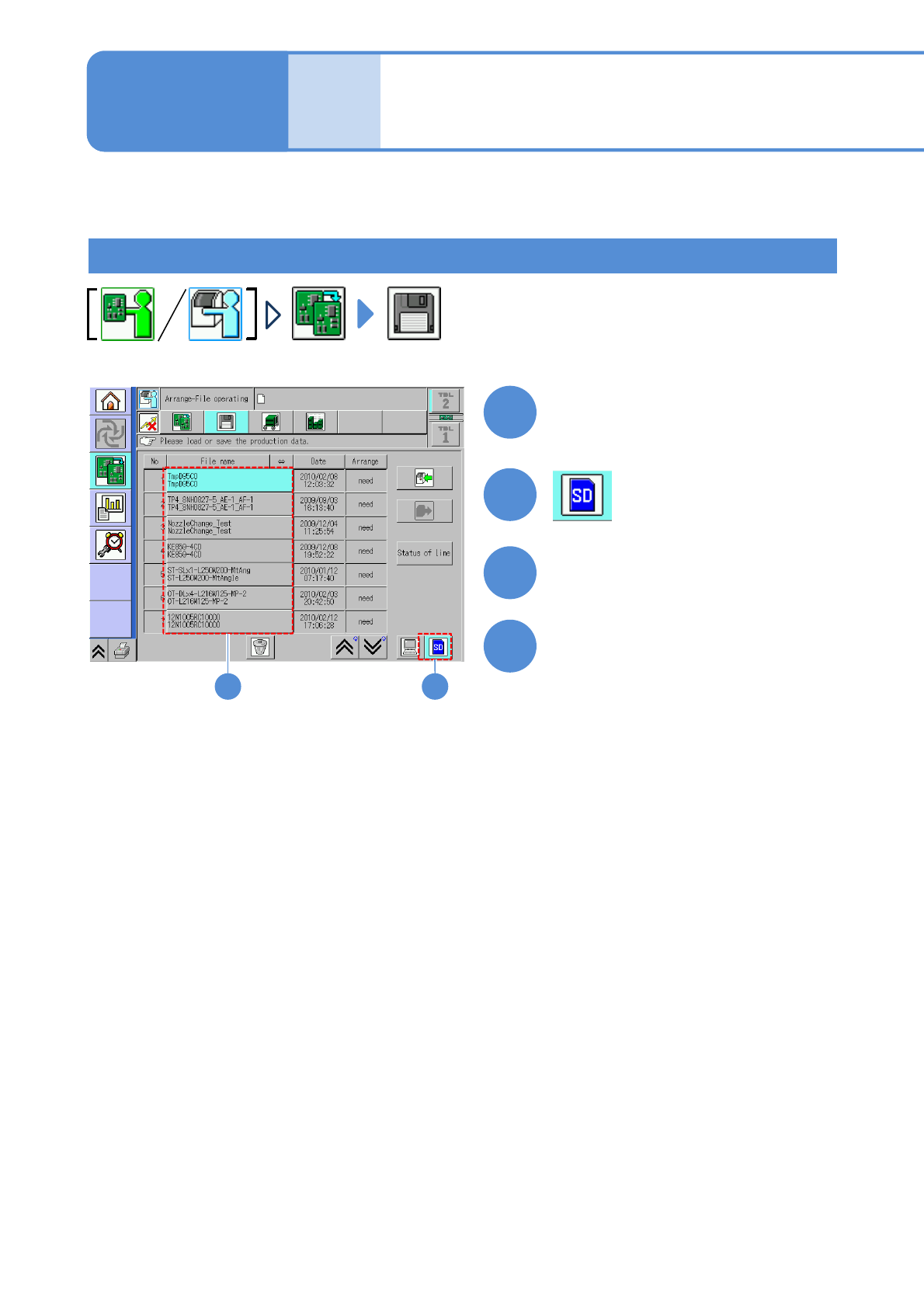
Production preparation 1 (Loading MCDATA: Production program)
23
Set the SD card which MCDATA
has been copied
3
●Load the data as same way as the
normal production data.
4
Choose MCDATA
Load MCDATA
Detailed process 1
(placement head)
(→ P.13-21-1-1 ‘■MCDATA type’)
About accuracy verification of the machine with a combination of the placement head and the inspection
head, see P.13-21-2
-9.
About accuracy verification of the machine with a combination of the placement head and the dispensing
head, see P.13-21-1
-17.
NPM-W2 EJM7DE-MB-13M-00
2
1
To
Set the nozzles
to the nozzle
holders
(This task is the same as
the normal production
operation)
Place components
13-21-2-2
3
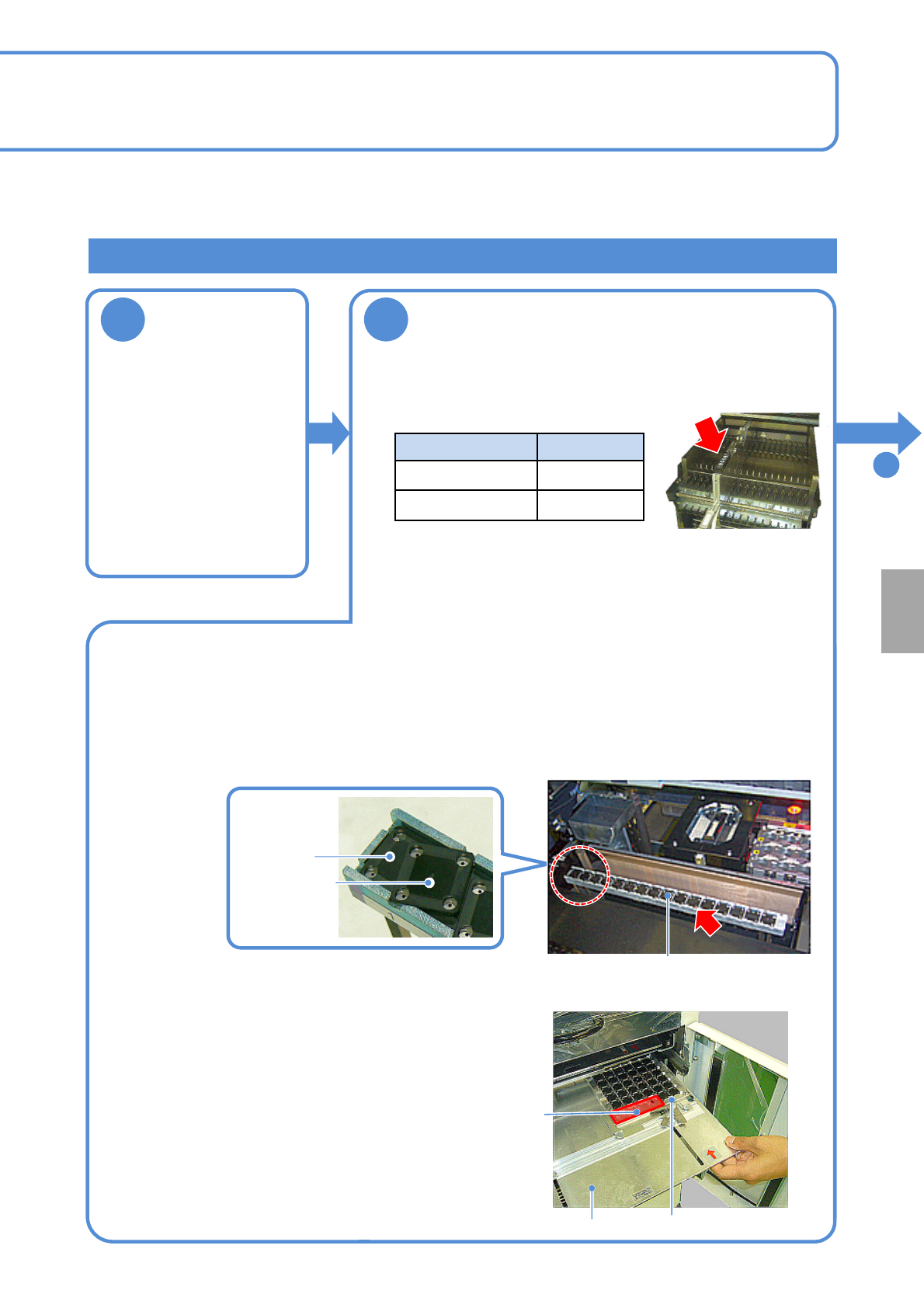
■For chip or micro
■When JIG_BGA, supply stage is put on the feeder cart
First stage
Second stage
Tray (storage aluminum case)
Tray pallet
Remove JIG_BGA (N610087876AA) from the tray and set it to the supply stage (N610074266AA).
●Left-align (Z1 to Z17) and install the supply stage.
●Install it in a line to prevent JIG_BGA from slanting.
●The supply stage consisting of two stages can be installed with 16 JIG_BGAs x 2 stages.
■ When JIG_BGA is put on the tray feeder
Calibration
Supply stage
●Set 1005JIG chip or 0402R to the tape feeder and install it to
the following slot.
Supply unit Slot No.
Feeder cart No.5
13-slot feeder
No.24
Production preparation 2 (preparation for verification material )
●When placement is performed on the both heads (front and
rear), set the feeder on the front and rear sides.
●You should perform teaching of the pockets in the tape feeder
where appropriate.
(This task is the same as the normal production operation)
①Install components together with the tray (storage
aluminum case) to the tray pallet.
②Set a tray pallet to slot 1 on the tape feeder.
(This task is the same as the normal production operation)
●Right-align and set the tray (storage aluminum case) in the
back as seen from the rear.
●Pay attention to the installation orientation.
JIG_BGA itself has no particular orientation. However, do
not place any parts onto four boxes in the section A in the
picture on the right side.
●For the twin tray feeder, set it to slot 1 on the tray A side.
A section