N7201A617E00_0317.pdf - 第504页
NPM-W 2 EJM7DE-MB-14 M-00 Main power connec- tion Connection of the main po wer supply 14-4-2 -1 Maintenance 14-4-2 1 Prepare a cable and process terminals Prepare four-core cable. ● Cross-section area: 3.5 to 5.5 mm 2 ●…
NPM-W2 EJM7DE-MB-14M-00
Main
power
connec-
tion
Checking voltages of the
primary power supply and
the machine
14-4-1
Maintenance
14-4-1
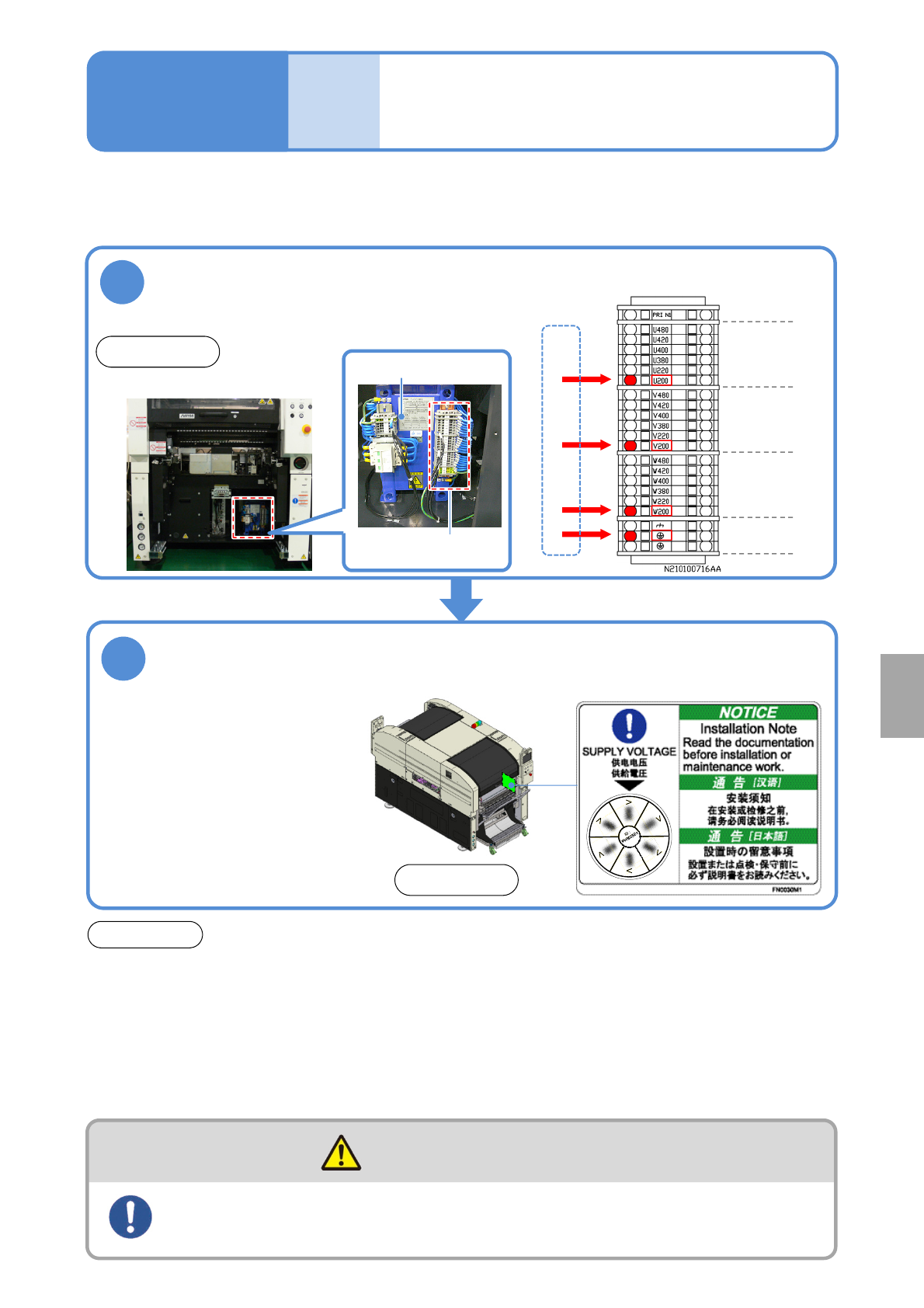
Ensure that the voltage setting of the machine is the same as that of the plant’s primary power supply.
●Before shipment, the voltage setting of the machine is configured as previously arranged with you.
Check the voltage indicated on the supply
voltage label
2
●Before using 290 V AC or
higher (any taps equal to or
higher than 380 V AC), ensure
that the voltage between a
ground and each phase is 290
V AC or lower and that star
connection is used on the
feeding side, with the N
(neutral) terminal connected to
the ground.
ATTENTION
●Before changing the primary input tap, make sure that the voltage after the tap change is the
same as the plant’s primary power-supply voltage. If not, the main transformer could generate
heat that causes the machine to malfunction.
●Separately use the breaker on the plant side. Before starting electrical construction, check the
specification for the rated power consumption and consult an electrical contractor. The shared
use of the breaker with other equipment may cause a fire due to heat generation.
●Even with the main power turned OFF, power is supplied up to the primary power line. Be careful
during maintenance work.
Front side
1
●Check the taps to which L10 cables are connected.
Grounding
earth
V:
Second phase
W:
Third phase
U:
First phase
■Wiring diagrams of transformer power
tap (abstract)
Check the voltage of the transformer
power supply taps(Ex. for AC 200 V)
Front side
Primary power voltage (factory side)
●Even with the main power turned OFF, power is supplied up to the primary power line. Be careful
during maintenance work.
The power supply and the air source should be connected to the
machine at the end of installation
WARNING
Installation
Transformer power tap
Transformer
NPM-W2 EJM7DE-MB-14M-00
Main
power
connec-
tion
Connection of the main
power supply
14-4-2-1
Maintenance
14-4-2
1
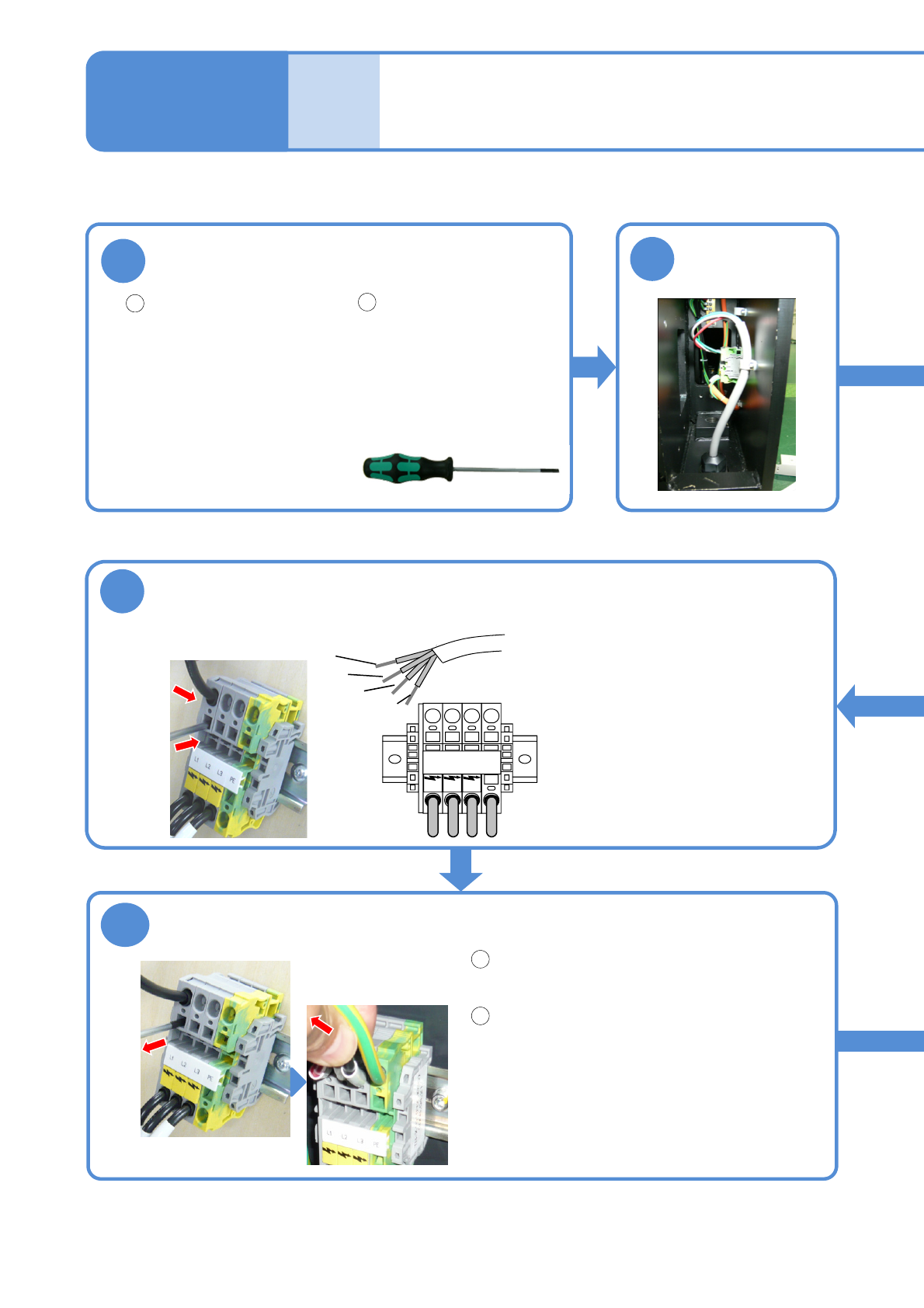
Prepare a cable and process terminals
Prepare four-core cable.
●Cross-section area:
3.5 to 5.5 mm
2
●Recommended sleeve
terminals
・Manufacturer:
PHOENIX CONTACT
・Type:
3.5-4.0 mm
2
Al4-12GY
5.5-6.0 mm
2
Al6-12YE
Tool used: Phillips screwdriver (No.2), Allen wrench (3 mm), special driver (provided)
2
Process the terminals to
be connected to the
machine.
Remove the front
right side cover
6
Confirm secured
insertions
Remove the special driver.
(The fixing bracket inside the cable insertion
slot closes)
Pull on the cable with a force of 50 N and
ensure that it is firmly-secured.
5
Insert the cable
Special driver (provided)
Insert the tip of
cable all the way to
the end.
●Insert the sleeve terminals until
their insulating coatings go inside
the terminal block.
●Connect the PE wire (green/yellow)
first and then connect the terminals
in the order of L1→L2→L3.
L1 L2 L3 PE
L1
L2
L3
PE
■Main power
terminal
Check the tension
1
2
1
2
NPM-W2 EJM7DE-MB-14M-00
Cable
clamp A
14-4-2-2
3
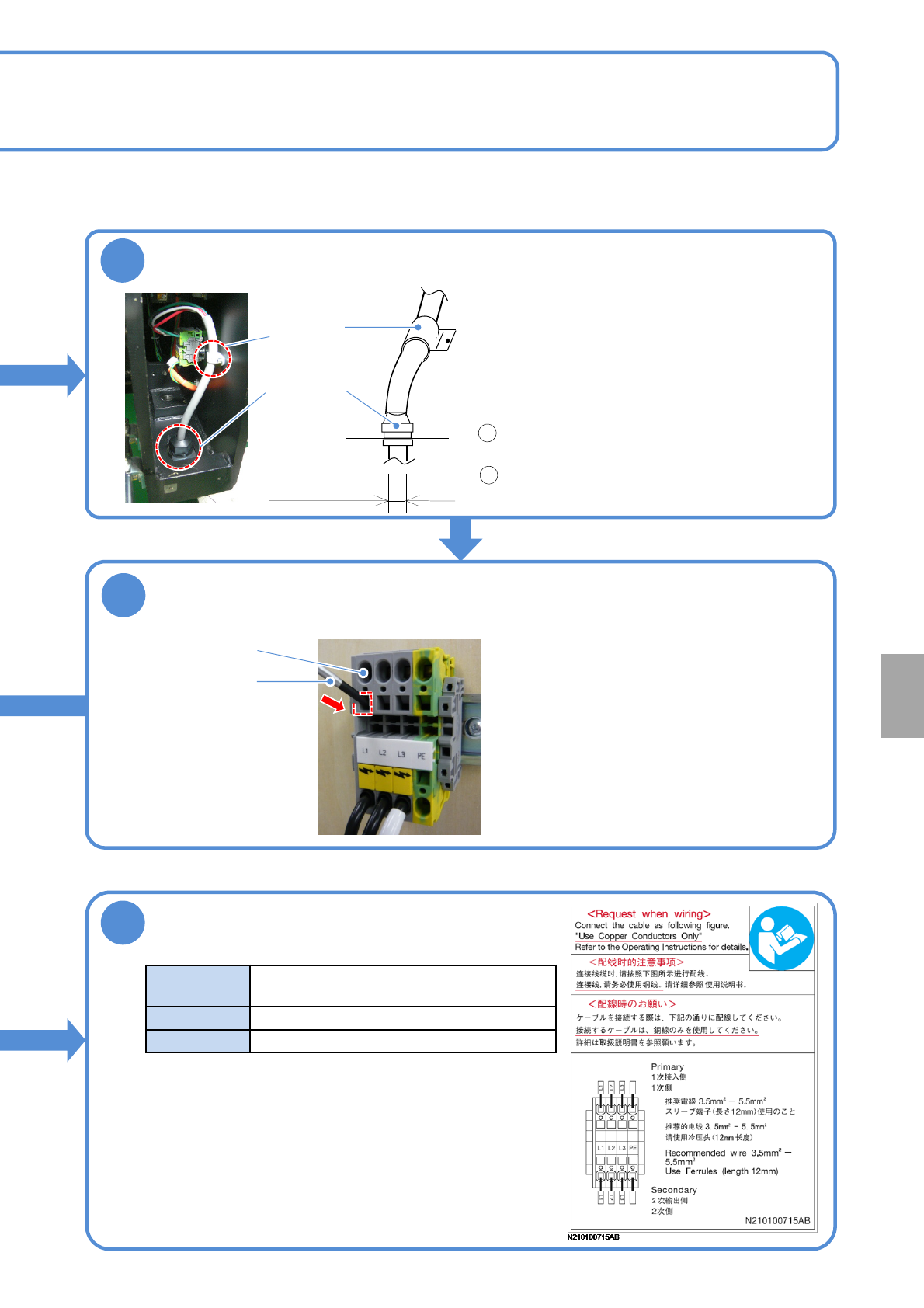
Pass the cable through cable clamps A and B, in that order
4
Insert the special driver
Cable insertion slot
Special driver
Cable
clamp B
●Recommended cable external dimensions:
13.5 to 18mm
●If you have trouble passing the cable through
Cable clamp A, loosen the clamp by turning it
counterclockwise.
●If you have trouble passing the cable through
Cable clamp B, pass the cable after removing the
mounting bolt and then bolt it again.
After passing the cable through Cable clamp A,
secure it by turning the clamp clockwise.
Pull on the cable with a force of 100 N and
ensure that the cable is firmly-secured.
7
Check the following conditions before
turning on the power
Ordinary use
power source
3-phase AC 200/220 ±10 V
380/400/420/480 ±20 V
Frequency
50/60 Hz ±5 %
Rating capacity
2.8 kVA
The primary power should be supplied from power-supply
facilities controlled inside your plant, rather than establishing
a direct connection with the public low-voltage power
distribution system (commercial power).
Recommended
cable external
dimensions
1
2
●Insert the special driver deep enough to
open the fixing bracket inside the cable
insertion slot.
●Make sure that the PE wire on the plant
side is connected to ground.
Installation