N7201A617E00_0317.pdf - 第517页
NPM-W 2 EJM7DE-MB-14M-00 14-7 -2 PCB transfer condition in each setting Installation PCB flow Unloading PCB Pre process machine other than NPM-W2 PCB flow Unloading PCB Pre process machine other than NPM-W2 ■ Normal sett…
NPM-W2 EJM7DE-MB-14M-00
14-7-1
PCB transfer settings
(when connected to non-NPM-W2 equipment)
Maintenance
14-7
When establishing a line connection with non-NPM-W2 equipment, it could cause double PCB transport and
others to malfunction depending on the timing of when the upstream machine transfers PCB request signals.
So, make sure that you change NPM-W2’s PCB transfer settings.
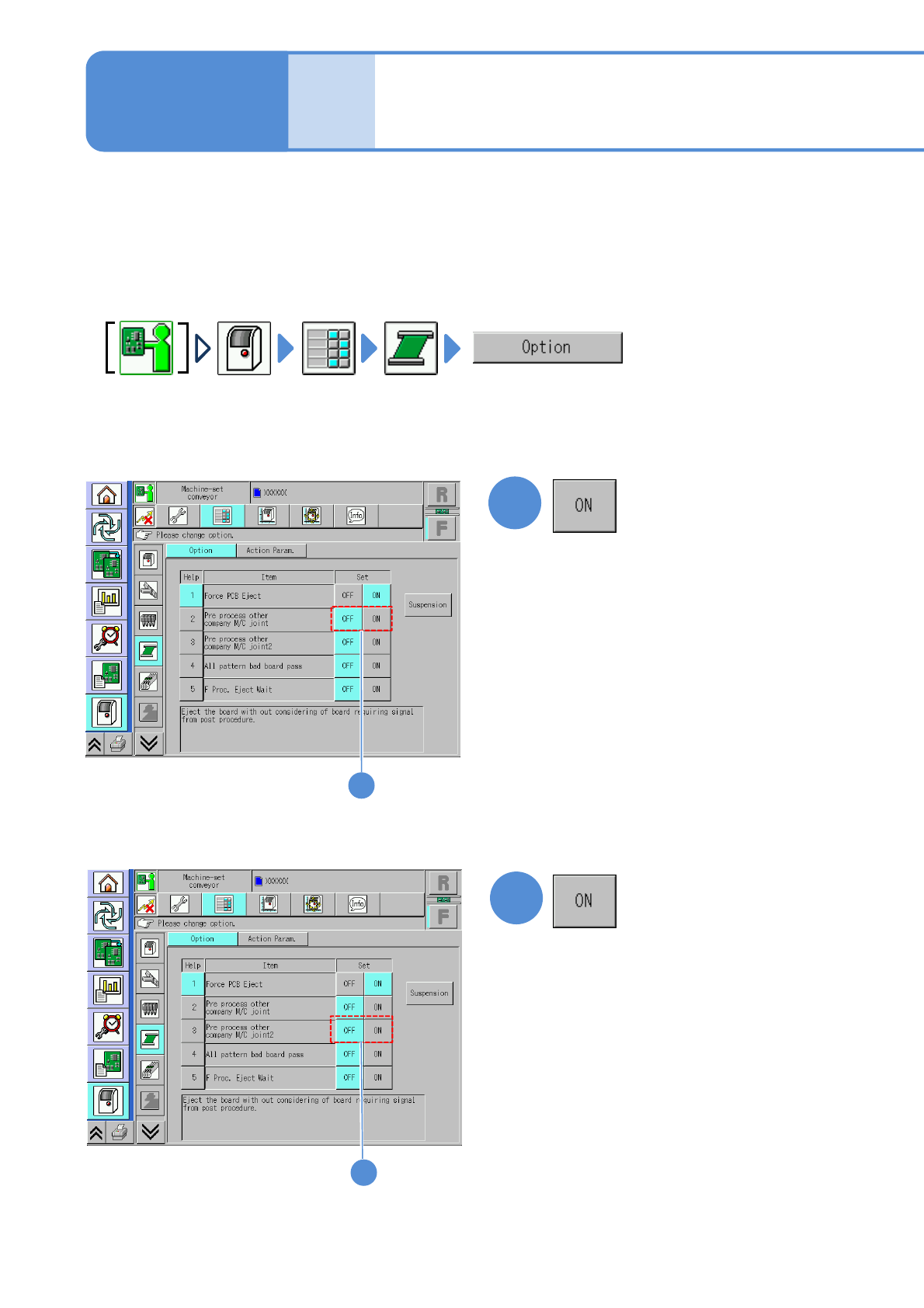
●This explains how to configure PCB transfer settings when flow is [from left to right]. Configure the
settings on NPM-W2 with an extension conveyor installed on the right side, if flow is [from right to left].
■Option set
To turn “ON” the [Pre process other
company M/C joint] setting
1
■Option set
To turn “ON” the [Pre process
other company M/C joint2] setting
2
1
2
NPM-W2 EJM7DE-MB-14M-00
14-7-2
PCB transfer condition in each setting
Installation
PCB flow
Unloading PCB
Pre process
machine other
than NPM-W2
PCB flow
Unloading PCB
Pre process
machine other
than NPM-W2
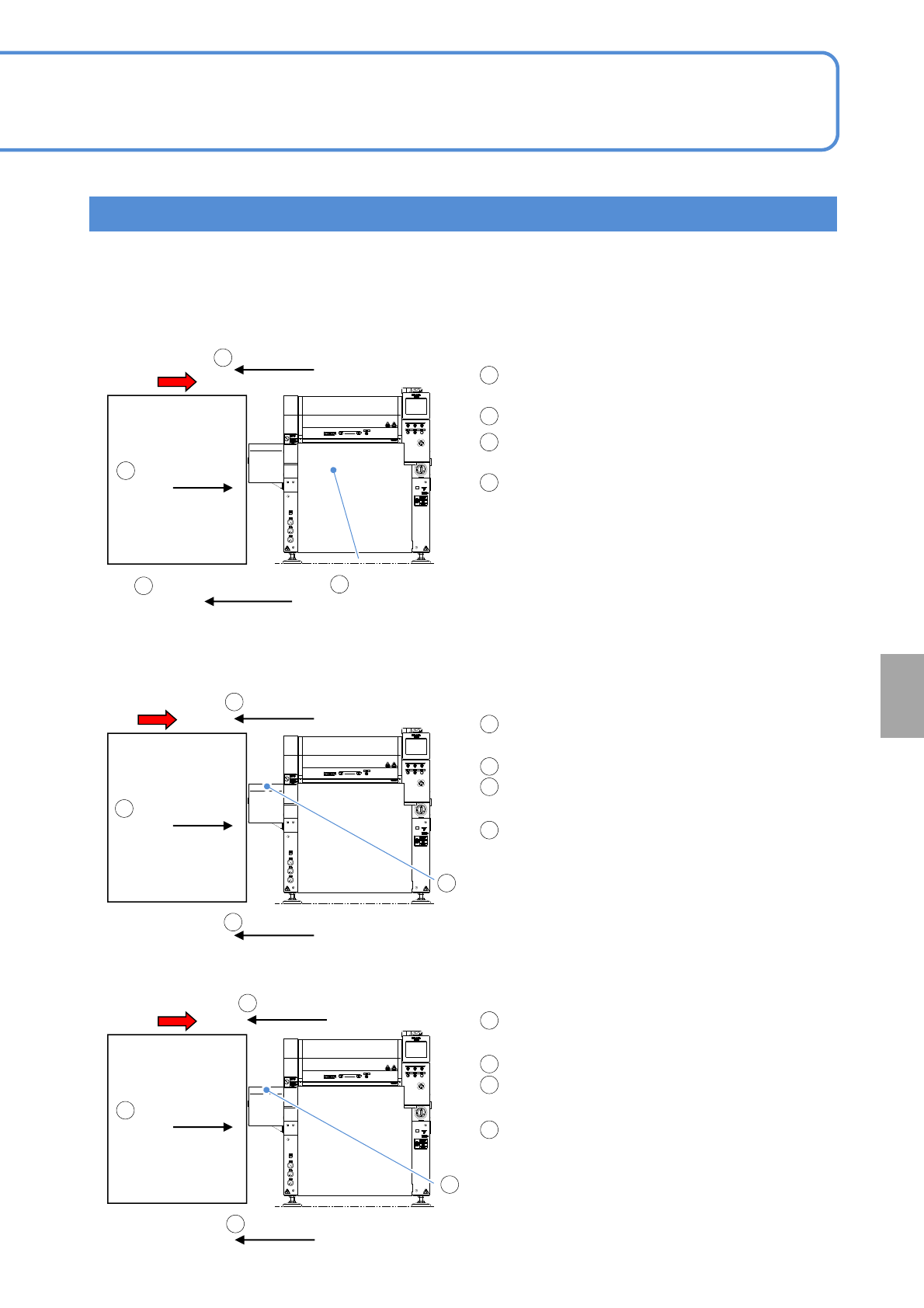
■Normal setting (default): [Pre process other company M/C joint] is turned [OFF], and
[Pre process other company M/C joint2], [OFF]
PCB flow
Unloading PCB
Pre process
machine other
than NPM-W2
NPM-W2
■Option setting: [Pre process other company
M/C joint] is turned [ON]
■Option setting: [Pre process other company M/C joint2] is turned [ON]
PCB detection sensor
Placement position
[ON]
PCB request signal [OFF]
After unloading a PCB, NPM-W2’s PCB request
signal is turned [ON].
PCB is unloaded from the pre process machine.
NPM-W2’s PCB detection sensor (placement
position) is turned [ON].
NPM-W2’s PCB request signal is turned [OFF].
PCB request signal [ON]
* PCBs are normally unloaded as the PCB request
signal switches from the [OFF] state the [ON]
state. So it cannot cause double PCB transport
and others to malfunction because it remains set
as default.
However, if the pre process machine does not
support our machine specifications, it may
continue unloading PCBs, with the PCB request
signal turned [ON]. In that case, NPM-W2’s PCB
transfer settings need to be changed.
PCB request signal [ON]
PCB request signal [OFF]
After unloading a PCB, NPM-W2’s PCB request
signal is turned [ON].
PCB is unloaded from the pre process machine.
The extension conveyor’s PCB detection sensor
(pre process side) is turned [ON].
NPM-W2’s PCB request signal is turned [OFF].
PCB request signal [OFF]
After unloading a PCB, NPM-W2’s PCB request
signal is turned [ON].
PCB is unloaded from the upstream machine.
The extension conveyor’s PCB detection sensor
(pre process side) switches from [ON] [OFF].
NPM-W2’s PCB request signal is turned [OFF].
1
2
3
4
1
2
3
4
1
2
3
4
1
2
4
3
1
2
4
PCB request signal [ON]
PCB detection sensor in
Pre process switches from
[ON] to [OFF]
(extension conveyor)
1
3
PCB detection sensor
Pre process [ON]
(extension conveyor)
3
2
4
●[Pre process other company M/C joint ] and [Pre process other company M/C joint2] cannot be turned [ON]
at the same time.
NPM-W2
NPM-W2
NPM-W2 EJM7DE-MB-14M-00
14-8-1
How to handle the tray
feeder
(option) 1
Maintenance
14-8
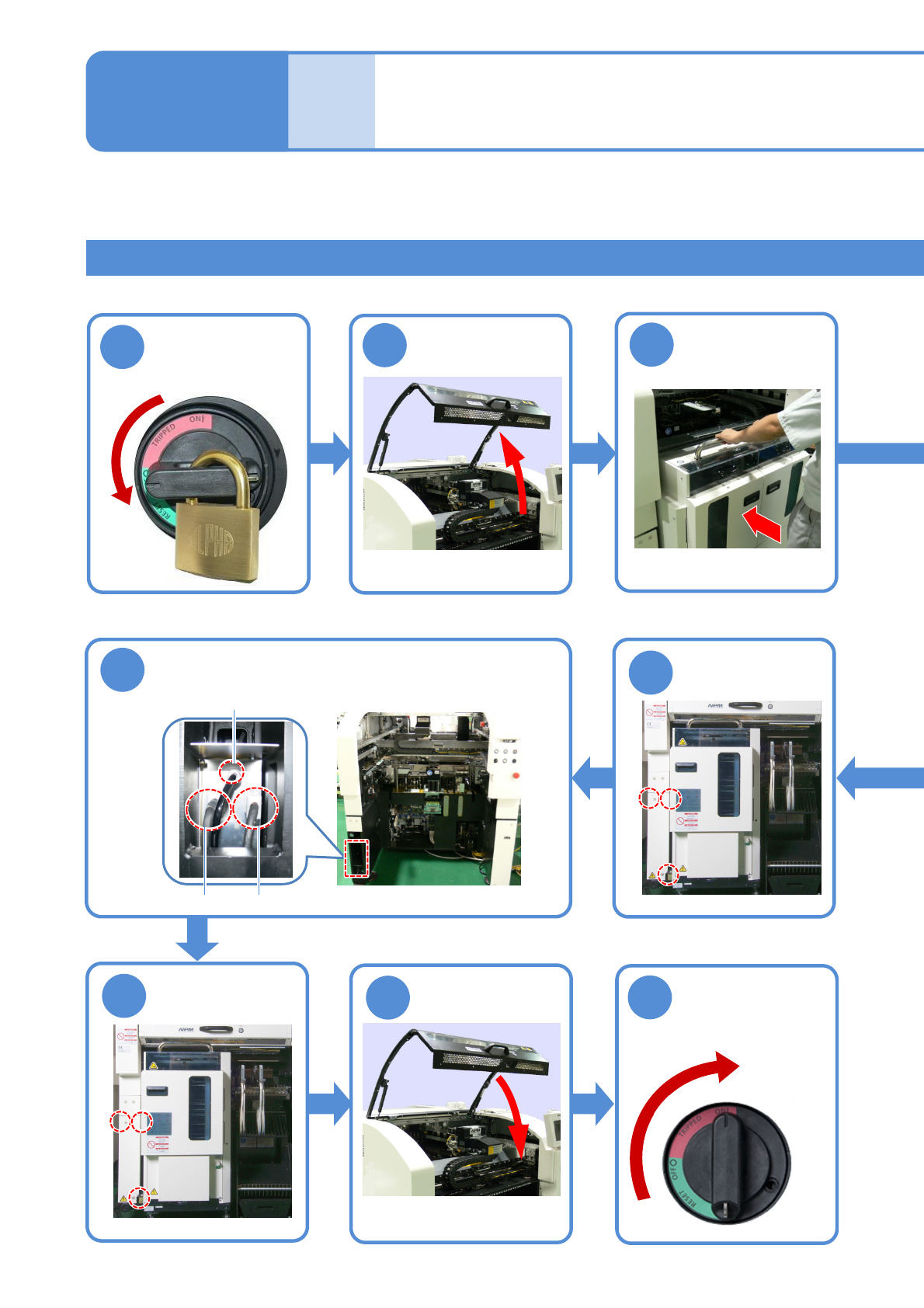
Attachment procedure
3
2
7
Connect the power cable, communication
cable and air piping
Attach the tray
feeder
Air piping
Communication cable
(Rear side)
Power cable
Tool used: Two spanner (30 mm), Allen wrench (3 mm)
●Be careful not to bump it
against the main unit.
6
Remove the
cover
●Screws (3 pcs)
8
Attach the
cover
●Screws (3 pcs)
Describes how to handle the single and the twin tray feeders. You can handle the screen at the front/rear.
The tray feeder can be attached or detached at the rear.
(Rear side)
9
(Rear side)
4
1
Turn OFF the
power and lock
the machine
OFF
10
Unlock the
machine and
ON