N7201A617E00_0317.pdf - 第527页
NPM-W 2 EJM7DE-MB-14M-00 14-9 -7 You can ar range positions o f the insp ection head and conveyor fle xibly ac cording to your purpose. ■ To be shorter the line length PCBs re sulting in NG by the solder inspection ( SPI…
NPM-W2 EJM7DE-MB-14M-00
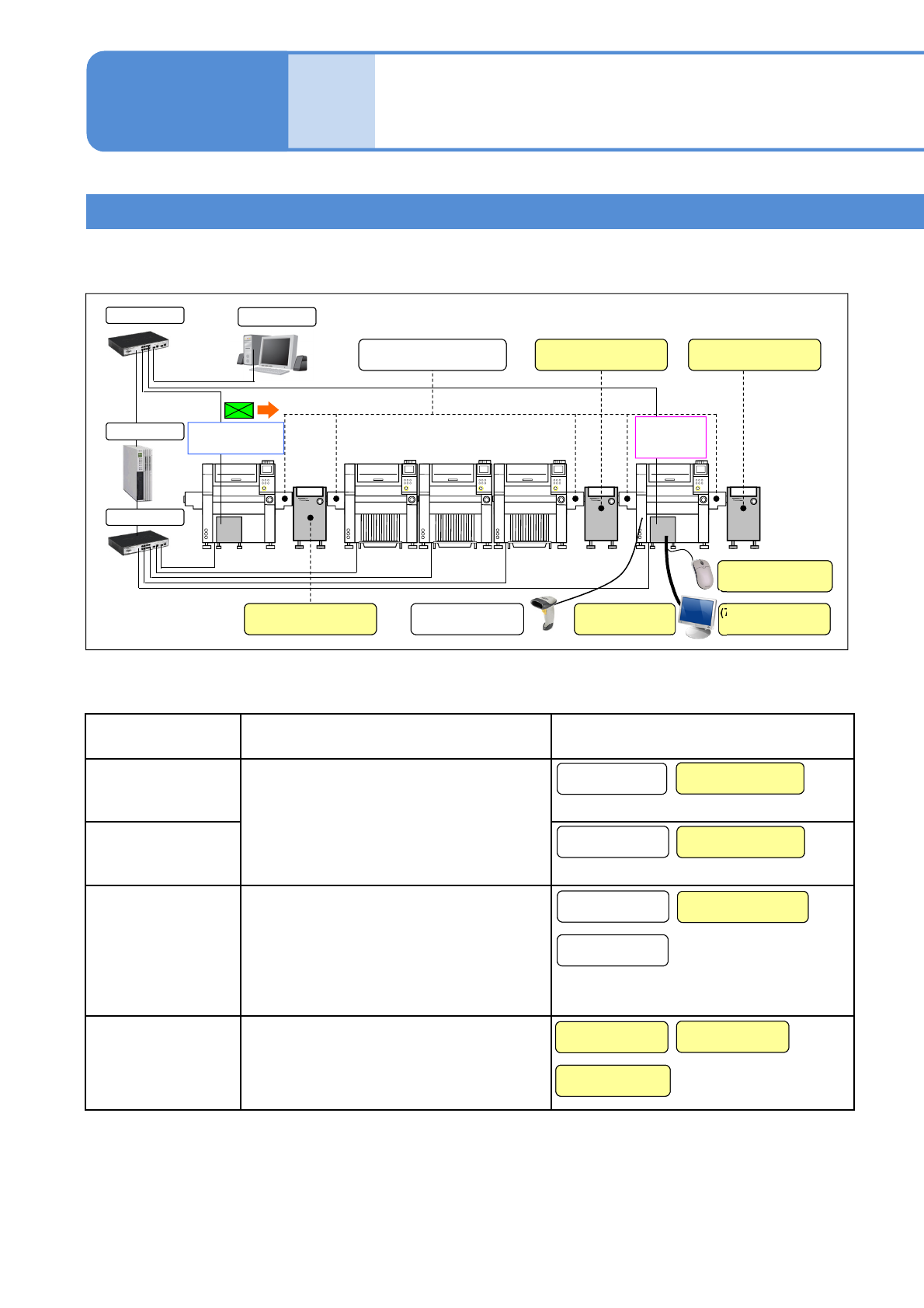
Optional function Description Peripheral equipment
Solder inspection NG
ejection function
Based on the inspection result of PCB ejected from
the NPM-W2, OK or NG signal is output so as to
pass through the PCB if it is OK, and to stop if it is
NG. In addition, PCBs are checked on the conveyor
or removed from the conveyor for repair or re-check,
the function which outputs the request signal as
NPM-W2 ejects the next PCB is required.
Component inspection
NG ejection function
Re-load function This function activates with [Component inspection
NG ejection function]. A repaired NG PCB is re-
loaded and the machine performs re-placement of a
component which could not be placed with the
diagonal head or re-inspection. Moreover, the
removed NG PCB is controlled by a barcode and its
trace is controlled by reading the barcode when the
PCB is re-loaded.
NG map display
function
Although inspection NG location can be checked on
the screen of the machine, it also can be displayed
on the screen of the computer during component
inspection.
14-9-6
2D inspection head 4
(option)
Maintenance
14-9
Line configuration
Line configuration including machines equipped with the 2D inspection head and equipment to be used for
them are explained here.
When the following optional functions are used, peripheral equipment required for their functions must be
prepared.
*Peripheral equipment with ‘Customer’ noted must be prepared yourself.
(3) Inspection ejection
conveyor (Customer)
(8) Mouse
(Customer)
(6) Display
(Customer)
(4) Re-load conveyor
(Customer)
(5) Wired scanner
(2) Inspection ejection
conveyor (Customer)
NPM-DGS
(7) Connection cable
(Customer)
LNB
HUB
HUB
(1) Extension conveyor
Solder inspection
(SPI)
Component
inspection
(AOI)
(1) Extension
conveyor
(1) Extension
conveyor
(2) Inspection ejection
conveyor (Customer)
(5) Wired scanner
(4) Re-load conveyor
(Customer)
(3) Inspection ejection
conveyor (Customer)
(1) Extension
conveyor
(7) Connection cable
(Customer)
(6) Display
(Customer)
(8) Mouse
(Customer)
NPM-W2 EJM7DE-MB-14M-00
14-9-7
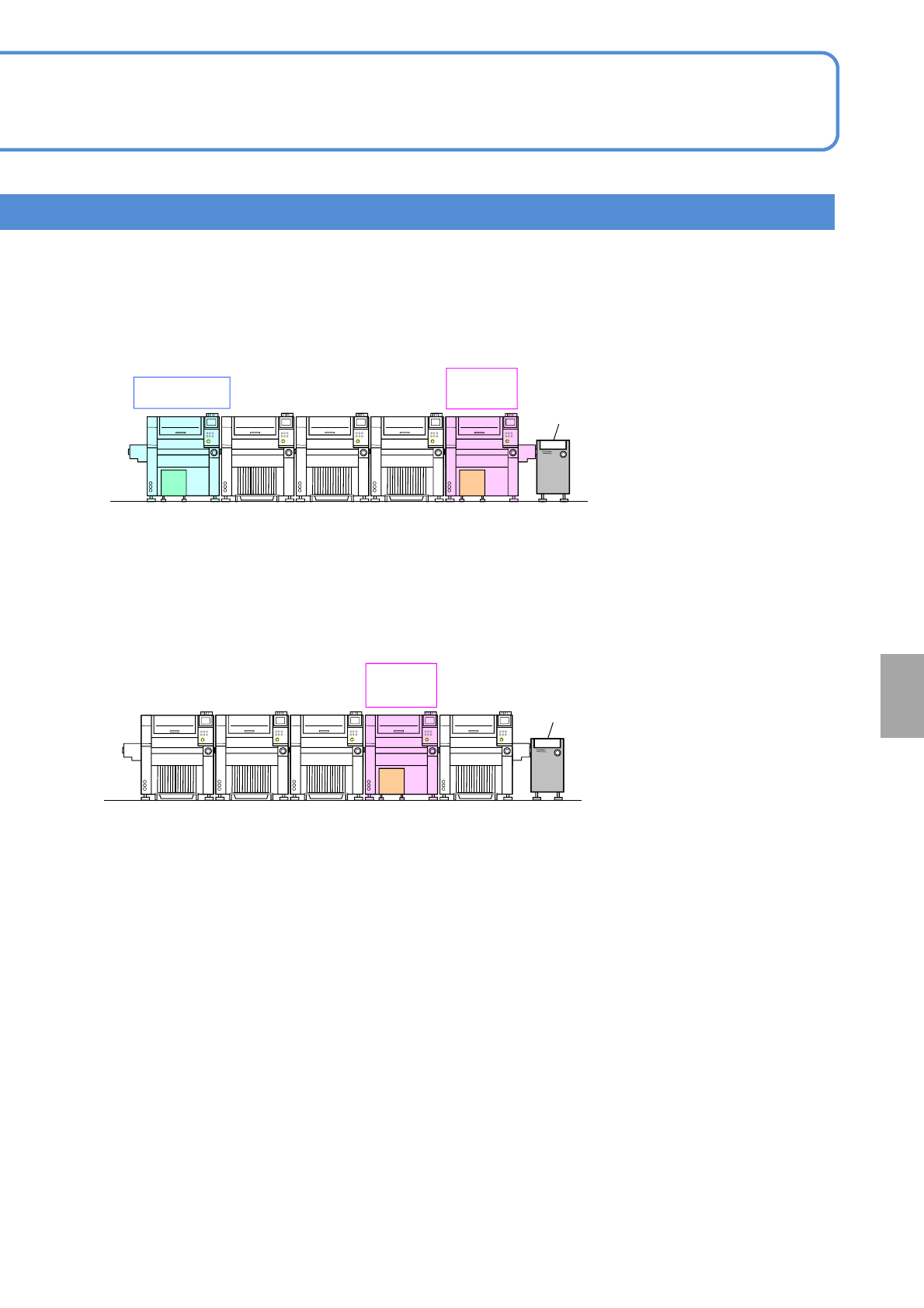
You can arrange positions of the inspection head and conveyor flexibly according to your purpose.
■To be shorter the line length
PCBs resulting in NG by the solder inspection (SPI) and the component inspection (AOI) stop all
together on the inspection ejection conveyor at the end of line. Regarding placement points or patterns
judged as NG by the solder inspection (SPI), placement and component inspection (AOI) are also
automatically skipped.
■To inspect foreign matters against two types of components (reel type and tray type)
In foreign matters inspection, whether foreign matters are exists under the specified component or not is
inspected. If any foreign matter is found, the specified component is not placed. Therefore, this
component must be moved to the diagonal head of inspection or the downstream process. If both the
reel type and tray type are mixed together, arrange the machine as shown below. However a
component placed on the downstream process is not inspected even after placed.
Installation
Solder inspection
(SPI)
Component
inspection
(AOI)
Component
inspection
(AOI)
Inspection
ejection
conveyor
Inspection
ejection
conveyor
NPM-W2 EJM7DE-MB-14M-00
14-10-1
Attaching and detaching
the safety cover
(option)
Maintenance
14-10
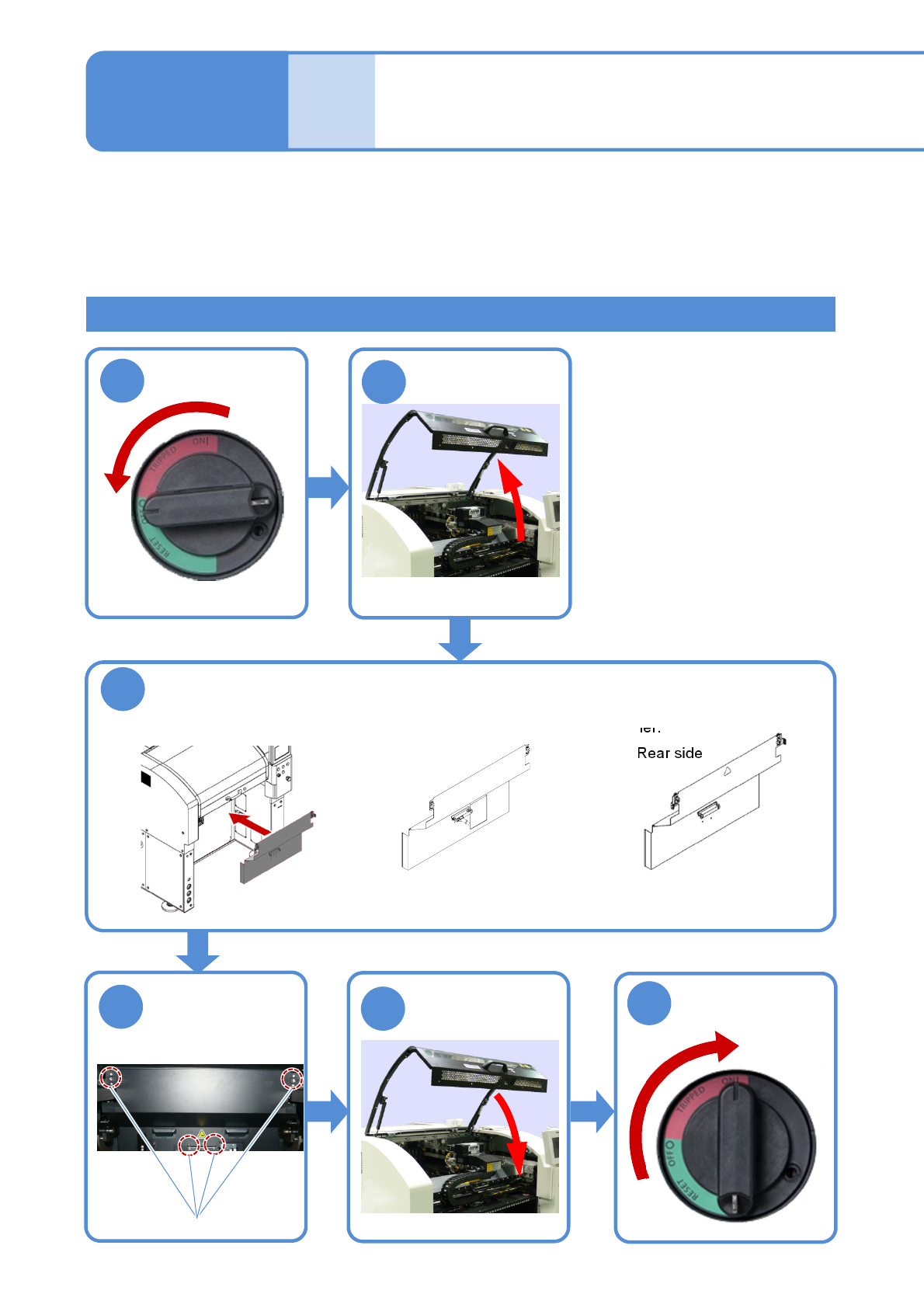
How to attach
Attach the safety cover (option)
●Attach the safety cover to the main body while ensuring the main-body drawer connector and the
connector on the safety cover reverse side are engaged with each other.
Tighten four bolts
on the safety
cover front side
Bolt
1
2
3
4
5
6
ON
OFF
■Front side
■Rear side
This safety cover covers the machine opening section when the feeder cart or tray feeder is not necessary to
ensure your safety.
How to attach and detach the safety cover is described as an example of working from the front side.
●Detach the feeder cart (option) and the tray feeder before work.
(For how to detach the feeder cart→P.3-2, and for how to detach the tray feeder→P.14-8)
●The safety cover for NPM-W cannot be used.
●The safety cover cannot attach to /detach from the machine with independent changeover support unit installed.
(Dispensing head specification,
2D inspection head specification,
Non-head specification)
(Dispensing head specification,
Non-head specification)