00197196-02_VB_SetupCenter_5.1_de_en.pdf - 第43页
New Functions in Setup Center 5.1 Domain-Wide Settings Supported Version Description / Versions beschreibung SIPLACE Setup Center 5.1 43 5 New Functions in Setup Center 5.1 5.1 Domain-Wide Settings Supported Purpose If m…
System Requirements
Supported Hardware
42 Version Description / Versionsbeschreibung SIPLACE Setup Center 5.1
Supported feeder types
Feeder types
▪ All WPC types
▪ MTC 1 & 2
▪ All waffle-pack trays
▪ All standard SIPLACE tape feeders
▪ All standard SIPLACE linear feeders
▪ SIPLACE X adapters
▪ Special feeders (Road Runner, Road Runner
XLF, Multi Stick Feeder: IPTE MSF 60 AX und
IPTE MSF XL80 AX; LED Feeder TE und LED
Feeder HS)
NOTICE
Restrictions
Please note that the programming system SIPLACE Pro and the hardware used may limit this
selection.
New Functions in Setup Center 5.1
Domain-Wide Settings Supported
Version Description / Versionsbeschreibung SIPLACE Setup Center 5.1 43
5 New Functions in Setup Center 5.1
5.1 Domain-Wide Settings Supported
Purpose
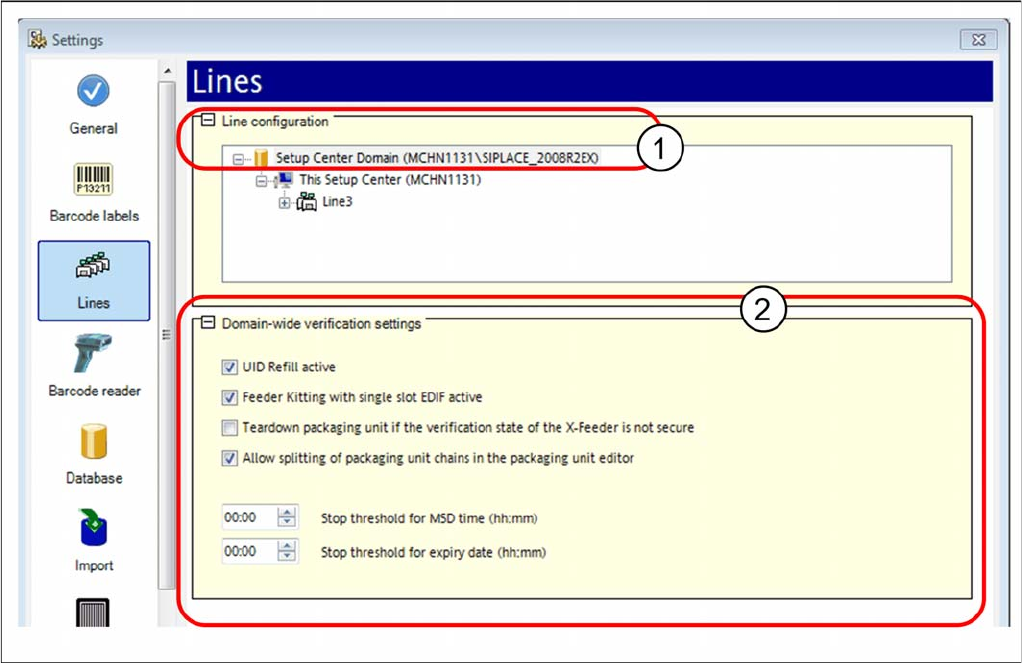
If multiple Setup Center applications are connected to a domain, you can define global settings which
are then applied for all Setup Center applications. If these domain-wide settings are defined for one Set
-
up Center application, they can not be changed at the other Setup Center applications. The changed
settings are not activated until they have been confirmed.
Function
► Open at Extras => Settings => Line configuration. If the domain is marked (1), the Domain-Wide Ver
-
ification Settings view (2) will open.
► For detailed information, refer to the user manual "Setup Center 5.1" or the Online Help.
New Functions in Setup Center 5.1
Domain-Wide Settings Supported Refilling with UID Permitted
44 Version Description / Versionsbeschreibung SIPLACE Setup Center 5.1
5.1.1 Refilling with UID Permitted
Purpose
Simplified refilling of unique packaging unit IDs is permitted. During refilling, you only need to select the
function "Refill Packaging Unit" in the scanner menu and then scan in the Packaging ID for the previous
reel, followed by the Packaging ID for the next reel. This simplified refilling can be used universally, in
the pre-setup area as well as on the line and you can even generate packaging unit chains in the ware
-
house area.
Function
► Open at Extras => Settings => Line configuration. If the domain is marked, the Domain-Wide Verifi
-
cation Settings view will open.
► Enable the option UID refill enabled.
5.1.2 Feeder Kitting on Single Slot EDIF Permitted
Purpose
Permits feeder kitting in the single slot EDIF. The packaging unit-feeder relation is formed during feeder
kitting with the single slot EDIF, by scanning in the feeder ID and the packaging unit data.
Function
► Open at Extras => Settings => Line configuration. If the domain is marked, the Domain-Wide Verifi
-
cation Settings view will open.
► Enable the option Feeder kitting enabled on single-slot EDIF.
► For detailed information, refer to the user manual "Setup Center 5.1" or the Online Help.