00197196-02_VB_SetupCenter_5.1_de_en.pdf - 第45页
New Functions in Setup Center 5.1 Prevent Manipulation of Tape Material Domain-Wide Settings Supported Version Description / Versions beschreibung SIPLACE Setup Center 5.1 45 5.1.3 Prevent Manipulat ion of Tape Material …
New Functions in Setup Center 5.1
Domain-Wide Settings Supported Refilling with UID Permitted
44 Version Description / Versionsbeschreibung SIPLACE Setup Center 5.1
5.1.1 Refilling with UID Permitted
Purpose
Simplified refilling of unique packaging unit IDs is permitted. During refilling, you only need to select the
function "Refill Packaging Unit" in the scanner menu and then scan in the Packaging ID for the previous
reel, followed by the Packaging ID for the next reel. This simplified refilling can be used universally, in
the pre-setup area as well as on the line and you can even generate packaging unit chains in the ware
-
house area.
Function
► Open at Extras => Settings => Line configuration. If the domain is marked, the Domain-Wide Verifi
-
cation Settings view will open.
► Enable the option UID refill enabled.
5.1.2 Feeder Kitting on Single Slot EDIF Permitted
Purpose
Permits feeder kitting in the single slot EDIF. The packaging unit-feeder relation is formed during feeder
kitting with the single slot EDIF, by scanning in the feeder ID and the packaging unit data.
Function
► Open at Extras => Settings => Line configuration. If the domain is marked, the Domain-Wide Verifi
-
cation Settings view will open.
► Enable the option Feeder kitting enabled on single-slot EDIF.
► For detailed information, refer to the user manual "Setup Center 5.1" or the Online Help.
New Functions in Setup Center 5.1
Prevent Manipulation of Tape Material Domain-Wide Settings Supported
Version Description / Versionsbeschreibung SIPLACE Setup Center 5.1 45
5.1.3 Prevent Manipulation of Tape Material
Purpose
The information about which material is configured on a feeder is saved in the Setup Center database.
This information is then used for setup verification. If the feeder detects a potential manipulation, which
could lead to the tape having been replaced, the feeder will change over to "unreliable" mode. If the feed
-
er is then used, Setup Center will recognize this state and will delete the saved data and it will need to
be scanned in again.
This prevents subsequent and unintentional configuration of an incorrect packaging unit (e.g. during set
-
up with single slot EDIF).
Function
► Open at Extras => Settings => Line configuration. If the domain is marked, the Domain-Wide Verifi
-
cation Settings view will open.
► Enable the option Tear down the packaging unit if the verification status of the X-feeder is unreliable.
5.1.4 Permit Packaging Unit Chains to be Split in the Packaging Unit Editor
The function for separating the packaging unit can be enabled or disabled. The icon for cutting
the packaging unit will then be displayed or hidden accordingly in the Packaging Unit Editor.
Function
► Open at Extras => Settings => Line configuration. If the domain is marked, the Domain-Wide Verifi
-
cation Settings view will open.
► Enable or disable the option Permit packaging unit chains to be split in the packaging unit editor.
WARNING
Minimum station software requirement essential at all machines
All machines which are checked by Setup Center must have at least station software 706.01 or
605.03 SP3 installed.
WARNING
Recommended activation strategy
If the function Tear down the packaging unit if the verification status of the X-feeder is unreliable
has been switched on, all setups which have already been verified (online and offline) are ini
-
tially unreliable and will need to be reverified.
➢ We therefore recommend that you first make sure all stations fulfil the minimum software
requirements and that you then, after a certain period (around 4 weeks) enable this func
-
tion in Setup Center.
► This ensures that most packaging unit-feeder relations will have reached a reliable state so
that only a minimum of these relations will be canceled when the function is enabled.
New Functions in Setup Center 5.1
Find Material Permit Packaging Unit Chains to be Split in the Packaging Unit Editor
46 Version Description / Versionsbeschreibung SIPLACE Setup Center 5.1
5.2 Find Material
Purpose
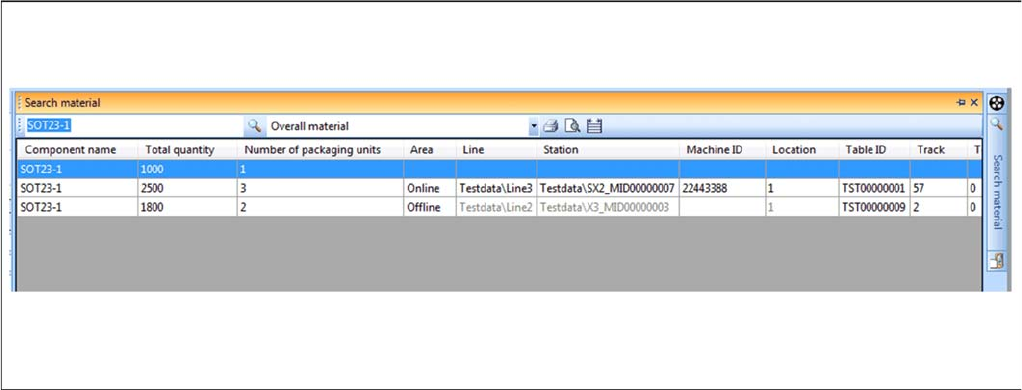
You can search by material (part number or component name). The materials are those packaging units
or packaging unit chains available in the database. This is helpful for seeing where this material is still
available in the production environment.
Function
► Right click with the mouse on a track to open the context menu.
► Select Find Material... to open the Find Material dialog box. Provided that the selected track already
has a material allocated to it, the component name will appear in the search field.
Or
► Alternatively, you can open the Find Material dialog box in the menu of the SIPLACE Setup Center
user interface Extras => Find Material…. Provided that a track which already has a material allocated
to it has been selected, the component name will appear in the search field.
► For detailed information, refer to the user manual "Setup Center 5.1" or the Online Help.
5.3 Verification History
Purpose
The verification history saves actions during the online and offline setup verification. Only those scan
runs which were successful will be recorded. You can also record material movements e.g. when a new
packaging unit is set up on a track and the previous packaging unit had a torn foil. Records of the veri
-
fication history which are older than 14 days will be deleted. The verification history is shown in a dialog
box.
▪ If the verification history is started from the table view (context menu), predefined filters will be ap
-
plied.
– Packaging ID
– Feeder ID
– Pickup point