YS12调整.pdf - 第11页
Service Engineer Service I nformati on SI080 4004 E-000 = YS12 , YG12: Procedure for adjustmen t after installa tion of the mach ine 11/60 4.4.How to adjust the PCB height “PCB height” is the reference height for the hea…

Service Engineer
Service Information
SI0804004E-000 = YS12, YG12: Procedure for adjustment after installation of the machine
10/60
4.3.2. How to check the parallelism and the initial position of the movable conveyor
[Required tools]
- Glass board for the mounting adjustment (240X170mm)
Used for checking the conveyor width.
- A 0.5mm thick scale or a 0.5mm thickness gauge
Used for checking the clearance between the conveyor edge and the board edge
1. Change the conveyor width to 170mm.
Click on the [Conveyor Width] button on the “Conveyor” tab in the “Unit” screen, then change
the conveyor width to 170.0mm.
2. Check the clearance between the conveyor edge and the board edge.
Press the glass conveyor against the reference conveyor and set it. Then insert the 0.5mm
thick scale between the board edge and the movable conveyor edge to check if there is a
proper clearance between them.
<Positions to be checked>
- At the entrance side of the conveyor
- At the center of the conveyor (mounting position)
- At the exit side of the conveyor
If there is no problem with the clearance, fill in the relevant column of the check sheet.
[If the clearance between the board edge and the conveyor edge is not properly kept]
If the clearance between the board edge and the movable conveyor edge is not 0.5mm,
please perform adjustment.
(1)
When the clearance is even but not appropriate.
Please perform “Initial position” adjustment of the W-axis on the “Soft Limit” screen
in the CalibSm.
(2)
When the clearance is getting smaller/bigger as it goes to the entrance/exit side of the
conveyor. (The clearance on the left side and on the right side is different.)
Adjust the initial position of the ball screws of the W-axis on the right side and on the
left side so that they move in synchronization with each other.
(3)
When the clearance is partly different.
Make sure that the W-axis is not damaged, and then adjust the position of the
conveyor guide plate.
4.3.3. Check if the board can be transferred smoothly between the main machine and the
upstream/ downstream machines
After making sure that the conveyor of the machine has no abnormality, adjust the conveyor
width of the upstream machine and the downstream machine to be equal, and check if a
board can be transferred smoothly between the machines.
If a board can be transferred smoothly, fill in the relevant column of the check sheet.
Service Engineer
Service Information
SI0804004E-000 = YS12, YG12: Procedure for adjustment after installation of the machine
11/60
4.4.How to adjust the PCB height
“PCB height” is the reference height for the head to mount components, and is automatically
measured according to the changes in the vacuum pressure of the nozzle when it contacts the
board surface. The “Vacuum Level“ needs to be adjusted before measuring the PCB height.
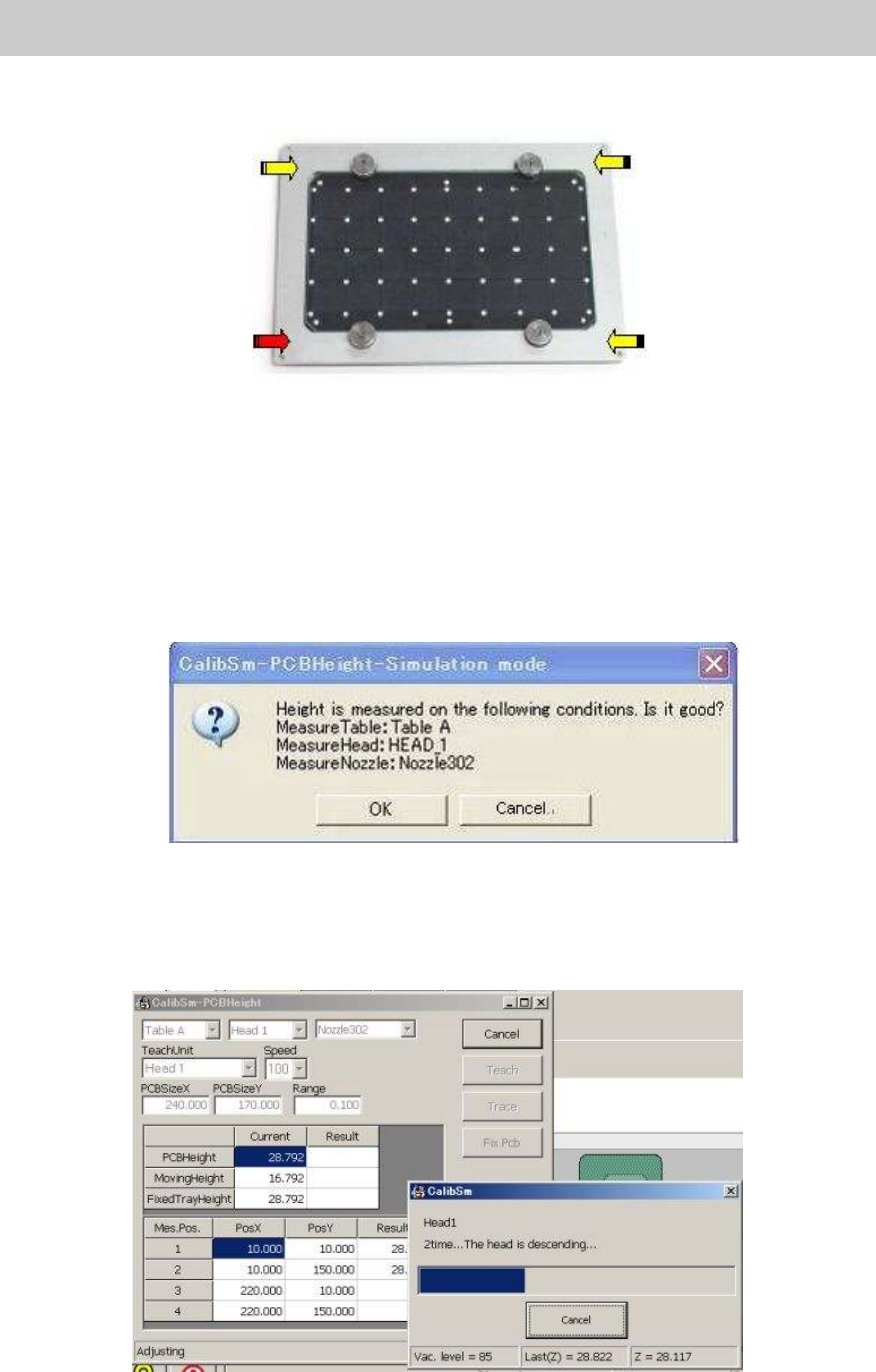
Measure the four points on the top surface of the aluminum frame of the Glass QFP, and save the
height of the lowest point as the “PCB height”.
<Tools used for adjustment>
KHN-M7720-A0X NOZZLE 302A ASSY.
Nozzle for chip
components
(Standard set)
KHY-M7730-A0X NOZZLE 313A ASSY.
Nozzle for chip
components
(Narrow pitch set)
Use either of the
nozzle
KM0-M8810-40X GLASS PCB ASSY.4 ACP glass board
KM0-M8810-10X GLASS PCB ASSY.1 AMF glass board
Use either of the board
Table 6
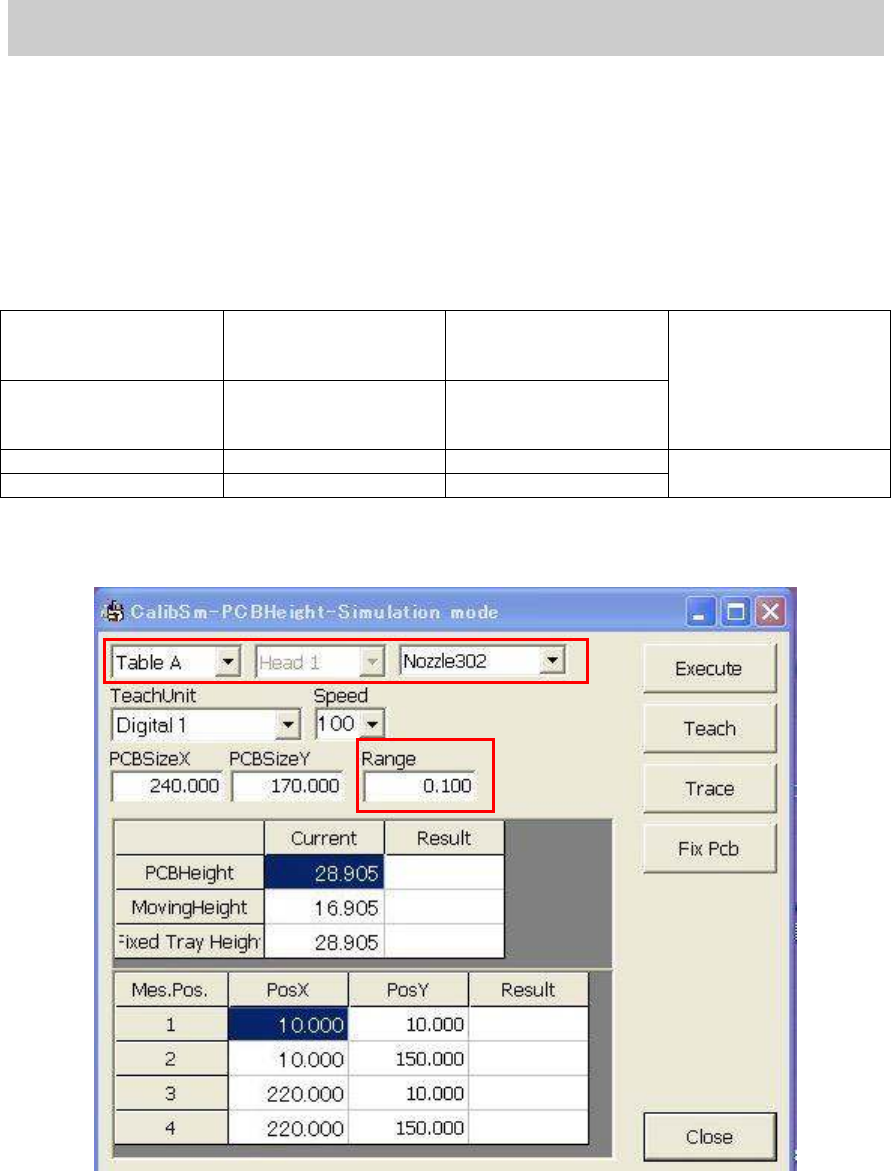
1. Click on the [PCB height] button on the main screen of the CalibSm.
Figure 8
2. Check the nozzle to be used.
Select “Nozzle 302A” or “Nozzle 313” as the PCB height is measured by the difference of the
vacuum pressure of the nozzle.
3. Check the value in the “Range” field.
The four points on the aluminum frame of the glass board are measured and the difference
between the maximum and minimum value is checked automatically. Please make sure that
the value in the “Range” field (standard value) is “0.100”.
Service Engineer
Service Information
SI0804004E-000 = YS12, YG12: Procedure for adjustment after installation of the machine
12/60
4. Set the Glass board on the conveyor.
Click on the [Board Clamp] button on the “Conveyor” tab on the “Unit screen in order to clamp
the board.
Figure 9
5. Move the head to the measurement position.
Select “Head 1“ from the dropdown list of the “TeachUnit” item, and then click on the [Trace]
button to move the Head 1 to the measurement position on the upper surface of the aluminum
frame (at the lower left).
6. Click on the [Execute] button.
Check if the Head has moved to the position where the nozzle of the Head 1 descends (at the
lower left of the aluminum frame of the glass board), and click on the [Execute] button.
When the message dialog box (See Figure 10) appears, check the message and click on the
[OK] button.
Figure 10
<If you click on the [Execute] button…>
The four points on the top surface of the aluminum frame of the Glass QFP are measured, and
the height of the lowest point is saved as the “PCB height” automatically.
Figure 11