YS12调整.pdf - 第19页
Service Engineer Service I nformati on SI080 4004 E-000 = YS12 , YG12: Procedure for adjustmen t after installa tion of the mach ine 19/60 Use the [Pickup From T ool] button. (* “Pickup Fr om T ool” function is curr en…
Service Engineer
Service Information
SI0804004E-000 = YS12, YG12: Procedure for adjustment after installation of the machine
18/60
4.5.2. How to adjust the “brightness “of the scan camera
The main camera and the side view camera of the scan cameras of YS series need to be adjusted
separately.
Please make sure to use the specified adjustment tool for the scan camera when performing
adjustment of the main camera in order to avoid the interference with the scan unit.
No tools (for brightness adjustment) are required for brightness adjustment of the side view
camera.
[Required tool]
Part No. Part Name Size Feature
KHW-M8806-D0* LIGHT ADJ.4 ASSY
11mm
square
Light gray + white
Table 11
1. Change the nozzle to “Nozzle 303A”.
Change the nozzle of Head 1 to “Nozzle 303A (314A)” in order to pick up the tool for brightness
adjustment of the scan camera.
If the machine is not equipped with the nozzle station, please press the [Emergency stop]
button and replace the nozzle by hand.
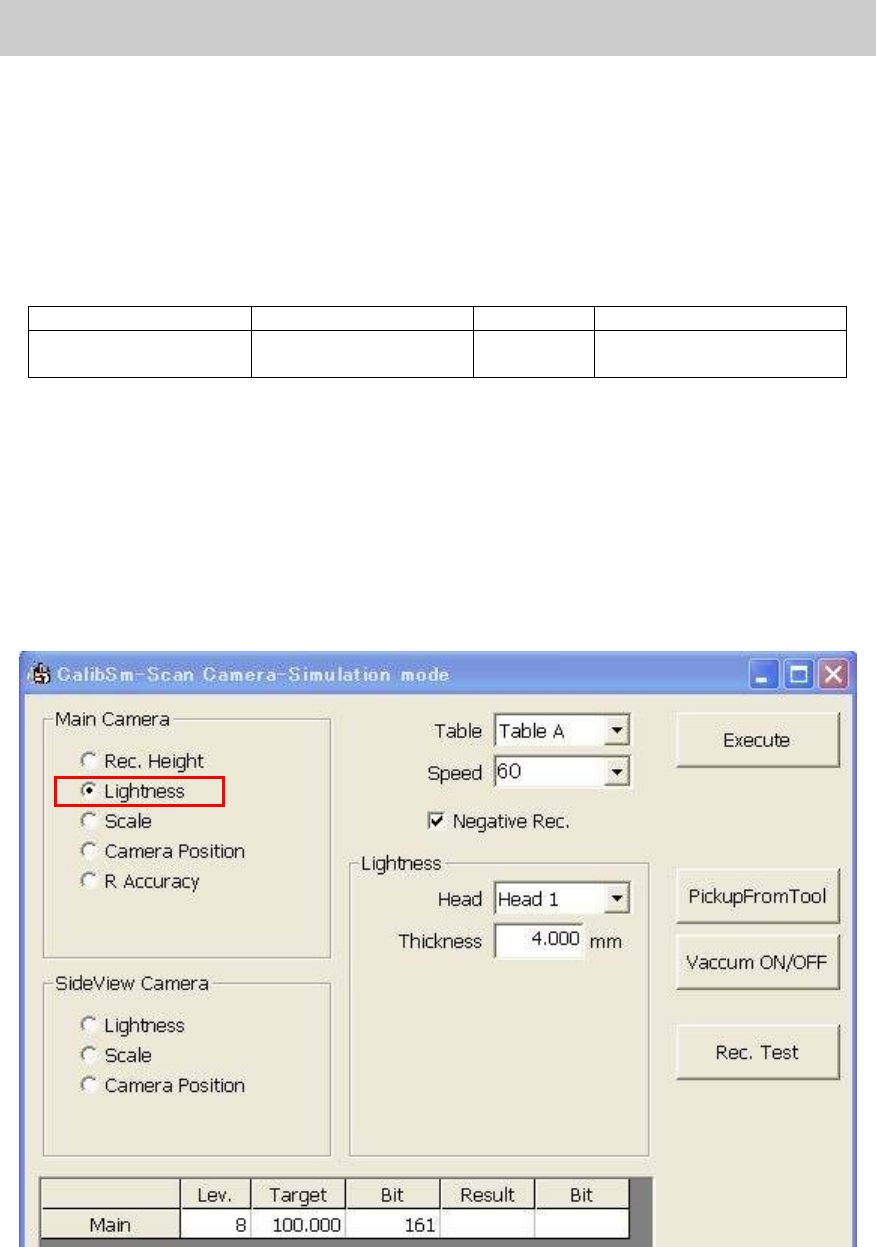
2. Select “Lightness” from the “Main Camera” item.
Click on the [Scan Camera] button on the main menu of the CalibSm.
Select “Lightness” from the “Main Camera” item.
Figure 21
3. Pick up the tool for brightness adjustment.
Use the [Vacuum ON/OFF] button.
If you click on the [Vacuum ON/OFF] button, Head 1 becomes able to pick up the tool for
brightness adjustment. Press the [Emergency Stop] button and make the nozzle vacuum
the tool with the light gray side facing down.
Service Engineer
Service Information
SI0804004E-000 = YS12, YG12: Procedure for adjustment after installation of the machine
19/60
Use the [Pickup From Tool] button.
(* “Pickup From Tool” function is currently under development.)
Please make sure to set the station for placing the components
when using the [Pickup
from Tool] button.
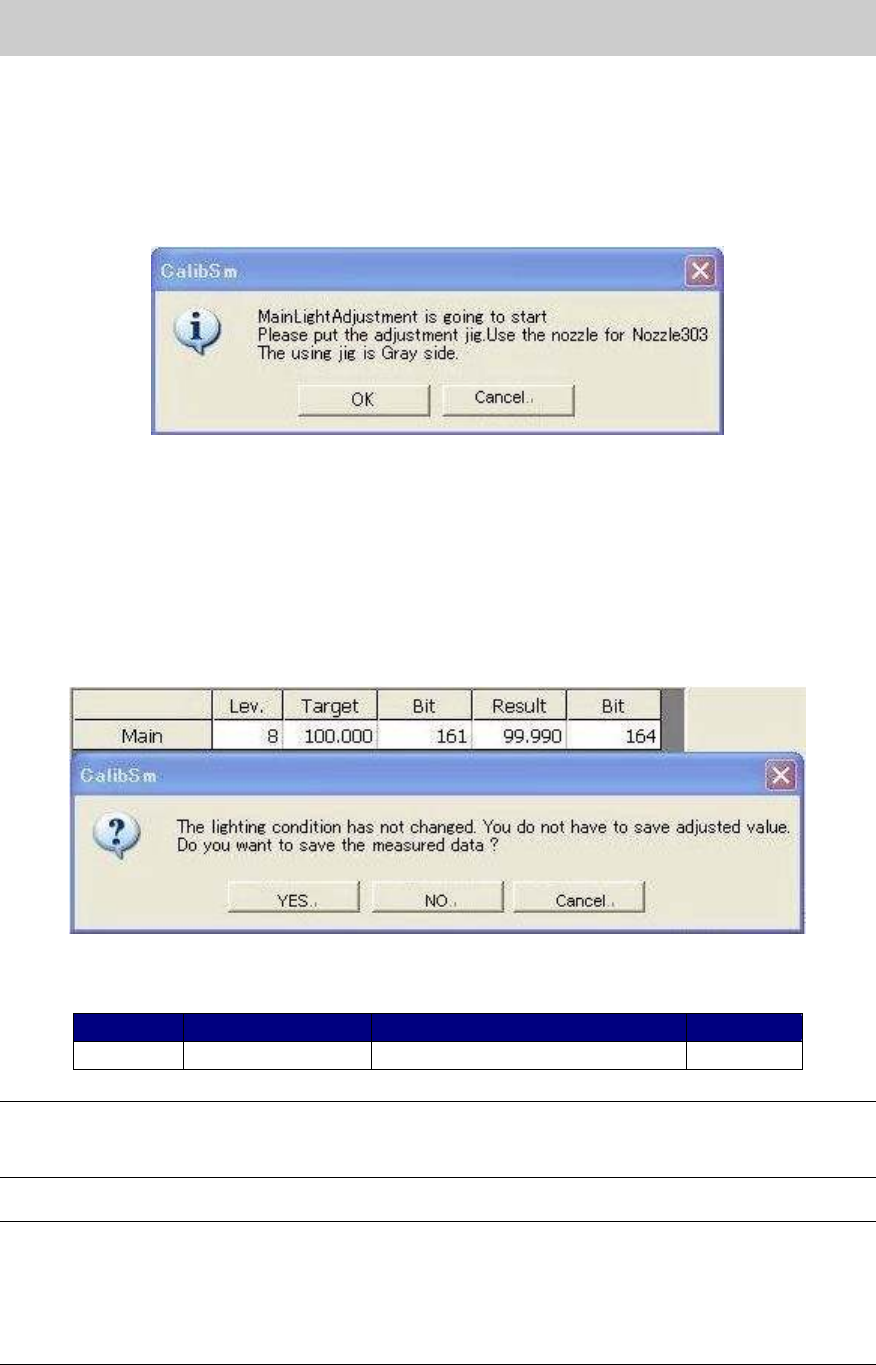
4. Start adjustment.
Click on the [Execute] button to display the following dialog box.
Figure 22
Check if the tool is set properly and click on the [OK] button to start adjustment.
5. Save the adjustment data.
When the adjustment is completed, the dialog box appears asking you to save the data.
Check if the values in the “Target” and “Bit” fields fall within the specification, and save the
data.
If the values fall within the specification, please fill in the values on the check sheet.
Figure 23
[Specification]
Color of the tool Tolerance of the measured value
Bit value
Main Light gray 100+-2 128 - 448
Table 12
Note:
If the Bit value does not fall within the specification, please check if the lens of the camera is clean,
if the lighting condition is good, or if the connector is connected properly.
Note:
As the maximum value of the Bit value is the warning value for the upper limit, the adjustment can
be performed even when the value exceeds the specification.
If the Bit value exceeds 448 (the seven eighth of the maximum value), it may attribute to the
deterioration of the lighting device. It is recommended to replace the lighting.
(The maximum value of the Bit value: 512)
Service Engineer
Service Information
SI0804004E-000 = YS12, YG12: Procedure for adjustment after installation of the machine
20/60
6. Remove the tool for brightness adjustment
When the adjustment is completed, press the [Emergency stop] button and remove the tool.
And then click on the [Vacuum ON/OFF] button to disable the nozzle to pick up the tool.
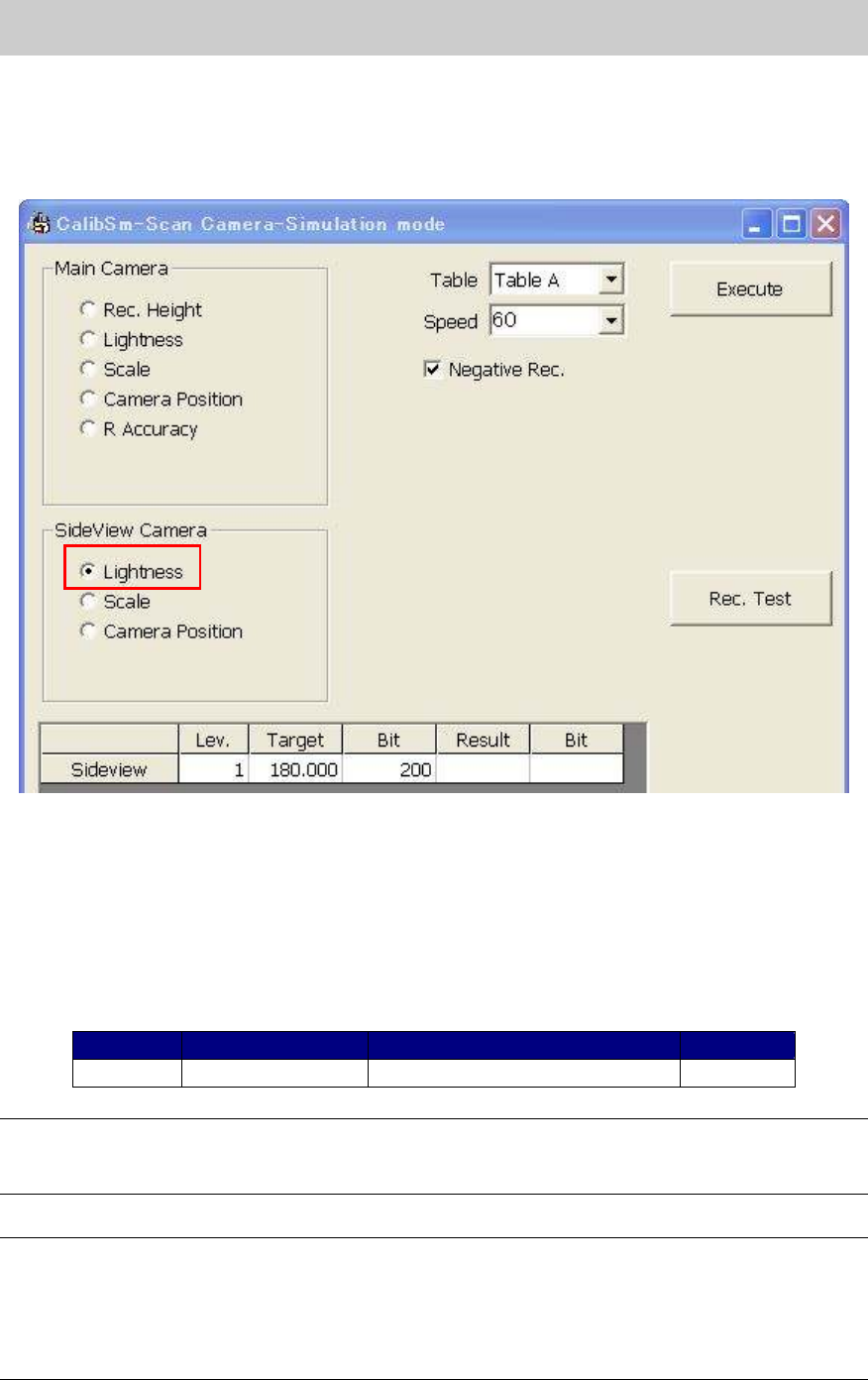
7. Select “Lightness” from the “Side View Camera” item.
Figure 24
8. Start adjustment.
Click on the [Execute] button without setting the tool to start adjustment.
(Adjustment for side view camera does not require any tools.)
Check if the values in the “Target” and “Bit” column fall within the specification, and save the
data.
If the values fall within the specification, please fill in the relevant column of the check sheet.
Color of the tool Tolerance of the measured value
Bit value
Side view
Not used 180+-5 32-448
Table 13
Note:
If the Bit value does not fall within the specification, please check if the lens of the camera is clean,
if the lighting condition is good, or if the connector is connected properly.
Note:
As the maximum value of the Bit value is the warning value for the upper limit, the adjustment can
be performed even when the value exceeds the specification.
If the Bit value exceeds 448 (the seven eighth of the maximum value), it may attribute to the
deterioration of the lighting device. It is recommended to replace the lighting.
(The maximum value of the Bit value: 512)