YS12调整.pdf - 第23页
Service Engineer Service I nformati on SI080 4004 E-000 = YS12 , YG12: Procedure for adjustmen t after installa tion of the mach ine 23/60 Figure 29 [ Specification] Color of the tool Tolerance of the measured value Bit …
Service Engineer
Service Information
SI0804004E-000 = YS12, YG12: Procedure for adjustment after installation of the machine
22/60
Figure 26
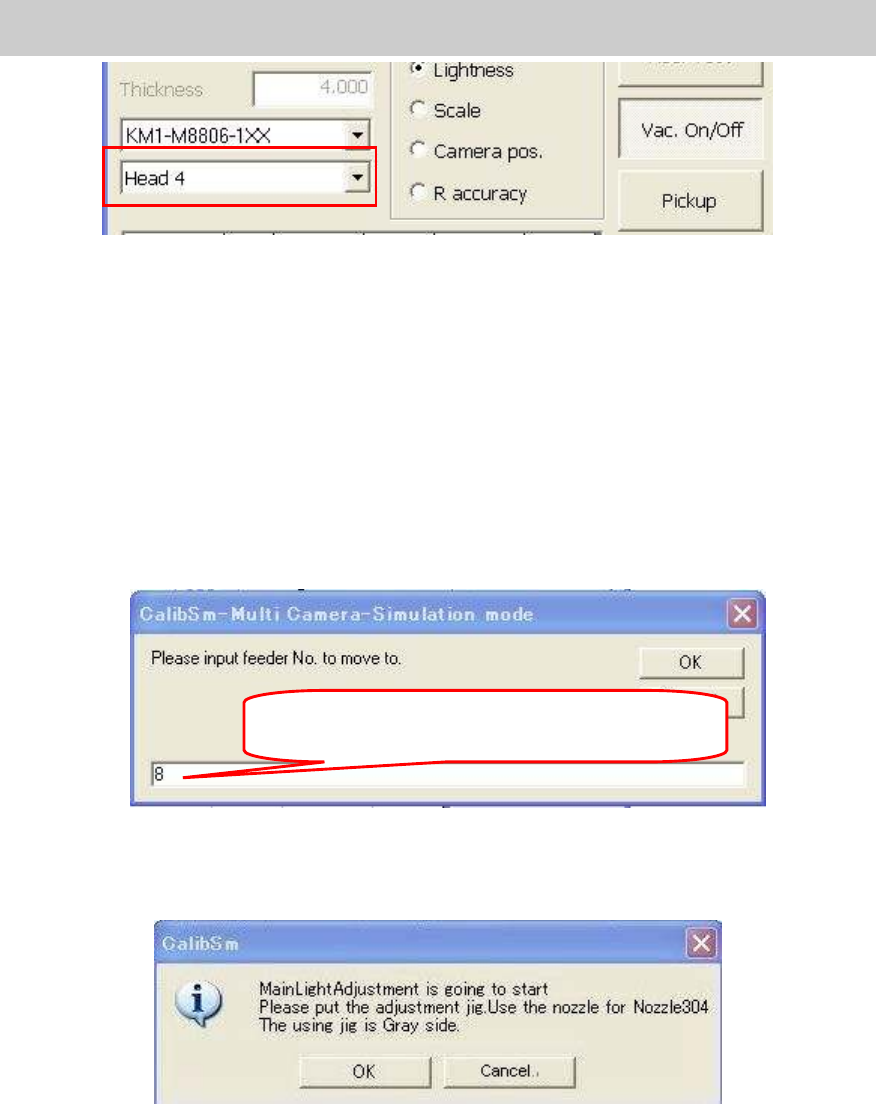
5. Pick up the tool for brightness adjustment.
Use the [Vac.ON/OFF] button.
If you click on the [Vac. ON/OFF] button, the head becomes able to pick up the tool for
brightness adjustment. Press the [Emergency Stop] button and make the nozzle vacuum
the tool with the light gray side facing down.
Use the [Pickup] button.
Click on the [Pickup] button and input the feeder number.
If you click on the [OK] button, the head moves to the pickup position and start
vacuuming Change the nozzle to the 304A (315A) nozzle and make the nozzle vacuum
the tool with the light gray side facing down.
Figure 27
6. Start adjustment.
Click on the [Execute]: button to display the following dialog box.
Figure 28
Check if the tool is set properly and click on the [OK] button to start adjustment.
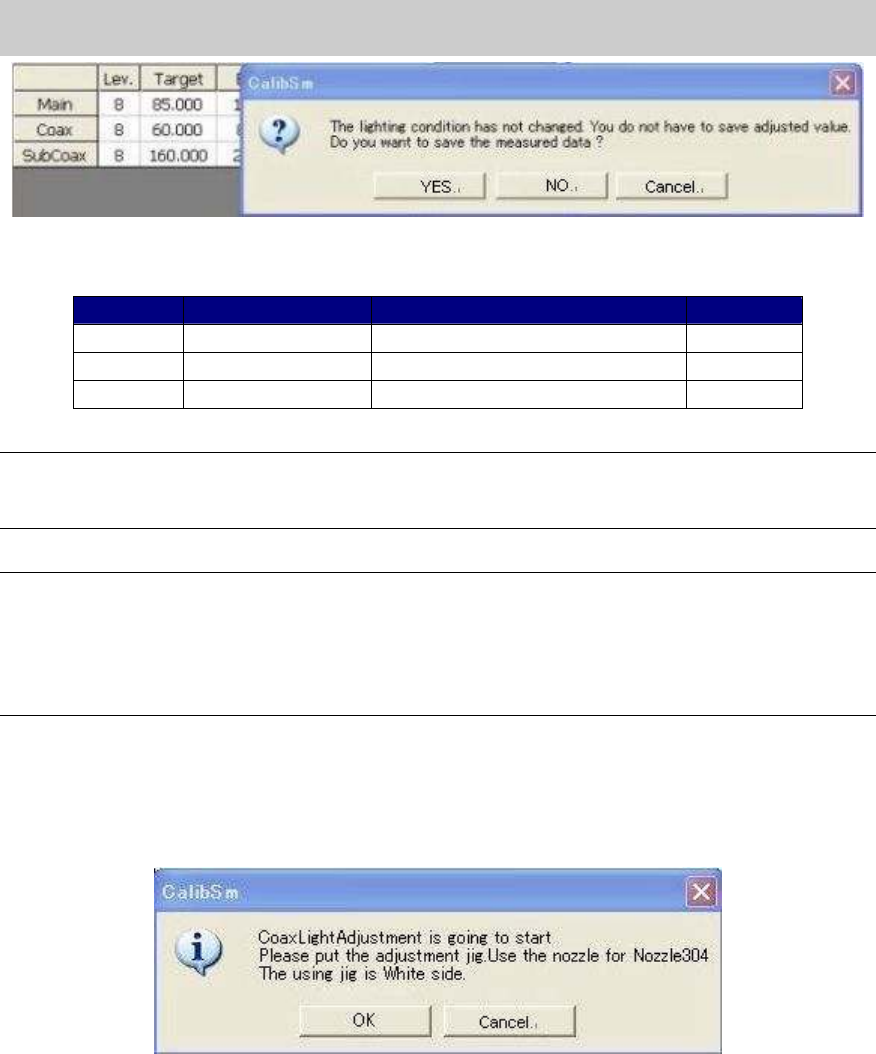
7. Save the adjustment data.
When the adjustment is completed, the dialog box appears asking you to save the data.
Check if the values in the “Target” and “Bit” fields fall within the specification, and save the
data.
If the values fall within the specification, please fill in the values on the check sheet.
Input the number of the feeder that the head to be
adjusted is able to vacuum.
Service Engineer
Service Information
SI0804004E-000 = YS12, YG12: Procedure for adjustment after installation of the machine
23/60
Figure 29
[Specification]
Color of the tool Tolerance of the measured value
Bit value
Main Light gray 85+-2 128 - 532
Coax White 60+-2 128 - 532
Sub Coax
White 160+-2 128 - 532
Table 15
Note:
If the Bit value does not fall within the specification, please check if the lens of the camera is clean,
if the lighting condition is good, or if the connector is connected properly.
Note:
As the maximum value of the Bit value is the warning value for the upper limit, the adjustment can
be performed even when the value exceeds the specification.
If the Bit value exceeds 532 (the seven eighth of the maximum value), it may attribute to the
deterioration of the lighting device. It is recommended to replace the lighting.
(The maximum value of the Bit value: 608)
8. Adjust the brightness of “Coax” and “Sub Coax”.
After completing adjustment of the main lighting, perform adjustment of “Coax” and “sub
coax” lighting according to the message in the dialog box.
Reverse the tool for brightness adjustment so that the white side faces down.
Figure 30
9. Save the adjusted data.
Perform adjustment, check the result, save the data and fill in the check sheet for both “coax”
and “Sub coax” lightings.
10. Remove the tool for brightness adjustment.
When the adjustment is completed, press the [Emergency stop] button and remove the tool.
And then click on the [Vac. ON/OFF] button to disable the nozzle to vacuum the tool.
If the 304A (315A) nozzle is mounted by hand for adjustment, change the nozzle to the original
one.
Service Engineer
Service Information
SI0804004E-000 = YS12, YG12: Procedure for adjustment after installation of the machine
24/60
4.6. Orthogonalization level
When the machine is adjusted at the factory before shipment, the distortion of the coordinates is
corrected with ”Coord Macs“ function. ”Orthogonalization level” function corrects the perpendicular
deviation of the axes caused by the relocation of the machine.
Please make sure to perform ”Orthogonalization level” adjustment when the machine is relocated.
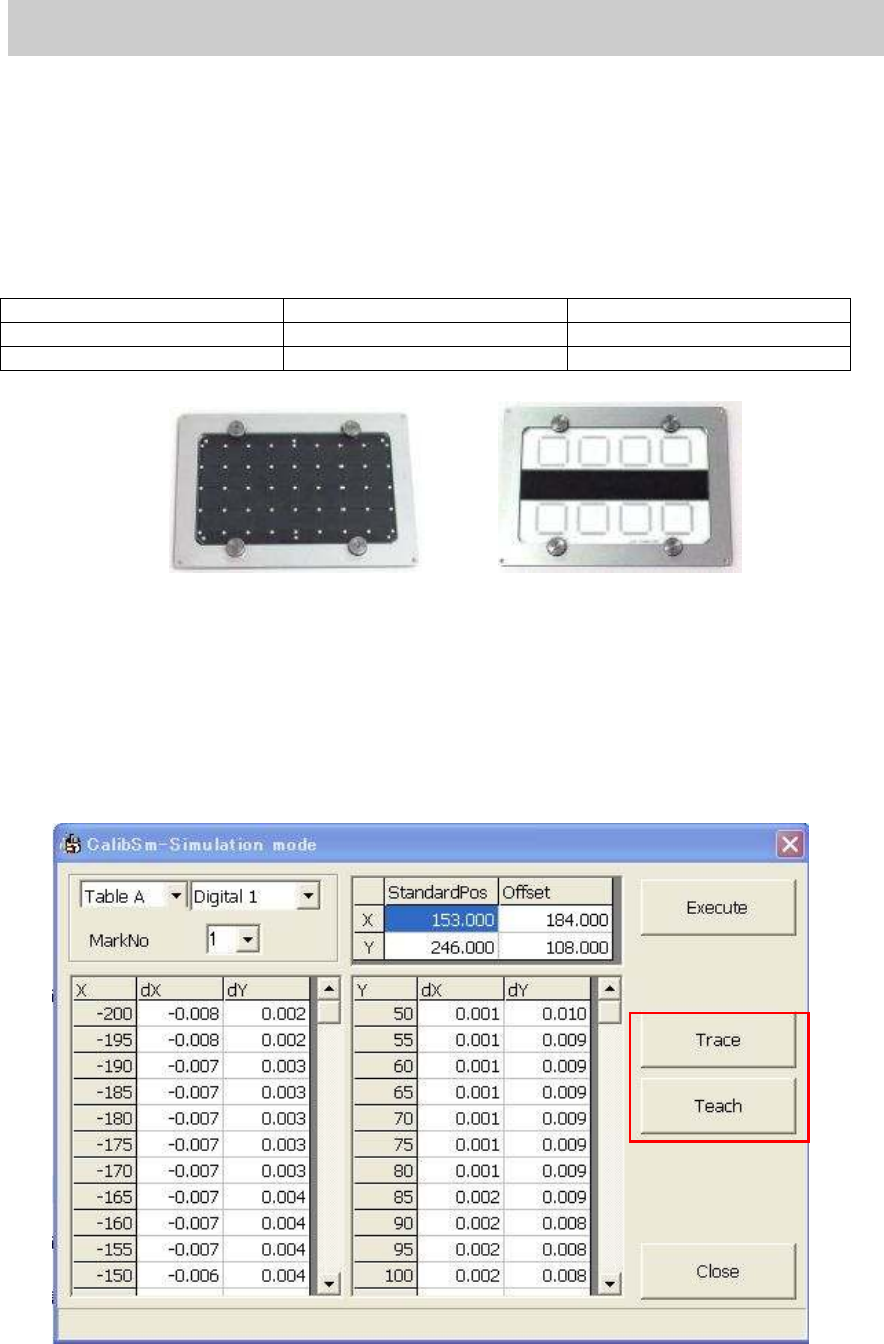
[Required tool]
Glass board for adjustment. (Please prepare either of the following.)
Part No. Part Name
1) ACP Glass board KM0-M8810-400 GLASS PCB ASSY.4
2) AMF Glass board KM0-M8810-100 GLASS PCB ASSY.1
Table 16
Figure 31
1. Read the board data (MCH_SETUP)
Read the board data (MCH_SETUP) before starting adjustment.
2. Set the glass board.
Change the conveyor width to the same as the board width (170.00mm) on the “Unit” screen,
then set the glass board to the mounting position and clamp the board.
3. Click on the [Orthogonalization level] button on the main menu of CalibSm.
Click on the [Orthogonalization level] button to display the following screen.
Figure 32
1)
2)