YS12调整.pdf - 第31页
Service Engineer Service I nformati on SI080 4004 E-000 = YS12 , YG12: Procedure for adjustmen t after installa tion of the mach ine 31/60 “M ount Inf o. M ode” * This m ode needs to be set when the machine is equipp…
Service Engineer
Service Information
SI0804004E-000 = YS12, YG12: Procedure for adjustment after installation of the machine
30/60
5.1.1. Required tools
Glass board used for adjustment
Part No. Part Name Board data
Double
-faced tape
ACP
Glass board
KM0-M8810-400
GLASS PCB
ASSY.4
ACP_1005_10HEAD_FL.ygx 20mm width
AMF
Glass board
KM0-M8810-100
GLASS PCB
ASSY.1
ACP_1005_10HEAD__OLD.ygx
35mm width
Component used for adjustment
Part No. Part Name
1005 Ceramic chip component
(Reel component)
KGA-M880C-10* REEL CERAMIC 1005
Table 20
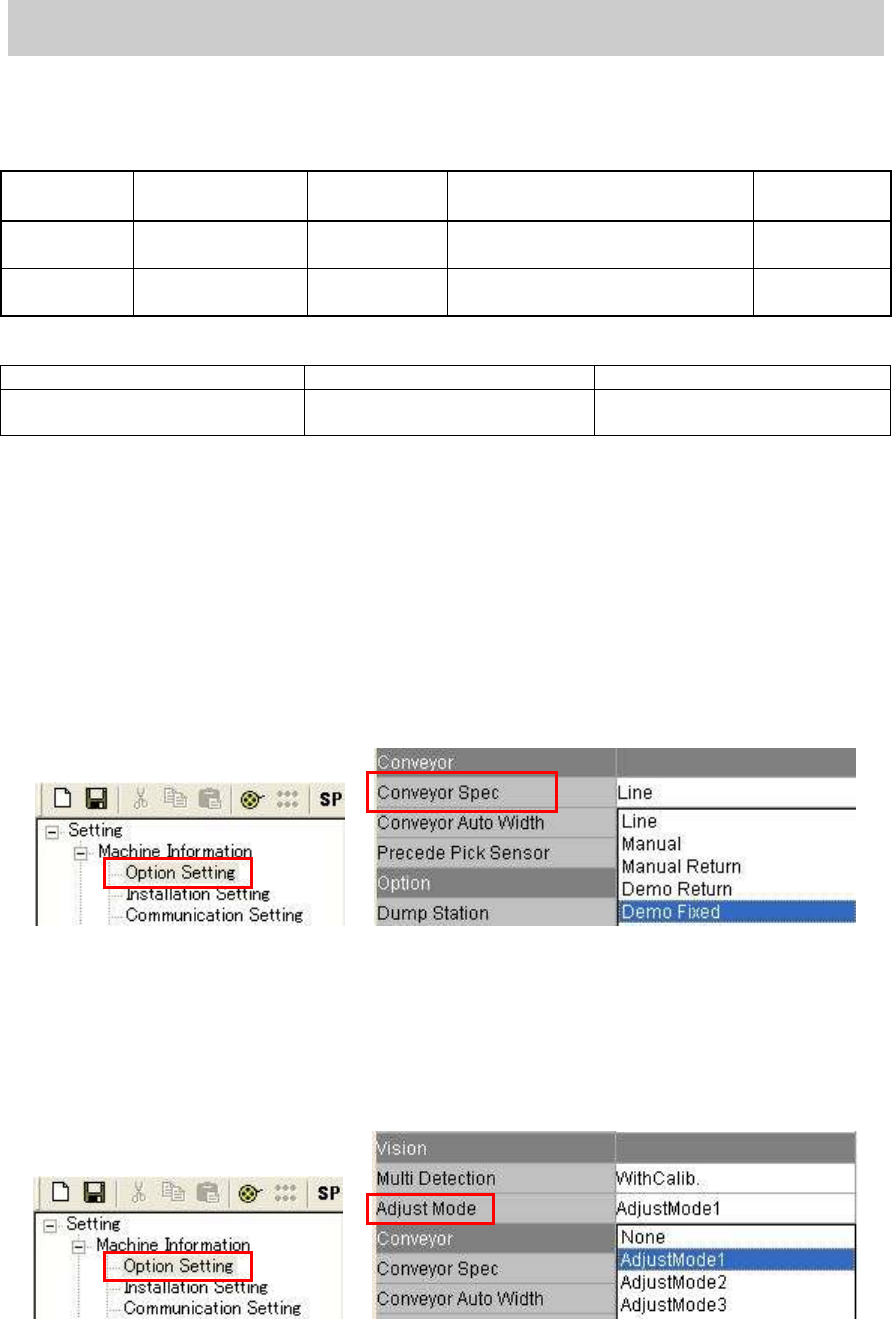
5.1.2. Check and change the option setting
“Conveyor Spec”
When selecting “Demo Fixed":
Set the board on the conveyor and clamp the board manually by clicking on the [Board Clamp]
button on the “Unit “ screen for mounting.
How to change the setting:
Select “Demo Fixed” from the dropdown list of the “Conveyor Spec” item on the “Option
setting “ screen in the “Machine information”.
Figure 39
“Adjust Mode”
When selecting “Adjust Mode 1”:
Performing mounting with the head that caused error when performing retry of mounting.
How to change the setting:
Select “AdjustMode1” from the dropdown list of the “Adjust Mode” item.
Figure 40
Service Engineer
Service Information
SI0804004E-000 = YS12, YG12: Procedure for adjustment after installation of the machine
31/60
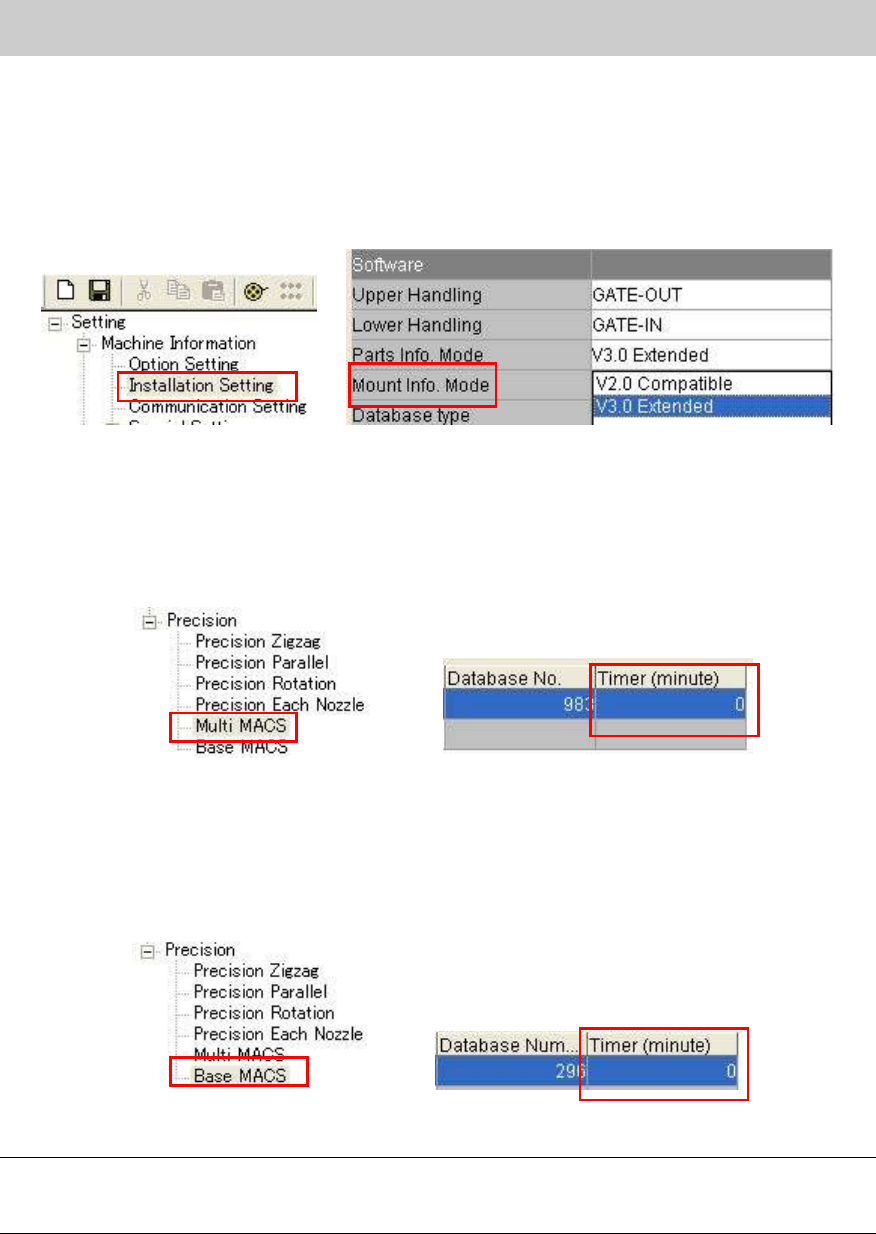
“Mount Info. Mode”
* This mode needs to be set when the machine is equipped with the multi camera.
How to change the setting:
Select “V3.0 Extended” from the dropdown list of the “Parts Info. Mode” in the “Machine
setting”.
Figure 41
“Multi MACS”
As accuracy of repeatability is checked during APC adjustment, the interval time to recognize the
multi MACS needs to be set to 0 in order to recognized Multi MACS each time.
Check if the “Timer (minute)” is set to “0” on the “Multi MACS” screen in the “Precision”.
Figure 42
“Base MACS”
In order to prevent the variation in accuracy from occurring depends on the time for mounting, set
the interval time to “0” so that Multi MACS is recognized each time.
Check if the “Timer (minute)” is set to “0” on the “Base MACS” screen in the “Precision”.
Figure 43
Note:
Please read the board data again in order to reflect the changes when changing the machine
setting.
Service Engineer
Service Information
SI0804004E-000 = YS12, YG12: Procedure for adjustment after installation of the machine
32/60
5.1.3. How to display the FAMF screen
Though it is not directly related to the ACP adjustment, if “Station” is selected from the “Measuring
Tool” item on the “FAMF” tab, the setting affects the mounting speed. Display the “FAMF” screen
and check if “PCB” is selected from the “Measuring tool” item.
[How to display the FAMF screen]
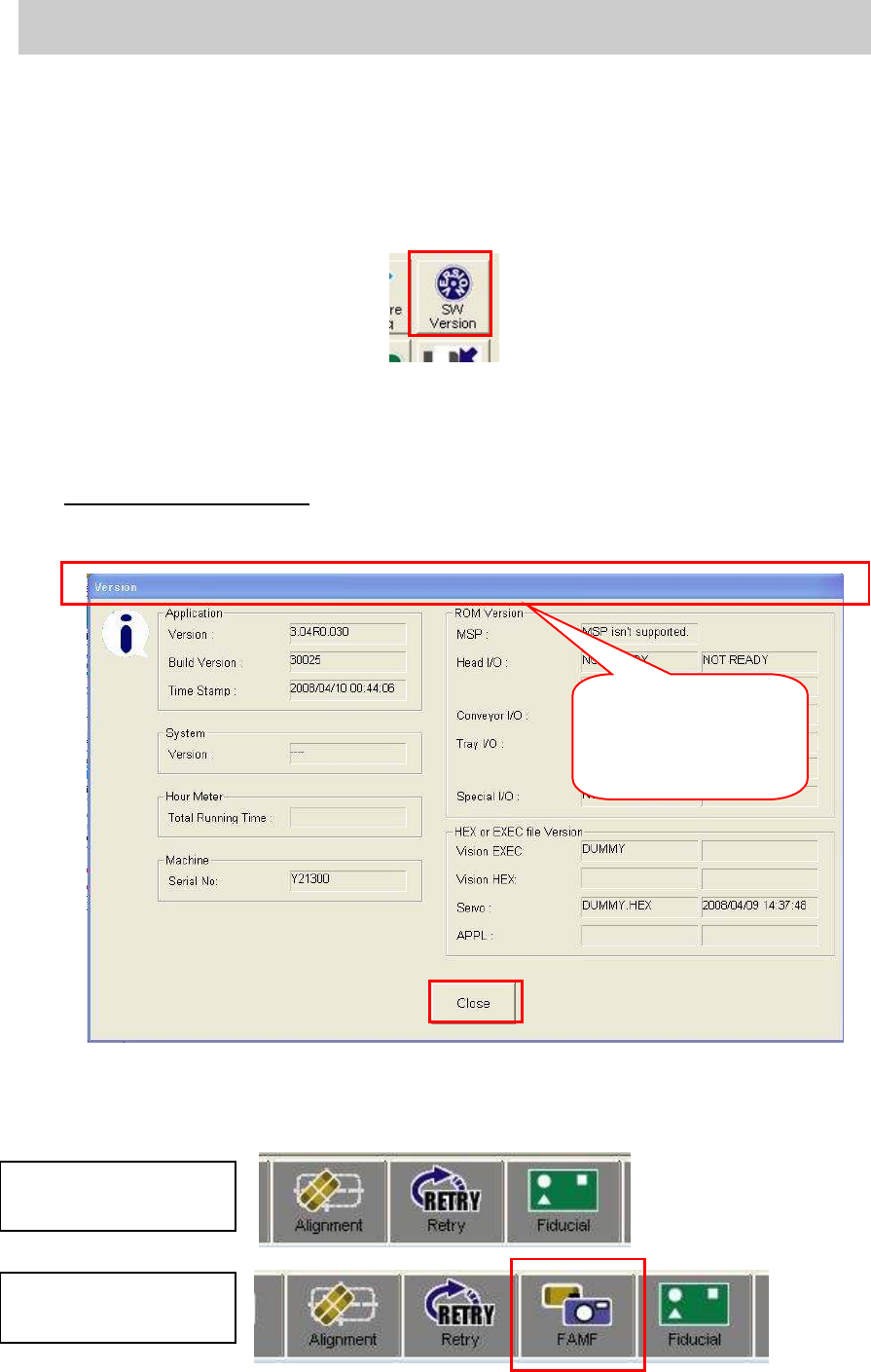
1. Click on the [SW Version] button on the “Setup” screen.
Figure 44
2. Punch in the password for displaying FAMF screen.
When the “Version” screen is displayed, punch in the password on the screen.
(Please do not press the [Enter] key.)
Password: famfmonitor
3. Check if the status bar blinks.
Check if the status bar blinks three times after punching in the password.
Figure 45
4. After checking that the status bar blinks, click on the [Close] button.
5. Check if the [FAMF] button is displayed.
Figure 46
After the password is
punched in, the status
bar blinks three times.
Tabs before changing
the setting
Tabs after changing
the setting