YS12调整.pdf - 第48页
Service Engineer Service I nformati on SI080 4004 E-000 = YS12 , YG12: Procedure for adjustmen t after installa tion of the mach ine 48/60 7.3.5. Perform “Teaching ” for the comp onents pickup p osition In FAMF adjustm e…
Service Engineer
Service Information
SI0804004E-000 = YS12, YG12: Procedure for adjustment after installation of the machine
47/60
Figure 64
2. Recognition check of the Glass QFP68 pin.
Perform recognition of the Glass QFP68 pin with the Head 4 or the Head 8.
Part No.: NO.71 QFP68_P0.65_t=1.0
Please perform recognition check on the “Parts adjust” screen.
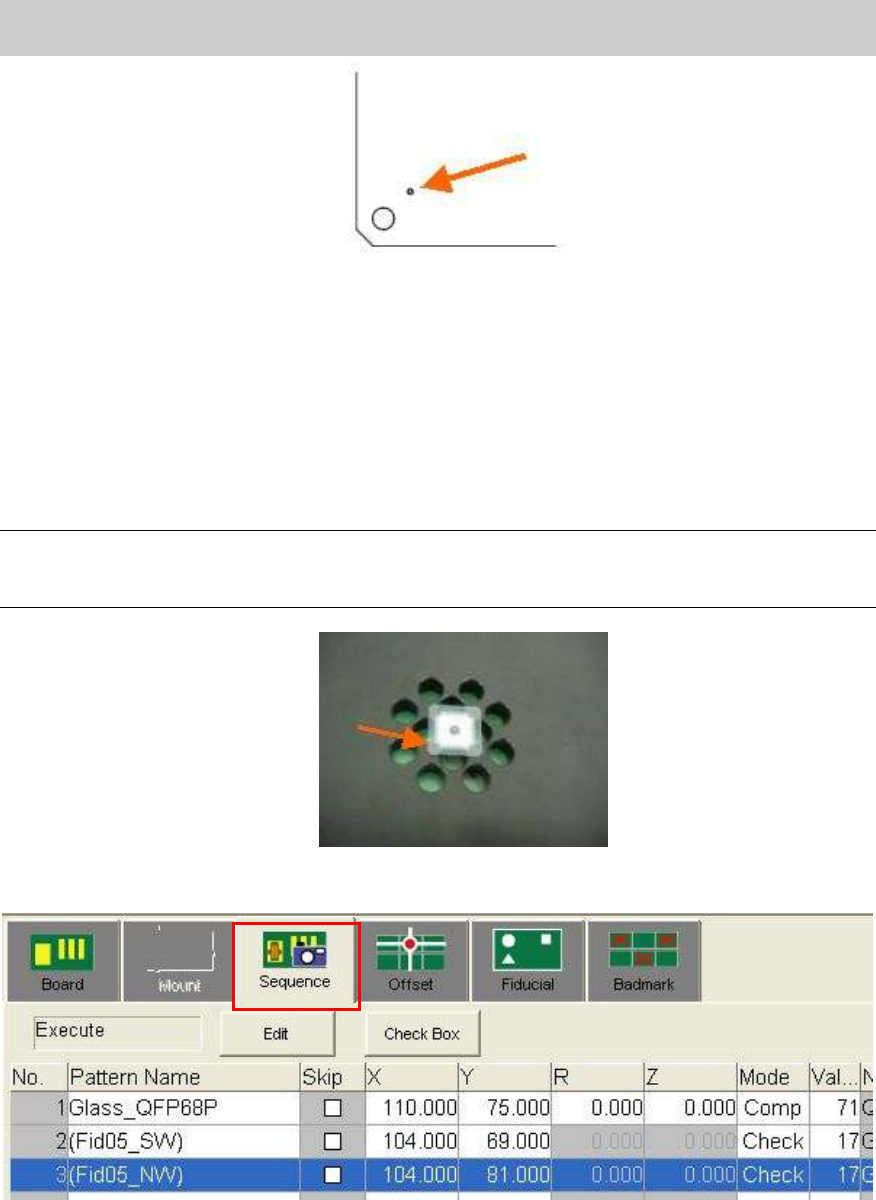
3. Recognition of the mark on the Glass QFP.
Place the Glass QFP68 pin in the center of the FAMF station board, and recognize one of the
marks at the four corners of the Glass QFP.
Note:
- Please clean the surface of the glass QFP.
- Please set the glass QFP with the printed side facing down..
Figure 65
[How to perform “Mark trace” (Moving the camera to the mark)]
Figure 66
Select “Sequence” tab on the “Board” screen and select “Check” from the “Mode” column.
Click on the [Teach] button to display the “Sequence” screen.
Click on the [Trace] button to move the camera to the mark on the board.
Mark No.: NO.17 GlassQFP_0.5_Circle
Please perform recognition check on the “Mark adjust” screen.
Service Engineer
Service Information
SI0804004E-000 = YS12, YG12: Procedure for adjustment after installation of the machine
48/60
7.3.5. Perform “Teaching” for the components pickup position
In FAMF adjustment, the component (Glass QFP) is picked up from the mounting position on the
station, then recognized and mounted on the station again.
Please perform teaching for the coordinate of the mounting position as the component pickup
position.
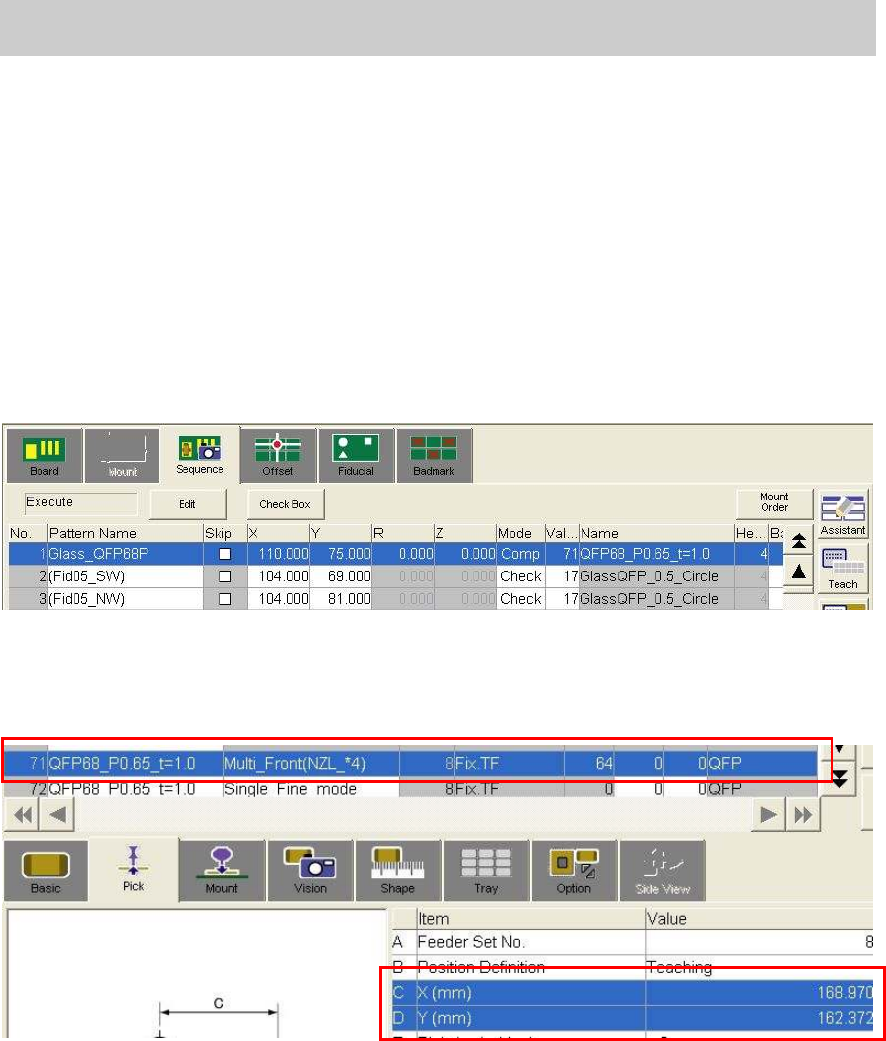
1. Check the parts information
Basically the settings do not need to be changed.
(Check if “Fix.TF” is selected as “Feeder Type”)
2. Move the camera to the coordinate of the component mounting position by trace.
Select No.1 from the table on the “Sequence” tab on the “Board” screen.
Figure 67
3. Perform teaching for the coordinate of the component pickup position.
Perform teaching for the X, Y coordinates of the Parts information No.71 on the “Pick” tab on
the “Parts” screen with the camera at the mounting position.
Figure 68
Service Engineer
Service Information
SI0804004E-000 = YS12, YG12: Procedure for adjustment after installation of the machine
49/60
7.3.6. Setting for operation and measurement (FAMF)
This section describes how to set the settings for FAMF adjustment for the multi camera.
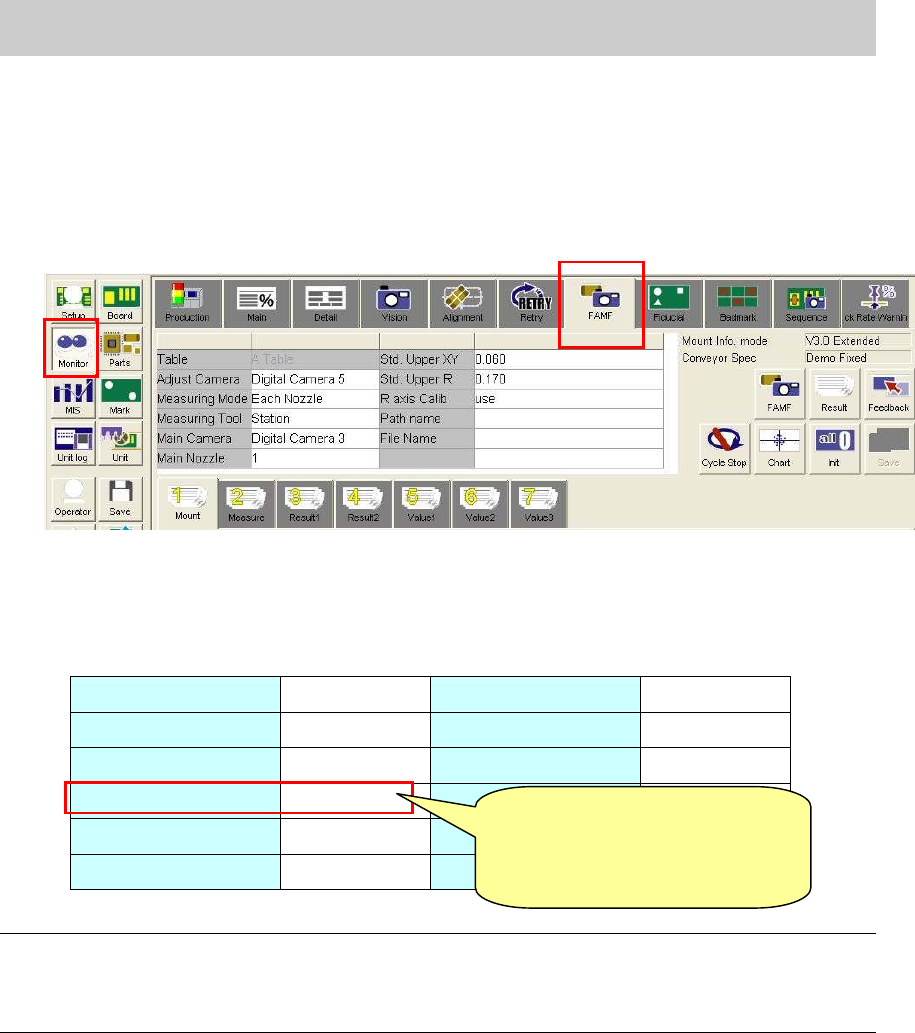
1. Display the FAMF setting screen.
Click on the [Monitor] button and display the “FAMF” tab.
*Please refer to “5.1.3. How to display the FAMF screen” for how to display the FAMF screen.
Figure 69
2. Check the settings
The multi cameras used for adjustment mounted on the front side is Digital 5, and the one on
the rear side is Digital 6.
Please check the setting referring to Table 24.
Table Table A Std. Upper XY 0.030
Adjust camera Digital 5 Std. Upper R 0.120
Measuring Mode
Each Nozzle R axis Calib Use
Measuring Tool Station
Main Camera Digital 3
Main Nozzle 1
*Note1
Table 24
Note:
The main nozzle changes depends on the specification of the machine.
- When the “Standard” set is used (30* series nozzle): 1 (301A nozzle)
- “When the “Narrow pitch” set is used: (31* series nozzle): 2 (312A nozzle).
[Items to be adjusted]
Digital 5_Head 4,8_Nozzle 304_”Precision Each Nozzle” parameter
Digital 5_Head 4,8_”Precision Rotation” Parameter
[Caution]
Please change the setting to
from “Station” to “PCB”
after adjustment.