LmrXP142机械手册.pdf - 第98页
3. Procedures for display and setting of [Pn20E = 1234567890] are shown below. Push the MODE/SET key to select the parameter setting mode. If Pn20E is not displayed, then select Pn20E by pushing the UP or DOWN keys. *The…
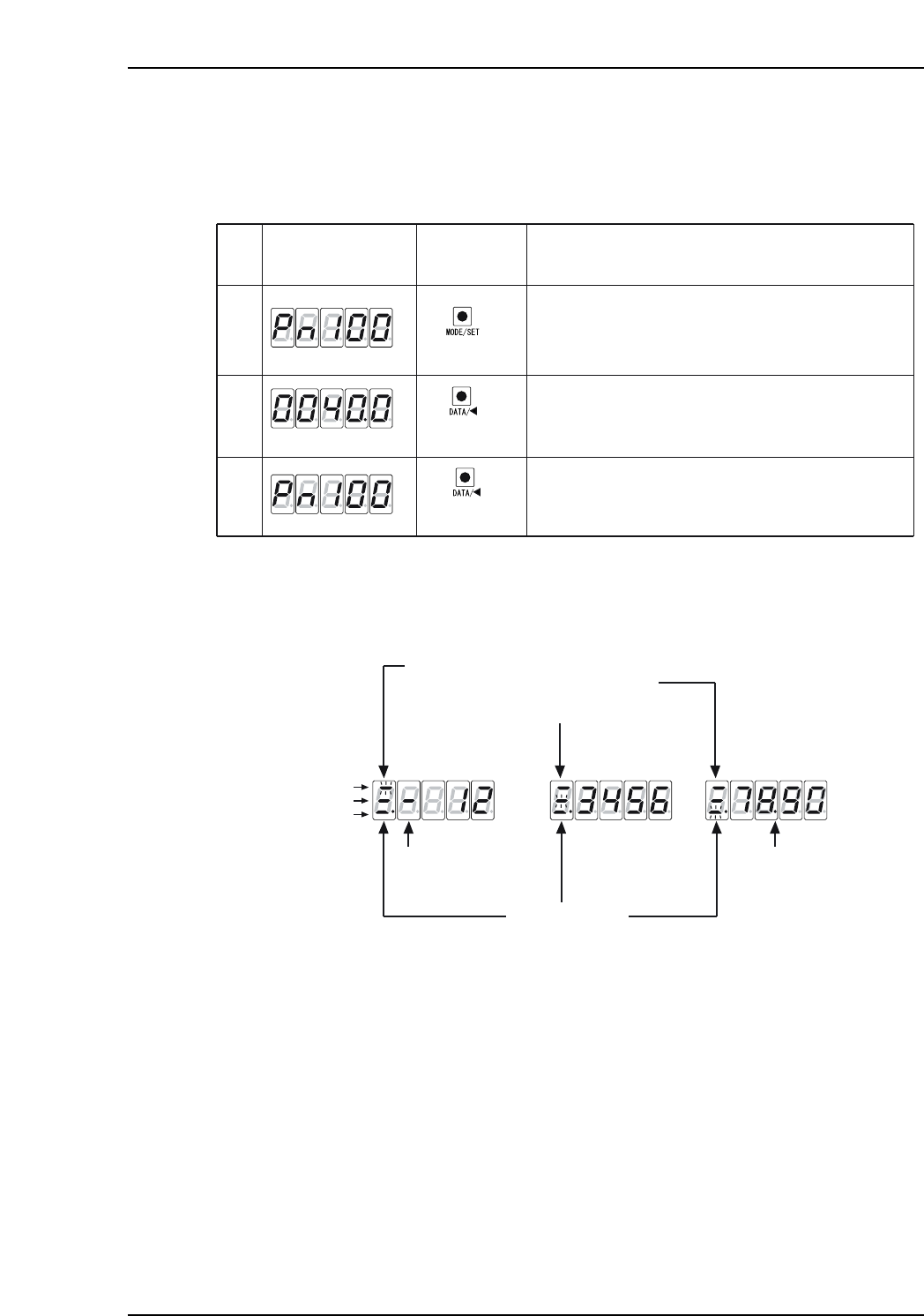
Operation in Parameter Check Mode (Pn _ _ _ )
1. Use this mode to check parameters.
The table below shows the procedure for checking the parameter Pn100 (Speed
loop gain).
2. The panel operator displays 5 digits. When the parameters have more than six
digits, values are displayed as shown below.
XP1MA033E
Leftmost blinks to indicate position:
Top, middle, or bottom.
All three need to be checked to see the
parameter value.
Top 2 digits
Top 2 digits
Middle 4digits
Middle 4 digits
Bottom 4 digits
Bottom 4 digits
Decimal
[-] appears when
value is negative
Lit if negative
Push the MODE/SET key to select the parameter setting
mode. If a parameter other than Pn100 is displayed,
then push the UP or DOWN key to select Pn100.
*The enabled digit blinks.
XP1MA032E
(DATA/SHIFT)
(1 sec. or more)
(DATA/SHIFT)
(1 sec. or more)
(MODE/SET key)
Display after
Operation
Description
Panel
Operator
1
2
3
Press the DATA/SHIFT key for more than 1 second.
The current Pn100 data is displayed.
Press the DATA/SHIFT key for more than 1 second to
return to the Pn100 display.
Part 4 Chapter 1 Servo Amplifier Adjustments
Edition 3.0 4-1-13 XP-142E Mechanical Reference
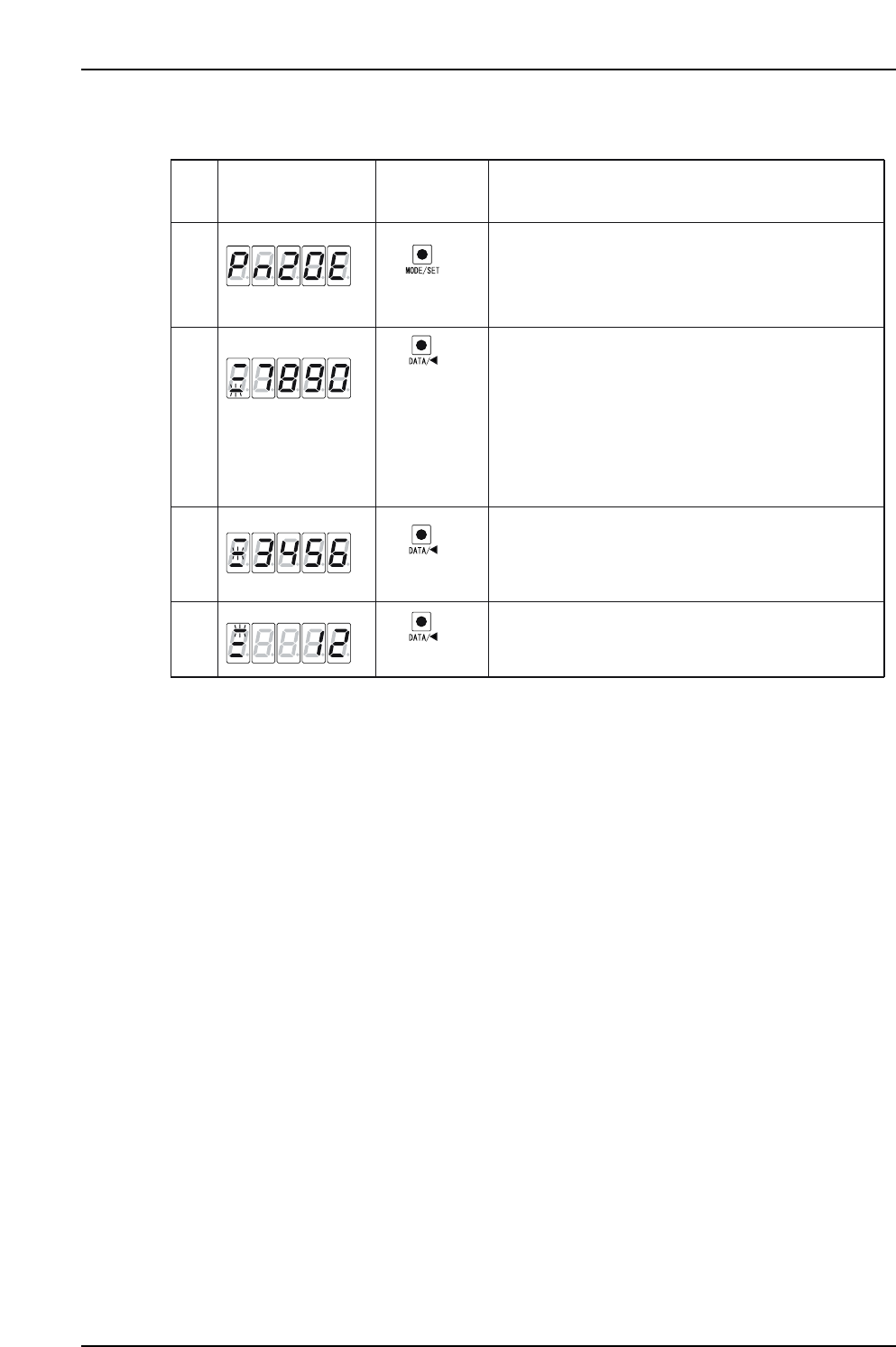
3. Procedures for display and setting of [Pn20E = 1234567890] are shown below.
Push the MODE/SET key to select the parameter setting
mode. If Pn20E is not displayed, then select Pn20E
by pushing the UP or DOWN keys.
*The digits that can be operated will blink.
XP1MA034E
(DATA/SHIFT)
(1 sec. or more)
Bottom 4 digits
Middle 4 digits
(MODE/SET key)
Display after
Operation
Description
Panel
Operator
1
2
4
Push the DATA/SHIFT key for at least one second.
The current Pn20E data is displayed.
The bottom 4 digits are displayed first, and the
rightmost digit will blink when selected.
Push the DATA/SHIFT key to move to other digits,
and change a digit's value by pushing the UP/DOWN keys.
When DATA/SHIFT is pushed while the 4th digit (7) is
selected, the middle 4 digits are displayed and the
5th value (6) blinks.
If DATA/SHIFT is pressed while the 10th value (1) is
selected, the bottom 4 digits are displayed again. In this
way, the selection can be moved one digit to the left.
(DATA/SHIFT)
(DATA/SHIFT)
3
In the same way, when DATA/SHIFT is pushed the select-
ed value moves from the 5th to the 8th digit
When DATA/SHIFT is pressed when on the 8th digit (3),
the top 2 digits are displayed and the 9th (2) is selected.
Top 2 digits
Part 4 Chapter 1 Servo Amplifier Adjustments
Edition 3.0 4-1-14 XP-142E Mechanical Reference

Part 5
Troubleshooting
1. Servo System Troubleshooting . . . . . . . . .5-1-1
This section explains basic procedures for
troubleshooting the machine and its
peripheral devices. Use this section as a
reference for identifying and resolving
minor problems to restore the machine to its
proper condition.
Contact a Fuji agent for serious problems or
repairs that cannot be performed.